

You are using an out of date browser. It may not display this or other websites correctly.
You should upgrade or use an alternative browser.
You should upgrade or use an alternative browser.
The Fabulous Fuji X owners thread
- Thread starter mart77
- Start date


paulcamcas
Suspended / Banned
- Messages
- 2,509
- Name
- Paul
- Edit My Images
- No
Good thought. I don't mind grey at all and might go for it body only at £779 as I don't really get on with zooms and have a 56/1.2 on the way which I bought when I had the X-E3 and is being serviced by Fuji at the mo.I know some folks don't like to go for grey imports, but that's well over the new price from E-Infinity.
Fujifilm X-T3 Digital Camera + 18-55mm f/2.8-4 R OIS Lens (Silver)
£959.00 - 12 Months<br />Warranty - 14 Days<br />Money Back - 100%<br />Brand New - Free<br />Shipping - Import Tax<br />Includedwww.e-infin.com
Don't have an answer as to X-T3 vs X-T4. X-T4 is quite a premium but is it worth it?
paulcamcas
Suspended / Banned
- Messages
- 2,509
- Name
- Paul
- Edit My Images
- No
Can anyone tell me if this new 50mm F1.0 lens is for full frame or crop?
It's an XF so for crop.
S
stupar
Guest
Got lots of flowers in the house at present but was drawn to the nice big fresh lilies as a subject matter.
Shot with the 85mm and a good old heavy crop in post
 Lily by Stuart Pardue, on Flickr
Shot with the 85mm and a good old heavy crop in post
Lily by Stuart Pardue, on Flickr
Jelster
Suspended / Banned
- Messages
- 9,986
- Name
- Steve
- Edit My Images
- Yes
Whoops, my finger slipped on an X-T4 with 18-55 lens. My mates going to be raging haha! Now to find a WCL, TCL for the mate and decide if I want a 55-200 or a 50-140 hmmmm.
The 50-140 is a lovely lens, and it will take the 1.4TC, effectively making it a 75-210 f4. The 55-200 can't be used with the TC.

bl0at3r
Suspended / Banned
- Messages
- 3,883
- Name
- Alan
- Edit My Images
- Yes
Whoops, my finger slipped on an X-T4 with 18-55 lens. My mates going to be raging haha! Now to find a WCL, TCL for the mate and decide if I want a 55-200 or a 50-140 hmmmm.
Off your head


YoshiK1
Suspended / Banned
- Messages
- 1,535
- Edit My Images
- No
Off your head
Haha, whys that? I can't save money so I will end up squandering it on garbage and have nothing to show for it. At least this way I get the longer focal lengths etc and can always sell it on. Use the X100V for street and wandering. Use the X-T4 for everything else.

Cagey75
Suspended / Banned
- Messages
- 17,146
- Name
- Keith
- Edit My Images
- No
Can anyone tell me if this new 50mm F1.0 lens is for full frame or crop?
If you mean does it have FF coverage? as an APSC lens - I doubt it. It can only be used on Fuji either way, don't think Fuji lenses can be adapted to other systems
Cagey75
Suspended / Banned
- Messages
- 17,146
- Name
- Keith
- Edit My Images
- No
both types (shallow dof and not) have a time and a place to be used. some backgrounds are just not pleasing and can ruin a shot if showing too clearly defined. all depends on the scene at the time. id rather have the option to stop down when needed/wanted rather not have the choice to adequately separate subject from background.
The whole seperate the subject from the background thing is kinda recent though isn't it? Portraits from decades back often had full backdrop detail, it was as much part of the image - these days we refer to these types of image as 'environmental portraits' but back then they were just portraits. I like a nice soft backdrop ... sometimes! But often I prefer a bit of detail in the environment, gives more of a sense of location. I could never understand for example, the portrait photographer who'd bring the model out to some glorious location like a deep forest, only to blow the backdrop out completely every shot - could have done same in the back yard


imattersuk
Suspended / Banned
- Messages
- 4,006
- Edit My Images
- No
A better plan would be to sell me the X100V for £50Haha, whys that? I can't save money so I will end up squandering it on garbage and have nothing to show for it. At least this way I get the longer focal lengths etc and can always sell it on. Use the X100V for street and wandering. Use the X-T4 for everything else.

YoshiK1
Suspended / Banned
- Messages
- 1,535
- Edit My Images
- No
A better plan would be to sell me the X100V for £50
Sold! £50 over £1000
I don't think I could sell it. It's magnificent! You really should get one.
The whole seperate the subject from the background thing is kinda recent though isn't it? Portraits from decades back often had full backdrop detail, it was as much part of the image - these days we refer to these types of image as 'environmental portraits' but back then they were just portraits. I like a nice soft backdrop ... sometimes! But often I prefer a bit of detail in the environment, gives more of a sense of location. I could never understand for example, the portrait photographer who'd bring the model out to some glorious location like a deep forest, only to blow the backdrop out completely every shot - could have done same in the back yard
Thats kind of the point, just because a lens is fast doesnt mean you will use it fast at every opportunity, fast lenses allow for more flexibility and let more light in... and they sure arent for amateurs, skill is required to nail focus when using a faster lens because of that DOF. Shallow DOF has been around a lot longer than you think.

tigerdriver
Suspended / Banned
- Messages
- 776
- Name
- Dave
- Edit My Images
- Yes
I love a bit of bokeh But it does seem to have gone a bit ott
tigerdriver
Suspended / Banned
- Messages
- 776
- Name
- Dave
- Edit My Images
- Yes
On a different note was quite pleased with this grab..
get me to the church on time
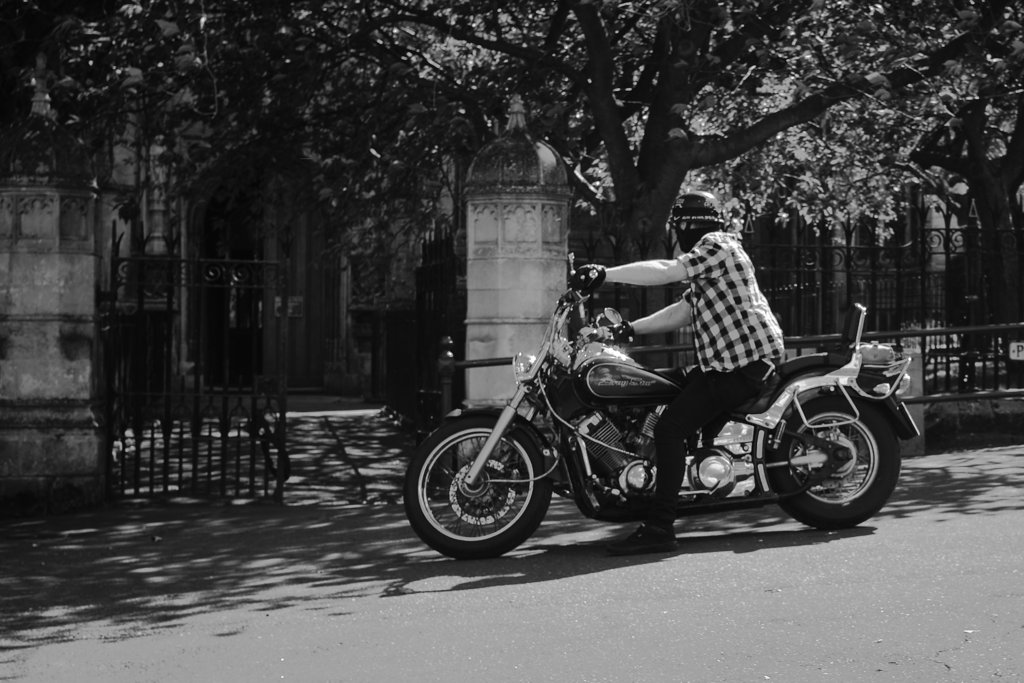
get me to the church on time

- Messages
- 21,611
- Name
- Dave
- Edit My Images
- No
On a different note was quite pleased with this grab..
get me to the church on time
Nice shot, and a great song too.

Mr Bastable
Suspended / Banned
- Messages
- 972
- Edit My Images
- No
I need to stop reading this thread, talked myself out of a X100V at least three times now but have succumbed to an X100.
Yes, yes, yes I know what’s going to happen - I’ll really like it but it’ll be a bit too slow and I’ll want more resolution, I’ll get a V with the intention of returning the X100 but won’t get round to it ...
All so familiar
Yes, yes, yes I know what’s going to happen - I’ll really like it but it’ll be a bit too slow and I’ll want more resolution, I’ll get a V with the intention of returning the X100 but won’t get round to it ...
All so familiar
Cagey75
Suspended / Banned
- Messages
- 17,146
- Name
- Keith
- Edit My Images
- No
@Cagey75 and others, what settings are you guys using in LR for sharpening?
I have sharpening set to 0 by default, it's 40 by Adobe's default which is way too high. From there I only add as needed [I generally tend to add about 20-25], and I'll use the masking to concentrate sharpening only where I desire it. Alt + the masking slider will highlight where sharpening occurs in white
It's a bit of a PITA the way you have to set defaults now after current updates, used to be much simpler. But ... once it's done, it's done
Last edited:
tigerdriver
Suspended / Banned
- Messages
- 776
- Name
- Dave
- Edit My Images
- Yes
Never got happy with LR since i got the 30
caved in and went to Capture One .... night and day even just the free fuji express version
caved in and went to Capture One .... night and day even just the free fuji express version
imattersuk
Suspended / Banned
- Messages
- 4,006
- Edit My Images
- No
I religiously use C1 for all Fuji processing, previously used Fuji's own Raw File Converter EX3.0 which gave brilliant results but works and looks like an Amstrad. Just seem to get more fine control in C1 especially in sharpening, easier to make subtle changes in my opinion.@Cagey75 and others, what settings are you guys using in LR for sharpening?
Cagey75
Suspended / Banned
- Messages
- 17,146
- Name
- Keith
- Edit My Images
- No
Never got happy with LR since i got the 30
caved in and went to Capture One .... night and day even just the free fuji express version
I don't like C1 at all, I've tried it and compared against LR and LR just does it so much smoother IMO. If I'm concerned about sharpening or if it's a landscape I want to shine, I'll take it to PS - which does better than most programs when it comes to sharpening
I have sharpening set to 0 by default, it's 40 by Adobe's default which is way too high. From there I only add as needed [I generally tend to add about 20-25], and I'll use the masking to concentrate sharpening only where I desire it. Alt + the masking slider will highlight where sharpening occurs in white
It's a bit of a PITA the way you have to set defaults now after current updates, used to be much simpler. But ... once it's done, it's done
Thanks, kind of where I am, 20 amount, detail can go up most of the way, if I push detail all they way I drop amount to offset.
Cagey75
Suspended / Banned
- Messages
- 17,146
- Name
- Keith
- Edit My Images
- No
Thanks, kind of where I am, 20 amount, detail can go up most of the way, if I push detail all they way I drop amount to offset.
If you're not already, do try the masking, it changed how I process for good once I discovered it. And I've never once had anyone point out any strange artifacts or oddities in any of my images. For portraits it's invaluable, you can concentrate sharpening to the eyes/hair and completely remove it from your softer backdrops, works really well and takes seconds. I'm not afraid to push masking right the ways up either.
Another thing I tend to do to avoid any weird srtifacting is use the adjustment brush when I want texture or clarity, instead of using it across the whole image. Texture in particular can really mess up smoother areas
Last edited:
If you're not already, do try the masking, it changed how I process for good once I discovered it. And I've never once had anyone point out any strange artifacts or oddities in any of my images. For portraits it's invaluable, you can concentrate sharpening to the eyes/hair and completely remove it from your softer backdrops, works really well and takes seconds. I'm not afraid to push masking right the ways up either.
Not seeing worms unless I push to hard but that applies to a lot of cameras, it's just finding the best way to batch the lot.
YoshiK1
Suspended / Banned
- Messages
- 1,535
- Edit My Images
- No
I need to stop reading this thread, talked myself out of a X100V at least three times now but have succumbed to an X100.
Yes, yes, yes I know what’s going to happen - I’ll really like it but it’ll be a bit too slow and I’ll want more resolution, I’ll get a V with the intention of returning the X100 but won’t get round to it ...
All so familiar
Just save yourself the hassle and return the X100 and get the V

I've basically done the same with an X-T4. Mate was between X-T4 and V. Got him onto the V but it made me lust after the X-T4 which I had but sold to get the V. I've just bought an X-T4 and a bunch of lenses. I can't see s****e go by without having it
Wife doesn't know. She'll never know haha
Last edited:
Cagey75
Suspended / Banned
- Messages
- 17,146
- Name
- Keith
- Edit My Images
- No
Not seeing worms unless I push to hard but that applies to a lot of cameras, it's just finding the best way to batch the lot.
I never see them, simply processing how I mentioned. I remember seeing them on Nikon, Olympus and Panasonic files if I pushed sharpening too hard, with Fuji you just have to hold back more so - I know a lot of people just don't get this as I see uploads with artifacts and they'll have sharpening at 50 with no masking and wonder why
Last edited:
imattersuk
Suspended / Banned
- Messages
- 4,006
- Edit My Images
- No
So much for a recession and all this covid b*****ks, people seem to be spending on gear lately.
D
Deleted member 90866
Guest
Use the X100V for street and wandering. Use the X-T4 for everything else.
That's about where I've settled, albeit I'm slumming it with a just-bought X100S and my X-T2.
- Messages
- 21,611
- Name
- Dave
- Edit My Images
- No
So much for a recession and all this covid b*****ks, people seem to be spending on gear lately.
I was thinking the same, as a lot of folk are buying a lot of Fuji kit.

bumper
Suspended / Banned
- Messages
- 1,051
- Name
- David
- Edit My Images
- No
most of it was yours DaveI was thinking the same, as a lot of folk are buying a lot of Fuji kit.
- Messages
- 21,611
- Name
- Dave
- Edit My Images
- No
most of it was yours Dave
True, that`s why I`m rich now...lol Just the beautiful sleek XPRO2 to go now.
bumper
Suspended / Banned
- Messages
- 1,051
- Name
- David
- Edit My Images
- No
It'll soon shift on, bargain price againTrue, that`s why I`m rich now...lol Just the beautiful sleek XPRO2 to go now.

S
stupar
Guest
I have sharpening set to 0 by default, it's 40 by Adobe's default which is way too high. From there I only add as needed [I generally tend to add about 20-25], and I'll use the masking to concentrate sharpening only where I desire it. Alt + the masking slider will highlight where sharpening occurs in white
It's a bit of a PITA the way you have to set defaults now after current updates, used to be much simpler. But ... once it's done, it's done
+1 for this technique.
I usually hover between 15 and 20 depending on subject matter and then using the Alt +masking slider to concentrate the sharpening where I want it most.

Barrysprout
Suspended / Banned
- Messages
- 6,773
- Name
- Colin
- Edit My Images
- No
True, that`s why I`m rich now...lol Just the beautiful sleek XPRO2 to go now.
It'll soon shift on, bargain price again
If I had realised that the 50mm was going up too I might have went for them both. Glad I missed out though as it means the 100V savings are intact.

addicknchips
Suspended / Banned
- Messages
- 9,795
- Name
- Jonathan
- Edit My Images
- No
The whole seperate the subject from the background thing is kinda recent though isn't it? Portraits from decades back often had full backdrop detail, it was as much part of the image - these days we refer to these types of image as 'environmental portraits' but back then they were just portraits. I like a nice soft backdrop ... sometimes! But often I prefer a bit of detail in the environment, gives more of a sense of location. I could never understand for example, the portrait photographer who'd bring the model out to some glorious location like a deep forest, only to blow the backdrop out completely every shot - could have done same in the back yard
I agree mostly with the above, but have definitely seen plenty of black and white film photos with shallow dof.
My main point though being that there's a time and a place for shallow dof shots and more "environmental" shots. The faster aperture lenses give the option and therefore justify the extra expense imo.
Probably my favourite portrait lens is the 100mm f2.8 gm. It's not a face melting aperture and with a f5.6 t stop it's not the most practical of lenses, but I love the way it renders.
- Messages
- 21,611
- Name
- Dave
- Edit My Images
- No
If I had realised that the 50mm was going up too I might have went for them both. Glad I missed out though as it means the 100V savings are intact.
I might even throw something in with it to help it sell, but that would be tomorrow.
imattersuk
Suspended / Banned
- Messages
- 4,006
- Edit My Images
- No
Why tomorrow, tell us now, you might even tempt meI might even throw something in with it to help it sell, but that would be tomorrow.
- Messages
- 21,611
- Name
- Dave
- Edit My Images
- No
Why tomorrow, tell us now, you might even tempt me
I will put it in now in the thread.
Cagey75
Suspended / Banned
- Messages
- 17,146
- Name
- Keith
- Edit My Images
- No
I agree mostly with the above, but have definitely seen plenty of black and white film photos with shallow dof.
My main point though being that there's a time and a place for shallow dof shots and more "environmental" shots. The faster aperture lenses give the option and therefore justify the extra expense imo.
Probably my favourite portrait lens is the 100mm f2.8 gm. It's not a face melting aperture and with a f5.6 t stop it's not the most practical of lenses, but I love the way it renders.
Thing is though, you can get that melt away shallow DOF with much, much cheaper lenses. Like the Viltrox 85 1.8, very easy to achieve this result and it's about as sharp as I'll ever need, especially stopped down a little. I've taken head/shoulder shots using it at F4 that had very pleasing bokeh. Now, it's trickier for full length portraits and that's where I can see a lens like the 50 F/1 come into it's own, but it's 7 times the price! [if you get the 85 for as little as many of us here have]