Zine Swap V: January - November 2022

Would that work in this context?
Try it and see :)

The more rules we have in place, the more restrictive it becomes. Do what you like :)

For my evening classes, I give everyone an A1 mountboard to put a final selection of images on for their projects. By far the most common questions surround the presentation. I just tell people to do what they like. a) it's their project and b) it's supposed to be enjoyable. By placing no restrictions, we get a far more varied and interesting set of boards. Some put 1 photo on there, some put 40. Some cut the mountboard, some blue-tack them on! We've had one person add wood carvings and quite a few people like to use glitter and gold pens. I've had scrunched up newspaper, a pull out drawer (was very ingenious!), a flowchart, and a movie-style storyboard amongst the very common "just stick five or six 8x10s on there".

if someone can point me to a decent video showing someone starting and working on a zine in Publisher!
I think because layout is so personal, it's quite difficult to get that. My suggestion (and way of working)...
1. Curate your images down to about 15-20
2. Add them to a folder and roughly organise them into groups based on content. Maybe there are 2 images that need to go together, maybe you have a "showcase" image you want across a double page with "introduction" images on the preceding pages. It's easy to move pages around in Affinity, so this only needs to be a rough estimate. I tend to use filenames to organise (image-1, image-2 etc) so that organising by filename puts them in the order I want.
3. Set up a new project in Affinity. Make a decision (based on your selection above) as to whether you want to go portrait, landscape or square, and make a decision on size based on who's going to print it. (Mixam for example only have a few standard sizes whilst other printers may be able to do something more bespoke)
4. Just start adding images to pages. Don't worry too much about size, just get them all in the book. Once you've finished, I would suggest exporting it to PDF and just having a flick through to see if the order seems right.
5. Time to mess about with image sizes and whether you want text. When complete, export to pdf and read it as a standalone thing.
6. Cover, back cover, introduction (if you're doing one) or afterword (if you're doing one)

Final export to PDF. Anything that doesn't work? You can still move pages around to rearrange the order.

Every time you come across a problem with the software, just Google "Affinity how do I dothething". It's much quicker than using their help pages (often you end up there with Google) and you don't end up overwhelmed trying to learn the whole thing all at once.

Hope that helps!
 
Try it and see :)

The more rules we have in place, the more restrictive it becomes. Do what you like :)

For my evening classes, I give everyone an A1 mountboard to put a final selection of images on for their projects. By far the most common questions surround the presentation. I just tell people to do what they like. a) it's their project and b) it's supposed to be enjoyable. By placing no restrictions, we get a far more varied and interesting set of boards. Some put 1 photo on there, some put 40. Some cut the mountboard, some blue-tack them on! We've had one person add wood carvings and quite a few people like to use glitter and gold pens. I've had scrunched up newspaper, a pull out drawer (was very ingenious!), a flowchart, and a movie-style storyboard amongst the very common "just stick five or six 8x10s on there".


I think because layout is so personal, it's quite difficult to get that. My suggestion (and way of working)...
1. Curate your images down to about 15-20
2. Add them to a folder and roughly organise them into groups based on content. Maybe there are 2 images that need to go together, maybe you have a "showcase" image you want across a double page with "introduction" images on the preceding pages. It's easy to move pages around in Affinity, so this only needs to be a rough estimate. I tend to use filenames to organise (image-1, image-2 etc) so that organising by filename puts them in the order I want.
3. Set up a new project in Affinity. Make a decision (based on your selection above) as to whether you want to go portrait, landscape or square, and make a decision on size based on who's going to print it. (Mixam for example only have a few standard sizes whilst other printers may be able to do something more bespoke)
4. Just start adding images to pages. Don't worry too much about size, just get them all in the book. Once you've finished, I would suggest exporting it to PDF and just having a flick through to see if the order seems right.
5. Time to mess about with image sizes and whether you want text. When complete, export to pdf and read it as a standalone thing.
6. Cover, back cover, introduction (if you're doing one) or afterword (if you're doing one)

Final export to PDF. Anything that doesn't work? You can still move pages around to rearrange the order.

Every time you come across a problem with the software, just Google "Affinity how do I dothething". It's much quicker than using their help pages (often you end up there with Google) and you don't end up overwhelmed trying to learn the whole thing all at once.

Hope that helps!
Thanks Ian. That looks so helpful I've liked it twice!

My question is also about getting started with Publisher, I've had 2 false starts so far. But this was based on the hubristic assumption that, of course I'd know what to do, it's WYSIWYG! I'll have a look at some Affinity videos before starting again.
 
Try it and see :)

The more rules we have in place, the more restrictive it becomes. Do what you like :)

For my evening classes, I give everyone an A1 mountboard to put a final selection of images on for their projects. By far the most common questions surround the presentation. I just tell people to do what they like. a) it's their project and b) it's supposed to be enjoyable. By placing no restrictions, we get a far more varied and interesting set of boards. Some put 1 photo on there, some put 40. Some cut the mountboard, some blue-tack them on! We've had one person add wood carvings and quite a few people like to use glitter and gold pens. I've had scrunched up newspaper, a pull out drawer (was very ingenious!), a flowchart, and a movie-style storyboard amongst the very common "just stick five or six 8x10s on there".


I think because layout is so personal, it's quite difficult to get that. My suggestion (and way of working)...
1. Curate your images down to about 15-20
2. Add them to a folder and roughly organise them into groups based on content. Maybe there are 2 images that need to go together, maybe you have a "showcase" image you want across a double page with "introduction" images on the preceding pages. It's easy to move pages around in Affinity, so this only needs to be a rough estimate. I tend to use filenames to organise (image-1, image-2 etc) so that organising by filename puts them in the order I want.
3. Set up a new project in Affinity. Make a decision (based on your selection above) as to whether you want to go portrait, landscape or square, and make a decision on size based on who's going to print it. (Mixam for example only have a few standard sizes whilst other printers may be able to do something more bespoke)
4. Just start adding images to pages. Don't worry too much about size, just get them all in the book. Once you've finished, I would suggest exporting it to PDF and just having a flick through to see if the order seems right.
5. Time to mess about with image sizes and whether you want text. When complete, export to pdf and read it as a standalone thing.
6. Cover, back cover, introduction (if you're doing one) or afterword (if you're doing one)

Final export to PDF. Anything that doesn't work? You can still move pages around to rearrange the order.

Every time you come across a problem with the software, just Google "Affinity how do I dothething". It's much quicker than using their help pages (often you end up there with Google) and you don't end up overwhelmed trying to learn the whole thing all at once.

Hope that helps!

I try and sort out the sequencing from a larger pool of images - sometimes printing them (even postcard size) and arranging them on the floor or on a board helps. Lots of discarding goes on!

Don't be afraid of discarding a belter of an image if it doesn't fit the sequencing

There are no rules that say 1 image per page, multiple images on a page or an image across a double page spread can work (just watch the bleed) or even blank pages

Try and leave enough time, that you can sit on it for a bit, and perhaps revisit a couple of times before finally committing to print - avoids the 'what on earth I was thinking' thoughts when it comes back from the printers.

Do it for yourself not for what you perceive the audience to be - if we don't like it so what, at least you've made a zine that you like!!!
 
Sometimes less is more.

I'm thinking of recording a basic tutorial on how to get started with publisher. Folks might find it useful.
I'm thinking that would be awesome. I tried to do similar with Lightroom and being a video noob it ended up an utter mess and complete waste of my time.
 
I have a question and hope the experienced zine makers can help me on my way. It's my idea to place a kind of panorama photo over the middle part of a zine, so over both pages, like a spread. The publisher asks for all pages for an A5 zine to be supplied individually as PDF and then I wonder how the center page will go in terms of accurately connecting the left and right parts of the photo. Does anyone have experience with this and what is the best way to get this done? Thanks in advance.

In Affinity you just place teh photo across the double page spread (taking into account the bleed, then export each page individually

Note if your double page spread images are not across the centre pages, you will need to do a bit more to make sure the bleed are filled with correct image.
 
Yes, I had already found making a double page with a spread, but creating 2 separate PDFs of this spread seems impossible, so I must be doing something wrong. I'm disappointed that Affinity Publisher does not exist in a Dutch version with manual, tuts etc., because that would speed up the learning process considerably, but hey, I still have a few months to discover and work on it.
From memory you can export single pages as PDFs. I haven't checked, but creating two pages in Affinity and exporting each page separately might work.
 
Yes, I had already found making a double page with a spread, but creating 2 separate PDFs of this spread seems impossible, so I must be doing something wrong. I'm disappointed that Affinity Publisher does not exist in a Dutch version with manual, tuts etc., because that would speed up the learning process considerably, but hey, I still have a few months to discover and work on it.
Different approach which may not work for you, would be to use a printer who will accept the whole document as a single PDF rather than each page individually. Mixam do this, there may be others
 
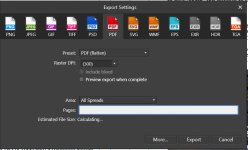
@gerards artzone If you click on "File" then "Export" you can choose the pages that you want to export. Have you tried this?


Screenshot 2022-02-12 115339.jpg
 
Yes, I had already found making a double page with a spread, but creating 2 separate PDFs of this spread seems impossible, so I must be doing something wrong. I'm disappointed that Affinity Publisher does not exist in a Dutch version with manual, tuts etc., because that would speed up the learning process considerably, but hey, I still have a few months to discover and work on it.

As @Harlequin565 says - just put a single page number in the box
 
You also have to take into account the type of binding the zine will use.
 
I'd quite like to make a zine! I have a few street photography related projects on the go and it would be nice to have a little output..

I have printed a load of 6x4 and started playing with sequencing on the living room floor! This process has already started to make me think differently about photography and projects!

I'm now going to disappear, read the other threads and make some notes on how to do this thing! see you on the other side
 
Thanks for the reminder Ben. We're now already a quarter way through the year!

So that's my thinking time done. Next three months to prepare myself methinks... :)
 
I'd quite like to make a zine! I have a few street photography related projects on the go and it would be nice to have a little output..

I have printed a load of 6x4 and started playing with sequencing on the living room floor! This process has already started to make me think differently about photography and projects!

I'm now going to disappear, read the other threads and make some notes on how to do this thing! see you on the other side

I've still got a few copies of my last zine (street-photography themed) left if you want a copy? It'll give an idea of what the results from Mixam look like if nothing else. :)
 
I'm also happy to send off any of my tat. Just PM me your addresses and I'll send them out.
 
Sorry, but for personal reasons I won't be able to participate this time
Sent Ian a PM, but he was already aware that I might not be able to manage this swap.

Hope it goes well and everyone enjoys their printed matter.
 
OK I know I've been quiet recently, got some personal stuff happening which is impacting everything, but I'm delighted to say i'm definitely in this time around. I've shot the content, largely edited and am almost ready to put it into the DTP programme.

It's not the most coherent of presentations, and I may go back and re-edit some of the shots to improve on that, but it's a personal triumph to actually have a set of new images I'm happy enough with to share :D:banana:. AND......I'm early
 
Just to say that Ian has decided to take a break from the forum, it would be great if he came back to run this but if not does anyone else want to pick up the reins, it's really just a case of confirming who is definitely in and circulating addresses via PM?

Failing that give me a kick nearer the time and I'll try to coordinate things.
 
Just to say that Ian has decided to take a break from the forum, it would be great if he came back to run this but if not does anyone else want to pick up the reins, it's really just a case of confirming who is definitely in and circulating addresses via PM?

Failing that give me a kick nearer the time and I'll try to coordinate things.

I'm happy to co-ordinate if there are no other 'volunteers'.

I also think that we should all send a zine to Ian, in thanks for getting the zine projects off the ground.

So far I have a couple of zine-able projects, but I have a photography trip away in the first week of October, so my plans are still quite fluid.
 
Last edited:
I'm happy to co-ordinate if there are no other 'volunteers'.

I also think that we should all send a zine to Ian, in thanks for getting the zine projects off the ground.

So far I have a couple of zine-able projects, but I have a photography trip away in the first week of October, so my plans are still quite fluid.
Thanks David and great idea to send zines to Ian. (y)
 
Alas I am not going to be taking part.

Good luck to everyone taking part.
 
Just realised I was still in this thread, joined with the best intentions but "burning too many candles" and can't commit the time to the Zine swap. Maybe I can re-visit the project later, time management has never been one of my best qualities!!
 
Unless I do another sheep zine I cant see me having anything to contribute this time. :(
 
Unfortunately i won’t be in a position to take part this time around
 
Being someone for whom the calendar and the passing of time in general is something of an abstract concept I was thinking I still had plenty of time but it seems not. However the nights are drawing in so I'm more likely to have some time in the evenings so I will try to pull something together in time. When we say November, are we looking at the start of November or the end?
 
Being someone for whom the calendar and the passing of time in general is something of an abstract concept I was thinking I still had plenty of time but it seems not. However the nights are drawing in so I'm more likely to have some time in the evenings so I will try to pull something together in time. When we say November, are we looking at the start of November or the end?

From Post #1

Timeline:
December 2021 to 6th November 2022 : You come up with an idea, take pictures and design your zine. You can even build it in your software of choice.
7th November 2022 : This week I will be asking people to formally commit to making their zine. You will have 7 days to PM me your name & address to confirm your commitment. I generally tag anyone who has registered an interest to remind them, so if you post on this thread that you might be interested, I can let you know closer to the time.
14th November 2022 : I will send out a PM to all confirmed participants with everyone's name & address as well as a confirmed amount of zines people need to print.
15th November to mid-December 2022 : Everyone gets the appropriate number of zines printed and mails them out to everyone on the list.
 
I'll try to contribute something as I said I would. I see a lot of people having to drop out so an update from the 'organiser' to say if it is still a go would be helpful.
 
I'll try to contribute something as I said I would. I see a lot of people having to drop out so an update from the 'organiser' to say if it is still a go would be helpful.

I have assumed control in Ian’s absence! At present it’s still going ahead- I will contact people around 7th November to get committed numbers, if we ‘all’ feel that there is not enough to make it worthwhile then we can revise accordingly.
 
I have assumed control in Ian’s absence! At present it’s still going ahead- I will contact people around 7th November to get committed numbers, if we ‘all’ feel that there is not enough to make it worthwhile then we can revise accordingly.
Wonderful and thank you for picking up the reins of the project, it's appreciated.
 
Back
Top