

OP

Harlequin565
Suspended / Banned
- Messages
- 8,684
- Name
- Ian
- Edit My Images
- No
Try it and seeWould that work in this context?

The more rules we have in place, the more restrictive it becomes. Do what you like
For my evening classes, I give everyone an A1 mountboard to put a final selection of images on for their projects. By far the most common questions surround the presentation. I just tell people to do what they like. a) it's their project and b) it's supposed to be enjoyable. By placing no restrictions, we get a far more varied and interesting set of boards. Some put 1 photo on there, some put 40. Some cut the mountboard, some blue-tack them on! We've had one person add wood carvings and quite a few people like to use glitter and gold pens. I've had scrunched up newspaper, a pull out drawer (was very ingenious!), a flowchart, and a movie-style storyboard amongst the very common "just stick five or six 8x10s on there".
I think because layout is so personal, it's quite difficult to get that. My suggestion (and way of working)...if someone can point me to a decent video showing someone starting and working on a zine in Publisher!
1. Curate your images down to about 15-20
2. Add them to a folder and roughly organise them into groups based on content. Maybe there are 2 images that need to go together, maybe you have a "showcase" image you want across a double page with "introduction" images on the preceding pages. It's easy to move pages around in Affinity, so this only needs to be a rough estimate. I tend to use filenames to organise (image-1, image-2 etc) so that organising by filename puts them in the order I want.
3. Set up a new project in Affinity. Make a decision (based on your selection above) as to whether you want to go portrait, landscape or square, and make a decision on size based on who's going to print it. (Mixam for example only have a few standard sizes whilst other printers may be able to do something more bespoke)
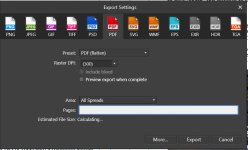
4. Just start adding images to pages. Don't worry too much about size, just get them all in the book. Once you've finished, I would suggest exporting it to PDF and just having a flick through to see if the order seems right.
5. Time to mess about with image sizes and whether you want text. When complete, export to pdf and read it as a standalone thing.
6. Cover, back cover, introduction (if you're doing one) or afterword (if you're doing one)
Final export to PDF. Anything that doesn't work? You can still move pages around to rearrange the order.
Every time you come across a problem with the software, just Google "Affinity how do I dothething". It's much quicker than using their help pages (often you end up there with Google) and you don't end up overwhelmed trying to learn the whole thing all at once.
Hope that helps!






 . AND......I'm early


