Hi Peter, apologies for the late reply.
Waking the camera up is no problem, the tablet stays active - so you tap and the camera will take a shot.
The way I do it is have the tablet and camera turned on, plug it in and the app auto starts, you hear the mirror flick and you're ready to go.
You can alter a whole bunch of stuff, I've taken a whole load of screenshots to show you..
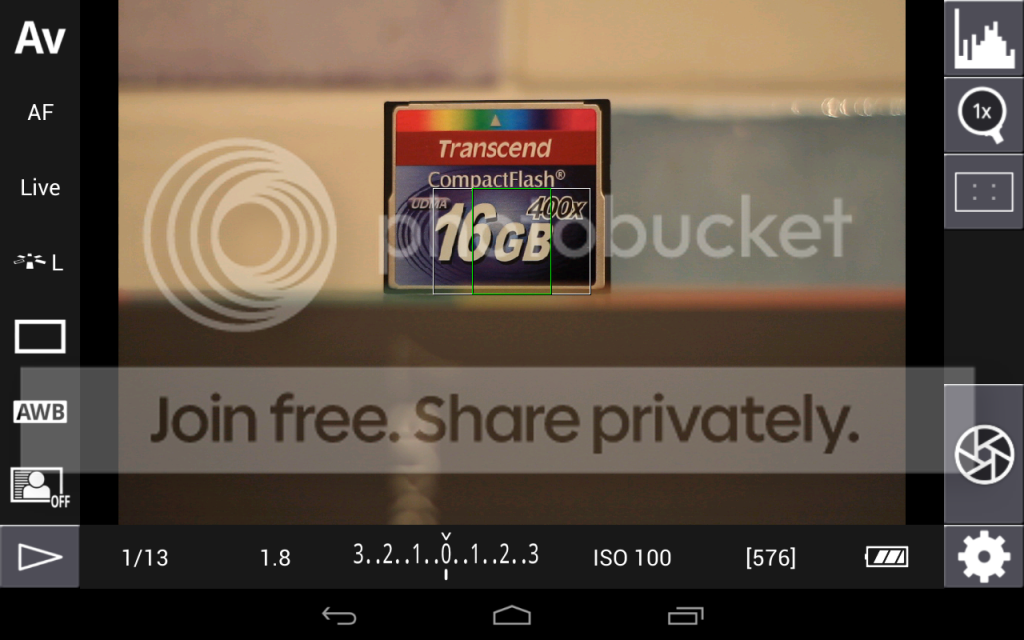
This is the main shooting screen. You can see we are in AV mode and the rest of the information you might find in a viewfinder is shown at the bottom. Other than the battery level and the remaining shots count everything can be tapped to open a settings screen of some sort.
I've put a whole bunch of screen shots here, they are titled so you should be able to tie them up.
http://s1044.photobucket.com/albums/b445/Crafty_77/Nex7/
They are a little out of order but you should be able to figure them out..
Starting from top right, we can pull up a histogram and display on screen:
If you tap the histogram again it shows an RGB histogram, tap again and it goes away.
Below that, we can zoom in in live view, goes x5 and x10.
Below that is the focus overlay options.
The next button is obviously the shutter. In the bottom right hand corner is the settings list.
Moving round, we can change ISO, I have the 7D set up to show full stops only, I don't know if the app knows this and only shows the available ISO settings or if its fixed at full stops.
Continuing on, we can change both exposure and flash exposure compensation.
Next to that is Aperture
Obviously you can't change shutter speed in Av mode or Aperture in Tv mode, but if in a suitable mode you can tap the displayed shutter speed to change it.
The button in the bottom left corner allows you to view images stored on the camera memory card. I have read that the author of the app is working on being able ot save images from here to the tablet/phone.
Starting up the left hand side, the 7D has the auto lighting optimiser system, so we can alter that.
White balance.. aside from the presets the numbered values go from 2500 up to 9600 in 100 increments.
Next up is AF Drive, so you can switch to continuous shooting etc.
Picture Style is above that, note this will let you pick custom setups programmed on the camera.
Focus Mode, I need to experiment with these and the 7D, I'm not completely sure of the difference.. I leave it in live for now!
To focus, just tap the screen where you want to focus, as with liveview this can be a little slow but it does work.
Additionally we can also take control of focussing by tapping the "AF" button, this will change us to R-MF mode (or remote manual focus), this lets us focus by tapping the arrow buttons on screen to change focus, it actually works quite well and lets you be very accurate.
I've just started to scratch the surface of what the app can do really, next time out I may fool around with the bracketing feature to see how that works.
Hope this helps. There is a 200+ page thread for the app here:
http://forum.xda-developers.com/showthread.php?t=1202082
Worth checking it every so often as the developer (goes by the name of "chainfire") posts there to help users and talk about new features.