Which 7" tablet for tethering

postcardcv

Suspended / Banned
Messages
2,661
Name
Peter
Edit My Images
No
I am looking at getting an Android tablet but want to get one that will work to tether my camera too. There seems to be a world of choices and at the moment I think I am swaying towards the Nexus 7. Has anyone used one for tethered shooting, if so so was it? Or can anyone recommend another tablet that would do the job better. I'm thinking I want a 7" for the portability (for this and other uses) but would consider a larger one if there are significant advantages.
 
I've been doing a lot of research too and i think the nexus7 is hard to beat.
 
I already have a Nexus 7, just waiting on a cable to try tethering. Once I have one, I'll give it a go and let you know.

As tablets go though, it is superb.
 
Do either of you know if you get the £15 of credit if you don't buy direct from the Google store?
Yes. Bought mine from ebuyer and have the credit.

If Joe happens to be looking in - I've changed my mind on tablets - great for finding out about the film you are watching and as a travel movie player... ;)
 
Yep, but be quick as the offer runs out this weekend.

What he said.

Although personally I prefer the slight increase of the galaxy 7.7 with samoled screen too, just found 7 too restricted so resold my nexus.

Can also highly reccomend the note 10.1 if you decide for larger still.
 
I have got the lead... then I went on holiday!

Although I choked a bit on finding out the remote control app was nearly a fiver. I should stop being a tightwad and just pony up and get it really!
 
I've got an Nexus 7 and the OTG lead you need to plug in the camera. I used some of the £15 credit to buy the DSLR Controller app.

It all works very well, I've had no problems. The developer of the app is working on an auto-upload feature to the tablet.

If you want me to try out something let me know.
 
H Mark, A few question for you about using the app... Obviously I would need the camera to be set to liveview to use this, but if the camera goes to sleep can I wake it back up from the app? Can you adjust most settings from the app, like ISO, aperture and shutter speed?.

Anyone know the answer to this?
 
Hi Peter, apologies for the late reply.

Waking the camera up is no problem, the tablet stays active - so you tap and the camera will take a shot.
The way I do it is have the tablet and camera turned on, plug it in and the app auto starts, you hear the mirror flick and you're ready to go.
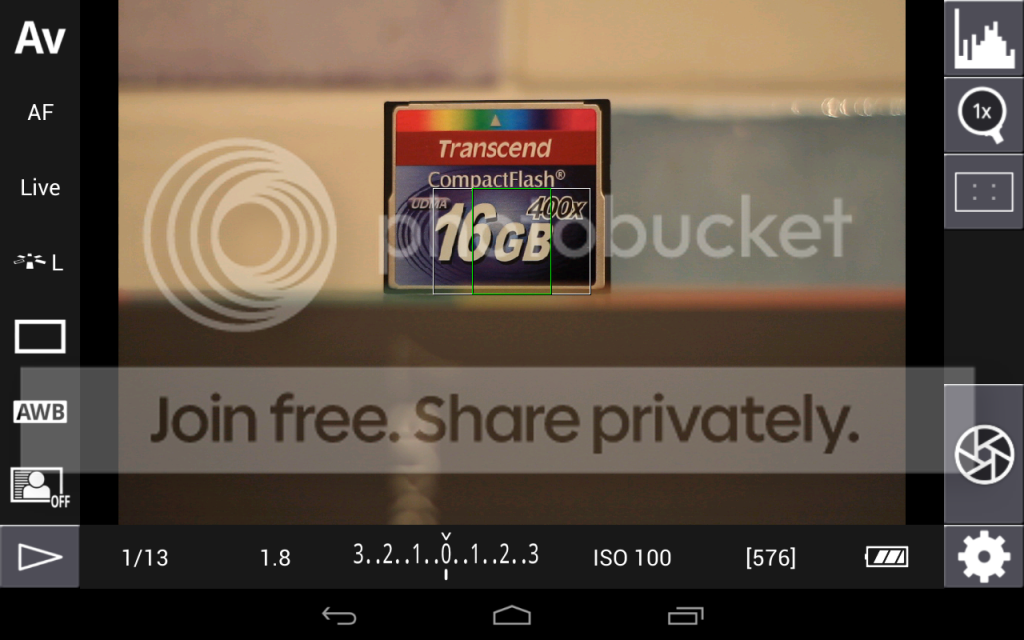
You can alter a whole bunch of stuff, I've taken a whole load of screenshots to show you..

This is the main shooting screen. You can see we are in AV mode and the rest of the information you might find in a viewfinder is shown at the bottom. Other than the battery level and the remaining shots count everything can be tapped to open a settings screen of some sort.

Screenshot_2012-10-12-21-40-08.png


I've put a whole bunch of screen shots here, they are titled so you should be able to tie them up.
http://s1044.photobucket.com/albums/b445/Crafty_77/Nex7/

They are a little out of order but you should be able to figure them out..
Starting from top right, we can pull up a histogram and display on screen:

If you tap the histogram again it shows an RGB histogram, tap again and it goes away.

Below that, we can zoom in in live view, goes x5 and x10.

Below that is the focus overlay options.

The next button is obviously the shutter. In the bottom right hand corner is the settings list.

Moving round, we can change ISO, I have the 7D set up to show full stops only, I don't know if the app knows this and only shows the available ISO settings or if its fixed at full stops.

Continuing on, we can change both exposure and flash exposure compensation.

Next to that is Aperture

Obviously you can't change shutter speed in Av mode or Aperture in Tv mode, but if in a suitable mode you can tap the displayed shutter speed to change it.

The button in the bottom left corner allows you to view images stored on the camera memory card. I have read that the author of the app is working on being able ot save images from here to the tablet/phone.

Starting up the left hand side, the 7D has the auto lighting optimiser system, so we can alter that.

White balance.. aside from the presets the numbered values go from 2500 up to 9600 in 100 increments.

Next up is AF Drive, so you can switch to continuous shooting etc.

Picture Style is above that, note this will let you pick custom setups programmed on the camera.

Focus Mode, I need to experiment with these and the 7D, I'm not completely sure of the difference.. I leave it in live for now!

To focus, just tap the screen where you want to focus, as with liveview this can be a little slow but it does work.

Additionally we can also take control of focussing by tapping the "AF" button, this will change us to R-MF mode (or remote manual focus), this lets us focus by tapping the arrow buttons on screen to change focus, it actually works quite well and lets you be very accurate.

I've just started to scratch the surface of what the app can do really, next time out I may fool around with the bracketing feature to see how that works.

Hope this helps. There is a 200+ page thread for the app here: http://forum.xda-developers.com/showthread.php?t=1202082

Worth checking it every so often as the developer (goes by the name of "chainfire") posts there to help users and talk about new features.

 
I'm quite happy with the N7, the only real downside is lack of an SD card slot, but seeing as I don't have any anymore its no big deal, you can plug in usb sticks or powered hard drives to read files and if you root it you can write as well.
Its had an update over the last week or so to 4.1.2, which has enabled landscape mode.

I like the 7" size, its easy to hold one handed. I'd like to find some sort of mount so I can attached it to the tripod when out shooting.

It seems there is a 32gb version on the way (its appeared in some shop stock systems), but no-one knows when or how much.
 
http://www.hotukdeals.com/deals/goo...ode-plus-3-5-cashback-1334871?page=5#comments

Nexus 7 down to £180 ATM, but have read the 32gb versiion is expected to be released this month at same price.Windows 8 tablets out soon but will be more expensive?, have a windows 7 phone and quite like thew system.Choices choices

Cool, thanks for that link getting very tempted to order one. I have basically decided that I don't want a bigger tablet but am tempted to buy a Galaxy s2 instead... That said all spare cash is heading into the new lens fund at the moment so I will probably wait a while before going either way.
 
Why do you want to change the camera settings from an oversized mobile phone? What is wrong with doing it on the camera, as you'll be holding it?

This sounds like technology for the sake of technology. Like people in th epub discussing what their various will do, but never actually NEED to use them for any of it.
 
Why do you want to change the camera settings from an oversized mobile phone? What is wrong with doing it on the camera, as you'll be holding it?

This sounds like technology for the sake of technology. Like people in th epub discussing what their various will do, but never actually NEED to use them for any of it.

Well if I was holding the camera I would obviously change settings on the camera itself. However I sometimes shot using a wireless remote to allow me to take wildlife shots from close with a shorter lens. My current set up allows me to fire the camera and nothing else, I have to try and judge whether the bird/animal is in shot. Setting up shots with the a tethered tablet would allow me to see whati attacking before firing the shutter and also to adjust focus if the subject isn't quite where I was wanting it in the frame.
 
Why do you want to change the camera settings from an oversized mobile phone? What is wrong with doing it on the camera, as you'll be holding it?

This sounds like technology for the sake of technology. Like people in th epub discussing what their various will do, but never actually NEED to use them for any of it.

Do you use autofocus or autometering on your camera ? or auto / semi auto modes ? surely they are also "technology for the sake of it" ?

The use of a larger screen lets you see in far better detail whats in the shot - useful for astro/star trail photography or when its not possible to see the LCD on the camera - when the camera is setup on a very low tripod for example.

Just because you don't see a use for it don't assume everyone has the same requirements.
 
Back
Top