Where am I going SO wrong?

The images in this thread show exactly why SOOC is not always good. A camera is there to record the image as it sees it (although with digital it can enhance things but still only an impression of the thing the camera is pointed at) It is not magic and needs human intervention to get the image to be how we want it.

In the case of these images they need help due to less than ideal light. Other circumstances don't need much help as the conditions are better and the SOOC image is a lot closer to what we want. And using raw doesn't always mean that lots has to be done and can often get away with minimal adjustments if the image was pretty spot on to start with.
 
Oi......don't laugh...............I thought it was all down to your expert ability :notworthy: ;)

Knowledgeable, I'll take, but after nearly 30 years of photography, I don't consider myself an expert. I think I know enough to realise how little I know. I'm OK with a camera, OK with processing and I can produce 'good enough' photos for my customers (someone thought 'good enough' was an insult recently) I'm still learning and still enjoying learning.

For me, it was lack of knowledge......:amstupid:.....but am keen to learn :D
You're far from responsible for the SOOC myth, but I hope you see how ridiculous a notion it is:suspect:. Ever since Fox Talbot produced the first negative, post processing has been an integral part of photography.

But that's not the same thing as shooting carelessly so that you can fix it in Photoshop later :nono:

See my earlier posts about light being the most important element of the photograph.
 
Ever since Fox Talbot produced the first negative, post processing has been an integral part of photography.

But that's not the same thing as shooting carelessly so that you can fix it in Photoshop later :nono:

See my earlier posts about light being the most important element of the photograph.

Quite so.
 
Or....what about converting a couple to black and white? :cuckoo:

Can definately work well on overcast days but you need to do more than just desaturate the image to achieve anything decent. Contrast will definately need to be selectively altered on most shots which is exactly what you want on a grey day, the ability to add it back in without having to worry about things looking unnatural.

If you don't mind I did a quick edit...

cNi2I.jpg
 
Last edited:
I'd scrap it, and call the day a write-off, unless you really want to practice your PP.

Get it right in camera, on a day where the light is appropriate for the shot you are trying to take. Then, any PP needed, is so much easier.


Wha?? Yeah, just give up ... that's the way to go. :thumbsdown:

The images are not so bad they need scrapping. Other posters have shown they can be revived. I think the mono version ooks cool, with a bit more work at least it could be a keeper. Clone the bin out and tinker about in photoshop and these images could well be saved.

As for SOOC ... I really hate when people start harping that one. Even the 'old masters' used post processing techniques to refine and bring out the best of their images. You think Ansel Adams' images were as glorious and popped off the page "SOOC"?? think again. He spent hours, even a whole day, on each image. Experimenting with post processing techniques in the dark room.

A SOOC section would end up a pompous mess hall on here.
 
The PP seems a large part of the success here, are there any good guides from the bottom up for using Lightroom for this purpose?
 
We all have dull days (not just the light). But that’s where the difference between a snapshotter and a photographer come in. Even on a dull day the light is suitable for something, you just need to find it. You need to think creatively, outside the box etc. Dull day……B&W long exposure….

research and inspiration. Trawl the net, read some books, The photographers eye and understanding exposure are fantastic. Go to a gallery. ‘Find’ that inspiration. It may just be a single photo that makes you think…”Aha!!! Im going to give it a go”.

Plan. Look at the lighting, think about the shot you want to achieve. Draw it out if need be on paper…but then get out there, try it. Every bad shot you take is one step closer to getting to where you want to be. I have recently cleansed my photo archive of 1000s of naff shots that, at the time, I thought were OK. But every one of those shots I deleted was key to me being a better photographer. I looked at them, learned from them, and tried again. If I select my entire photo library (33000 photos!!) you can see the journey from beginner, to intermediate to…well…. A bit better lol!!
its right there, in light room, and that acts as inspiration in itself as you can see progress and the journey.

Plus.....everything Phil Said.......!!
 
Cagey75 said:
Wha?? Yeah, just give up ... that's the way to go. :thumbsdown:

The images are not so bad they need scrapping. Other posters have shown they can be revived. I think the mono version ooks cool, with a bit more work at least it could be a keeper. Clone the bin out and tinker about in photoshop and these images could well be saved.

As for SOOC ... I really hate when people start harping that one. Even the 'old masters' used post processing techniques to refine and bring out the best of their images. You think Ansel Adams' images were as glorious and popped off the page "SOOC"?? think again. He spent hours, even a whole day, on each image. Experimenting with post processing techniques in the dark room.

A SOOC section would end up a pompous mess hall on here.

Calm down tiger, I never mentioned SOOC once. I never advocate, or use, SOOC.

I invariably use PP, on images that are exposed well for the light/shot intended, in camera.

Read it again.
 
Even on a dull day the light is suitable for something, you just need to find it.

good point. It is clear that with the light on this given day that catching autumn colours was not the best thing to try and do. You are already out with camera so try something else instead.
 
NOTE: I have checked by PM with the OP that reworking his images is ok.

The PP seems a large part of the success here, are there any good guides from the bottom up for using Lightroom for this purpose?

On Lightroom in particular, see below. But after I had posted those two reworks above I was thinking about what I did (with Lightroom and Photoshop), and wondering what I would say if anyone asked what exactly I had done to the images (which the OP now has). And I was concerned that explaining what I did would make PP seem really difficult and complicated and time-consuming and possibly not worth the hassle, or the money.

So I wondered what I could do with free software, and do really simply. So I had another go at the first image, with Faststone Image Viewer. Now I do use Faststone a lot, but not for editing images, so that side of it is pretty unfamiliar to me.

So, starting with this, the as posted version of the first image ...
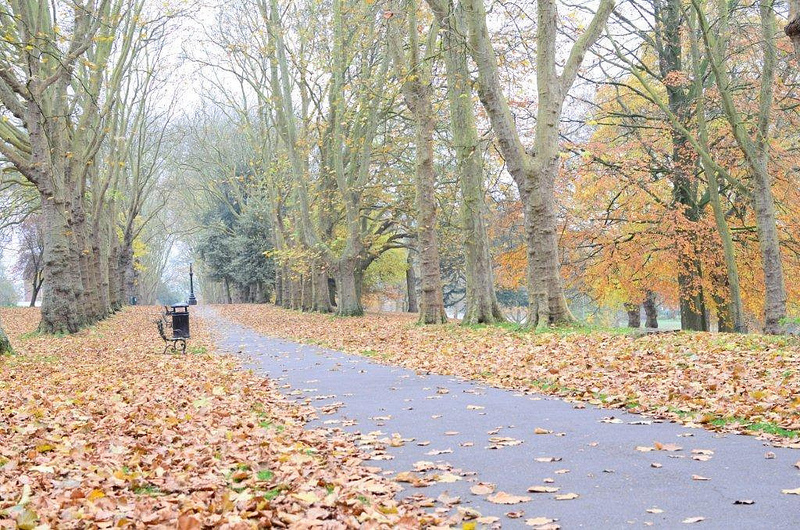

NOT MY IMAGE - kabooi - autumn 1 - original by gardenersassistant, on Flickr

... I got to this ...
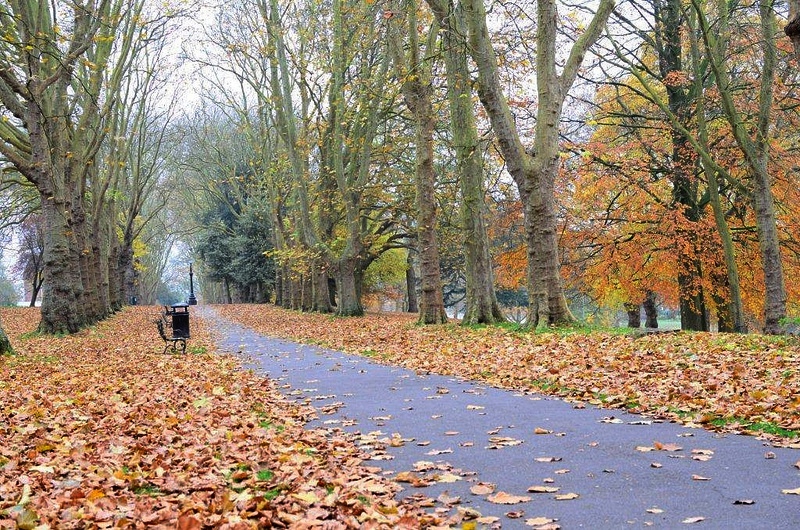

NOT MY IMAGE - kabooi - autumn 1 - FS1 Lem by gardenersassistant, on Flickr

... by moving one slider, and it is a slider that is available in almost any software that lets you adjust a photo. And again using Faststone I got another version, which looks very similar, by moving another slider, which is quite often available.

The first slider is on something called Levels. Here is a screen shot of it in use in Faststone (the image is big in pixels, but very compressed so not horribly big in KB).
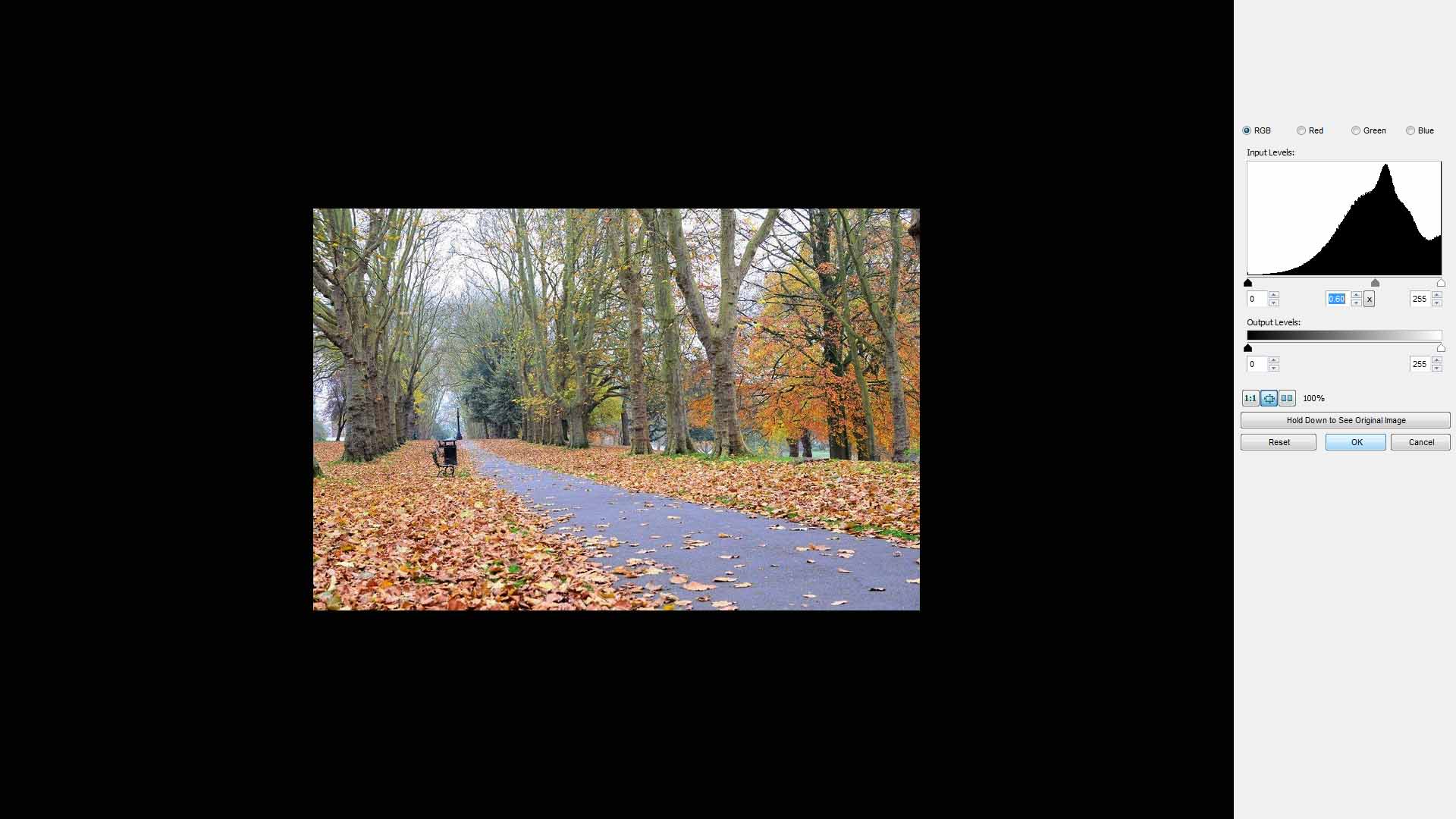

Levels in Faststone by gardenersassistant, on Flickr

Over on the right you can see a graph; this is the histogram. It shows how the light is distributed in the image; the more of the graph that is over towards the left, the darker the image is, and the more of it that is over on the right, as in this case, the lighter the image is.

There are three little triangles under the histogram. The black one, on the left, is called the Black Point. The white one, on the right, is called the White Point. The Grey one is called the Grey Point, and it starts out right in the middle, half way between the Black Point and the White Point. As you can see, it is now over towards the right, because I dragged it there, and this had the effect of making the image "darker". (OK, strictly speaking not darker, but you can see what the effect is.) And that is the only difference between the first and second versions above.

My point? This may not be the best you can do with this image, but you can quite often make a big change to an image quite quickly and easily, and without expensive or sophisticated software. (But if you do have the expensive and sophisticated stuff, and you have learnt how to use it, with photo software like with cameras you can produce results that would not otherwise be possible, or if possible would be very difficult or tedious to achieve.)

Incidentally, the other slider I used in Faststone was called Highlights. You can use this to make the lighter parts of an image less bright. For this image it produced quite similar results to what I did with Levels. That isn't always the case.

What did I do in Lightroom and Photoshop? I used the workflow and techniques that I normally use for my insect and flower photographs. Comparing with these simpler approaches, I'm not convinced my more complicated approach produced a particularly good result here, so unless anyone really wants to know about it for some reason, I'm inclined to leave it at that.

Learning about Lightroom

I have only been using Lightroom for about three weeks, so I'm an expert in being a beginner with Lightroom.

The first thing I did was to watch a lot of videos about Lightroom on the adobe site. They were very instructive. Being able to watch things happening while they were being explained worked very well for me.

I then got recommended a book by Martin Evening, Photoshop Lightroom (4, in my case, but he has written about previous versions too). There must be loads of books about Lightroom, and I haven't read any of them so there may be better ones, but I did find this one extremely helpful.

It's a big book, about 650 pages, but it is an easy and quick read with lots of illustrations, and if you are most interested in the PP side of things you could start off by just reading the Chapter on Develop Module Image Editing (160 pages). It is a bit leaden, and possibly a bit repetitive, but very thorough, and like I said an easy read. Not for everyone I'm sure, but I found it very useful indeed.

(By the way, the book not only explains in great detail how to do things, it also talks about some interesting things that are going on under the surface, which I too found helpful to understand.)

 
Back
Top