Beginner Underexpose Shots with Lots of Highlights?

Sony Corleone

Suspended / Banned
Messages
213
Edit My Images
Yes
Photography teacher Wolf Amri says that for high dynamic range shots, we should deliberately underexpose and then use software to increase the brightness. He says this will preserve highlights, and it's better than playing with ISO. True?

Obviously, this is for raw.
 
I think it's a good idea to take practice shots and see what you're happy with. My newer cameras seems to be able to pull quite a bit from the shadows and more back from he highlights than I'd have thought possible. Some cameras I've had in the past couldn't take much of a boost to the shadows at all... I'm looking at you Canon :D

I think it maybe just takes time and practice shots to learn where the limits are for you kit. Maybe take a couple of shots with different settings if you think DR is a problem.
 
Basically expose for the highlights and raise the shadows.
 
Thanks for the help. Now I just have to spend the next 12 hours figuring out how to change the custom modes on my cameras.
 
I'm not sure about the ISO bit..... That's usually light level dependant rather than DR.

But yeah, I look at my digital landscape work as collecting data sometimes rather than capturing an image. I don't tend to generally 'under expose' though, I'll set the exposure to just above where the camera starts to show me some zebras/blinkies on the highlights.
 
One of my cameras only does zebras in video. Weird. It does blinkies for stills, but only after you shoot, so basically, it tells you you blew the shot after it's too late. I think it does a live histogram. It's hard to keep track of multiple cameras.
 
Photography teacher Wolf Amri says that for high dynamic range shots, we should deliberately underexpose and then use software to increase the brightness. He says this will preserve highlights, and it's better than playing with ISO. True?

Obviously, this is for raw.
Perhaps rather than saying 'deliberately underexpose' it would be better to say 'expose to prevent clipping highlights, even if this means underexposing the main subject' - but even that is more of a general guide, as sometimes you just have to let highlights clip (eg you have the sun in frame), and the choice is how much to clip.
If your camera has the option to display the live histogram this can be a good guide to help control clipping.
 
Watch the histogram and expose to the right. Thats all I do

Same here - ETTR was kind of essential shooting high dynamic range subjects with sensors that were prevalent maybe 10+ years ago, though I understand the modern crop of sensors are a little more tolerant in that the new sensors have a bit higher dynamic range than (say) the Canon EOS 450D or 7D that are still the ones in my camera bag.*


*I've kind of lost my photography mojo, in terms of going out shooting as a hobby at the moment - though I love looking at imagery, commenting on it, and occasionally even adding my 2-pennorth on technical or semi-technical things - though, I've never been particulary into the tech side of photography, as befit's an old hippy.... "I'm in it for the Art man...."
 
Ideally you get a few exposures to cover the whole lot cleanly. My work commonly involves 5-7 stop range. There is no way you can ever recover that much and keep it together
 
Some cameras I've had in the past couldn't take much of a boost to the shadows at all... I'm looking at you Canon :D

I recall when I was looking at second hand DSLR options and the YT reviews of cameras around the Nikon D5500 release era.
The comparisons between the Nikon Sensors and the equivalent Canon options back then, the higher HDR of the Nikons was really a marked improvement.
 
This very much depends on the camera, the scene, and the intent... I.e. if the highlights are specular or something that should be white, then there is no point in "saving them." In that case properly exposing the subject is more beneficial; likewise if it's a highlight you just don't care much about (it's not important to the image).

With a non ISO invariant camera underexposing and recovering in post results in more noise, less detail, and less dynamic range... those are not good things.

With many newer cameras being more ISO invariant, underexposing by using a lower ISO in order to save highlights results in a larger dynamic range being recorded with little/no penalty. But almost no camera is fully ISO invariant, and with many of these cameras there is a dual gain step/consideration as well.

Underexposing by recording less light is never a good thing for image quality (Ap/SS), ISO invariance makes no difference.

This doesn't only apply to raw images...
 
Last edited:
Photography teacher Wolf Amri says that for high dynamic range shots, we should deliberately underexpose and then use software to increase the brightness. He says this will preserve highlights, and it's better than playing with ISO. True?

Obviously, this is for raw.
It's about exposing for the significant highlights. That may exclude concern for light sources (sun; lamps) and small but bright specular highlights - rather than letting the camera (or separate meter) impose a reading for the scene as a whole.

If you can raise a histogram in your vf display, life gets easier. Some here will pop up to say that it just represents the jpg output, but ignore them - it's the best we've got.

Otherwise - using cameras that don't have such a feature except maybe in image review after the event (personally I never 'chimp' - it's just so clunky, never mind the inelegant simian aspect) - for general out and about photography I would just leave exposure compensation set on minus 1 (stop). That would cover most cases.

But with thought & experience even that would be modified further by judging the light, whether generally or in particular parts of the scene. For many scenes a -2/3 stop adjustment will do. Other times you'll need a stop & a half, or could just leave it the zero default. I know that you'ld like the camera to do all the work, but come on - we're photographers, aren't we? Let's not be subjects of the machine as if it was royalty - let's tell it what to do!

You're out in the land, & it's covered in snow. You have a hand-held meter, or your camera has basic through the lens metering. So you open up the exposure a stop & a half (say) so that the snow comes out white but without blowing the highlights.

You're out in the dusk with similar equipment, and you purposely expose a stop or two down - a reverse circumstance with no highlight issues involved. Just so that the resultant file is close to what you want as the final output. And so it goes on.

I have cameras of various ages & types (& media). The above comments apply to slide film & digital. Neg film is upside down, in that highlights in the scene will be dark on the negative, so exposure concerns are different.

And yes, RAW every time, because your guesses ain't gonna be perfect, & you want a malleable file.

That's as good as it gets for most of us, unless the lighting situation is more extreme and special measures need to be invoked. Like tripods, for instance - I sometims trip over my own feet already so more limbs are the last thing I need. Or spot meters. How small is your spot, how good is your aim? Etc.
 
Last edited:
One of my cameras only does zebras in video. Weird. It does blinkies for stills, but only after you shoot, so basically, it tells you you blew the shot after it's too late. I think it does a live histogram.
Keep in mind that most camera histograms and highlight warnings lie to you... they typically show clipping if any channel reaches ~ 250 in the recorded jpeg. With an ISO invariant camera set to auto ISO (and adjusting ISO at the time) it may be easiest to just set a negative exposure compensation or use highlight weighted metering (my preference).

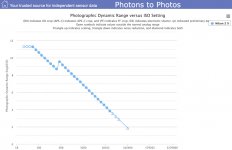
It is also important to know that as soon as you raise the ISO above base you are *reducing recorded dynamic range.

(*except for the dual gain step for some cameras)
 
Last edited:
Keep in mind that most camera histograms and highlight warnings lie to you... they typically show clipping if any channel reaches ~ 250 in the recorded jpeg.
So what's so terribly wrong about a bit of spare headroom?
It is also important to know that as soon as you raise the ISO above base you are *reducing recorded dynamic range.
This is well documented. So for hand-held work, I set the auto-iso to stick to base unless a certain shutter speed would be underachieved ...
(*except for the dual gain step for some cameras)
This where I lose the plot - not through laziness, but by the character of my brain type: I'm a technophobe. Sure, I've read about it, seen the graphs, but I'm non the wiser. I wonder how many people are?
 
I tend to expose for the highlights - a Sony FF sensor allows considerable shadow recovery:

View attachment 475719
Appears to have blown highlights. How does this contribute to the argument?

I tend to expose for the highlights - a Sony FF sensor allows considerable shadow recovery:


Shadow recovery by Anton Ertl, on Flickr

Left example looks artificial. Right example looks more natural / real, but a bit obscure. Maybe a better answer is something between the two? But I allow that they illustrate your point.
 
So what's so terribly wrong about a bit of spare headroom?

This is well documented. So for hand-held work, I set the auto-iso to stick to base unless a certain shutter speed would be underachieved ...

This where I lose the plot - not through laziness, but by the character of my brain type: I'm a technophobe. Sure, I've read about it, seen the graphs, but I'm non the wiser. I wonder how many people are?

I find it's just a bit of experimenting. I know that I can go a stop over from when the zebras start to show (99% in the sky) and still recover them back down & LR - obviously that's then one stop less that I have to pull the shadows up too.

ISO I don't tend to worry about so much anymore - If I'm tripod shooting which is typically sunrise/sunset then I try to stick to 100 or 640 ISO - anytime I'm handheld with any of my digital cameras then it's auto ISO - I have many higher ISO photos which are more than adequate! :)
 
So what's so terribly wrong about a bit of spare headroom?
Nothing in particular; that's why the manufacturer's REI ISO's are usually overstated and the metering/etc conservative. But if you are doing things like underexposing in order to get the maximum dynamic range it's wasted range.

This where I lose the plot - not through laziness, but by the character of my brain type: I'm a technophobe. Sure, I've read about it, seen the graphs, but I'm non the wiser.
It's pretty simple. When the sensor photosites switch to the high gain mode they actually become more sensitive to light. This means you gain usable signal/data/DR (reduce noise) in the shadow regions. You have still lost the highlights that were otherwise recordable in the low gain state, but it's better than the previous elevated ISOs. And noise is most prevalent/visible in the shadow regions; so it can be significant.

Untitled-1.jpg
 
Last edited:
Appears to have blown highlights. How does this contribute to the argument?

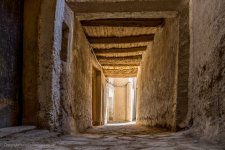
It's just a JPG with some artistic pushing and pulling. The highlights have enough detail to make it pleasing without being a white blob at the end of a black tunnel.
 
Here is the video.

 
See if your camera has a highlight priority metering option. That will save the highlights, but might need a slight over exposure relative to the metered exposure depending on subject and your taste.
 
Have you thought of exposure bracketing?

You could then compile in HDR software to arrange shadows and highlights as is your desire.
 
Can you show an example of what you are shooting? And where you struggle?

To my mind it becomes a creative decision on what gets clipped - either the shadows or the highlights, depending on what’s most important.

I feel there is a real balance to be struck - trying to get everything exposed “correctly” gives a kind of soulless iPhone look, I’m actually very happy to work to the limits of dynamic range, indeed, I actually very often purposefully reduce it.

Every time you take photograph, you are making a choice about what you include or exclude - dynamic range is no different and so I feel the ETTR safety net can be an easy trap to fall in to - like I know what I want the end product to look like when I hit the shutter and expose for it. Fixing in post is ultimately unsatisfying, imo.
 
I went through the settings on my OM1II today, trying to get it set up for "shooting for editing," and I have taken a few shots. I don't yet have one with serious highlights, but the highlight question was really just part of the bigger question of whether shooting for editing was a good idea, so it shouldn't matter much.

The first two shots were taken at ISO 3200, which is not what the video recommends. One was edited in Photolab, and the other in Lightroom. Denoising seemed to work okay, even in Lightroom, but the noise was significant.

The second two shots were taken at ISO 200. Much less noise after cranking the exposure.

The big problem with the shots taken at 200 is that previewing them and culling were not very practical. Viewers showed extremely dark images. When I edited the second shot, I just chose one that looked acceptable when I brightened it up in a viewer.

So is this method a good idea? How do you preview and cull images you can't really see? Also, the second pair of images couldn't be brightened up enough in Photolab to suit me. Maybe I am missing out on a setting, but "Exposure" didn't do it.

OLYM0035test OM1II custom by Cosmo Bogus, on Flickr

OLYM0035 Lightroom by Cosmo Bogus, on Flickr

OLYM0060test OM1II custom by Cosmo Bogus, on Flickr

OLYM0060 Lightroom by Cosmo Bogus, on Flickr
 
On the phone, the ISO 3200 image looks most natural but colours on all are between a little and a lot off. The 3rd and 4th are at least 4 stops under exposed, and recovery can be difficult, especially with a small sensor camera like the OM.
 
This is an interesting approach, I've surely never heard of it. If anything, I'd say that even guides on fixing dark photos suggest you try to avoid it in the first place while shooting (source lol). I suspect it really depends on the photo and many shooting nuances as well as the scene and lighting details of a particular shot. With some photos this approach may not work at all but with others it may work just fine. The only way to find out would be to try, though I'm not sure I personally would like to risk a potentially good shot being ruined by intentional underexposure.
 
I think in the context of being a beginner photographer and someone who wants to learn, 'shooting to edit' sounds like a bad idea.

It's no different from learning to print negatives. Editing doesn't mean fixing in post, but shooting to edit is rather creating a base image with maximum possibilities.
 
I think in the context of being a beginner photographer and someone who wants to learn, 'shooting to edit' sounds like a bad idea.

I think shooting to edit can be a good thing, depending on the situation and how you look at things. It certainly shows a great knowledge and confidence in what you are doing, your decision making, what your gear is capable of and your editing abilities. Some landscapes and certainly night skies is often more about "capturing the data" rather than "taking a nice photo"

Now, "fix it in editing" is completely different ;)
 
I think that when you’re starting out as a beginner, no one wants to make a bad exposure, but there are so many elements that go into making a good picture, and therefore so many small decisions to navigate. Shooting with the edit in mind, or treating photography as data collection, feels like the antithesis of experimentation - I know, I'm probably missing the point of the discussion :ROFLMAO:
 
I went through the settings on my OM1II today, trying to get it set up for "shooting for editing," and I have taken a few shots.
If you are going to do that, then it helps to know what you are dealing with.
And if the camera is the OM1 mkII, it is not ISO invariant.


It shows nearly a full stop more dynamic range (less shadow noise) by increasing the ISO to 3200 instead of using ISO 200 and recovering. Somewhere around/above 1/3 of a stop is when it becomes visibly noticeable. So, while not huge, I wouldn't be throwing it away unless I had a good reason.
 
Last edited:
I am trying 400 and perhaps a little higher today. So far, it looks like 3200 is too high and 200 is too low.
 
This is all pretty confusing.

Both shots were taken at 1/250 and f/2.8 in the same light with the same subject, so neither shot received more light. In Lightroom, the exposure slider let me crank it enough to overcome the dimness. In Photolab, the results were not as good.

At 200, I definitely had much less noise after brightening. I didn't see any need at all for noise reduction in Lightroom, and I believe the same thing was true in Photolab.

The web says this camera has two ISO stages:

"ISO 200 – 800: Low Gain Stage. Not invariant. If you shoot at ISO 200 and push 2 stops in post, it will look noisier than if you had just shot at ISO 800 in-camera.

ISO 1000 and Up High Gain Stage. Highly invariant. The "switch" flips at ISO 1000. From this point on, shooting at ISO 1000 and brightening in post is virtually identical to shooting at ISO 6400."

Something seems to be wrong with that information, because the 200 shots had less noise after brightening, not more.

I also read that Lightroom did a better job for me because its slider is allowed to do more. I am told Photolab will stop you before Lightroom, so to compensate, you have to mask the entire photo in Photolab and then bump the exposure again. I have not tried this.

I am told that software does a better brightening job than the camera, and I may be able to overcome the culling problem by using the camera's settings to boost the previews.

As for what "shooting for editing" means to me, it doesn't mean "spraying and praying and hoping Photolab saves me from lack of effort." It means shooting at low ISO's to minimize noise and then using supposedly-superior desktop software to fix the exposure. It means using a powerful PC instead of a little weak camera.

It looks like the old advice I got--shoot at high ISO and let Photolab kill the noise--is not great for human subjects. Strong noise reduction seems to work fine for objects and maybe animals, but too much makes people look like plastic toys.
 
I think that when you’re starting out as a beginner, no one wants to make a bad exposure, but there are so many elements that go into making a good picture, and therefore so many small decisions to navigate. Shooting with the edit in mind, or treating photography as data collection, feels like the antithesis of experimentation - I know, I'm probably missing the point of the discussion :ROFLMAO:
A couple of things, exposing to ensure you don't blow out the highlights isn't making a "bad exposure" it's making a "good" exposure, because "fixing" blown highlights is a lot more problematical than living with blocked/noisy shadow areas. This will often, necessarily, result in very dark raw files that need the shadows lifted, but this is just what an "optimal" exposure for a subject with high dynamic range (when you need highlight detail) looks like.

And to reply out of order. The argument isn't to treat "photography" as data collection, but to treat "exposure choice" as data collection, thus leaving your mind free to focus on the "so many elements" that go into making good pictures.

Ignoring making multiple exposures for HDR, the essentials of exposure with digital is to give as much exposure as you can, while also making sure you don't give so much exposure that you end up blocking important highlight detail.

With the help of the histogram (and understanding its limitations) it's a relatively mechanical process, and I think of it as "data capture". But this is (almost) entirely separate from all the things involved in capturing the "picture'. The aim of the data capture element is just to ensure you get an "optimal" raw file for subsequent processing.

You still need to make some creative decisions e.g. what is or is not a specular highlight which I can allow to blow out, what highlights are essential to the picture. Do I need to live with blown highlights to get some essential shadow detail, or am I happy I will be able to recover that shadow detail during the processing? Am I going to need to do a couple of exposures and use HDR, to get the photograph I am visualising etc.

But overall, getting the exposure "correct" is usually a technical exercise to give you base on which to realise your visualisation during processing

In the film days (for Black and White at least) exposure was much more integrated part of the creative process. Exposure, film processing and choice of colour filter, all had major effects on how your final print would look. As did the choice of paper, paper developer, and toning choices.

One way of dealing with this in the film days, was to use Ansel Adams Zone system, which through lots of experimentation (to create an "exposure" system) and careful spot metering of the different tones across the subject allowed you to "visualise" how the final print should look, and adopt the exposure and processing approach most likely to allow you to realise that visualisation.

For example, you could visualise the tonality that you wanted a sky to appear in the print and know that to get that tonality you would need to use a x2 yellow filter, but as this would also affect the tonality of shadow areas you would need to compensate for this by changing the exposure time and the film development time.

With sufficient expertise this allowed you to visualise the final print and create negatives that "placed" the important tones in the way you wanted them to look, and also check where other tones would "fall" because of how the important tones were "placed". This still just gave you a "good" starting point for making the print.

With digital, although I still visualise how a final print will look at the time of taking, my goal in terms of exposure, after making a basic highlight/shadow assessment, is to try and capture as much usable data as possible within the raw file, which I feel is more a technical exercise than a creative one.

Now a days, improved exposure expertise comes from feedback got at the raw processor stage, rather than weeks and months of testing films, developers, filters, papers and toners.

Shooting with the edit in mind (ie to produce raw files that maximise the flexibility of choices during raw processing) isn't the antithesis of experimentation; it's helping you develop the skills to remove the technical constraints that might hinder experimental aspirations.

I realised when writing this, just how complicated this all is, and how inadequate my brief explanation is; I hope this makes some sense.

 
ISO 1000 and Up High Gain Stage. Highly invariant. The "switch" flips at ISO 1000. From this point on, shooting at ISO 1000 and brightening in post is virtually identical to shooting at ISO 6400."

So if this is correct, you need to set ISO to 1000.

Grain/noise is not the only criteria for an image, and the pictures at 3200 look much more pleasant to me. Those at 200 are green in the shadows (a common problem with under exposure).
 
Last edited:
This is all pretty confusing.
It would probably help if I had selected the right camera...

Untitled-1.jpg
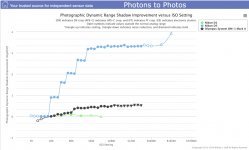
This shows the camera is rather invariant, with the difference being just at/above the visible threshold.

It's nothing like the Nikon D5, but being ISO invariant doesn't mean a lot in itself... the D5 was known as the "low light king". And the first Nikon DSLR was extremely ISO invariant; it was also very noisy.

Note that this chart is not useful for comparing between cameras; the amount of improvement is compared to the camera's own baseline.
 
Last edited:
I thought there were some artifacts on his cheek, but now I think he was just lying on it before I shot the pictures.
 
Back
Top