TV Questions Maybe I Can Help.

Barry L.

Suspended / Banned
Messages
322
Name
Barry
Edit My Images
Yes
Been into AV for some years now and have a little experience regarding TV's, PQ, and Calibration etc. I have calibrated my own TV using the Eye One Pro, and Chromapure Software. So any questions please fire away and I will try to help..........or I can find out.

Also into Blu Ray Films.

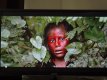
This picture was taken a few years ago before I had any interest in Photography and of course we are viewing it on possibly uncalibrated monitors, but you get an basic idea of what can be achieved:

DSCF0151.JPG
 
Last edited:
Not sure exactly what you're expecting/asking?
 
Strange post.... slightly patronising too..


and of course we are viewing it on possibly uncalibrated monitors, but you get an basic idea of what can be achieved:

View attachment 69294

Speak for yourself dude... hardware calibrated 30" Eizo ColorEdge here.

Plus.. you really, really can not show the quality of a monitor by taking a photograph of it. Surely you know that.... don't you? Plus... if you really wanted to ensure quality, why did you post an image with no colour profile attached or embedded? You any idea how oversaturated that looks as a result on a wide gamut monitor?

Many on here will be on calibrated screens... it's a photography forum, and there are many on here who probably already know a great deal more than you, who by your own admission has "a little knowledge".


Sorry but there's one thing that bugs me, and that's someone with "a little knowledge" setting themselves up as a source of information for beginners. That's why there's so much BS floating around the internet.
 
Last edited:
I think you are being overly harsh, especially considering the context of how this thread was started which was following a thread where it was very clear people had no clue about their AV equipment.

And that is not even taking into account the amount of people who do not have their screens calibrated or if they do it wouldn't come anywhere close anyway as they start with equipment that just doesn't allow it.
 
Last edited:
I think you are being overly harsh, especially considering the context of how this thread was started which was following a threat where it was very clear people had no clue about their AV equipment.


What thread? There was no mention of a thread. I just saw a bloke posting an image that looks awful on a wide gamut screen due to having no colour profile saying he can help people with colour profiling.
 
What thread? There was no mention of a thread. I just saw a bloke posting an image that looks awful on a wide gamut screen due to having no colour profile saying he can help people with colour profiling.
This was a spin off following a thread about a new TV, a discussion about various systems, how people judge their new purchase based upon a shop (pointless) demonstration etc.
 
This was a spin off following a thread about a new TV, a discussion about various systems, how people judge their new purchase based upon a shop (pointless) demonstration etc.

Sorry... my telepathic powers seem to be weak this morning. Maybe he should have included this info for those of us with less than perfect mind reading skills.
 
Sorry... my telepathic powers seem to be weak this morning. Maybe he should have included this info for those of us with less than perfect mind reading skills.
Or perhaps just give people a little bit more credit before jumping in with both feet in an extremely harsh manner ;)
 
Feel free to ignore me if I bother you please.
 
Feel free to ignore me if I bother you please.
You don't bother me in the slightest; but feel free to take it when you can give it ;)
 
What thread? There was no mention of a thread. I just saw a bloke posting an image that looks awful on a wide gamut screen due to having no colour profile saying he can help people with colour profiling.
An image that would look awful on incorrectly calibrated tv screen and is as close to colour gamut rec 709 as i was able to achieve using the Eye One Display Pro and Chromapure Software.
This tv has been calibrated to ISF/THX and industry standards. I started this thread to help out with AV qurstions which you clearly know nothing about.
 
Last edited:
You don't bother me in the slightest; but feel free to take it when you can give it ;)

I am. No mention of previous posts or continuation from one. Not my fault I misunderstood any intentions. Now I know, that changes things, but.....


An image that looks awful on incorrectly calibrated tv screen and is sd close to colour gamut rec 709 as i was able to achieve using the Eye One Display Pro and Chromapure Software.
This tv has been calibrated to ISF/THX and industry standards. I started this thread to help out with AV qurstions which you clearly know nothing about.

..the poster continues to show ignorance.


My monitor is NOT incorrectly calibrated, and your image has NO colour profile. If you want to show how an image looks correctly calibrated in REC709 (or more accurately ITU-R BT709), then you either A) Show it on such a device, or profile it in the correct colourspace for the intended audience, which in this case, is a bunch of people sat in front of computers, not TVs. So in this case, IEC61966-2.1 sRGB.

If you post an image with no embedded colour profile, a computer monitor, and/or browser will just force sRGB or whatever it's native gamut is (Adobe RGB 1998 in my case) without making any value recalculation for specific RGB values... therefore just "fitting" the colourspace into what's available. As I have a monitor capable of 98% of Adobe RGB1998, the colour gamut of your image is being expanded to fit the available colourspace, hence it looks massively over-saturated here. If you had ensured the image looks as you intended (REC709) by soft-proofing it in sRGB and then embedding that profile, it would have appeared (preceptively) correctly on everyone's screen that is calibrated regardless of the variations in their equipment: That's what colour profiles are for, to ensure correct visual representation on a variety of devices.

You posted an image to show me what can be "achieved", but it looks truly awful on my monitor, and that is your fault, not mine because there is no colour profile for my calibrated system to honour.

You have some learning to do.

However... apparently I know nothing about this, so feel free to ignore me :)
 
Last edited:
I am. No mention of previous posts or continuation from one. Not my fault I misunderstood any intentions. Now I know, that changes things, but.....


..the poster continues to show ignorance.


My monitor is NOT incorrectly calibrated, and your image has NO colour profile. If you want to show how an image looks correctly calibrated in REC709 (or more accurately ITU-R BT709), then you either A) Show it on such a device, or profile it in the correct colourspace for the intended audience, which in this case, is a bunch of people sat in front of computers, not TVs. So in this case, IEC61966-2.1 sRGB.

If you post an image with no embedded colour profile, a computer monitor, and/or browser will just force sRGB or whatever it's native gamut is (Adobe RGB 1998 in my case) without making any value recalculation for specific RGB values... therefore just "fitting" the colourspace into what's available. As I have a monitor capable of 98% of Adobe RGB1998, the colour gamut of your image is being expanded to fit the available colourspace, hence it looks massively over-saturated here. If you had ensured the image looks as you intended (REC709) by soft-proofing it in sRGB and then embedding that profile, it would have appeared (preceptively) correctly on everyone's screen that is calibrated regardless of the variations in their equipment: That's what colour profiles are for, to ensure correct visual representation on a variety of devices.

You posted an image to show me what can be "achieved", but it looks truly awful on my monitor, and that is your fault, not mine because there is no colour profile for my calibrated system to honour.

You have some learning to do.

However... apparently I know nothing about this, so feel free to ignore me :)

I have not read such a load of fluff and waffle in a very long time. This is a TV picture to be viewed on a TV ( the clue is in the title of the thread) and has been calibrated to industry standards. I am at a loss as to your conclusions on a subject you clearly again know nothing about.
 
(shrug) Like I said... perhaps a note explaining that it needs to be viewed on a TV screen calibrated to REC709 would stop people thinking "Jesus.. that looks terrible".
 
(shrug) Like I said... perhaps a note explaining that it needs to be viewed on a TV screen calibrated to REC709 would stop people thinking "Jesus.. that looks terrible".
Like i said the clue was in the title of the thread.
 
(shrug) Like I said... perhaps a note explaining that it needs to be viewed on a TV screen calibrated to REC709 would stop people thinking "Jesus.. that looks terrible".
Isn't that obvious? I mean fair enough I don't see the point in photographing calibrated audio visual screens to demonstrate how good it is, I'd prefer to see the actual measurements taken before and after. But surely it is obvious that you need to see the screen itself?

And yes I've had my plasma displays (Pioneer and Samsung) calibrated.
 
Isn't that obvious? I mean fair enough I don't see the point in photographing calibrated audio visual screens to demonstrate how good it is,

Which was my point, but if he'd spoft-proofed it, like someone well versed in colour work flow would have done, it would have actually looked nice regardless of destination.

(shrug).
 
Which was my point, but if he'd spoft-proofed it, like someone well versed in colour work flow would have done, it would have actually looked nice regardless of destination.

(shrug).
Spot proofed or not. We are talking about TV calibation here not how your pc monitor handles colour gamut.
 
Spot proofed or not. We are talking about TV calibation here not how your pc monitor handles colour gamut.


I think you're missing my point. You post an image to "get an (sic) basic idea of what can be achieved", and it looks bloody awful on my screen. It didn't have to be that way if you realised that by far the majority of people.. if not almost all of them.. who look at it, will not be looking on a TV, regardless of the thread being about TV calibration, and soft-proofed to ensure that it was... even if not strictly accurate... a pleasing image.


Never mind.
 
Last edited:
I have not read such a load of fluff and waffle in a very long time. This is a TV picture to be viewed on a TV ( the clue is in the title of the thread) and has been calibrated to industry standards. I am at a loss as to your conclusions on a subject you clearly again know nothing about.

Sorry I'm really confused.

This picture was taken a few years ago before I had any interest in Photography and of course we are viewing it on possibly uncalibrated monitors, but you get an basic idea of what can be achieved:

So we have a photo of a calibrated TV, taken with a Fuji Finepix S2980 over 4 years ago, thats posted on a forum that people read on PC's via different browsers and mobile devices and you say to experience correctly I have to view it on a TV? Is that the original media rather than your image?

Why the pause indicator on the image if its an image and if we're to understand the difference between a calibrated and uncalibrated TV, then wouldn't it be better to show a before and after?
 
No sorry. I would need to see the tv.:)

Even then you'd not be able to tell just by looking at it. You'd need to measure it in software with a colorimeter. Anything else is just subjective opinion.
 
Last edited:
Strange post.... slightly patronising too.. Sorry but there's one thing that bugs me, and that's someone with "a little knowledge" setting themselves up as a source of information for beginners. That's why there's so much BS floating around the internet.

Wow, the guy tries to help fellow members and you decide he has "a little knowledge" and you feel threatened or something ? how strange.
 
There are certain details that can be seen without the use of the meter but yes for me to give this a full calibration that would be correct
There are also some quite easy steps that can be made using simple test patterns and of course putting the tv in the cinema preset.
 
Sorry I'm really confused.

This picture was taken a few years ago before I had any interest in Photography and of course we are viewing it on possibly uncalibrated monitors, but you get an basic idea of what can be achieved:

So we have a photo of a calibrated TV, taken with a Fuji Finepix S2980 over 4 years ago, thats posted on a forum that people read on PC's via different browsers and mobile devices and you say to experience correctly I have to view it on a TV? Is that the original media rather than your image?

Why the pause indicator on the image if its an image and if we're to understand the difference between a calibrated and uncalibrated TV, then wouldn't it be better to show a before and after?

To get close you would need to view it on another Calibated TV. What you can get from that image is a sense of depth and to a degree sharpness.
 
So what are you offering? Advice in how to setup the colour profile on a tv, kit to use, advice on why we should bother? Is it important for normal TV watching or just AV buffs?
All of the above.
 
So why we should bother? Is it important for normal TV watching or just AV buffs?
 
Last edited:
For PC Monitor calibration I understand it's important for workflow, correct colour reference, especially in post production, so is this just about setting your TV to display the same as the media was produced in. How important is this for your average viewer, seeing as the majority of people will cycle through the preset modes and stop on the one they like. Is ambient light an important consideration in these modes, some better for daylight than dusk/night time?

In your eyes for TV viewing, would calibration of the TV for Rec709 produce a different image if say for instance the post production house used DCI. How about sRGB which some advertising companies have been using?

Not sure it affects sharpness and depth though?

Then, is all this assuming people have good TV's, as can be seen from displays in say Currys, they all display slightly differently, especially when comparing against cost, type (oled, LED, plasma etc)
 
It is important in the sense that all DP's/ Directors use certain standards for colour etc and in so doing it makes sense for us to adhere to this, to get the very best from a film or TV program.
All tv's can be improved even with a few simple steps.
OLED is looking to be the go to format after the sad demise of PDP.

Ps
REC 2020 is the agreed colour space for 4k UHD.
 
Last edited:
So why we should bother? Is it important for normal TV watching or just AV buffs?
I think we should, and not just AV buffs. Olympics hockey was a brilliant example where I noticed colour was all over the place on friends and family sets. I often find that general TV looks very weird.

Each to their own, but I think it is worthwhile. Sometimes the difference is truly staggering, and the amount of detail that can be retrieved by using correct settings changes the experience significantly. To me it makes it much more enjoyable to watch.

Your mileage may vary.
 
In what context?


The original post is confusing, and is accompanied by an image that does nothing to show what can be "achieved"......it looks like a rather bland screen capture of an image that probably looks a lot better in it's original form than it does here...it's not made me rush to calibrate my TV, at any rate.
 
The original post is confusing, and is accompanied by an image that does nothing to show what can be "achieved"......it looks like a rather bland screen capture of an image that probably looks a lot better in it's original form than it does here...it's not made me rush to calibrate my TV, at any rate.
Then your missing out. But of course that is your choice.
Remember film is just photograhy so why not have it look as the director intended?

Sorry but that pic is anything but bland if you know what to look for. If you are uninterested in AV again your choice but have you ever wondered what all of those settings ( White Balance, Gamma etc) are for on your TV?
 
Last edited:
Back
Top