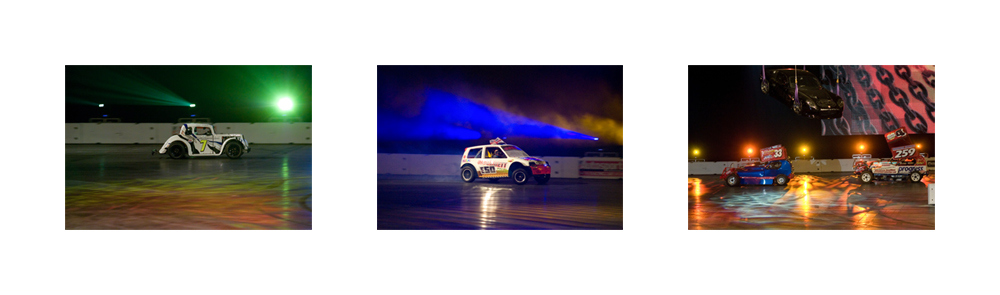
Triptych SCRIPT for Photoshop

cowasaki

TPer Emeritus
Suspended / Banned
Messages
19,708
Name
Darren
Edit My Images
Yes
What else could I do at 2-4am in the morning......

One script to create Triptych collages for Photoshop.

This is a stand alone script. Just place it into your Photoshop SCRIPTS directory (before you start photoshop), which is located at.

MAC

APPLICATIONS::Adobe Photoshop CS3 (or CS2)::Presets::SCRIPTS

PC

C:\Program Files\Adobe\Photoshop\Presets\scripts

or

C:\Program Files (x86)\Adobe\Photoshop\Presets\scripts


Basically you then run Photoshop as normal but in the scripts menu there will be an entry TRIPTYCH. Select this and the script runs.

You will be presented with a UI screen to input your preferred image size, border size, border colour (or clear for transparent) and click the tick if you want to change it to vertical from horizontal.

Now click the final tick box for whether you want to select each picture or use the first 3 in a directory...

Then click [OK].

Triptych.PNG


You will be be given a directory selector box. Select the directory with your pictures in (if there are more than 3 it will just select the first 3)

Then hey presto it will go ahead and do it for you...

Triptych.jpg


Enjoy :)

All pictures are reduced by the same ratio so, for best results, pick 3 pictures the same size.

You may want to use it for the competition


DOWNLOAD : Triptych.ZIP
 
:thumbs: Brilliant idea mate, only prob is, I cant get the pc version to work, it creates the background colour then just sticks one picture in top left hand corner and thats it. The layers pallete seems to be showing that its put all 3 in same place, so when you merge them, just the one picture. Can take a screen shot if that helps. I have run it twice, I don't think I am doing anything wrong, but its not yet 5am so I might be :thinking:
 
:thumbs: Brilliant idea mate, only prob is, I cant get the pc version to work, it creates the background colour then just sticks one picture in top left hand corner and thats it. The layers pallete seems to be showing that its put all 3 in same place, so when you merge them, just the one picture. Can take a screen shot if that helps. I have run it twice, I don't think I am doing anything wrong, but its not yet 5am so I might be :thinking:

I will have a look when I get up. Its working fine here so not sure...
 
is it teh default page size?
 
is it teh default page size?

What it does is it asks for the size to do the pictures then calculates the size of the first picture and from there it produces the page. There is no default page size it varies dependent on the pics! Like I said it is working faultlessly here on a Mac with CS3. When I get up shortly I will check it on the PC and see what happens. Is this happening on all PCs?
 
Also, there should be four layers one with the background the others with pictures. Is this the case?
 
Just so I can work out what is happening, can anyone who has tested this tell me if it is working or not and what version of CS/Elements they are using and whether it is Mac,Vista or XP please...
 
should this work with elements then?

Later versions of Elements run photoshop scripts. Not sure which versions do it but there are a few people running the older EXIF border script on Elements.
 
Later versions of Elements run photoshop scripts. Not sure which versions do it but there are a few people running the older EXIF border script on Elements.

OK, it's just that I don't have a scripts folder in presets. I'm running version 5 so maybe they're only available in later versions.
 
You know when things are going well, it is time to push the boundaries!

How about doing something similar so that it can fit to a frame (6x4, 5x7, 10x8)?

Chris
 
You know when things are going well, it is time to push the boundaries!

How about doing something similar so that it can fit to a frame (6x4, 5x7, 10x8)?

Chris

I have done a contact sheet generator as part of the new EBS scripts version 1.2 it will be released next week. It allows any upto 1000x1000 :)
 
Right NEW version now with ability to select each picture individually as an option. Can those that have had problems try the latest one and see if it helps. It can be used the same as the original one by clicking on use dir
 
Vista Ultimate 32 bit and CS$

Get the following

Error 1233: Expected a reference to an existing File/Folder
Line 91:
-> imagefile= open(filename );

This is orig version and clicking directory box.
 
Looks like you have been busy!
One thing I noticed is that you haven't set rulerunits!
Fine if everyone is using Pixels on thier machine, if they were set to inches it would try to create HUGE pictures.

Paul.
 
Looks like you have been busy!
One thing I noticed is that you haven't set rulerunits!
Fine if everyone is using Pixels on thier machine, if they were set to inches it would try to create HUGE pictures.

Paul.

Doh! Oh yes, thanks. Will upload new version shortly :)
 
New version 1.02 uploaded with correction as noted :)
 
Still get same error with new version.
 
Ok TulipOne asked for it so here it is:

Triptych is now PANEL

You will be presented with a UI screen to input your preferred image size, border size, border colour (or clear for transparent), NUMBER OF X IMAGES & NUMBER OF Y IMAGES.

Now click the final tick box for whether you want to select each picture or use the first ones in a directory (now checks they are images!)...

Then click [OK].

Panel.PNG


You will be be given a directory selector box. Select the directory with your pictures in.

Then hey presto it will go ahead and do it for you...

Panel.jpg


Enjoy :)


DOWNLOAD : PANEL.ZIP


Oh and after version 1.2 of the EXIF scripts is done I will add to this script with the option to CUT A SINGLE PICTURE UP, that is what the (use with multi) bit is talking about. There will be a further tick box for MULTIPLE IMAGES (ie what it does now) otherwise it will only ask for one picture!
 
Will this take care of the error message I keep getting?
 
Will this take care of the error message I keep getting?

I hope so, I have been really busy so not had chance to check it on my PCs yet but it is not an inherent PC problem as it is clearly working on some.

If you are running Vista then there is a security thing which causes some problems. Check out the EXIF Border script thread (see my sig) and scroll back a day or two and there is a screen shot from Vista with an explanation of how to open the security on the scripts folder. Let me know how it goes. I only got this email whilst I am at my parents fixing their network so not sure when I will be back at my computer.
 
Nice job. Works great for me using Mac OSX (10.5.6) and PS CS4
 
Brill. Works great on Vista home premium with CS3.
 
Just madly typing away to try and get all four packages ready for next week. Hopefully the option to chop up an image will go to plan!

For information. The DEFAULT values are in the code lines 45-50 so if anyone uses a particular set of details you can change these lines to automatically start with the variables set like that.
 
I don't suppose you can have an option for a larger (2x width of outer) sized middle image as is traditional in (religious) Triptychs.

Yes, that would not be difficult I shall add that with a tick box
 
Ok, having read the last post I was going to add a double border tick box but then I thought of a better way. I have now added an extra box for the "extra size of the outer border" (note this could be used with minus to remove some of the border too)

Panel2.PNG


Border of 80 and outer border of an EXTRA 80 making 160

PanelDB.jpg


Border of 80 and outer border of an EXTRA -80 making 0

PanelNB.jpg


I have replaced the original download with this one and here is the link again.


DOWNLOAD : Panel.ZIP
 
Hi

Sorry, I couldn't answer this morning, had to head off up the motorway, so can someone confirm wihc download I am now meant to use for Pc running XP64bit, the original, or this 'PANEL' one, and I shall try again. :)

Sorry for the confusion...

Triptych has now been replaced by Panel as panel does everything that Triptych did plus more.

ALL my scripts should work on ANY COMBINATION OF THE FOLLOWING...

CS2,CS3 & CS4

MacOS Tiger, MacOS Leopard, MacOS Server (tiger onwards), XP 32/64, Vista 32/64​

They MAY work on the last 2 versions of Elements and CS1 especially the single file ones such as this but I do not have an Elements to test it on.

IF ANYONE HAS UPGRADED FROM THE PREVIOUS VERSION TO THE NEWER VERSION AND WANTS TO DONATE THE PREVIOUS ONE TO THE CAUSE I WILL BE ABLE TO CHECK IT WORKS ON THEIR LATEST VERSION....
 
PANEL definitely works with elements 7 :)

Really appreciate all your efforts Darren - I couldn't even start to contemplate it!
 
PANEL definitely works with elements 7 :)

Really appreciate all your efforts Darren - I couldn't even start to contemplate it!

Some questions for you then :)

Where do you put the scripts to work with Elements?
How do you invoke the script from Elements?
Do you know what the latest version is?

And I still want an old (script running) copy of Elements that someone has finished with JUST for testing purposes.....
 
I am just re-doing the Cowasaki web page with all the new scripts that I have been working on so I wanted to include which ones are compatible with Elements...

I have just finished the EBS Script editor too (at last).... For anyone that uses the Border Scripts and has installed the Panel script I have now written two new scripts one edits your USER DATA.lib file in a window like the setup window on Panel whilst the other program edits the Border setup scripts in a window again making this easier to do for people.
 
Some questions for you then :)

Where do you put the scripts to work with Elements?
I put them in the following folder on my PC running Windows Vista Home Premium: C:\Program files\Adobe\Photoshop Elements 7.0\Presets\Scripts\

How do you invoke the script from Elements?
You invoke them through File|Open| - then go to the folder you have copied the script to. In my case as above but you could save them in any convenient folder.

Do you know what the latest version is?
Latest version is Elements 7.0

And I still want an old (script running) copy of Elements that someone has finished with JUST for testing purposes.....

I have a copy of Elements 5 that's never been used. Came free with a graphics tablet. Not sure if it runs scripts but if it does you are very welcome to it. Can anyone else confirm if Elements 5 will run scripts?

By the way I also use CS3 and it works grat on that too.
Thanks again - Jim
 
I have a copy of Elements 5 that's never been used. Came free with a graphics tablet. Not sure if it runs scripts but if it does you are very welcome to it. Can anyone else confirm if Elements 5 will run scripts?

By the way I also use CS3 and it works grat on that too.
Thanks again - Jim

Thanks, I gave away several copies of Elements which came free with my Epson R2400 it came with 5 discs of English/French, English/German, English/Italian etc.... Not sure which version it was !

Hope someone who really knows about Elements can answer that question...
 
Back
Top