The VR and panning debate

bsmotorsport

Suspended / Banned
Messages
918
Name
Stephen
Edit My Images
Yes
Ice tried to search on this but VR is too short a word for the search engine so I got thousands of panning results. What is the definitive answer on what setting to use when your intentionally panning. lens is a 70-200VR if that makes any difference. Ive googled about and got two different answers. Whats the bottom line???

thanks
Steve :thumbs:
 
I don't know about other manufacturers, but Canon lenses have 2 modes for VR/IS/OS...one for vertically and horizontally, the other for just one direction...designed for panning :)
 
The Nikon VR system should be set to "Active" if panning if I remember correctly.
 
I thought it was active also, but read this extract

Curiously, Nikon's documentation only hints at, but never quite makes clear, how VR handles panning. Page 17 of the English section has one of the worst diagrams I've ever seen; it's a poor attempt to tell you when to use each VR mode. In this case, 100 words is worth any number of Nikon diagrams, so here they are: When you pan the camera in Normal VR mode, two of the four stabilizers are deactivated (for a horizontal pan the "left"/"right" pair are deactivated; for a vertical pan the "top"/"bottom" pair). When you rotate the lens the actual physical stabilizers that are deactivated change, though the intent stays the same. Thus, up/down motion is always taken out in a horizontal pan regardless of whether you've positioned the camera and lens for a vertical or horizontal shot. In short, if you pan in Normal VR mode, the lens tries to take motion out that isn't a pan.

Active VR takes away this automatic panning detection--all four stabilizers are always active. Thus, in Active VR mode, the lens assumes you want to remove all motion. Do you need to put the lens into Active VR mode to remove motion when you're not panning? Not really. Most photographers produce much more up/down motion (due to stabbing at the shutter release) than they do left/right motion. But if you have lots of strong vibrations you need to remove--as you might when shooting from a vehicle with its engine on--set the VR to Active to be sure that nothing is interpreted as a pan. [Okay, that was more than 100 words, but hopefully clearer than Nikon's diagram.]

 
NO NO NO NO.......For panning from a solid base (you are stood on the ground) set the VR to on and the mode switch to normal.

On the pan, do not expect every shot to be sharp. Don't use it in the shutter speed range around the 160 - 250 range for thee 70-200, or you will getghosting. Just turn it off and it will be fine.

For panning shots with dramatic impact, really push the boundaries...you can have the lens on 200mm and set the shutter speed to 1/30th or slower quite happily.

The actual results will depend upon the speed of the object you are shooting and the shutter speed set and the focal length chosen and the distance from camera.

An object doing 10mph at 5 feet from the camera will cross you vision MUCH faster than an object doing 600mph 1 mile away. Successful panning depends upon a smooth, even swing - this is more easily achieved with a faster crossing object than a slow one.

You will get better results with fast moving objects to do it the old fashioned way and just swing with the VR off and 1/125th. Slower objects can be made to look as though they are going fast by using slow shutter and VR.

ACTIVE mode is for when you are on a moving platform as well as taking a moving subject. eg boat to boat, or a car to car shot when driving across rough terrain.

As with all new techniques, you need to practise before relying on it for something important. The trick is - get the safe shot first, then play!
 
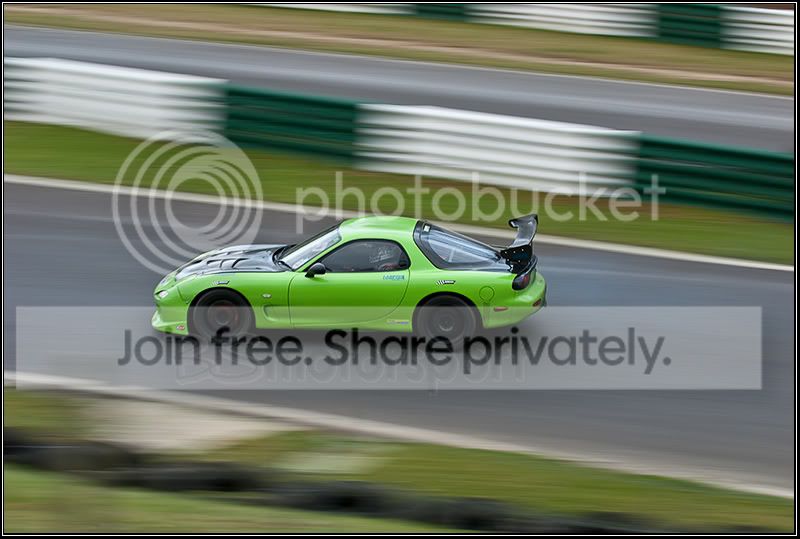
Id got it in to my head that active was used to disable two of the stabalisers but obviously got it the wrong way around. I recently went to a track day and kept it on this setting, I got down to 1/30th
2ND-CARD-239-of-303.jpg

The majority I took at this speed came out okay but some did have a ghosting effect, whether that was my fault or the VR im unsure, thus this post. Im going back there soon so I reckon its normal or off to try out then.
thanks :thumbs:
 
Nuffing wrong with that...next time there, watch the tarmac and avoid BUMPS - they will ruin your panning shots because the car/bike is suddenly moving in 2 planes, not just one. Thebump will blur your object.

Smooth tarmac and pick your angle so the swing is even - try the entry into a corner too, so you are not absolutely side on, but 3/4 front on and then pan. You will get a lot of misses, but then you will get some where there is a sharp zone and the rest of the car is swooshing as well as the background...go try it, you'll see what I mean!
 
Having spent a lot of time with Canon, I can tell you their IS (the "Canon VR") is cracking. It helped me no end with my shots. I used it 90% of the time.

Every single attempt at using VR turned on on my 70-200 VR has been crap. Doesn't matter what the hell I am shooting at. I've turned it off and leave it off! Results are infinitely better.

One thing that is really important to know if you fancy trying it, if you have enabled the AF ON button on the back of the camera (D300 et all) THIS DOES NOT ACTIVATE THE VR! You still have to half press the shutter release to turn it on.

Nikon, thats crap dudes! Sort it out!

Yet another Nikon hang over from their film cameras I suspect....
 
Not at all - the AF On button on the back is for exactly that...to get the focus up and working while you put the viewfinder to your eye...you don't need VR until you go to take the shot, so why does it need to be whirring beforehand?

I too had issues with the VR when I first got my lens - it was onoly because I wasn't using it as it it had been intended. use it properly and it sorts out camera shake from long holds at long exposures, and for pushing your luck with dragged shutters in action situations. As said above, it doesn't work within a small frame of shutter speeds - if you fell into that, then comisserations, because I did too, until the way the lens works was pointed out...then it clicked and everything is dandy again.

Nikon don't use stuff unecessarily - like VR when nothing is happening, that just drains battery power to no avail. Likewise, you don't need VR at safe shutter speeds - so it doesn't work at them, in fact it buggers things up, so simply turn it off and again, save battery power instead of wasting it.

Itis one of those personal things - you either work the way the Nikon systme does, or you don't, in which case you either mould to it, or you work with different gear that suits your modus operandii.
 
Not at all - the AF On button on the back is for exactly that...to get the focus up and working while you put the viewfinder to your eye...you don't need VR until you go to take the shot, so why does it need to be whirring beforehand?

Errrm if you are shooting action, you track your subject with the AF active then press the shutter release. That is how you shoot, I know no other way using AF. If you have VR/IS then you need it spun up and stabalising before you press the shutter release. Just mashing the button won't work. It takes at least a second or so to get up to speed...

doesn't work within a small frame of shutter speeds - if you fell into that, then comisserations, because I did too, until the way the lens works was pointed out...then it clicked and everything is dandy again.

Do tell me where I am going wrong!!! I am not one of those who will refuse the aid of modern technology just because "it takes away the skill", I'll use any and all tricks I paid for in my gear!
 
I thought it was active also, but read this extract

Curiously, Nikon's documentation only hints at, but never quite makes clear, how VR handles panning. Page 17 of the English section has one of the worst diagrams I've ever seen; it's a poor attempt to tell you when to use each VR mode. In this case, 100 words is worth any number of Nikon diagrams, so here they are: When you pan the camera in Normal VR mode, two of the four stabilizers are deactivated (for a horizontal pan the "left"/"right" pair are deactivated; for a vertical pan the "top"/"bottom" pair). When you rotate the lens the actual physical stabilizers that are deactivated change, though the intent stays the same. Thus, up/down motion is always taken out in a horizontal pan regardless of whether you've positioned the camera and lens for a vertical or horizontal shot. In short, if you pan in Normal VR mode, the lens tries to take motion out that isn't a pan.

Active VR takes away this automatic panning detection--all four stabilizers are always active. Thus, in Active VR mode, the lens assumes you want to remove all motion. Do you need to put the lens into Active VR mode to remove motion when you're not panning? Not really. Most photographers produce much more up/down motion (due to stabbing at the shutter release) than they do left/right motion. But if you have lots of strong vibrations you need to remove--as you might when shooting from a vehicle with its engine on--set the VR to Active to be sure that nothing is interpreted as a pan. [Okay, that was more than 100 words, but hopefully clearer than Nikon's diagram.]


According to Nikon's website, panning does not require either mode to be set, it will automatically compensate for it in either mode: :thinking:

VR
Vibration Reduction (VR)
This innovative VR system minimizes image blur caused by camera shake, and offers the equivalent of shooting at a shutter speed three stops (eight times) faster.* It allows handheld shooting at dusk, at night, and even in poorly lit interiors. The lens’ VR system also detects automatically when the photographer pans — no special mode is required.
* As determined by Nikon performance tests.


Ken Rockwell (and we all know how much everyone loves him!!) does say that "active" should be used when shooting from a car, and panning should be done in Normal.

TBH, I don't do much panning anyway so can't say I've tried either way...
 
I use normal for any horizontal panning where I am stationary (apart from body) and active if I am on a boat or in a car etc.

If shutter speed permits it is off.
 
I use normal for any horizontal panning where I am stationary (apart from body) and active if I am on a boat or in a car etc.

If shutter speed permits it is off.

On reflection, it seems that is the way you are supposed to use it :)
 
Nikon don't use stuff unecessarily - like VR when nothing is happening, that just drains battery power to no avail.
Ooh, don't get me started about the idiosyncracies of Nikon's VR design....

The AF 80-400mm VR has an amazing mode whereby the VR doesn't spin up until you fully press the shutter button. The usual method is of course for the VR to activate when you half-press the shutter button, but for some reason Nikon thought this extra mode would be useful.

I would love to know what practical use there is for it. I can't think of one. Anybody ......?
 
Stewart,

That can't work can it? Like I said further up, the mechanism needs time to achieve velocity to create the gyroscopic effect. It can't do that on shutter release can it?? Not without having some serious shutter lag to take advantage of, in which case the camera is no bloody good for action shots to start with because the lag will kill the images far more than a bit of camera shake!
 
Cheers for the debate everyone :thumbs: Ive got somewhere to try on friday so Im going to go with normal and also try a few with it off altogether. Will see how it pans out (get it :shake: )
 
Remember that nothing to do with VR is stored in the EXIF, so do something like shoot a frame or two of sky or grass to seperate your shots into groups you can easily spot...
 
Back
Top