THE PP GAME!

Oh dear.........I'm have problems again :rolleyes:

I've tried to download the dark raw file of Grahams image to ACR, but I just keep getting the message that 'file can not be opened' :shrug:

I've clicked 'download' 'open with PS E11' but then I get the message :thinking:

Any ideas please? :)
 
Last edited:
Phil - Just downloaded & opened fine in PE10 so mystery :thinking:
 
Just had another quick go and it doesn't matter what I try open it with........this is what I get :shrug:...........not to worry I'll just have a go at editing the image as a jpeg :)


screenshot
by Phil D 245, on Flickr
 
Oh dear.........I'm have problems again :rolleyes:

I've tried to download the dark raw file of Grahams image to ACR, but I just keep getting the message that 'file can not be opened' :shrug:

I've clicked 'download' 'open with PS E11' but then I get the message :thinking:

Any ideas please? :)


When did you last update your camera (RAW) profiles?

http://www.adobe.com/support/downloads/product.jsp?product=106&platform=Windows

http://www.adobe.com/support/downloads/product.jsp?product=40&platform=Windows

Rhodese.
 
Bravo Graham, another notch on you Wacom. Have a :jaffa: :clap:.

Three whole days “eh”, I think I might need them remembering the last car with reflections I edited, (Pookeyheads Corvette).
http://www.talkphotography.co.uk/threads/the-pp-game.347318/page-64

John, the wife says I have to tell you to “Spell-check”. :lol:
Your comments on going your own way, brings back memories of a mentor at a camera club I went to in the 60s, 70s and 80s. She would comment that until she recognised a style in a presentation that she could identify with an individual then the artist/photographer had not become notable.
I don’t know if it was “BS” or not. I do know it has always made me try to be different.

PS, With the exception of thirds. I do find that rule pleasing.

Rhodese.
 
Last edited:
What a smashing good car Graham, is it yours? Obviously the winner of the "Concours d'Elegance". The front suspension must be that trick stuff the Low-riders use to pimp their rides.
Well with 3 bracketed exposures I had to have a go at HDR so here's the result, it won't be to everybody's taste, well it's not to mine anyway.
This is well OTT.
Apart from adjusting the clarity in ACR and removing the vehicle behind it, all I did was run it through Photomatrix and played with the sliders.

Ladies and gentlemen, allow me to introduce The Car, HDR.......Too Far.......... (you have to say that last bit in a Jezza Clarkson voice :))

View attachment 2269


Rhodese, thanks, I've updated adobe but still i can't open any of the raw files for Grahams image :shrug:

Anyway, I've had a go with the jpeg and here is my effort

Very slight alter in View NX2 on the sliders
Crop some of the grass at bottom
Cloned out woman at rear, chap,other motor to left and aerial
and tried to hide the mud with cloning on more grass


pp golf 2_01_edited-1
by Phil D 245, on Flickr
 
No need for HDR :) As usual from me... kept all things to a minimum, and ensured quality is maintained.

LR5:
Lens profile
CA
Slight sharpen
+20 Highlight reduction on +2 RAW
+20 Shadow increase on -2 RAW
Exported both out as 16bit TIFFs

PS CC:
Loaded -2 TIFF
Loaded +2 TIFF
Copied -2 TIFF as layer over +2 TIFF
Aligned layers
Created layer mask on -2 TIFF
Added black to white gradient on layer mask
Cloned out bloke, woman, van and antenna (more rushed than it would have been if this was a real live job)
Flattened
Cropped the foreground a little
8bit convert
sRGB embed
Save as max quality JPEG.

10 mins.

Click for big
 
Last edited:
:banana: At last!...............I've managed to download a raw file of Grahams image

Please don't count this in the game as I've already submitted an entry, but just thought I'd repost a version that I'd edited from the raw file

Opened in ACR ;)

Temp 7850
Ex -1.10
Shadows +85
Whites -18
Blacks +65
Clarity +42
Vib +36
and a little sharpen
Tighter crop to bottom to try give the effect of the car being even lower (does that work :shrug:)

Then just the same cloning as before :)

Again, this is just for my benefit, not to be entered into the game, thanks :)


pp game golf raw con.
by Phil D 245, on Flickr
 
Normally I’m not one for colour popping but on the odd occasion, it does have a role and I think this is such an occasion.

Using the darkest file only.

Open in ACR see screen grab.

1592-1387038480-8f81d9b54f2a608c2abcb23fe15ef1ac.jpg


Open in PS.

Copy layer.
Select the car with quick select and the polygonal lasso. Contract by 1 pixel, feather by 1 pixel.
Copy and paste into new layer. Name it “CAR” switch it off.
SAVE.
On the copy layer, select the sky only with the rectangular marquee tool pulling it all the way across the image.
Copy and paste into new layer, call it “SKY”. With transform scale selected, stretch it half way down the picture.
On the copy layer, clone the ladies foot out.
Merge the copy layer and the “SKY” layer. Convert to mono.
SAVE
New layer, call it” GRADS”.
Pull a 60% grey grad from the top to half way down.
Pull another grad from the bottom up to the tyres.
Adjust opacity to liking.
Flatten all but the “CAR” layer.
SAVE.
Switch the “CAR” layer on.
On the “CAR” layer, select all, and with transform distort selected, stretch the R/H side (the rear of the car) to the edge of the image.
Open a new layer above the “CAR” layer name it “D and B”.
Fill with 50% grey, and set the blend mode to soft light, with the fore and background colours set to black and white respectively and with a soft round brush at low values, burn in with black and dodge with white.
SAVE.
Flatten.
Select all, add a border using stroke.
SAVE.
Save for web.


Click for enlargment, again to zoom.

Rhodese.

PS. I would have made a better job of the grass and the colour in the windows, but “SHE WHO IS MOST WISE” thought it better I left it and helped with the Christmas decorations.

Rhodese.

 
Last edited:
Mornign all, nice easy one to judge this time.....

Not my car, saw it at a show - think it's a VW Beetle chassis, under the Mk I Golf shell. Important parts to bring out in the edit for me were the clouds - was a good day for clouds, same show as the Challenger came from. And the detail in the front wheel arch. I didn;t think that one shot would cover it - so I bracketed.

Jim, I do like HDR, but as you rightly say, that is OTT. That's not to say I don;t like it, it's just a bit tooo much. But good cloning of the required bits round the bonnet, like teh clouds and can see the detail in the arch. :thumbs:

Phil - from an 800 pix jpeg, this is a great edit, obviously you don't have any sky here - but its a great clean up, even at small size you worked with. What was the solution to opening the files in the end??

David, Liking this a lot, good cloning of the intruders round the bonnet, detail under the arch - I'd like a heavier - darker feel to the sky (but you've declared my skies as too dark and heavy for you so we'll put that down to personal tastes!), and I'm most impressed this is a simple gradiented(?) blend of two files.

Phil - This is, IMO a more than worthy entrant, and would have had me agonising over whether to place it above David's or not - the cloning is really good in all areas. the sky is how I would like. However, I shall respect your wish to not have it entered.

Rhodese. I really think the colour pop could work here, there's not much colour in the sky, and the grass is all mud, so a great idea. The stretching of the car does exaggerate its lowness, but the stretching down of the sky doesn't work for me.

Buuut, Taking the win this round, is David's, it's a great final image, with a seemingly minimum of effort. Top work. :thumbs:


Here's mine - done a while back, but was a blend of all exposures, and then a fair bit of cloning...
7imk.jpg
 
Last edited:
Good un David
animated-smileys-jumping-011.gif
 
I think my ASBO looks cool :lol:
 
Phil - from an 800 pix jpeg, this is a great edit, obviously you don't have any sky here - but its a great clean up, even at small size you worked with. What was the solution to opening the files in the end??

Phil - This is, IMO a more than worthy entrant, and would have had me agonising over whether to place it above David's or not - the cloning is really good in all areas. the sky is how I would like. However, I shall respect your wish to not have it entered.

Firstly, Well done David :thumbs:

Graham, thanks for the above, I only thought it fair, after already doing an edit, that the second shouldn't be included :)

I still have no idea why your first three links to the raw files wouldn't open, I'm not very technically minded when it comes to computers, but I can normally bumble my way through things. I tried a number of times, just in case I was missing something, but got the same message every time :shrug:

I even updated Adobe from the links provided by Rhodese, thanks btw, but still got same message :bang:

In the end, to open your second links, I had to download Speedyshare Download Manager, download the link to my laptop, then download again with the Tiny download manager that came with the Speedyshare download, then I had the option to open with ACR :thinking:.............:lol:..........at least I got there in the end :D
 
Last edited:
Phil next time one of us can email the file to see if that works but other than that :thinking:
 
Phil next time one of us can email the file to see if that works but other than that :thinking:

Not until you get that tag off your leg! :nono:...............guilty be association springs to mind :whistling:


:D John, I'll be willing to give it a go, cheers :thumbs:
 
Phil, the second link set were all converted to .dng format, rather than their original .NEF

You can get a free adobe dng converter from t'interweb, and that should allow you to convert most files to a format that you can open in ACR. Tis a wierd one.

And John, I were wondering why you had an ASBO on your avatar... not noticed anyone else with one?
 
And John, I were wondering why you had an ASBO on your avatar... not noticed anyone else with one?

It's a joke as I was having a bit of fun with the Admin, on another thread, & I understand I am the first to get one :D
 
Thanks all :) Sorry I never got back last night... had a rough day... just went to bed :)

Ok... let me dig one out.

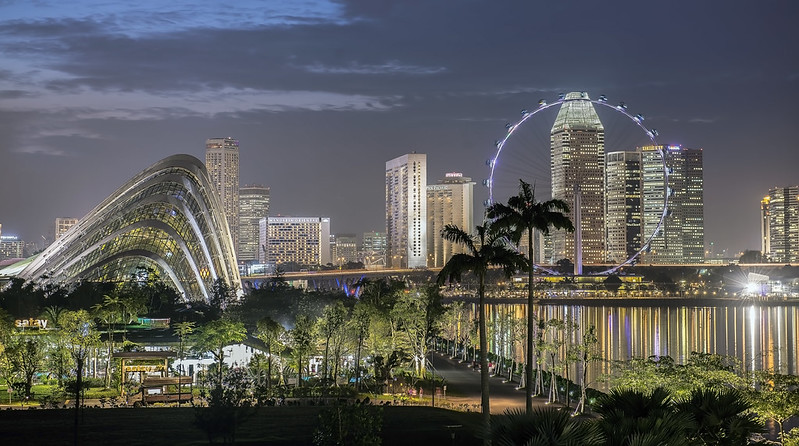
Ok... a random, closed eye stab with the mouse cursor turned up this..... I tend to go with whatever the random finger of fate decides :) I've never edited this myself.... just a random RAW.. so I've no benchmark to judge by. Probaby the best way actually.... Should be interesting. I'm fully expecting a Godzilla from farmerjim though :)

7Pq4fxS.jpg


14bit Raw file here.... https://dl.dropboxusercontent.com/u/23953768/_DSC2914.NEF


I'll call it Friday evening.
 
Last edited:
David, I like that :thumbs: Where was it taken?
 
David, I like that :thumbs: Where was it taken?

:plus1:

Just had a very quick edit but all I'm ending up doing is making it worse than the original :thinking:
 
Thanks for the f/b and critique Graham and well done David :clap:

I'm fully expecting a Godzilla from farmerjim though :)
Don't start giving me ideas David :) He-he-he, there could be mayhem afoot:runaway:
 
David, I like that :thumbs: Where was it taken?


Thanks

Singapore, taken from Marine Barrage looking back over Marina Bay Sands. :)

Thanks for the f/b and critique Graham and well done David :clap:


Don't start giving me ideas David :) He-he-he, there could be mayhem afoot:runaway:

You know you want to :)
 
Last edited:
Yes.......excellent image.......but what a head ache trying to figure out what to do with it :bonk: :D

So here's my attempt :-

Temp 4450
Expos. -1.90
H/lights -62
Shad. +73
Whites -76
Blacks +87
Clarity +63
Vib. +12
Sat. +13

A little sharpening and noise reduction. Cloned out the people at the bottom, although it probably didn't need it :shrug:

Composition, to me, was already spot on, but I tried a few different crops anyway, none of them did the image justice so left it as it was.

I would have to like to think it was possible to clone out the two tall palm tress :cuckoo:.....but it wasn't for me anyway :lol:

David, hope you don't mind, I've left it public on flickr but marked it as 'not my picture' so it can be viewed at larger sizes


PP game raw con. Not my picture
by Phil D 245, on Flickr
 
David, hope you don't mind, I've left it public on flickr but marked it as 'not my picture' so it can be viewed at larger sizes


Nope.... no problem Phil. Not an image I ever plan to do anything with. Just a holiday snap more than anything. plus, my name is still in the EXIF as the author.
 
Last edited:
Nope.... no problem Phil. Not an image I ever plan to do anything with. Just a holiday snap more than anything. plus, my name is still in the EXIF as the author.

Just thought I'd mention it. I normally set images that aren't mine to private. I wasn't sure if there's any sort of 'etiquette' when it comes to posting other peoples images :)
 
Cool shot David, why is it so hard to edit though??

In Lightzone
Darkened the image to bring out the "night-ness" of it with the Zonemapper
Relight to adjust shadows and highlights, and add a touch of detail
Small amount of local contrast, small radius
Increased saturation

In PS
Selected the purply colour behind the MANDARIN ORIENTAL sign
desaturated and then with layer mask painted out the CA
cloned out the ghost in the foreground
crop

Then struggled with the building on the left being sharper than the wheel and tower to the right, to me the wheel is the focal point, so
created a B&W layer, blurred it slightly
then revealed the colour layer with a mask only around the wheel
Gaussian blur on the mask to soften the transition

Which gave this!
 
Last edited:
Nope.... no problem Phil. Not an image I ever plan to do anything with. Just a holiday snap more than anything. plus, my name is still in the EXIF as the author.


I suppose if you make it clear it's not your image, then I doubt anyone in here minds. I certainly don't. I would never use commercial work or my own personal project work in this thread.


Cool shot David,

Thanks

why is it so hard to edit though??

LOL.. no idea :)
 
This is a lovely image David.... and I'm struggling to edit it.... just so much colour everywhere.....
I've tried light painting it from a tutorial, I've tried B&W, tried mono, tried any number of edits...nothing worked for me....
I really struggled to lift the shadows, and make a good edit as well.....so, I thought b****r it, I just as well process it differently...
Done in Lightroom 4....and I've chopped and changed my mind a lot, so may not know everything I did lol.
I've cropped it..... and then the colour version I lifted the shadows, decreased highlights, and adjusted contrast.
Then in the tone curve, I altered the graph to swap blacks for whites...
I've de-saturated it, decreased highlights, whites, blacks, and increased temp, tint, contrast exposure and shadows...
In the tone curve sliders I've increased highlights and darks, and decreased shadows and lights.
It's been sharpened slightly and noise reduction applied.
Using the adjustment brush I adjusted contrast, and exposure and highlights.
Whilst I'm happy enough with the idea, I'm not happy with the edit itself, as the light flare/light glowy stuff makes it look like haloing.... and I couldn't recover the blacks either(or what where the bright whites).
Can be clicked for bigger...

11434353536_f8ceb83adf_h.jpg
 
LR5
Lens Correction, Temp 4150, Tint 7, Exposure 0.65, Contrast 25, Highlights -100, Shadows 86, whites -100, Blacks -26, Clarity 95, Vibrance 5, Saturation 3, Luminance Orange -100 & Yellow 22, Sharpened, Noise Reduction

PE10
High pass sharpen, save for web

Picasa
16/10 Crop

20 minutes

 
No Godzillas I promise!
Started with Adobe DNG converter 'cos my ACR wouldn't/couldn't handle it then adjusted highlights and clarity with ACR..............

View attachment 2555

Then in PS gave a little more mid-tone contrast and tweeked the highlights/shadows. Added the moon and decided to get rid of the big black palm trees but then realised that it was more difficult then I'd envisaged so used section of the big wheel from the opposite side and inverted it. Just hope no-one gets close enough to check the spokes on the wheel:)
Filled in the blown out section bottom left and that was about it, give or take a bit of meddling.
View attachment 2558
 
Hard one - But I wanted to have a go in LR.
The light pollution is, to my eye, the biggest problem with editing this image so Ive gone for processing it as a more panoramic nighttime scene and removes as much light pollution as I can.

 
Well dun David, :clap:.

Open in ACR, AUTO + LC, + 35 sharpen.
Open in PS, Crop 16 x 9 loosing sky.
Copy layer.
New layer, drop grey grad from top to water line. Add a mask to the layer and hide the grad below the skyline.
SAVE.
Make a rough selection of the water and waters edge, feather by 100 pixels and apply a levels adjustment layer. Adjust levels.
Make a rough selection of the buildings, the arch like structure and the upper road, feather by 150 pixels and apply a levels adjustment layer. Adjust levels.
Select/feather and lighten the grass in the foreground,
SAVE.
On copy layer clone over the burnt out area in the foreground.
Flatten and apply a slight sharpen, selectively sharpen the hotel names.
Add a border with stroke.
SAVE.
Save for web.
Datsit.


CLICK 4 BIG AND BIGGER.

I ‘m not really happy with it :'( as it has banding in the sky.
Is there a way round this?

Rhodese.
 
Jim that looks like a Christmas box boster to me. Av a :beer:or two.

Rhodese.

PS "Boster" or "Bostin" is a black country word for Excellent, a bit like a "Gudun."
 
Jim that looks like a Christmas box boster to me. Av a :beer:or two.

Rhodese.

PS "Boster" or "Bostin" is a black country word for Excellent, a bit like a "Gudun."

Cheers Rhodese, thanks for that. Never heard that word before. So if I say "Have a bostin Christmas", is that correct? Anyway it's our annual Xmas pub dinner tonight so I'll definitely have a :beer:or two of Poacher's Pocket.
 
Cheers Jim, yep that's abaart right.

While we are on the subject of Christmas, I’ll take the opportunity to wish you all a Merry Christmas and a New Year full of the perfect photo moments.

From Gods little secret, The Black Country.


Rhodese.
 
Last edited:
It seems I've just had a bostin coop av tay as well! Seasons greetings :) :banana:
 
Back
Top