Thank you Phil, David, Graham, Lee and Rhodese for putting your time into what was a deliberately awkward task. It has been fascinating and instructive to have a close look at your reworks and consider the techniques you used. Thanks again.
In order to compare all our versions I have resized them all to 1100 pixels high. This is a bit unfair on Lee, as it means his image had to be upsized, while the others were downsized. The fairer alternative would have been to have downsized all of the images to the 688 pixel height of Lee's version. I did do this but didn't feel the images were large enough to get a decent look at issues of detail retention and noise. So, my apologies Lee, but I used the larger versions to make the comparisons.
There is, inevitably I suppose, a lot of personal taste/opinion/prejudice in what follows; I dearly hope I don't offend anyone – perceptions and preferences/tastes do vary widely of course, and legitimately so.
PHIL
Download and save raw image then convert with Adobe DNG converter
Open in ACR
Temp 4900, Exp +2.75, Contrast -13, Shad. +26, blacks +58,
clarity +73, Vib. +22
Sharpen 85
Noise Reduction:-
Lum 77, Lum detail 76
Colour 88, Col. detail 49
Crop then clone out the plantation
I had a look on youtube at selective sharpening. I would have liked to try make the head and front legs stand out more..........but then again.......I don't think I'm ready for that just yet

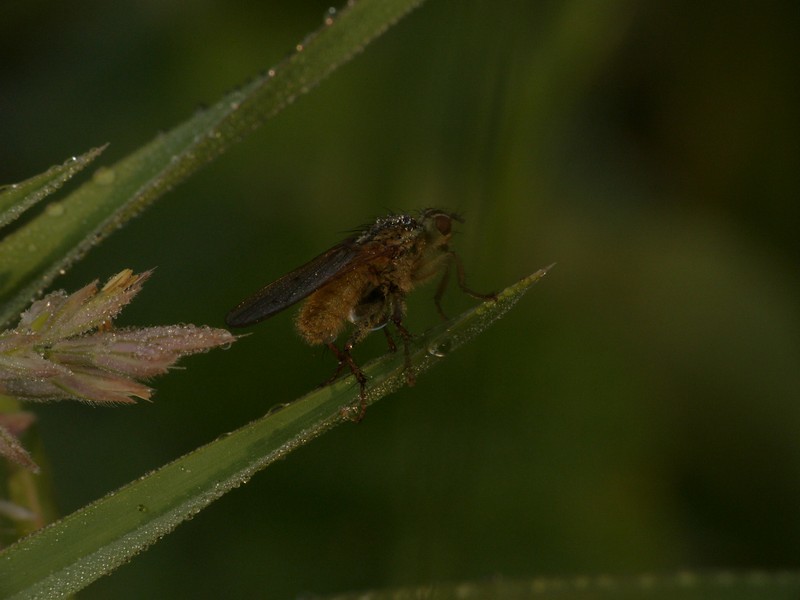
You took an aventurous approach, in the sense that you used a fairly aggressive crop from what was a low quality (small sensor and underexposed) original. This has the advantage (from my perspective) of giving a composition I like; very simple, and with the subject offset from the centre so as to be looking into the picture rather than out of it. Detail retention seems better than I would have expected. The colours of the subject are possibly a tad undersaturated – I'm looking at the legs (front and rear) and the head. I am quite keen on mild colours, but even so I think perhaps these are just a little too mild. I wonder whether, if they had a bit more “substance”, the subject might stand out a bit more from the background. The colours are also perhaps a touch on the cold (blue) side. The noise in the background is nicely fine-grained, but perhaps just slightly more obtrusive in some areas (for example at the top right) than I feel comfortable with. It is marginal in daylight, but more evident in the subdued light that I use for my processing and image evaluation. (I am using a quite good, hardware calibrated monitor btw.)
I tried your numbers in Lightoom and I think that shed some light on what I was seeing.
I think the
Contrast -13, Shad. +26, blacks +58 all worked in the same direction, reducing colour intensity and micro-contrast (especially the
blacks +58), the reduced micro-contrast reducing the perceived level of detail in the image.
The
clarity +73 is a huge amount (by my standards; I generally use 10, or at most 15), and has a discernable negative impact on the noise. It has also significantly increased the blacknesses in the subject, which may be why you used
Contrast -13, Shad. +26, blacks +58 to reverse that effect. FWIW I try to get the light in the image to “sing” using Highlights, Shadows, Whites and Blacks (often all four of them, sometimes possibly counter-intuitively, for example taking Whites and Highlights in opposite directions, and/or taking Blacks and Shadows in opposite directions), and then use a light touch on Clarity to add just a little edge to the micro-contrast.
I'm puzzled by the noise reduction. When I use your settings of
Lum 77, Lum detail 76 (with your crop and
Sharpen 85) the noise is killed pretty much totally, along with a lot of detail. To my eye it doesn't look like the version you posted. With Luminance
Detail 76, I have to dial back
Luminance to around 25 to get roughly the combination of detail and noise I see in the posted version.
Colour 88, Col. detail 49 puzzles me as well. I think the default
Color 25, Detail 50, Smoothness 50 is sufficient. I don't think increasing it does much if any harm in this case, but FWIW I pretty much always leave this at the default values for my images.
DAVID
LR5.3:
- Crop
- apply lens profile and remove CA
- sharpen and NR
- Export into PS with "Edit in PS"
PS CC:
- Convert to smart object/smart filter
- edit in ACR using radial filter to darken background and add additional NR to darkened areas.
- edit in ACR to reduce green saturation and luminance, and increased yellow sat a little
- save as 8bit JPEG with sRGB embedded
With the images resized, I found to my surprise that your crop was just as aggressive as Phil's, in the sense that the subject is the same size (indeed, fractionally larger I think) when both versions are viewed at the same pixel height (the difference in aspect ratio had confused my eye). The noise seems more subdued than in Phil's version, partly by being hidden in darkened areas of the background, and partly perhaps from stronger noise reduction. The noise is within my comfort threshold (of course this varies hugely from person to person). The radial filter used to darken the background is a bit strong for my taste; a bit too obviously there perhaps. Your rendition has more “solid” colours than Phil's, and warmer colours, both of which appeal to my eye. The light is very nicely handled and does better justice to the strange illumination on the subject (very low in the sky early morning sun I believe). I'm not so keen on the crop, with the subject pointing out of the frame, but I can see the logic of it, here and in Graham's and Lee's versions, and the more I look at it the more comfortable I get with it. (More on the composition issue when I discuss my version.)
Presumably you upped the Exposure?
I'm puzzled by
apply lens profile and remove CA. I have not noticed any lens profiles in Lightroom for any Panasonic equipment. And aren't lens profiles specific to particular interchangeable lenses? The FZ200 has a fixed lens. I'd like to know which lens profile you used so I can try it and see what the effect is.
I didn't spot any CA in the image. Could you help me please and point me at it?
GRAHAM
Lightzone
Zonemapper to pull black and white points out
slight detail increase
increase sat on yellows on insect only
noise reduction on all but insect
noise reduction on all but insect
(yep - did it twice)
PS
despeckle
noise reduction on all but insect
(yep - really)
Picasa
vignette
Your composition is a bit more centred than David's, and I very much like the way the colour and light work on the fly's abdomen. The contrast over the rest of the subject seems too strong for my taste, with a fair amount of black where I would normally expect colours, albeit quite possibly dark colours. In the lighter, right hand areas of the background the noise has been pretty much eliminated. I don't see any noise speckle to the left of the image either, but the background there has a slightly blotchy appearance that I'm not quite comfortable with. The image detail seems less sharp than in David's version, for example the dew drops on the grass head on the centre left, but also I think on the main subject when compared to Phil and David's versions. However, this is not a simple “like for like” comparison as I'm not sure how much of the detail loss is simply because the subject is smaller in your version.
LEE
Mine done in Lightroom 4...
Cropped, adjusted contrast, exposure, highlights, and decreased saturation...
Used adjustment brush and increased contrast and clarity.
Sharpened slightly, and applied some noise reduction
Flipped image.
Yours is another high contrast version Lee, with some distinctly dark areas on the subject as with Graham's rendition, but yours doesn't have the blackness that Graham's has in some places. The grass head is the lightest in any of the versions, and its colouring is quite mild and low contrast, compared for example to the much stronger colour and contrast of the fly. The contrast between the darker, richer-coloured subject and the lighter, milder grass head is sufficient to give the image a slightly unbalance feel to my eye, tending to pull my eye away from the fly towards the grass head which seems, to my eye, to compete with the fly rather than complementing it. The level of detail looks good, for example on the grass head as well as the subject (and that despite the image having been upsized). Similarly to Phil's version, the noise is fine-enough grained for me not to find it too distracting in daylight, but it stands out more in my subdued light working conditions.
RHODESE
Opened in PhotoDirector4, see screen grabs.
Exported and opened in ACR, see screen grab.
Open in PS, crop 2x3 putting the fly on bottom left third.
Copy layer.
Fill in the spaces on the top and R/H side that were left after cropping by, copying and pasting selections into new layers and then in free transform, stretch over the spaces.
Remove the light grass by, select/ fill /content aware.
Burn in on the front of the fly.
Flatten.
New layer.
Create the border using stroke, white, 20 pixels, drop opacity to 10%, then in fx, bevel and emboss and add an outer glow.
Flatten.
SAVE. Save for web.
Very interesting placement of the subject; it works well for me. The means of getting that placement is interesting, with fill to the top and the right. However, the fill to the top jars a bit for me. The “bend” in lower boundary of the dew-covered blade above the fly was the first thing that struck me as odd-looking, and then I saw the horizontal line, ending on the right with a discontinuity of the vertical lighter green broad line to the left of the dark area, as it starts bending over to the right. And when I looked a bit closer I saw that the texture above and a bit below the horizontal line was different from the texture in the rest of the image, a bit rougher; not objectionable, but different. Once I had noticed these things I found it difficult to get them out of my mind/sight and they were a bit disruptive of my enjoyment. That said, I think the compositional effect of opening up that space and placing the subject where it is, given its orientation, is excellent.
The noise in the image is nicely subdued, whilst the micro-contrast/level of visible detail is good; a difficult combination to achieve. The colours are a bit orangy for my taste on the abdomen and on and around the lower sections of the fly's two feet that are nearest to us. The droplets up towards the tip of the blade look well defined and glow nicely. The subject and the blade it is on have good clarity and stand out well against the simple background with its unobtrusive colour, texture and lack of distracting detail. The more I look at it, the more I like the way the light has been rendered.
How did you do the noise reduction? I don't see mention of that in your text and I didn't spot anything about it in the screen grabs. Was it global or selective?
THE WINNER
My winner? Rhodese, for a (to my eye) well envisioned, simple and pleasing composition, a treatment of light that gives the subject and its immediate surroundings (the blade it is on, and the drops) a “presence” that I find appealing, and a good combination of detail and noise control. As long as I disregard the extension of the top of the image it is a picture that I can stare at and contemplate with great pleasure.
My runner up is David, for producing a rendition with what looks to me to be nicely balanced colour, detail, distribution of light and noise control.
Rhodese, over to you.
Well done everyone. And thanks again for the opportunity to dig a bit deeper into these things than it is usually polite to do, and I do hope I haven't overstepped the mark on that score.
My version
Folowing my wife's harsh comments on my attempts, I did another one. I did it prior to anyone else posting so as to avoid being influenced by or stealing ideas from your versions. My thinking at that stage was that because the original was of such poor quality it would be unwise to crop the image much (this is after all an image from a small sensor camera, and grossly underexposed). However, this left the subject a bit too central for my liking. It would not have taken much of a crop on the left to decentre the subject enough for my taste, but I couldn't find a crop that left an edge that I was comfortable with. I found one further in, but that would have been too much of a crop for comfort. I therefore decided to stretch the image on the right instead. Having now seen Rhodese's version, this one of mine still seems rather too central to me.
This approach, with or without the stretching, leaves the subject relatively small in the image compared to cropped versions. I am comfortable with this, as I tend to go for “subject in its environment” shots as well as “here is a good, detailed look at a subject” shots, but experience has shown me that “environmental/contextual” shots are not very popular. For most people doing and commenting on this sort of stuff, the subject pretty much filling the frame is as far out as they want to go, and very often they go in much closer and look at parts of the subject (heads, or even just eyes), and these are the shots that get the strongest reactions. For this reason I tend to refer to my stuff as “close-ups” rather than “macros”, the term most people use. Some of my “close-ups”, or example showing the whole of a (rather small) fruit fly or springtail, are in fact higher magnification than some people's “macros” of part of a subject. But in my mind at least the term “close-up” indicates a different feel for the balance between subjects and enviroments.
(Click on image for larger version, then right click and select
Original)
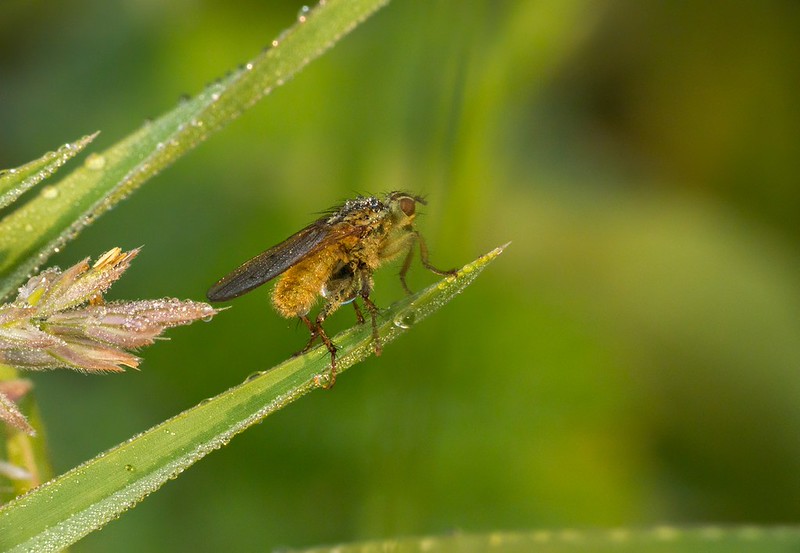
Nick P1070974-Take2 - Edit-3-Edit PS1 WaPSS3.43 by
gardenersassistant, on Flickr
In Lightroom
White balance, Temp 5500 (daylight temp), Tint +15.
Exposure: +2.60, Contrast: +5, Highlights: -100, Whites: +35
Clarity: +10, Vibrance: +5
Noise Reduction (default)
Luminance: 0
Colour: 25, Detail: 50, Smoothness: 50
Radial filter
On light grass head left edge: Exposure -0.09, Highlights -100
On fly's head: Exposure +0.10
Pass across to Photoshop CS2 as 16-bit TIFF in ProPhoto colour space
In Lightroom
Apply Luminance Noise Reduction: Luminance 79, Detail 0, Contrast 0
Pass across to Photoshop CS2 as 16-bit TIFF in ProPhoto colour space.
Copy non- noise reduced version as upper layer on top of noise reduced version.
Use eraser with 84% opacity to reveal noise reduced layer on plain parts of background.
User eraser with lower opacities to somewhat reveal noise reduced layer on some mid-ground areas with particularly prominent noise.
But, apply no noise reduction to the subject.
Flatten image.
Increase canvas size on the right.
Stretch right hand third or so of image over to the right, so fly (or at least, its “centre of gravity”) is offset to the left of centre of the image. (To combat what I assume is a bug in CS2, this has to be done by duplicating the (now) single layer of the image, doing the canvas resize and image stretch, and then, on the top layer, running the eraser (with a soft brush, 100% opacity) down the join between the stretched area on the right and the untouched area on the left. This gets rid of the very narrow line along the join that is visible at some magnifications.)
Apply standard finishing:
Very mild defog. Unsharp Mask: Amount 7%, Radius 30 pixels, Threshold 0.
Mild curves. Three points down at 25% across, one point up at 75% across.
Resize to 1100 pixels high.
Smart Sharpen: Radius 0.3 pixels, in this case with Amount 63%.
Convert to RGB profile.
Convert to 8-bit.
Save as JPEG Compression 10
My comparison version
I was fascinated by how the image had held up with cropping, so I decided to re-do my version with the same crop as David's, so I could do a more direct comparison of detail retention and noise between my version and everyone else's.
Apart from doing the crop in Lightroom, the processing was I believe the same as the above up to copying the second, noise-reduced version across to CS2. The rest of the process was the same as above, with the following exceptions.
I think I used 100% opacity with the eraser on the background. I did some low (20% or so) opacity erasing on the fly.
I didn't do the stretch.
I used Amount 100% rather than 63% for the Smart Sharpening. This is normal for me in the sense that (I know this doesn't sound like it makes sense) I tend to use higher Amounts the larger the subject is in the frame. It's not a formulaic thing, I do it by eye each time, but that is the way it tends to work out.
Anyway, here is what I got.
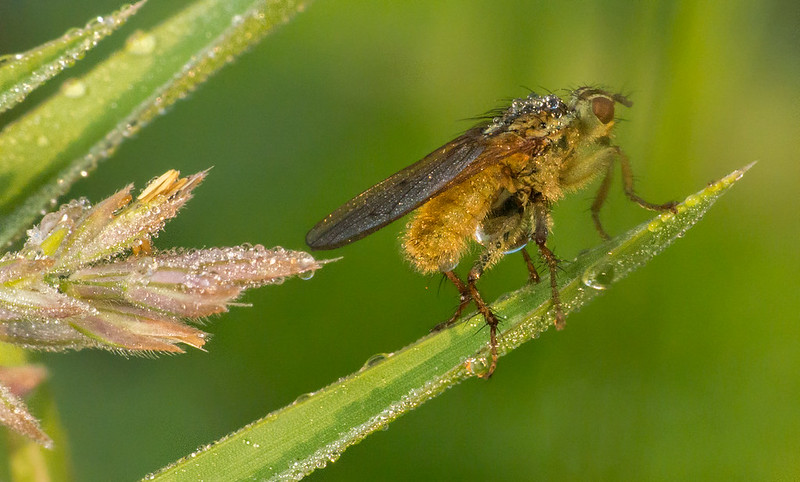
Nick - with Pookeyhead crop - P1070974-Edit-3-Edit PS1 PSS3 by
gardenersassistant, on Flickr











 Oh well, I've got a couple of days to try again.