Rhodese
Suspended / Banned
- Messages
- 1,154
- Edit My Images
- Yes
Congratulations Graham.
The challenge you have set is a type of image that most of us have had a go at over the years. That wind swept lone tree, the tree on the island in the river/lake. The snow-laden tree with its branches touching the ground. I’ve taken them but never really scored with one, one in particular comes to mind every time I see an image like the subject. I had taken a shot of a tree outside of the French town of Orange, the winds were so bad that the tree had had a harness attached to help hold it firm.
It turned out to be a half-decent image, so I printed it for a club competition, I spent hours in the darkroom spotting and such to hide the cable only for the judge to say “I know that tree, it’s at Orange, it would be better if the ropes were shown.” and marked me down. What did he know!
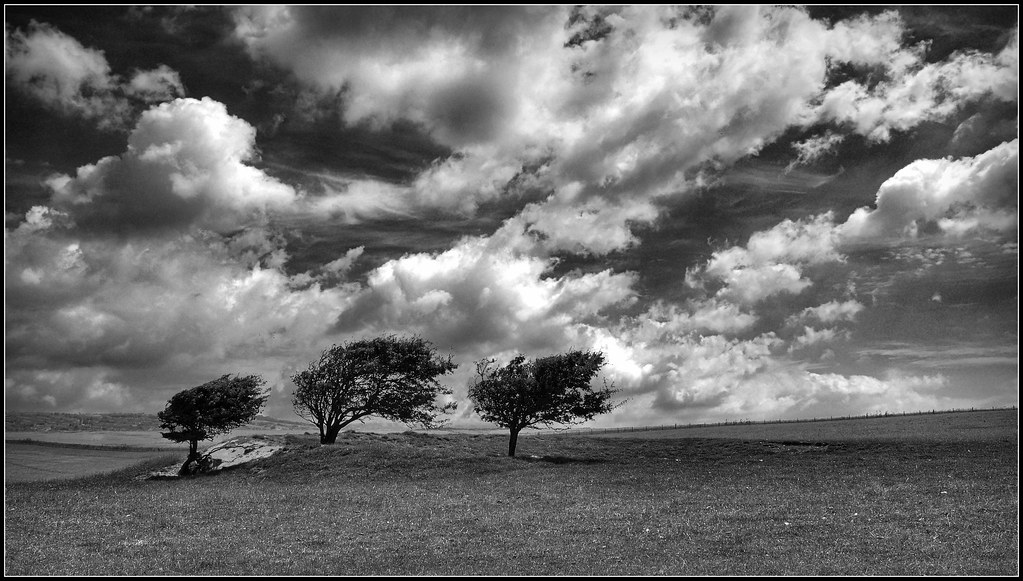
My edit.
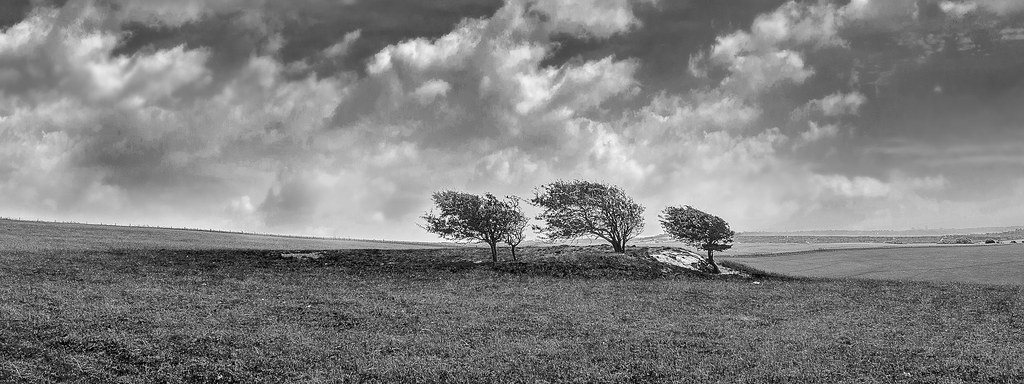
I thought the picture is all about the trees and not so much the sky, I saw it with less sky and the trees playing a stronger roll but I didn’t want to loose the regression to the skyline or the foreground. The width was needed for the trees to have space. I thought a crop would loose all that.
I further thought how like a watercolour it was that lovely pale blue, and pastel shades of green.
So,
Open in ACR, no edits, open in PS.
Copy layer.
Make a selection starting at the left hand side, going along the darker grass line sweeping above the trees and back down to the grass line and off to the right-hand side then back across to the left side keeping in front of the darker grass mound.
Feather by 60 pixels, edit-copy-paste, this puts the selection into a new layer. Name this layer trees.
SAVE.
Transform using transform scale, increasing the size of the trees selection, OK.
Using the move tool, move the selection down until the upper grass line lines up with the layer underneath.
On the copy layer, clone the trees out above the skyline, using sky samples.
On the trees layer create a mask, hide any mismatches, and reveal the copy layer background, I needed to do a bit of creative cloning to make the townscape match.
SAVE.
On the copy layer, make a selection of the sky utilizing the rectangular marquee tool. Pull it out across the full width and down to bellow the dense cloud that points down, feather by 60 pixels, edit-copy-past.
Name the new layer sky.
Using the move tool, move the selection down, covering the dominant cloud on the left.
Select transform, distort, and pull the edges so that the cloud takes on symmetry with the direction of the trees. OK.
On the sky layer, create a mask and blend the edges of the selection in.
When everything looks OK, flatten the image.
SAVE.
Now crop but only to lose the unwanted sky above what had been the sky layer.
Applied auto levels.
Increase the saturation on the green and blue.
Got rid of the barbed wire.
Dodge and burn a bit.
Applied a warm filter at 25%.
Select all create border using stroke.
SAVE
Save for web.
Criticism welcome.

Rhodese.
The challenge you have set is a type of image that most of us have had a go at over the years. That wind swept lone tree, the tree on the island in the river/lake. The snow-laden tree with its branches touching the ground. I’ve taken them but never really scored with one, one in particular comes to mind every time I see an image like the subject. I had taken a shot of a tree outside of the French town of Orange, the winds were so bad that the tree had had a harness attached to help hold it firm.
It turned out to be a half-decent image, so I printed it for a club competition, I spent hours in the darkroom spotting and such to hide the cable only for the judge to say “I know that tree, it’s at Orange, it would be better if the ropes were shown.” and marked me down. What did he know!
My edit.
I thought the picture is all about the trees and not so much the sky, I saw it with less sky and the trees playing a stronger roll but I didn’t want to loose the regression to the skyline or the foreground. The width was needed for the trees to have space. I thought a crop would loose all that.
I further thought how like a watercolour it was that lovely pale blue, and pastel shades of green.
So,
Open in ACR, no edits, open in PS.
Copy layer.
Make a selection starting at the left hand side, going along the darker grass line sweeping above the trees and back down to the grass line and off to the right-hand side then back across to the left side keeping in front of the darker grass mound.
Feather by 60 pixels, edit-copy-paste, this puts the selection into a new layer. Name this layer trees.
SAVE.
Transform using transform scale, increasing the size of the trees selection, OK.
Using the move tool, move the selection down until the upper grass line lines up with the layer underneath.
On the copy layer, clone the trees out above the skyline, using sky samples.
On the trees layer create a mask, hide any mismatches, and reveal the copy layer background, I needed to do a bit of creative cloning to make the townscape match.
SAVE.
On the copy layer, make a selection of the sky utilizing the rectangular marquee tool. Pull it out across the full width and down to bellow the dense cloud that points down, feather by 60 pixels, edit-copy-past.
Name the new layer sky.
Using the move tool, move the selection down, covering the dominant cloud on the left.
Select transform, distort, and pull the edges so that the cloud takes on symmetry with the direction of the trees. OK.
On the sky layer, create a mask and blend the edges of the selection in.
When everything looks OK, flatten the image.
SAVE.
Now crop but only to lose the unwanted sky above what had been the sky layer.
Applied auto levels.
Increase the saturation on the green and blue.
Got rid of the barbed wire.
Dodge and burn a bit.
Applied a warm filter at 25%.
Select all create border using stroke.
SAVE
Save for web.
Criticism welcome.
Rhodese.
Last edited:


 ) and all I have time for today even though it's not perfect.




 That's going some even for me