Flying giraffe
Suspended / Banned
- Messages
- 1,189
- Name
- Neil
- Edit My Images
- No
ive done this before, but i think this pic would suit it so im doing it again lol
basic sliders in raw
clone out board at the front
overlay pic onto a textured paper template, then reduce opacity to 30%
then over the top paste a folded paper template and reduce opacity again till it looked right
merged visible
pasted image onto another backround template and pasted
used rectangular marquee tool and selected each corner in turn going over the folded paper part by about 15mm, and then used spherize at -20% to pull the corners in
then added drop shadow
in hue/sat ticked colourize and reduced hue to 30% and sat to 10%
added noise
save and done
ppcar by flying giraffe, on Flickr
prob about 25 mins
feedback ok
just to add, if anyone wants to try this ill upload the templates for them
basic sliders in raw
clone out board at the front
overlay pic onto a textured paper template, then reduce opacity to 30%
then over the top paste a folded paper template and reduce opacity again till it looked right
merged visible
pasted image onto another backround template and pasted
used rectangular marquee tool and selected each corner in turn going over the folded paper part by about 15mm, and then used spherize at -20% to pull the corners in
then added drop shadow
in hue/sat ticked colourize and reduced hue to 30% and sat to 10%
added noise
save and done
ppcar by flying giraffe, on Flickr
prob about 25 mins
feedback ok
just to add, if anyone wants to try this ill upload the templates for them
Last edited:


 Oh, and removed the person in the garage behind and re-constructed the letters "L MOTOR"
  And darkened the top right corner too. :nuts: And a high pass sharpen.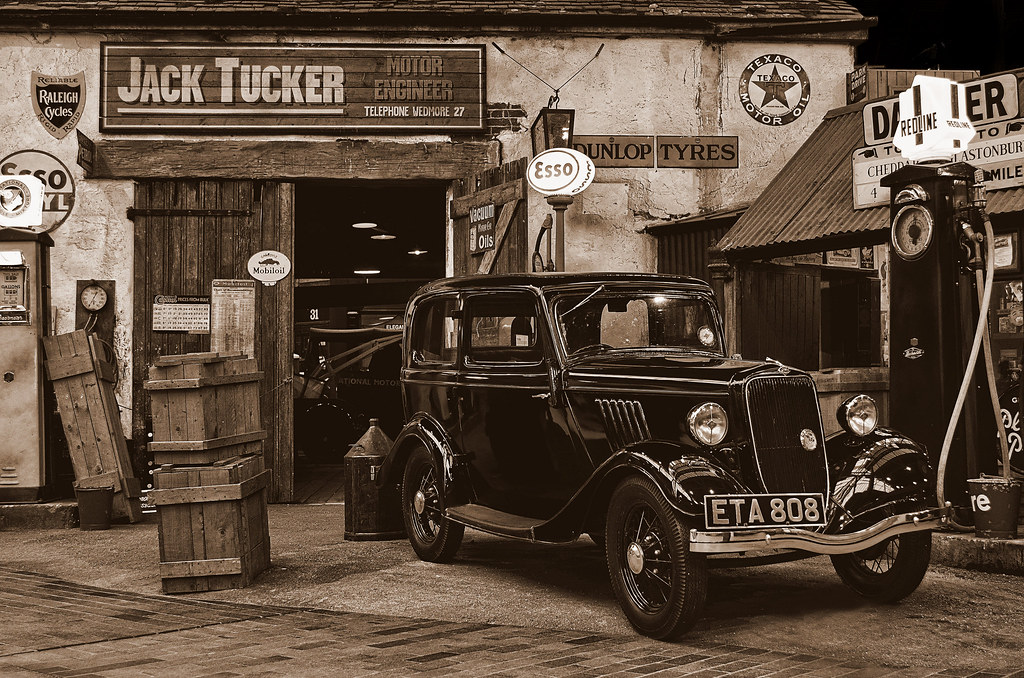





 Also have a Desktop but not able to sit at it for long. And PP software not on these other machines.