THE PP GAME!

ive done this before, but i think this pic would suit it so im doing it again lol
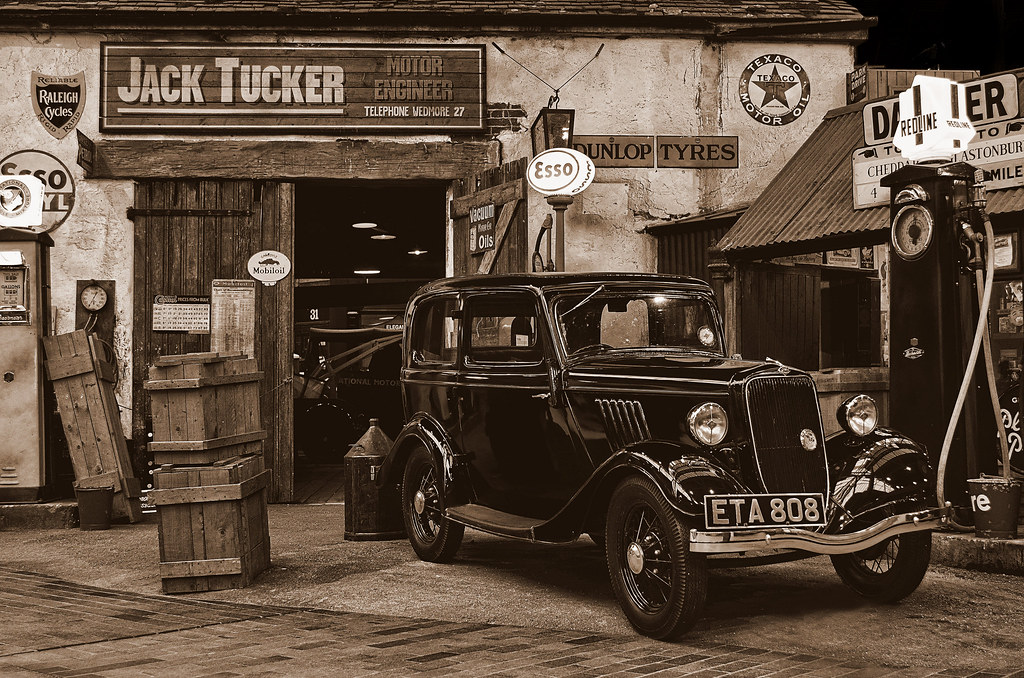
basic sliders in raw
clone out board at the front
overlay pic onto a textured paper template, then reduce opacity to 30%
then over the top paste a folded paper template and reduce opacity again till it looked right
merged visible
pasted image onto another backround template and pasted
used rectangular marquee tool and selected each corner in turn going over the folded paper part by about 15mm, and then used spherize at -20% to pull the corners in
then added drop shadow
in hue/sat ticked colourize and reduced hue to 30% and sat to 10%
added noise
save and done

ppcar by flying giraffe, on Flickr

prob about 25 mins

feedback ok

just to add, if anyone wants to try this ill upload the templates for them
 
Last edited:
I don't normally like effects but that is very nice, would appreciate having a go at the templates
 
OK - well done to all

Must be honest, I pretty much had this as being either a B&W or some other vintage style from the moment I took the shot. Sponner - like the hint of colour coming through, adds a bit of interest without detracting, finding the car (sides sespecially) looking a bit too shiny and reflective, good sharp detail throughout though.

Ben, nice bright, clear, colour edit. :thumbs:

Nice one Phil - I'm a fan of boosting midtone contrast / microdetails etc, brought out the grain in the wooden boxes and the dirt on the garage walls really well..

SMAM - good B&W, definately along the lines of my thinking.

Neil, good B&W / hint of sepia conversion - like the noise / grain (not sure it needs to be on the white "paper" and wooden BG though??). Folded / creased paper effect works really well here, really brings a 3 dimensional effect... (The light to dark effect on the drivers door is a little too obvious for me.) And the sign is cloned out :thumbs:

Winner - Flying Giraffe Neil...... :1st: Suitable "effect", executed really well!

Here's mine, some HDR and cloning, followed by a sepia conversion in Picasa...... :eek: Oh, and removed the person in the garage behind and re-constructed the letters "L MOTOR" :D And darkened the top right corner too. :nuts: And a high pass sharpen.
9379140610_0066363d96_b.jpg
 
A very well done Neil - some very creative thinking :clap:

Also what a very high calibre of entries from everyone & of a standard that, not that long ago, would each have been the winner :thumbs:
 
Cheers, the templates really help, I got the front a cd cover a while ago, download them and give them a try, good luck with this one, lots of potential I think (hope)
 
A very well done Neil - some very creative thinking :clap:

Also what a very high calibre of entries from everyone & of a standard that, not that long ago, would each have been the winner :thumbs:

Missed your entry john, hope your pc problems get sorted mate
 
All done in Lightroom.

USAy0hx.jpg


BHi0WKy.jpg


10 mins or so.
 
some amazing colours in this photo, love it!


IMG_0934-2-1 by btyreman, on Flickr

opened in PSE10

created a second layer with high pass filter added set to soft light 30% opacity,
brightness and contrast adjustment layer, with increased brightness.
burning and dodging on the building and parts of the crowd,

exported as PSD file into LR5:
cropped and some clarity increased,
highlights decreased
increased highlights and decreased shadows in the Tone Curve,
+2 red added in the shadows split tone.
radial brush used on the train crash in the building
second radial brush used on the guy smoking and blue light.

this one took a while especially with the burning and dodging probably 45 minutes. Looks really good on black!
 
Last edited:
Missed your entry john, hope your pc problems get sorted mate

Thanks for that Neil :thumbs:

I will be on the phone to Tech Support tomorrow but suspect it will be a return to get a repair - under warranty thank goodness. My wife has a laptop but I would be a rotter to 'borrow' it :lol: Also have a Desktop but not able to sit at it for long. And PP software not on these other machines.

I did try editing on my Ipad Mini but errr not good :eek:

But I'm still keeping my eyes on what's happening - after I'm one of the Deputies for the Thread Cop - well not asked him yet :clap:
 
Last edited:
Well done Neil, well deserved :clap:
Thanks for the template, have to give it a try later :)

My edit:
IMG_0934.jpg


in LR:
Cropped
Increased the exposure, contrast, shadows, whites, blacks, clarity, saturation and vibrance
Played with the colours
Applied noise reduction
think thats it :)

Took me about 15-20 min
Feedback please
 
Another thanks for the template, looking forward to trying it out.

Great image, struggled to process it. I have no idea what steps I have taken. About an hour of fiddling with all kinds of things.

ppgame.jpg


I can remember adjusting the verticals, cropping some and cloning out some trees, using a topaz adjust hdr filter then back into lightroom and boosting greens purples and yellows. Sharpened and de-noised.

Any feedback is good
 
Last edited:
I'm one of the Deputies for the Thread Cop - well not asked him yet :clap:

Being a deputy is rather like...going shopping...

You need to buy it.

I'm thinking £250 by bank transfer should secure your first deputy star of approval.

For this you will get permission to let the sheriff know when things are in trouble.

Essentially, you are paying for the privilege of being my eyes and ears... how does that sound??? Lol
 
Being a deputy is rather like...going shopping...

You need to buy it.

I'm thinking £250 by bank transfer should secure your first deputy star of approval.

For this you will get permission to let the sheriff know when things are in trouble.

Essentially, you are paying for the privilege of being my eyes and ears... how does that sound??? Lol

I best get saving :lol::lol::lol::lol:
 
thanks for all the entries, it was a tricky one i know with lots of noise in the sky to deal with, plus keeping all the colours true.
2 have asked for feedback so ill here goes,

smam, good edit, the sky has stayed the colour it should be, there are some artifacts though which i got rid of by double denoising the sky only, but i also understand that image hosters dont give the best quality, great colours in the building too, and a nice sharp train

sponner, another good edit, not the crop i would have chosen, i kept some heads in, but did darken them, again some artifacts in the sky, maybe too much processing, or again the hosting of the image, the building has lost some of its ruggedness and a bit smooth.

thanks again everyone and i hope the feedback is ok?

this was a real tricky image so i appreciate all the entries, but for the closest to what i did (below) is SMAM, well done, now over to you sir


IMG_0934 by flying giraffe, on Flickr
 
Well done SMAM. Tough one this was and I did have a try but couldn't make it work.

Wotchagotferus SMAM??
 
Well done SMAM as it wasn't the easiest :clap:

I am without my lappy at the moment (away for repair) so cant take part until it's back - about 7/10 days. I've tried on my Ipad mini but ...... not really very successfully unless you can get LR for Ipad :thinking:
 
New here so hope I haven't got the wrong end of the stick. This was such a 'quiet' image that I thought I could get away with something more painterly.


Lake by juggler100, on Flickr

Gimp, starting from the jpeg
Reduce saturation of blue, red and magenta
Oilify filter with mask size 15, exponent 8
Tweak levels & gamma point
Apply 6 pixel Gaussian Blur to the horizon with opacity 70%
Despeckle radius 2
Flatten
Duplicate layer in overlay mode at 20% opacity
Add 20 pixel Gaussian Blur to some of the sky to remove banding artifacts.
Add a canvas texture layer in grain merge mode at 50% opacity
 
Wasn't going to do much to this one...... :lol:

Three exposures blended together to get the sky as I wanted
(at the expense of a couple of other areas)
PS, to correct a barrel and vertical perspective distortion
cloned all the birds
cloned the cone to right of boat house
D&B on the clouds a bit
reduced the greens and yellows
upped the reds


20 mins or so
Any feedback welcome . :thumbs:
 
I went for a degraded film look here


lake+letterboxing-2-1 by btyreman, on Flickr

opened in PSE first

using camera raw, sharpened increased clarity e.t.c,
imported as DNG,
cropped,
created layer using color efex pro with modern film and used custom settings,
new layer with high pass filter set to soft light 20% opacity,

stage 2 in LR5:

imported as a PSD file,
created a few gradient filters,
one on the water set to desaturate and remove moire',
second gradient on the right for a light leak effect,
added radial filter to the centre with de-saturation and contrast decreased,
used the brush tool around the very edges to roughen it up a bit and degrade it even more,
applied the new 'auto' perspective correction which worked very well in this,
post crop vignette set to lighten the edges,
finally changed mode to 'print' in LR and exported as jpeg with the letterboxing,
 
Last edited:
OK, thanks for the entries as there are some interesting different edits here to choose from :)

juggler:Its a nice edit and it really fits the image but just not what i was looking for :)

overbez:Really like the colours in there specially the sky but (for my liking) i prefer more green for the trees and...

symmetricalOCD: interesting degraded film look, i like the way the colours fade out in the corners :)

Flying giraffe:Really like the panorama look of the image :)

It was quite hard choosing a winner, but over all i think the winner(in my opinion) is overbez. Well done Graham, Over to you :clap:

And my edit:
DSC0020.jpg

In LR:
Increased the contrast, shadows, whites, clarity
Decreased the highlights, blacks
Played with the colours Green and Blue
Done!
took me about 20 min
 
Congratulations Graham :clap:

Getting a bit of a habit - winning - don't let it go to your head :nono: :lol::lol:

My Laptop ended up back with Toshiba in Germany & I see they have repaired it & it is just about to start its trip back to me - thank goodness as I have withdrawal symptoms :gag:
 
Well done Graham, Over to you :clap:

Thanks very much.......

Hmmm - running out of images over here... :lol:

fk0b.jpg


http://speedy.sh/RFUyU/DSC-5927.NEF

Some time on Monday afternoon as I'm off camping on Tuesday. :thumbs:

edit
Congratulations Graham :clap:
Getting a bit of a habit - winning - don't let it go to your head :nono: :lol::lol:
:

Thanks John - This thread is a really good way of getting some good editing practice - in all genres of photography....

I have mentioned before but all my edits are done without Lightroom!!, and only CS2. And my fave software ( lightroom replacement (for me), if you will), is also free (SNS-HDR). ;)
 
Last edited:
Thanks John - This thread is a really good way of getting some good editing practice - in all genres of photography....

I have mentioned before but all my edits are done without Lightroom!!, and only CS2. And my fave software ( lightroom replacement (for me), if you will), is also free (SNS-HDR). ;)

I have LR4 but have won less often since using it so I may be tempted to go back to PE10 & (like you) I have CS2 which was an Adobe free giveaway.

I assume for your new image you expect us to copy & paste & fit together so we end up with a completed car :thinking: Of course I am joking but some may think that is the challenge :nuts:
 
& (like you) I have CS2 which was an Adobe free giveaway.

That's open to interpretation... but that's the way I interpreted it.. :naughty:

I assume for your new image you expect us to copy & paste & fit together so we end up with a completed car :thinking: Of course I am joking but some may think that is the challenge :nuts:

Now that I would like to see done.... Not edited this one myself yet...

Fingers crossed your laptop arrives back safe and soon and ready for a workout. :thumbs:
 

indiecar_mess-2-Edit-1 by btyreman, on Flickr

PSE 10:

duplicated background layer with a high pass filter set to 25% soft light,

exported to LR5:

  • Greens and Reds altered the Hue and Luminance
  • Removed the colour cast using WB sliders
  • increased highlights in the Tone Curve
  • Post Crop Vignette
  • Sharpened using Nik Sharpener Pro

then exported as jpeg with more sharpening for the decrease in size.

nice photo by the way! :thumbs:

Ben.

also no feedback this time (unless I say) thanks.
 
Last edited:
Mines probably v similar.
In lr4 lens correction
punch preset (clarity and vibrance boost)
reduced whites boosted shadows slightly
sharpened a bit and a bit of nr
exported with resize.
2-3 mins
great image.

pp-1.jpg


didn't think it needed anything else,

feedback welcome
 
Lightroom:

CA and Lens profile

-crop
-Adjusted white balance to cool it down
-reduced highlights
-increased shadows slightly
-increased vibrancy slightly to increase the contrast between light source colours to make it more colourful without resorting to saturation.
-increased clarity slightly
-slight split tone

In Photoshop:

High pass to increase wire definition
burn and dodge by hand.

iH50T8o.jpg


10 mins

feedback welcome.
 
sliders in raw, increase clarity and vibrance high, sharpen and crop
increase clarity again with a topaz filter adjust
burn the tyre and brake hub
denoise
done


DSC_5927 by flying giraffe, on Flickr

feedback ok
 
afternoon guys, quite a tricky image to edit (I found), definitely a less is more type......

4 top edits there guys - really hard to crit any of them......

in a very good second place is neil - awesome shine on the metallic parts - super detail on the brake disc area - possibly bordering on oversharpened in order to get this??

but taking the prize this round, SymmetricalOCD - Ben, colours coming through nicely, and good level of detail and shine throughout without going OTT anywhere! :clap:

I did my usual exposure blend (I did actually bracket 3 shots), but didn;t feel these added much, so worked of the one, and played with highlights and shadows in CS2, and a bit of selective sharpening and darkening on the tyre and wheel...

 
Good to see that you've won this round Ben - so very well done:thumbs:
 
Back
Top