THE PP GAME!

Come on Dave...rack your brain and show us something amazingly different!
To be honest I had the pic in CS5 and did an auto contrast and tone, gave no result thats why I asked if there was any pp, tried levels and curves auto same, no change, think if I did have a go it would so no point end up like CTs image :thumbs: rather than HDR
 
Last edited:
Patience, patience, as I said, I would take a look on Sunday seeing as the closing time was 11.30pm Saturday....

So here's the first :) from Swansea Male

swanseam.jpg
 
Last edited:
And here's my runner up.....Pork

pork.jpg
 
Last edited:
And here's mine....

Big_Frame1.jpg


First off a general sort out then cloned out all electrical wires and lamposts to emphasise the abandoned and disconnected feel of the pic, copied the tyres to cover the caravan, removed tyre marks on the road, made a B&W copy blended with original at 20% painted in/out where I fancied, oval curves adjustment to darken off bits and bobs,
added 50% grey layer -overlay mode to dodge and burn where I fancied, a little levels tweak, slight selective sharpen with high pass, add a title, signature etc and I'm happy with that.

Thanks to all who entered ;)
 
Ok thanks Joan.

Ok heres the next one, and a bit of a tricky one.
heres the jpeg give a minute and I'll upload the raw somewhere.

6111873244_8f5d22b9d2_b.jpg
 
Started by trying to make the centre arch and its reflection looking like a planet. :thinking: Well if you look from a way off..


planet.jpg


cloned out the botom right distracting twigs;
HUGE crop;
added a saturation and vibrance layer with a circular graduated mask;
used the burn tool arount the top edge and bottom corners.
 
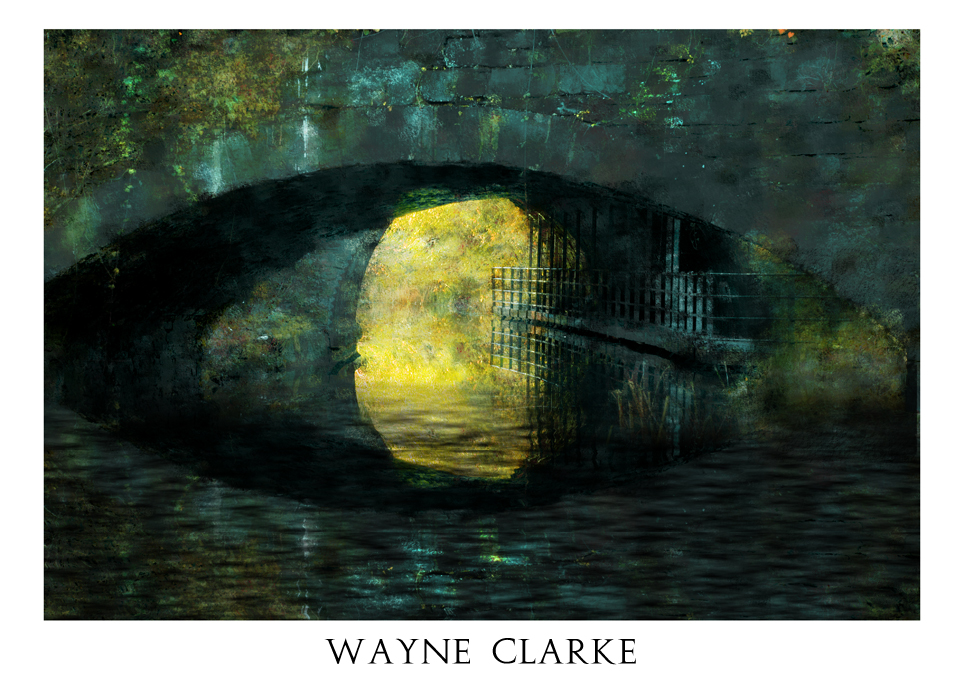
Heres mine.


ppcompsmall2 by Adrian Deans, on Flickr

Im really trying to go beyond my comfort zone with these edits, so forgive my vague explanations.

What i did;

Used ACR to play with the colour adjustments, tried to manipulate the colours into something more pastel-like and painterly. Didnt do a great deal with the other settings apart from a tweak of temperature/contrast that type of thing. Created 3 exposures at2 stop increments (-2, 0, +2) and used photomatix to create a more painterly tone pallette (not typical HDR look). Exported this as 16bit tiff, and opened in photoshop. Selected the whole image and defined as pattern. Created new layer and using the pattern stamp tool (set to the defined pattern and impressionist), i painted in the features of the image using gradually smaller brushes to bring out the details. I then combined this 'painted' version with the (pre-edited) original using a lot of experimenting with different blend modes, cant remember this stage too well im afraid. Next i wanted to get rid of the foreground so i made a selection of the top portion of the image, flipped it upside down and placed it at the bottom. Next i created a new layer and rendered some clouds. I then squashed this layer right down so it looked like ripples, duplicated this layer twice and placed them on top of each other so that combined they covered the bottom 3rd of the screen. Merged these new ripple layers. Transfered this layer to a new document and saved as .psd. Next i selected my 'mirror' layer again, and applied a displacement map using the 'ripple' psd. I then used the 'ripple' layer over the mirror layer and set to overlay or multiply i cant remember. Bit of dodge/burn.

Finished of with a border using Canvass size and put Wayne's name on the bottom using Augustus font.

:)
 
Here's mine:
DSC_4032_copy.jpg

I went with stephen's crop...
Adjustments on camera RAW, increased black and contrast & reduced saturation. Cloned out the distracting twigs.
Masked over the colour parts to apply colour correction to everything but. Adjustment layer: selective colour...decreased black in the neutral channel increased black in black channel. Sharpened.
 
Changed mine

I added a layer chose what I thought should be white with the colour picker,(which was a light blue) filled the layer with the blue, inverted it, then lowered the opacity to remove the blue cast, curves layer to lightened the shadows under the bridge and masked, few bits of cloning, colour boost, warmed up the reeds in the foreground, cropped

6114241816_7cfa4a7d2b_z.jpg
 
Last edited:
Wooooooaaahhh hang on a minute hahaha!

DAVE - how can you change!?

For future make sure it's 100% to your liking before posting otherwise we could have a problem if we start doing that...

wasnt aware we couldnt change them, I was sure but I didnt like the crop, so I changed it after 10mins

Would anyone have know had I not said I had changed :shrug:
 
Last edited:
Here's mine, I've used the Jpeg as Rapidshare didn't want me to have the raw file :/

Bridge15.jpg


Adjust levels, got rid of magenta cast, cloned out reedy bits from centre to left, then copied the left hand side of pic, pasted back in, flip, position, copied, pasted & cloned bits and bobs of the gorse and stuff, painted bridge with desaturation sponge where I fancied, cloned out just a few of the repeating areas, colour boost to yellows & greens.
 
Cough!

6116663312_ca33dec004_b.jpg
 
Here's mine, I've used the Jpeg as Rapidshare didn't want me to have the raw file :/

Bridge15.jpg


Adjust levels, got rid of magenta cast, cloned out reedy bits from centre to left, then copied the left hand side of pic, pasted back in, flip, position, copied, pasted & cloned bits and bobs of the gorse and stuff, painted bridge with desaturation sponge where I fancied, cloned out just a few of the repeating areas, colour boost to yellows & greens.

Very innovative...
 
Like Joans edit looks good think I would have cloned out a few of the repeated things, but brill idea and very imaginative and creative :clap:
 
December2009--Edit.jpg

Duplicated layer and used hue/saturation to make yellows pink. Think I did something to the blues but I can't remember what.
Made a new layer and painted over most of the grass with black.
Cloned some of the fencing reflection over the new 'water'. Used a blue paintbrush on overlay mode or something and painted over it. Cloned some of the light reflection (with the trees) to make it come further out. Did some more small-scale cloning work to get rid of an obvious tree trunk reflection copy.
Cloned out branches and things that were still across the water.
Cloned (yeah, again... :p) some bits and bobs from the top of the bridge, etc, at a low opacity and layer at 'lighten' blending mode to make the water look more reflective.

Think that's it. I need to get better at post processing :/
 
Last edited:
Not a thread I feel comfortable posting an edit in (yet), but just thought I'd say thanks to everyone for explaining what you're doing with each image. I'm learning lots just from seeing what you guys do.
 
I first off opened in ACR then I saved 5 versions at different exposures. I then opened in Oloneo in Local Tone Mapping mode.
TM strength 58
Detail Strength 43
Exposure -1.47
Contrast -13

I then exported to Photoshop where I used a combination of clone stamp and content aware fill to remove the foreground on the right.
A little dodge & burn followed to emphasise the reflection and also to subdue the grass.
I then used Topaz Clean 3 (crisp style preset)
Then I made a new layer and converted to B&W I then reduced that layer to 35% and used the Lighten blend mode this helped to lighten some of the darker areas and to reduce the saturation a little.
Finally I sharpened it a little using the High Pass method with Soft Light blend mode instead of the usual Overlay.


2Bp3Y.jpg
 
Heres mine.


ppcompsmall2 by Adrian Deans, on Flickr

Im really trying to go beyond my comfort zone with these edits, so forgive my vague explanations.

What i did;

Used ACR to play with the colour adjustments, tried to manipulate the colours into something more pastel-like and painterly. Didnt do a great deal with the other settings apart from a tweak of temperature/contrast that type of thing. Created 3 exposures at2 stop increments (-2, 0, +2) and used photomatix to create a more painterly tone pallette (not typical HDR look). Exported this as 16bit tiff, and opened in photoshop. Selected the whole image and defined as pattern. Created new layer and using the pattern stamp tool (set to the defined pattern and impressionist), i painted in the features of the image using gradually smaller brushes to bring out the details. I then combined this 'painted' version with the (pre-edited) original using a lot of experimenting with different blend modes, cant remember this stage too well im afraid. Next i wanted to get rid of the foreground so i made a selection of the top portion of the image, flipped it upside down and placed it at the bottom. Next i created a new layer and rendered some clouds. I then squashed this layer right down so it looked like ripples, duplicated this layer twice and placed them on top of each other so that combined they covered the bottom 3rd of the screen. Merged these new ripple layers. Transfered this layer to a new document and saved as .psd. Next i selected my 'mirror' layer again, and applied a displacement map using the 'ripple' psd. I then used the 'ripple' layer over the mirror layer and set to overlay or multiply i cant remember. Bit of dodge/burn.

Finished of with a border using Canvass size and put Wayne's name on the bottom using Augustus font.

:)

Very nice. but come again! Makes as much as sense nailing jelly to a wall.
 
Last edited:
I like what you have done with that Dale nice and sharp with cool colours good job :thumbs:
 
December2009--Edit.jpg

Duplicated layer and used hue/saturation to make yellows pink. Think I did something to the blues but I can't remember what.
Made a new layer and painted over most of the grass with black.
Cloned some of the fencing reflection over the new 'water'. Used a blue paintbrush on overlay mode or something and painted over it. Cloned some of the light reflection (with the trees) to make it come further out. Did some more small-scale cloning work to get rid of an obvious tree trunk reflection copy.
Cloned out branches and things that were still across the water.
Cloned (yeah, again... :p) some bits and bobs from the top of the bridge, etc, at a low opacity and layer at 'lighten' blending mode to make the water look more reflective.

Think that's it. I need to get better at post processing :/

Possible best yet...
 
sharpened in raw, basic touch ups, in cs5 played around with the artistic filters, cant remember which ones as i tried a few till i got what i was after (can you see your history in cs5?)

bridge.jpg
 
Back
Top