

You are using an out of date browser. It may not display this or other websites correctly.
You should upgrade or use an alternative browser.
You should upgrade or use an alternative browser.
The Official Fuji X10/X20/X30/XF1/XQ1 Thread
- Thread starter DuncanDisorderly
- Start date


robenroute
Suspended / Banned
- Messages
- 306
- Name
- Rob
- Edit My Images
- Yes
Rob, thus far there is no indication that the X 20 RAW files will be any more supported than current or impending X Trans cameras, and of course the current level of support is pretty much non-existent. My talks with heads at Fuji revealed that we can expect "some improvement" from Adobe over the coming months, but we can only guess as to what that actually means. There seems to be a belief that X Trans images are "better" than non X Trans images, and I would say that is purely subjective and certainly not something I would agree with. If there is no useful RAW support then this technology is quite limited for some users. Of course the current X 10 has a unique bespoke sensor and the output is different to the output characteristics of X Trans, which is a bit flatter by comparison (and somewhat colder) and not particularly pleasing to my eyes (though others of course may be very happy since it is as I said subjective). For this reason it's unlikely I'll be interested in the X 20. Fuji have a history of making fairly outlandish marketing claims and I will never again be in a hurry to buy a Fuji camera for this reason - giving it three or four months will probably be advisable and will hopefully also show a better price point.
Hi Lindsay, I have no first-hand experience with the X-Trans sensors. I just know that I'm very happy with the output of the X10. I've tried different RAW processors, and SilkyPix definitely has the upper hand. However, SilkyPix (the bundled one, version 3) and I don't get along very well. What I tend to do now is shoot JPG and when needed I do a bit of PP on the JPG. Personally, I think that Fuji should invest time and knwoledge/people into getting proper support in LR and/or similar mainstream products, or, if that somehow doesn't work out, offer the latest SilkyPix to their customers (I've tried SillyPix version 5 and it's better than version 3, by leaps and bounds).
I'm a little nervous at current, because I've sent my X10 in for the sensor transplant and it came back with skew levels. It's with Fuji at the moment (2nd time this month) and should be back within a week or so (so they promised). I'm still not sure that sensor "upgrade" was a smart move. Time will tell. I'll be shooting lots as soon as I get my X10 back. Strange thing is that my guts are telling me that the "magic" of the original sensor came at the cost of the blooming effects aka white discs aka orbs. I know, nothing tangible, just gut feeling. The only reason I got it upgraded was the fact that I might want to sell it in a few months time if the X20 proves to be a worthy successor. Like I said, time will tell...
Last edited:

souldeep
Suspended / Banned
- Messages
- 864
- Edit My Images
- Yes
We where staying at Tossa de Mar, the following are from walks and sittings around the town.
My first visit to Tossa was 1971, our honeymoon, indeed my first trip abroad, £39 each for a week half board. The old town remains quaint and a delight but the modern building constructed over 40 years has turned a village into a rather large holiday resort. For the better?
Two pans of the beach, I think the flare in the first one adds to the knowing that it’s a low sun.


Two more low angle boat shots, guestemated framing, shutter released using cable. Cropped to correct frame, levels, contrast, dodge and burn.


Tossa old folk. 1- Cropped, levels, contrast. 2- Cropped, converted to mono in CS3, dodge and burn. 3- Same as 2.


Rhodese... firstly thank you. The set you have posted is... pure sun candy - in comparison to the grey dull weather in old blightly at the moment. I'm totally amazed that you feel like packing it all in when I see the set you've shared!
Next up are your B&W's. They are very very good. A thousand times better than any I have been able to achieve even though I have spent much time trying to improve my B&W photography. The photo of the statues holding hands is very dramatic. I really like the perspective as well. The B&W street shot of the couple coming up the street on the right is brilliant! I also love your signature on the photos, perfect watermark. The abstract tree root is one to make me think - really good perspective choice and great eye to even try such a shot.
Finally some great panos to wrap up the set. A real
 from me and thanks once again. I love Barca - you've done it justice - the only thing missing is some of that lovely organic architecture from Gaudi! Lol - go on - post them... I know you must of taken some.
Last edited:

Lindsay D
Suspended / Banned
- Messages
- 2,677
- Name
- Lindsay
- Edit My Images
- No
nothing wrong with punchy PP if it gives the final image you want!
I quite agree. Processing, just like the way we see and shoot, is a personal thing. Providing it's done with skill and reflects the photographer's vision, that's what matters to me. I think Piscator Pete's shot is great"

Rhodese
Suspended / Banned
- Messages
- 1,154
- Edit My Images
- Yes
Thanks for the comments.
Souldeep I think when building up a mono image you should work on them as if you were in a darkroom. Duplicate the background layer, Crop the duplicate, then once you have the flat image, divide it up in your minds eye, not necessarily thirds but more component parts but not images within, like a person. Then use levels as you would do with dodging masks. Roughly select one of the component areas using a lasso, feather it by say 50 pixels, and gently apply level to darken or lighten that area. Now with that done and the whole image in use, use the dodge and burn tools to bring out the detail. I always use the burn tool set to shadows; it still affects midtones and highlights, but not as much, simarly the dodge tool set to highlights for the same reason. Both of them never more than about 7% or 8% strength as less is more and building up is the key to control.
Finally on a new layer ,select the grad tool, set the foreground to black, opacity to 45% and pull a grad from the top to about halfway, then do the same from the bottom. Adjust and erase as necessary.
Re the signature, it applied using a brush.
To create a brush. On a clean piece of white paper, write your signature, as cleanly as you can.
Scan and save it as a 300ppi jpeg, or photograph it with a digital camera as squarely and as close as possible and save it as a 300ppi jpeg.
Open in Photoshop or Elements, go to levels and move the right slider in until the background is as white as possible then move the left slider in until the signature is as black as possible, press OK.
Crop as near to the parameters of the written signature as possible.
Go to image size and enter 1200pixels width, tick constrain proportions and resample image boxes, Hit OK.
Go to edit, define brush, name the brush, hit OK.
Save the signature image you have on screen, and then close it.
The brush is now ready to use, click on the brush tool and your signature brush will be the last one listed. Pick a foreground colour and set the opacity, set the size by using the square bracket keys, click on an image and your signature is added.
You may find it advantageous to create a clean new layer on which to apply the signature as you can do pretty much anything you like with it, resize, colour, position etc.
I think that’s correct, I’m sure someone will edit if its not.
Rhodese.
Souldeep I think when building up a mono image you should work on them as if you were in a darkroom. Duplicate the background layer, Crop the duplicate, then once you have the flat image, divide it up in your minds eye, not necessarily thirds but more component parts but not images within, like a person. Then use levels as you would do with dodging masks. Roughly select one of the component areas using a lasso, feather it by say 50 pixels, and gently apply level to darken or lighten that area. Now with that done and the whole image in use, use the dodge and burn tools to bring out the detail. I always use the burn tool set to shadows; it still affects midtones and highlights, but not as much, simarly the dodge tool set to highlights for the same reason. Both of them never more than about 7% or 8% strength as less is more and building up is the key to control.
Finally on a new layer ,select the grad tool, set the foreground to black, opacity to 45% and pull a grad from the top to about halfway, then do the same from the bottom. Adjust and erase as necessary.
Re the signature, it applied using a brush.
To create a brush. On a clean piece of white paper, write your signature, as cleanly as you can.
Scan and save it as a 300ppi jpeg, or photograph it with a digital camera as squarely and as close as possible and save it as a 300ppi jpeg.
Open in Photoshop or Elements, go to levels and move the right slider in until the background is as white as possible then move the left slider in until the signature is as black as possible, press OK.
Crop as near to the parameters of the written signature as possible.
Go to image size and enter 1200pixels width, tick constrain proportions and resample image boxes, Hit OK.
Go to edit, define brush, name the brush, hit OK.
Save the signature image you have on screen, and then close it.
The brush is now ready to use, click on the brush tool and your signature brush will be the last one listed. Pick a foreground colour and set the opacity, set the size by using the square bracket keys, click on an image and your signature is added.
You may find it advantageous to create a clean new layer on which to apply the signature as you can do pretty much anything you like with it, resize, colour, position etc.
I think that’s correct, I’m sure someone will edit if its not.
Rhodese.

Ed Sutton
Suspended / Banned
- Messages
- 8,556
- Name
- Dave
- Edit My Images
- No
Lots more shots that put my efforts with the X10 being posted recently which helped put my camera out of favour. Again. To the point of me thinking of selling it.
That was until today when it was the camera I had with me because it will fit in my fleece pocket. For once I exercised some patience. Pre focused and waited. I'm surprised how sharp it is considering I was almost Getting blown over! Needless to say it's the one half decent shot out of many...
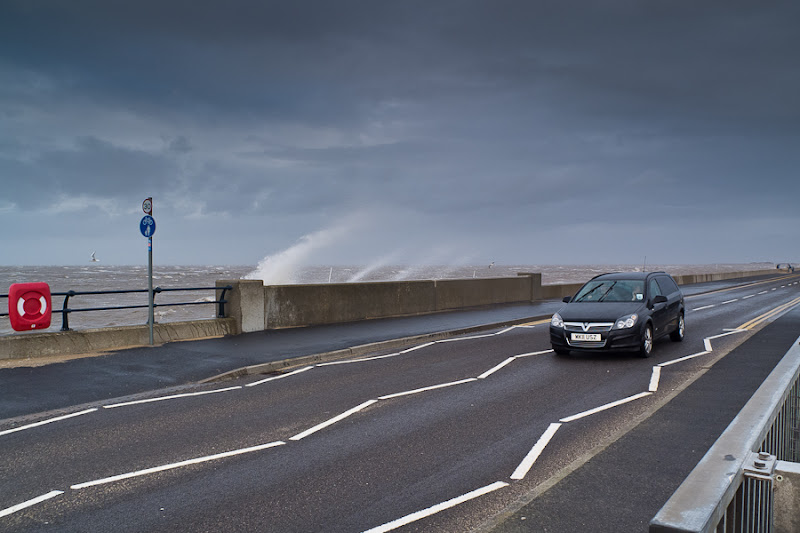
Some fiddling with the curve, clarity and a grad added in LR3.
That was until today when it was the camera I had with me because it will fit in my fleece pocket. For once I exercised some patience. Pre focused and waited. I'm surprised how sharp it is considering I was almost Getting blown over! Needless to say it's the one half decent shot out of many...
Some fiddling with the curve, clarity and a grad added in LR3.
robenroute
Suspended / Banned
- Messages
- 306
- Name
- Rob
- Edit My Images
- Yes
Lots more shots that put my efforts with the X10 being posted recently which helped put my camera out of favour. Again. To the point of me thinking of selling it.
That was until today when it was the camera I had with me because it will fit in my fleece pocket. For once I exercised some patience. Pre focused and waited. I'm surprised how sharp it is considering I was almost Getting blown over! Needless to say it's the one half decent shot out of many...
http://1.bp.blogspot.com/-9rZ38nendgo/UQk1vPm3Z2I/AAAAAAAALrs/y3LTcSP_Csg/s800/DSCF6397.jpg
Some fiddling with the curve, clarity and a grad added in LR3.
Stormy shot, Dave! So windy that the white lines on the road seem to have been blown all jaggedy
 (sorry, couldn't resist). Seriously, a shot well done. I wouldn't worry too much about the ratio of good vs. bad shots; I suppose we all have to cherrypick our postable ones. I know I need to
  . You may have hit the hammer on the proverbial nail nicely there: "patience".
Rhodese
Suspended / Banned
- Messages
- 1,154
- Edit My Images
- Yes
Dave, I love the windy shot, the fence on the right holds it all together, pulls you in. As regards hit and miss ratios I used to think if there was one keeper from a roll of 36, I was doing well, now if I get a keeper I think I’m doing well. How do birds fly in such weather?
Last edited:
Ed Sutton
Suspended / Banned
- Messages
- 8,556
- Name
- Dave
- Edit My Images
- No
Stormy shot, Dave! So windy that the white lines on the road seem to have been blown all jaggedy
Groan!
Dave, I love the windy shot, the fence on the right holds it all together, pulls you in. As regards hit and miss ratios I used to think if there was one keeper from a roll of 36, I was doing well, now if I get a keeper I think Im doing well. How do birds fly in such weather?
Thanks both. I agree with the one in 36 ratio. Although on some rare days/rolls it could get up to three!

- Messages
- 4,495
- Name
- Keith
- Edit My Images
- Yes
I thought I'd pop up another of mine, taken recently in Chichester - in the rain - and I'd noticed the reflections from a jewellers window in the puddles on some paving stones:
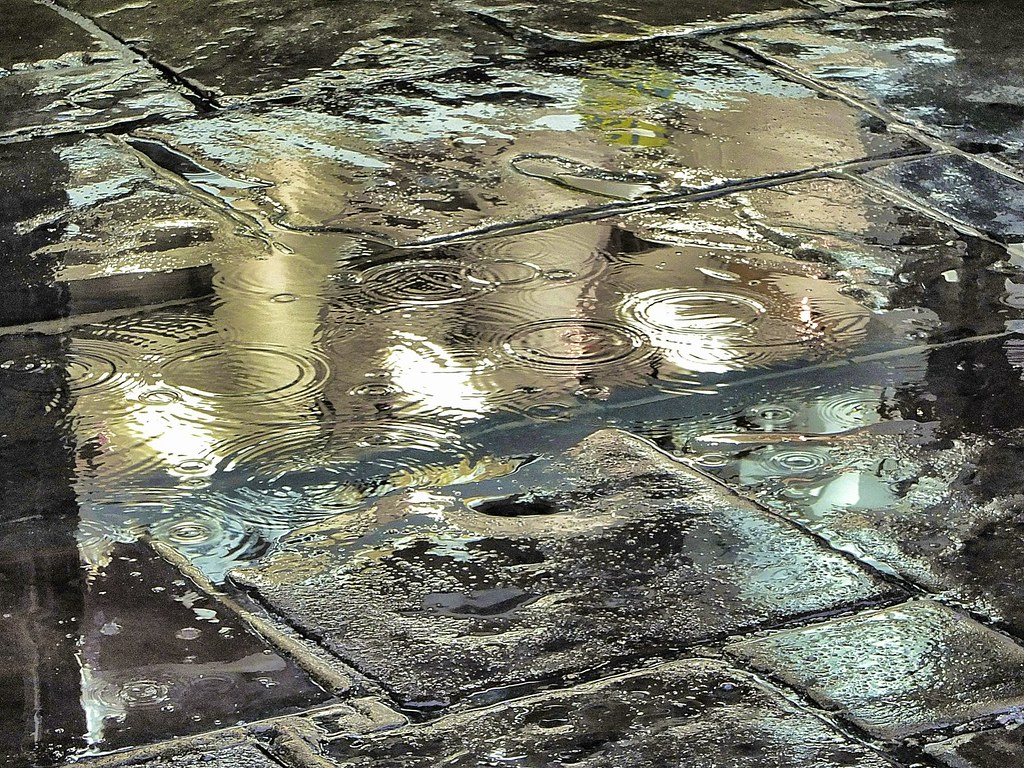
Reflections in the rain by Keith Burton, on Flickr
Reflections in the rain by Keith Burton, on Flickr

Terrywoodenpic
Suspended / Banned
- Messages
- 8,172
- Name
- Terry
- Edit My Images
- Yes
Re the signature, it applied using a brush.
To create a brush. On a clean piece of white paper, write your signature, as cleanly as you can.
Scan and save it as a 300ppi jpeg, or photograph it with a digital camera as squarely and as close as possible and save it as a 300ppi jpeg.
Open in Photoshop or Elements, go to levels and move the right slider in until the background is as white as possible then move the left slider in until the signature is as black as possible, press OK.
Crop as near to the parameters of the written signature as possible.
Go to image size and enter 1200pixels width, tick constrain proportions and resample image boxes, Hit OK.
Go to edit, define brush, name the brush, hit OK.
Save the signature image you have on screen, and then close it.
The brush is now ready to use, click on the brush tool and your signature brush will be the last one listed. Pick a foreground colour and set the opacity, set the size by using the square bracket keys, click on an image and your signature is added.
You may find it advantageous to create a clean new layer on which to apply the signature as you can do pretty much anything you like with it, resize, colour, position etc.
I think thats correct, Im sure someone will edit if its not.
Rhodese.
Thanks for the tip.
Excellent Idea.... I had never thought of doing that... it is so easy.
Even the size ( like all brushes) can be adjusted with the [ ] keys on the fly and colours changed with the eyedropper and colour picker to suit the actual picture. Using a layer on the original is a "Must" or it is impossible to remove.
Quick attempmt a a copyright logo

Last edited:
robenroute
Suspended / Banned
- Messages
- 306
- Name
- Rob
- Edit My Images
- Yes
I thought I'd pop up another of mine, taken recently in Chichester - in the rain - and I'd noticed the reflections from a jewellers window in the puddles on some paving stones:
http://www.flickr.com/photos/keithburton/8431053386/
Really nice photo, Keith. Colours, texture, a smacker!
In the EXIF data I see you used ISO 800. I'm just impressed at the quality and detail of the photo. Great stuff!
Last edited:
- Messages
- 4,495
- Name
- Keith
- Edit My Images
- Yes
Really nice photo, Keith. Colours, texture, a smacker!
In the EXIF data I see you used ISO 800. I'm just impressed at the quality and detail of the photo. Great stuff!
Thanks..........I'm constantly amazed at the quality this little camera produces.

petercastleton
Suspended / Banned
- Messages
- 65
- Name
- Peter
- Edit My Images
- Yes
Keith, like the reflections shot, the three highlights ranged across the image lift it
- Messages
- 4,495
- Name
- Keith
- Edit My Images
- Yes
Keith, like the reflections shot, the three highlights ranged across the image lift it
Thank you Peter


- Messages
- 25,725
- Name
- Yvonne, pronounced Eve...
- Edit My Images
- Yes
Sorry, we are back and about to bore you with holiday snaps!! :nuts:
Actually, I will just post the standard 6 allowed in a post and then if you want to view the entire set from our travels around Morocco, you can do so on the Flickr set HERE The first half are Nikon pics, but starting at the ginger & white cat about half way down, those are all X10 photos. I have prefixed the title of the all with X10 so should be easy to find if you want to see how the X10 coped with this startlingly colourful and changeable country.
I did a lot of 'shooting from the hip' with the X10, it was easier than constantly asking people if they would allow photos and gave much more natural looking photos, albeit with several 'misses'
This lot are really just to show a range of the kind of stuff I was asking the camera to deal with, everything from souk scenes, to dramatic landscapes
and even a little bit of local wildlife [shot with flash ] but you really do need to see the entire set to really get the big picture, as it were. Amazing country, amazing people and still the x10 is an amazing camera.
1
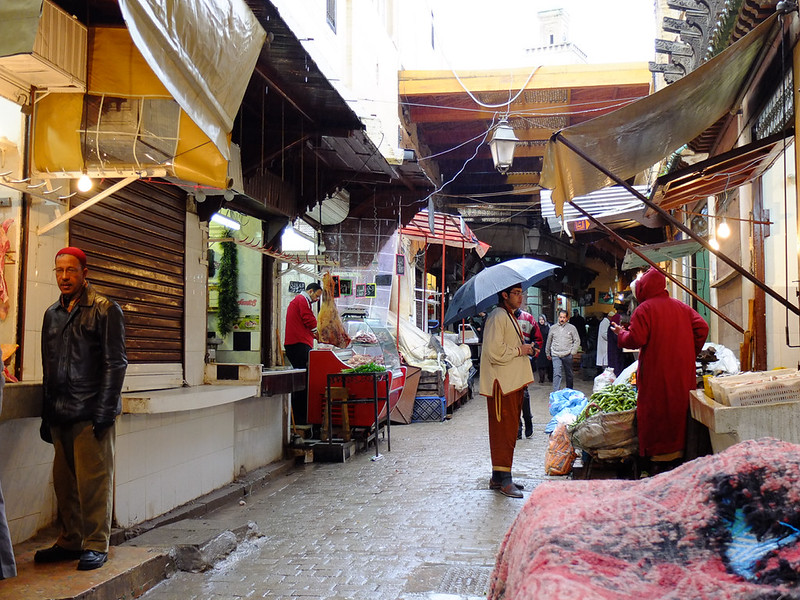
Morocco with the Fuji X10 Fes Medina by Yvonne White - WhiteGoldImages, on Flickr
2
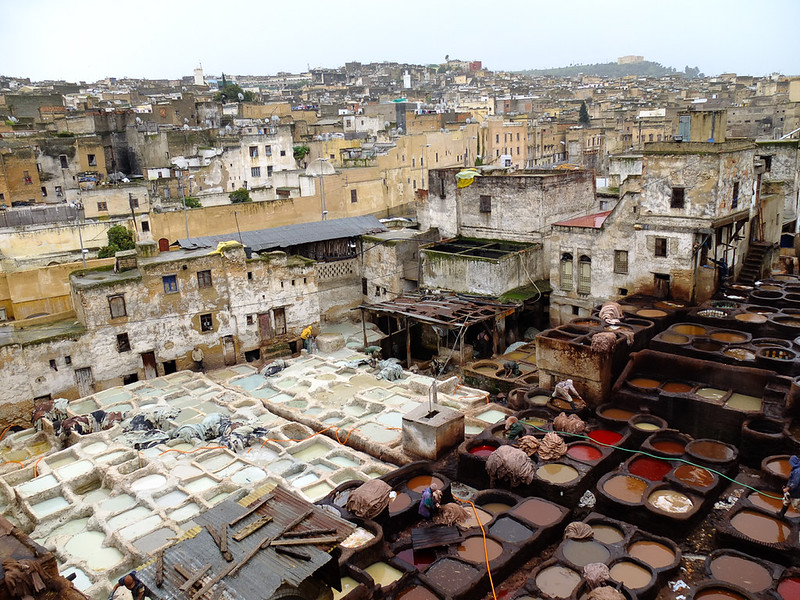
Morocco with the Fuji X10 Fes Leather Tannery by Yvonne White - WhiteGoldImages, on Flickr
3
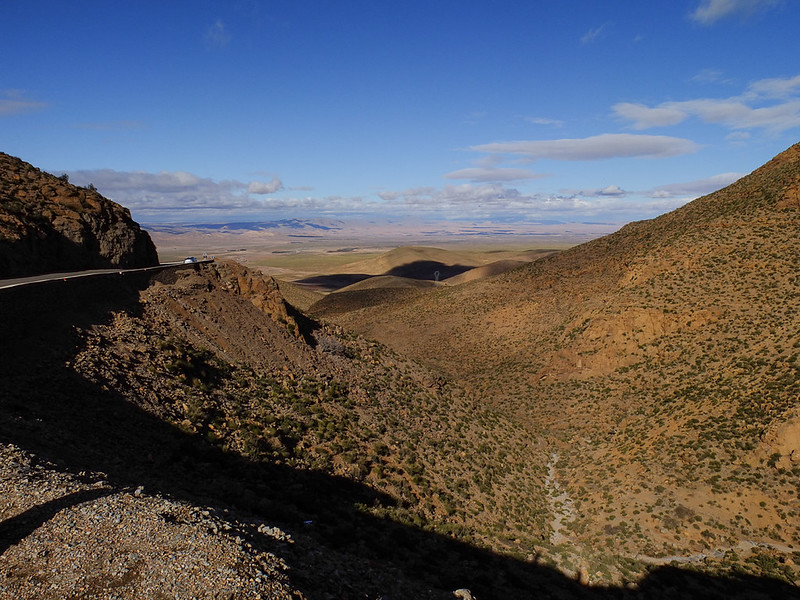
Morocco with the Fuji X10 - the mountain pass from Fes to Erfoud by Yvonne White - WhiteGoldImages, on Flickr
4
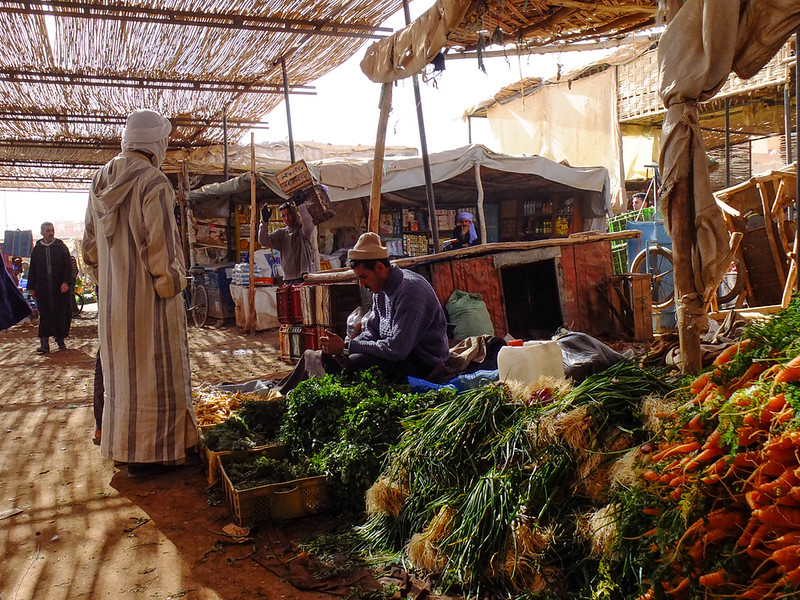
Morocco with the Fuji X10 Souk Stalls Rissani by Yvonne White - WhiteGoldImages, on Flickr
5
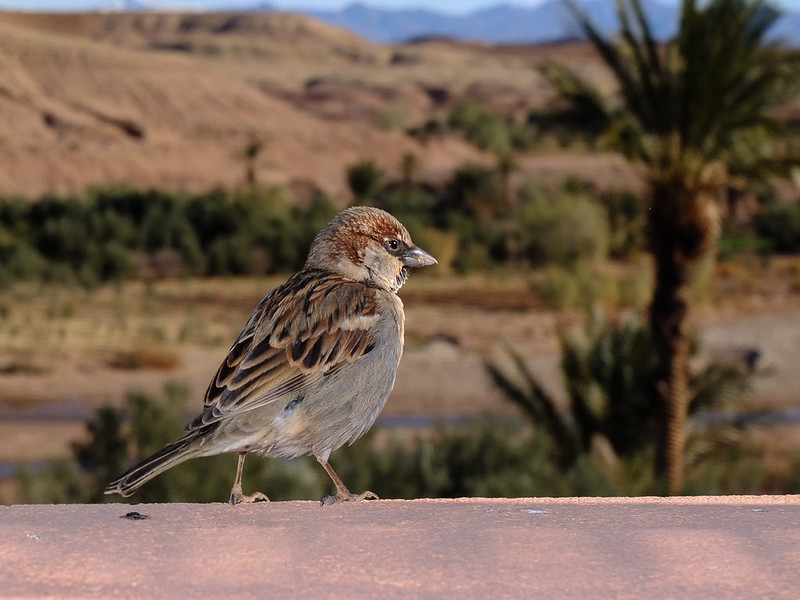
Morocco with the Fuji X10 by Yvonne White - WhiteGoldImages, on Flickr
6
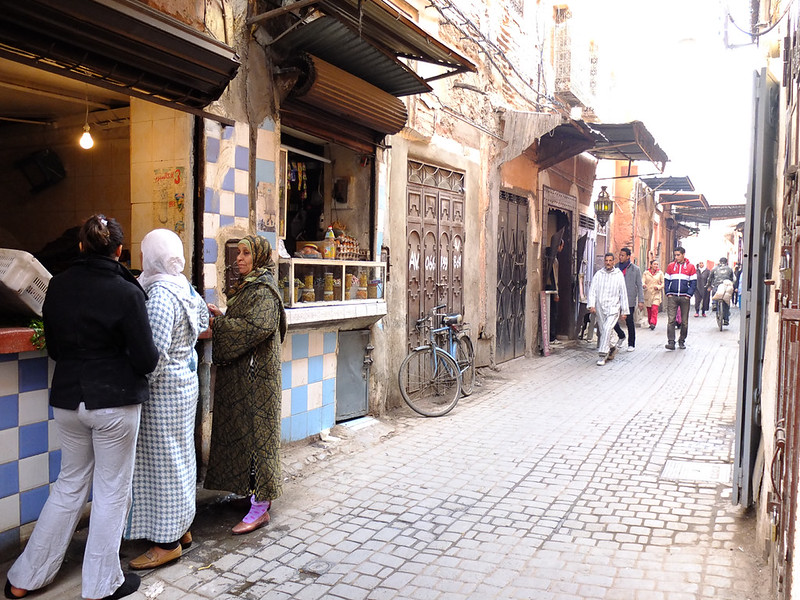
Morocco with the Fuji X10 Marrakech Medina by Yvonne White - WhiteGoldImages, on Flickr
Actually, I will just post the standard 6 allowed in a post and then if you want to view the entire set from our travels around Morocco, you can do so on the Flickr set HERE The first half are Nikon pics, but starting at the ginger & white cat about half way down, those are all X10 photos. I have prefixed the title of the all with X10 so should be easy to find if you want to see how the X10 coped with this startlingly colourful and changeable country.
I did a lot of 'shooting from the hip' with the X10, it was easier than constantly asking people if they would allow photos and gave much more natural looking photos, albeit with several 'misses'
This lot are really just to show a range of the kind of stuff I was asking the camera to deal with, everything from souk scenes, to dramatic landscapes
and even a little bit of local wildlife [shot with flash
] but you really do need to see the entire set to really get the big picture, as it were. Amazing country, amazing people and still the x10 is an amazing camera.1
Morocco with the Fuji X10 Fes Medina by Yvonne White - WhiteGoldImages, on Flickr
2
Morocco with the Fuji X10 Fes Leather Tannery by Yvonne White - WhiteGoldImages, on Flickr
3
Morocco with the Fuji X10 - the mountain pass from Fes to Erfoud by Yvonne White - WhiteGoldImages, on Flickr
4
Morocco with the Fuji X10 Souk Stalls Rissani by Yvonne White - WhiteGoldImages, on Flickr
5
Morocco with the Fuji X10 by Yvonne White - WhiteGoldImages, on Flickr
6
Morocco with the Fuji X10 Marrakech Medina by Yvonne White - WhiteGoldImages, on Flickr

DayDreamer
Suspended / Banned
- Messages
- 3,739
- Name
- John
- Edit My Images
- Yes
Hi Yvonne
A superb set and will take a look at the others on Flickr.
I think you must have a specially tuned X10
P.S. I hope you & Jonathan enjoyed the break - when you put your camera/s down
A superb set and will take a look at the others on Flickr.
I think you must have a specially tuned X10
P.S. I hope you & Jonathan enjoyed the break - when you put your camera/s down
robenroute
Suspended / Banned
- Messages
- 306
- Name
- Rob
- Edit My Images
- Yes
Yvonne, nice set! I actually did go through the lot... well, most of them.
Yes, the X10 is a very capable little shooter. Really like that shot straight at the sun, somewhere in the desert, with this wooden (?) contraption to the left.
Thanks for sharing!
 I got that one. Nice to see you still care about "your" baby...
Yes, the X10 is a very capable little shooter. Really like that shot straight at the sun, somewhere in the desert, with this wooden (?) contraption to the left.
Thanks for sharing!
I think you must have a specially tuned X10
I got that one. Nice to see you still care about "your" baby...
robenroute
Suspended / Banned
- Messages
- 306
- Name
- Rob
- Edit My Images
- Yes
Yvonne, the reputation of the X10 has travelled far; they've even renamed some mountains, apparently...
DayDreamer
Suspended / Banned
- Messages
- 3,739
- Name
- John
- Edit My Images
- Yes
I miss the X10 but still read this thread every day as it is so friendly and has so many good tips about techniques generally. I bought a replacement which suits my abilities more but haven't used it yet in earnest. And it isn't an X20
- Messages
- 25,725
- Name
- Yvonne, pronounced Eve...
- Edit My Images
- Yes
Hi Yvonne
A superb set and will take a look at the others on Flickr.
I think you must have a specially tuned X10
P.S. I hope you & Jonathan enjoyed the break - when you put your camera/s down
Thanks John, we really enjoyed it. I am not sure the regimentation of a coach tour is Jonathans thing, but it was a great way to see a lot of the country and plan possible future visits with a little more knowledge and experience.
Yvonne, nice set! I actually did go through the lot... well, most of them.
Yes, the X10 is a very capable little shooter. Really like that shot straight at the sun, somewhere in the desert, with this wooden (?) contraption to the left.
Thanks for sharing!
Yvonne, the reputation of the X10 has travelled far; they've even renamed some mountains, apparently...
Well why not... The desert shot is out by the wells near Erfoud in the desert, the wind was whipping up the sand and the wooden contraption was part of the well system as far as I know.
robenroute
Suspended / Banned
- Messages
- 306
- Name
- Rob
- Edit My Images
- Yes
Yvonne, I've just had another look at that massive set from Morocco. Are those photographs all SOOC? I find the X10 shots to be more appealing than the D700 ones. The X10 shots seem to have a little more depth. The higher ISO shots from the D700 are definitely cleaner, but, I find, less pleasurable.
Last edited:
- Messages
- 25,725
- Name
- Yvonne, pronounced Eve...
- Edit My Images
- Yes
Yvonne, I've just had another look at that massive set from Morocco. Are those photographs all SOOC? I find the X10 shots to be more appealing than the D700 ones. The X10 shots seem to have a little more depth. The higher ISO shots from the D700 are definitely cleaner, but, I find, less pleasurable.
there are a couple of factors at play Rob. Firstly, the x10 shots are nearly all 'live', as in not through a coach window and are shot in jpg [and we all know how good it is at that]. A few have had some post tweaks to light shadow areas, or a crop. The D700 shots are more from on board the coach and shot in RAW, and other than a crop have had very little pp other than converting to jpg. The lack of any proper pp on the raw files combined with the subject matter & nature of shooting is the main reason for the difference. I could have posted the pics I took on the D700 on a couple of nights out we did, but they are mainly of the tour party enjoying themselves so are in a private gallery for them, but they do demonstrate a more vivid, vibrant look much closer to what you are seeing from the X10. You are right, I did notice the difference between the two when viewing the thumbnails on the flickr set, but its a lot to do with what I used the cameras for and editing laziness. The X10 was used much more for the interesting stuff, just because its a far more discreet beast. However its slower focusing made using it whilst driving less successful than the D700. Hope that makes sense?

robenroute
Suspended / Banned
- Messages
- 306
- Name
- Rob
- Edit My Images
- Yes
there are a couple of factors at play Rob. Firstly, the x10 shots are nearly all 'live', as in not through a coach window and are shot in jpg [and we all know how good it is at that]. A few have had some post tweaks to light shadow areas, or a crop. The D700 shots are more from on board the coach and shot in RAW, and other than a crop have had very little pp other than converting to jpg. The lack of any proper pp on the raw files combined with the subject matter & nature of shooting is the main reason for the difference. I could have posted the pics I took on the D700 on a couple of nights out we did, but they are mainly of the tour party enjoying themselves so are in a private gallery for them, but they do demonstrate a more vivid, vibrant look much closer to what you are seeing from the X10. You are right, I did notice the difference between the two when viewing the thumbnails on the flickr set, but its a lot to do with what I used the cameras for. The X10 was used much more for the interesting stuff, just because its a far more discreet beast. However its slower focusing made using it whilst driving less successful than the D700. Hoep that makes sense?
Thanks for the elaboration, Yvonne. It does make sense. Because I couldn't really put my finger on the issue, I went in again and noticed for example the following two pictures: http://www.flickr.com/photos/wgi/8397799363/in/photostream/ and http://www.flickr.com/photos/wgi/8432702771/in/photostream/, where the second one is more pleasing to the/my eye. So yes, indeed, with a bit of PP vs. RAW-->JPG conversion only it's no surprise. Thanks again!
- Messages
- 25,725
- Name
- Yvonne, pronounced Eve...
- Edit My Images
- Yes
Very nice set Yvonne, some cracking shots in that lot.
thanks Eddie

- Messages
- 49,339
- Name
- Nod (UK)
- Edit My Images
- Yes
Welcome back (again!).
At last! Someone who doesn't feel the need to post 20+ shots of their holiday in this thread... Lovely set - will get around to looking at the rest sometime.
As for Jon not being at home on a coach tour, well, that surprises me - after all, he IS a SAGA lout!!!
At last! Someone who doesn't feel the need to post 20+ shots of their holiday in this thread... Lovely set - will get around to looking at the rest sometime.
As for Jon not being at home on a coach tour, well, that surprises me - after all, he IS a SAGA lout!!!
Rhodese
Suspended / Banned
- Messages
- 1,154
- Edit My Images
- Yes
Yvonne, the pictures you have presented here are nice, very nice, more would have been appreciated by most I’m sure. On Flickr, I just love the landscape shot with the moon high in the sky, in my opinion the best of the set. Have you thought of a gritty mono version, it is so reminiscent of the classic Ansel Adams picture, Moonrise, Hernandez, New Mexico?
I know it’s a holiday pic but it’s such a pity about the reflection, a few strokes of the healing brush would remedy it. It would make a tremendous wall hanging.
Rhodese.
I know it’s a holiday pic but it’s such a pity about the reflection, a few strokes of the healing brush would remedy it. It would make a tremendous wall hanging.
Rhodese.
- Messages
- 25,725
- Name
- Yvonne, pronounced Eve...
- Edit My Images
- Yes
Thankyou... As I probably indicated earlier, editing has been on the skimpy side even on the X10 pics, albeit they had more attention than the poor Nikon pics, mainly because of time restrictions. I have been hard back at work since returning and still playing catch up. There are a few that will get some more attention and probably be posted here individually when time allows. You are indeed right, on that one, the reflections should be fairly easy to get rid of.
DayDreamer
Suspended / Banned
- Messages
- 3,739
- Name
- John
- Edit My Images
- Yes
Thankyou... As I probably indicated earlier, editing has been on the skimpy side even on the X10 pics, albeit they had more attention than the poor Nikon pics, mainly because of time restrictions. I have been hard back at work since returning and still playing catch up. There are a few that will get some more attention and probably be posted here individually when time allows. You are indeed right, on that one, the reflections should be fairly easy to get rid of.
Make sure you don't post too many or you may upset Nod
- Messages
- 25,725
- Name
- Yvonne, pronounced Eve...
- Edit My Images
- Yes
Make sure you don't post too many or you may upset Nod
s'alright John, he is threatening to darken our Lundun doorstep in the next month or two, I will post them while he is here and not tell him the wifi password

Ed Sutton
Suspended / Banned
- Messages
- 8,556
- Name
- Dave
- Edit My Images
- No
I thought I'd pop up another of mine, taken recently in Chichester - in the rain - and I'd noticed the reflections from a jewellers window in the puddles on some paving stones:
I like that, the light and colours.
As for Yv's fotos. What more's to say that hasn't been said?

Blank_Canvas
Suspended / Banned
- Messages
- 6,400
- Edit My Images
- No
I'm just lost without my X10. I'm waiting for it to come from Fuji with the new sensor. S much has been written about it. Hopefully I have done the right thing, there has been so much written over the past year on the subject. Does anyone acutely regret doing it ? Have I done the right thing?
Piscator Pete
Suspended / Banned
- Messages
- 227
- Name
- Pete
- Edit My Images
- Yes
I'm just lost without my X10. I'm waiting for it to come from Fuji with the new sensor. S much has been written about it. Hopefully I have done the right thing, there has been so much written over the past year on the subject. Does anyone acutely regret doing it ? Have I done the right thing?
Hello Nick,
I had similar worries when my X10 went back in the autumn after only a week or two of ownership - you'll see my misgivings, and Duncan's common sense advice, if you look at the pages that relate to that time.
If the new sensor does reduce image quality, it's too subtle for me - just get on and enjoy the camera, and you'll soon forget the sensor thing.
One word of warning - after the sensor change, the camera came back with a focussing problem. Apparently the lens had been ''misaligned'' in reassembly, whatever that meant. The X10 had to be returned for a second time, but Fuji responded as one would hope, and the camera is fine now. This is a cautionary tale, hoping that you'll give the X10's systems a good going-over when you get it back.
Pete
Rhodese
Suspended / Banned
- Messages
- 1,154
- Edit My Images
- Yes
While I was travelling on a coach, looking at the panoramas I had taken (old style, individual shots to be stitched later), it crossed my mind that the X10s panorama function was basically the same thing but would it work in a linear fashion? I sometimes use a technique where instead of taking a pano from one spot and rotating the camera, I move along the view taking overlapping images like say an image or graffiti on a long wall. So setting the X10 to 120 degree panorama mode, hood fitted, I held the camera against the window and fired. The following are the results strait out of the camera. There not great, I offer them as food for thought, anyone? I’m sure that with a bit of perseverance quite good results could be achieved by having more control over the speed of the vehicle and setting a wider view panorama.


Thinking about it could you achieve a similar result using high speed drive?
Rhodese.
Thinking about it could you achieve a similar result using high speed drive?
Rhodese.
Last edited:
robenroute
Suspended / Banned
- Messages
- 306
- Name
- Rob
- Edit My Images
- Yes
While I was travelling on a coach, looking at the panoramas I had taken (old style, individual shots to be stitched later), it crossed my mind that the X10s panorama function was basically the same thing but would it work in a linear fashion? I sometimes use a technique where instead of taking a pano from one spot and rotating the camera, I move along the view taking overlapping images like say an image or graffiti on a long wall. So setting the X10 to 120 degree panorama mode, hood fitted, I held the camera against the window and fired. The following are the results strait out of the camera. There not great, I offer them as food for thought, anyone? I’m sure that with a bit of perseverance quite good results could be achieved by having more control over the speed of the vehicle and setting a wider view panorama.
http://www.talkphotography.co.uk/gallery/data/7090/coach-pan-1.jpg
http://www.talkphotography.co.uk/gallery/data/7090/coach-pan-2.jpg
http://www.talkphotography.co.uk/gallery/data/7090/coach-pan-3.jpg
Thinking about it could you achieve a similar result using high speed drive?
Rhodese.
Rhodese, I think your panos aren't what the ought to. I can clearly see the vertical misalignment in the panos, most probably caused by the vertical movement of the coach's suspension. Panos "only" work properly if the complete series of shots (the complete horizontal movement) is done in plane, so to speak. Ideally, you'd need a tripod on a non-moving underground.
Regards,
Rob
Last edited: