The Official Fuji X10/X20/X30/XF1/XQ1 Thread

ChrisR said:
Riz, the strict answer is no. Mac Raw support is an OS feature rather than implemented in iPhoto or Aperture. So far, Apple have not seen fit to implement X10 Raw in their Raw updates.

All is not lost, however. You can get Adobe's DNG Converter for free, and run your Raw files through that. Then Aperture at least is happy to take and use the resulting DNGs. I haven't used iPhoto for a while, and haven't checked, but I have heard that iPhoto will take the DNGs.

The work flow is a pain. Last evening I went out with the local Camerabuddies group and took a zillion sunset shots. About halfway through I switched to Raw+JPEG (I normally take just JPEG). Back home, I imported the JPEGs into Aperture and deleted them from the X10. Then I did a separate import of the Raws, storing them on the Mac. Then I... updated DNG Converter to the latest release (you can see how little I use it), and ran it over the directory with the Raws in it, turning each one automatically into a DNG. You get no creative control in this process; it's just batch. Then, import that folder into Aperture.

There is a bit of distortion that rather surprised me. When paging through the images, they first loaded with a flat horizon, then it would pop into a curve! I'm not sure it will show up in a side by side, but here is a couple of images, first the JPEG from the camera...

then via the DNG (no extra processing)...

PS we stayed there for an hour through sunset; it was a lot of fun. I'm not sure I needed the Raws, but at least I have them. And for the moment, they are also still on the card in camera, in case I want to (and can work out how to) process them again there.

Cheers hmm that may put me off a purchase actually. I have elements but I loved iPhoto ease
 
Ive been waiting for my returns box for a week so phoned them today. They said a batch were sent out on friday and I should have received it so they are sending another.

With everyones problems I dont know whether I should bother. Do you have 12 months to replace the sensor from purchase or is it september as Im sure I have seen september mentioned?
 
sent mine in for the software update
cant wait to see what it comes back like
 
Oh dear my rubber grip on the back has lifted on one side :shake:

I remember one or two others saying they had this problem and so I wonder what the solution was. Sending it back again is not a good option so is it a tube of super glue, a bit of blue tack, or some other cunning solution :help:
 
Oh dear my rubber grip on the back has lifted on one side :shake:

I remember one or two others saying they had this problem and so I wonder what the solution was. Sending it back again is not a good option so is it a tube of super glue, a bit of blue tack, or some other cunning solution :help:

I don't think super glue is the answer....
There is a screw underneath which I presume needs to come out if the camera is ever opened.

I suggest either industrial strength double sided tape, or contact adhesive.

Once the pad falls off, and you get past being annoyed.
It's actually not as big a problem as you might think.
I used mine without the grip for quite a long time :)
 
Oh dear my rubber grip on the back has lifted on one side :shake:

I remember one or two others saying they had this problem and so I wonder what the solution was. Sending it back again is not a good option so is it a tube of super glue, a bit of blue tack, or some other cunning solution :help:

Mine has lifted, too. Looking at the form from the sensor upgrade, it says the grip was part of the work. Perhaps they/re using some dodgy glue. Anyway, I hadn't had the email about the associated software upgrade (and mine was one of the first to have its sensor tweaked), so I rang them, to discover they have my name and email address (and physical address) spelt wrongly. So now I'm waiting for a box, with both the software AND the grip on the list to be fixed!

Oh dear.
 
Thanks Duncan & Chris :thumbs:

Four months old and disappointing as it really hasn't been used very much at all. Will think what to do as I would rather Fuji did it if they could turn it round within a week unlike the senor update which was three weeks plus a few days.
 
Hi all,

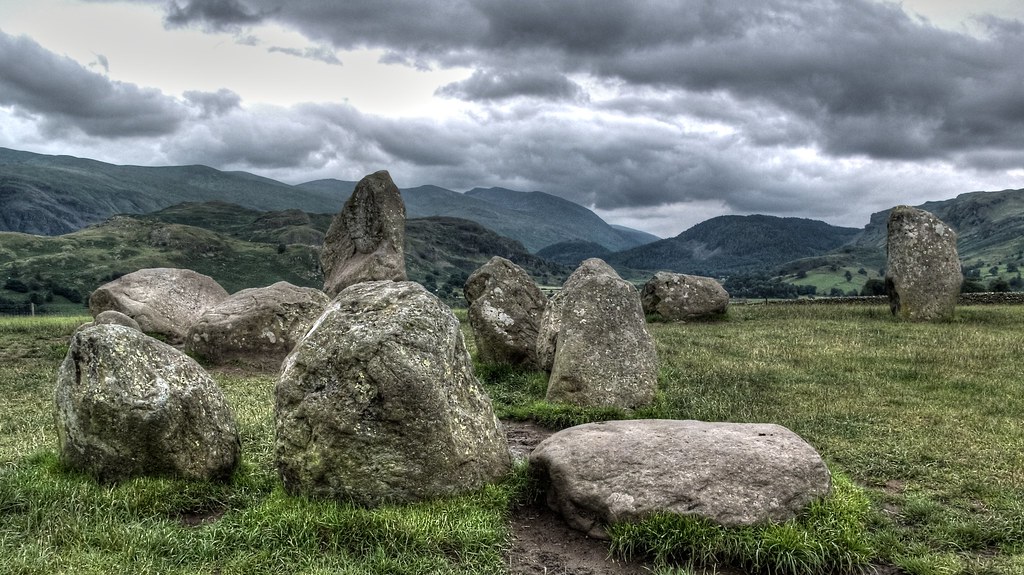
If I've read correctly, the sweet for the lens is f4. As such I tried a landscape shot today at f4 but the DOF is not deep enough. Plus I think I focused to closely which didn't help! What do you guys recommend as the optimum aperture for good DOF for landscapes which won't start to suffer from diffraction?

Here's my example.


Castlerigg by Steve Babb, on Flickr

Thanks
Steve
 
Hi all,

If I've read correctly, the sweet for the lens is f4. As such I tried a landscape shot today at f4 but the DOF is not deep enough. Plus I think I focused to closely which didn't help! What do you guys recommend as the optimum aperture for good DOF for landscapes which won't start to suffer from diffraction?

Here's my example.


Thanks
Steve

Diffraction is really a seperate issue. It sets the maximum sharpness you can expect overall when it become diffraction limited.
At that point every thing is limited to that sharpness and it can not be exceeded.

However, that being the case, depth of field is at its maximum and sharpness becomes equalised. It will not of course equal the sweet spot for the lens, but it is usually visualy acceptable. If this were not the case, no one would ever use the smaller apertures as are used in land scape work.

I would test what is acceptable to you, by taking a series of shots using progressively smaller apertures, and using the hyperfocal distance.
 
I tried a landscape shot today at f4 but the DOF is not deep enough. Plus I think I focused to closely which didn't help! What do you guys recommend as the optimum aperture for good DOF for landscapes which won't start to suffer from diffraction?

OK I can't answer the diffraction question, although other resources on the site I'm about to point to might. What I wanted to say was that with the smaller sensor, the depth of field is MUCH greater. In fact one of the calculators in http://www.cambridgeincolour.com/tutorials/digital-camera-sensor-size.htm suggests that f/4 with a 2/3" sensor and a 7.1mm lens would give the same DOF as f/16 on a full frame camera and a 28mm lens. So I would be surprised if it wasn't enough!

TBH your pic looks pretty good to me!
 
Do I get a gold star for the first post on page 100?????:wave:
 
Just a couple from me - more my own personal snaps than anything else.
I'm still struggling trying to get in-camera settings that I like for the JPEGs and then processing them. What film simulation and colour setting combinations do you guys use? and with that combination do you do much PP?

7687138252_cbe69f3d5c_c.jpg


xpav4z.jpg


I think I just need some kind of basic set of instructions that I can follow for my PP. I'm not very creatively minded when it comes to editing so I find it hard to get it right without following rules.
 
ChrisR said:
Do I get a gold star for the first post on page 100?????:wave:

No, because on my iPhone this is page 199... Try again soon and you might have page 100 on computer and iPhone page 200... You'll be the Usain Bolt of TP! :-)
 
Hey Paul - great colour in your shots. Were they taken in Velvia mode?

Mine? Have to say the settings will be whatever it came out of the factory with in 'P' mode. The only PP'ing was to clone out the less attractive people on the beach :D

Paul
 
Mine? Have to say the settings will be whatever it came out of the factory with in 'P' mode. The only PP'ing was to clone out the less attractive people on the beach :D

Paul

If you take any at Slapton Sands make sure you clone out the people on the beach there :clap:

PS A beach in South Devon where users often do not wear clothes :eek:
 
Oh dear my rubber grip on the back has lifted on one side :shake:

I remember one or two others saying they had this problem and so I wonder what the solution was. Sending it back again is not a good option so is it a tube of super glue, a bit of blue tack, or some other cunning solution :help:

When I posted I held the rubber pad firmly for a while and it seems to have stuck back again soundly so problem solved - phew.
 
Hi Can anyone tell me if there is a way to calculate the number of shutter actuations on the X10?
 
I'm still struggling trying to get in-camera settings that I like for the JPEGs and then processing them. What film simulation and colour setting combinations do you guys use? and with that combination do you do much PP?

I think I just need some kind of basic set of instructions that I can follow for my PP. I'm not very creatively minded when it comes to editing so I find it hard to get it right without following rules.


I hope you will get the answer but I am not too sure you will. Photography is such a frustrating hobby - absorbing yet at the same time maddening as there are so many choices. Choices of how to set the camera and choices how to PP. I recall Starbucks advertising saying they had about 180,000 drink combinations. Well that must be a very very small fraction of the combinations in achieving the end photo.

Then at any time in the future when re-looking at shots the temptation to start the tweaking all over again.
 
When I posted I held the rubber pad firmly for a while and it seems to have stuck back again soundly so problem solved - phew.

Spoke to soon it has come away totally :(

So called Fuji and waiting for box and they say turn around should be fast as backlog cleared. Let's hope so :thinking:
 
Turnround is certainly fast...... Had two emails at 12 oc the first saying they had the camera the second saying that they had returned it.

Phoned them and was told that camera was within spec....

Although the distance scale was both inaccurate and not working at the 35mm zoom setting.
The view finder points to the left.
The horizon indicator is 1.25 degrees out

They are trying to retrieve it from the post system to have another look.

However if it does come back tomorrow I will not accept the delivery.
 
Hi All,

It's been a while since I was able to post any photos on here for various reasons such as work commitments, X10 sensor replacement etc, so I thought I would post a few now.

The first is taken from my garden of an interesting cloud formation that caught my eye and the rest are from the Cross Country part of the 3 day eventing at the London 2012 Olympics. My wife and I were lucky enough to get tickets :cloud-9-039:

I haven't had time to do much in the way of PP, so all are with pretty much standard Snapseed presets and a little cropping here and there.

7689876946_ca9510aaa7.jpg
[/url] DSCF9073_Snapseed by Neiltluck, on Flickr[/IMG]


7689897982_7127fab654.jpg
[/url] London 2012 Cross Country Eventing by Neiltluck, on Flickr[/IMG]

7689895748_b9ee5c6d60.jpg
[/url] London 2012 Cross Country Eventing by Neiltluck, on Flickr[/IMG]

7689891238_1a792e8075.jpg
[/url] London 2012 Cross Country Eventing by Neiltluck, on Flickr[/IMG]

7689889528_2914621186.jpg
[/url] London 2012 Cross Country Eventing by Neiltluck, on Flickr[/IMG]

7689887112_3aaf1fb7c7.jpg
[/url] London 2012 Cross Country Eventing by Neiltluck, on Flickr[/IMG]

Cheers

Neil
 
Last edited:
Neiltluck. I'm very impressed. Never thought of the X10 for equestrian. Very very well done. Some outstanding shots here.

As an aside, choosing Greenwich was inspired don't you think. Great backdrop.
 
Neiltluck. I'm very impressed. Never thought of the X10 for equestrian. Very very well done. Some outstanding shots here.

As an aside, choosing Greenwich was inspired don't you think. Great backdrop.

Thank you Trevor, I appreciate the comments. The X10 actually worked very well for this event. I used EXR Mode and P Mode for most of the shots. It came into its own being lightweight and easy to handle and also the on-in-an-instant feature came in handy too.

The zoom range proved a little frustrating at times, but hey ho, you can't have everything. I did use the digital zoom for a couple of shots, but without a great deal of success.

On the whole, I was very impressed with the little camera's performance.

As for your second point; I couldn't agree more. Greenwich Park was absolutely spot on for this event. If it wasn't for the amazing backdrop of Canary Wharf and the O2 Arena, you'd could almost be forgiven for forgetting you were actually in London. The atmosphere was electric and the opportunity to get into great viewing positions were plentiful despite there being around 50,000 people there. Top marks to the organisers for this one.

Cheers

Neil
 
It's arrived! Not a mark on it and feels like new. Very happy I went for the refurb option and saved myself £100! :-)
 
Neil another one here very impressed with your shots.

Just one tiny point did you sharpen in PP as the second one, on my screen, looks well sharpened - forgive me - just asking.
 
Neil another one here very impressed with your shots.

Just one tiny point did you sharpen in PP as the second one, on my screen, looks well sharpened - forgive me - just asking.

Hi John,

Thanks for the comments, much appreciated.

To answer your question, yes, the images were sharpened PP. Not intentionally as much as they were. I was a little short on time, so I literally used the Presets within Snapseed. Some of them can be a little harsh and need to be softened somewhat, but I didn't bother.
 
those horse photos are just awesome! :thumbs:

A couple more from the lakes, back home tomorrow :(

Buttermere:


And one on the way down from Helvellyn. Shame it was a bit damp misty and murkey. I think if the sun had been out it would of killed me getting up there though!

 
So got my refurbished x10 today.... and it has dust on the sensor! Guess it has to go straight back :(
 
those horse photos are just awesome! :thumbs:

A couple more from the lakes, back home tomorrow :(

Buttermere:


And one on the way down from Helvellyn. Shame it was a bit damp misty and murkey. I think if the sun had been out it would of killed me getting up there though!


Thank you Essex. Yours are mighty fine too!!
 
There's dust on the pictures.. just like when you get it on a DLSR.
 
So I imagine it's possibly in the lens? Either way it's the same problem!
 
check your monitor
 
It's on the sensor then. It shows on the lcd on the back a little whilst taking pic, completely on the taken pic on lcd. Then same on my laptop monitor. It's quite obviously dust on the sensor..
 
Back
Top