The Fabulous Fuji X owners thread

OK guys, mystery solved ... I don't blame you that you don't know how raw date Vs color profiles work :D (joke but true) .. I was googling further and found this


and indeed .. I had there DR400 which is underexposing photos ... On Canon or Nikon cameras this feature works differently and it doesn't affect the RAW (ie notice here for example)

lesson taken, solution:

DR400 is severely damaging the raw data because Fuji camera underexpose with it images by 2 stops ... So if you're shooting to both RAW and JPEG make sure that your recipe (https://fujixweekly.com/fujifilm-x-trans-iii-recipes/) is not employing DR400 ...

I am shooting many years but I've never noticed this with any other camera .. as I said, I returned from vacation and found all shots taken crippled and damaged by underexposing ... this is just the real thing .. I've tested it now .. it's DR400 .. no need to look further .. this is just something that shall be avoided if you want to use RAWs as well
The article you linked doesn't match what Fuji has said.

Fuji describe the DR correction, used with raw files, as exposing for the highlights and then lifting the gain in the shadow detail so it isn't underexposed. That is why it only works at ISOs above base, because it selectively changes the gain

The Nikon highlight weighted metering does something similar with raw files but I've never seen Nikon explain how it works. The Nikon Active D lighting only works with Jpegs and the Nikon raw processing software. I don't know how Canon works.

I use DR with Fuji and highlight weighted metering with Nikon regularly, and while it doesn't seem to "underexpose" (loses shadow detail), the correction can compress the tonal range, which, if you have a lot of light areas in the picture these can come out a bit dark.

I think this might be what has happened with the image you posted.

But, based on the histogram nothing appears to be underexposed or overexposed, it just has a compressed tonal range. Which is what the DR tool is meant to do., but if you start with a flattish image, theDR tools can "overcorrect" the tonal range, which then needs expanded in processing.

In Capture One I would use the levels slider to expand the tonal range, and then adjust the overall bightness with the gamma adjustment, which adjusts the overall brightness without affecting the white and black point.

I am sure you could do something similar with LR.

I tend to be lazy, and just leave DR or highlight weighted metering on pretty well all the time, but it should probably be used more selectively. I just find it easier to correct a file with a compressed tonal range than one with blocked shadows or blown highlights.
 
The article you linked doesn't match what Fuji has said.
...

Hi Graham,

again, please check my original post where I provide link to the hard data which inevitably demonstrates what I am saying ... I did final demonstration:

here are two raw files shot with ISO1600, A mode and one with DR400 and other with DR100, it is what it is, please look below, RAW files don't lie

Code:
> exiftool DSCF1069.RAF | egrep 'Exposure Compensation|Raw Exposure Bias|Development Dynamic Range'
Exposure Compensation           : 0
Development Dynamic Range       : 100
Raw Exposure Bias               : -0.7

> exiftool DSCF1070.RAF | egrep 'Exposure Compensation|Raw Exposure Bias|Development Dynamic Range'
Exposure Compensation           : 0
Development Dynamic Range       : 400
Raw Exposure Bias               : -2.7

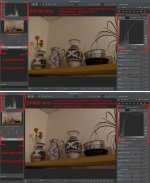
File with Development Dynamic Range 400 has -2.7 Exposure Bias Vs file with DR100 which has -0.7 == -2EV data captured .. one file contains -2EV data less .. it can be clearly seen on the image quality when you look for the detail ... Or at least X100F is not ISO invariant with ISO1600 at least (two shots below)

In practical numbers you really have to push the file with lesser data +2EV to reach clipping and there's also the difference in the IQ because of that

DSCF1069_0EV.jpg DSCF1070_-2EV.jpg

This is really weird design ... But OK, it is what it is ... I'm glad that I've figured out .. it's OK on shots with lot of light but on shots with high ISO and low light conditions is the impact significant ..

So I really don't know what else to do, I've demonstrated, analyzed and explained problem and provided the `hard data' (raw files) which don't lie and additionally pointed to external sources which are describing the issue as well, so no matter how furiously will particular people deny the issue, it is just real :D ... analyzed, proven, demonstrated ...

regards, ~d

ps.

Nice guitar - I've always liked the look of Vola stuff (y)

thank you :) .. I can absolutely recommend it .. these guitars have quality and feel of 2+ more times expensive instruments .. It's almost an investment, Vola is very young brand and they will be only more expensive over the time (if they will maintain the quality)
 
Last edited:
Hi Graham,

again, please check my original post where I provide link to the hard data which inevitably demonstrates what I am saying ... I did final demonstration:

here are two raw files shot with ISO1600, A mode and one with DR400 and other with DR100, it is what it is, please look below, RAW files don't lie

Code:
> exiftool DSCF1069.RAF | egrep 'Exposure Compensation|Raw Exposure Bias|Development Dynamic Range'
Exposure Compensation           : 0
Development Dynamic Range       : 100
Raw Exposure Bias               : -0.7

> exiftool DSCF1070.RAF | egrep 'Exposure Compensation|Raw Exposure Bias|Development Dynamic Range'
Exposure Compensation           : 0
Development Dynamic Range       : 400
Raw Exposure Bias               : -2.7

File with Development Dynamic Range 400 has -2.7 Exposure Bias Vs file with DR100 which has -0.7 == -2EV data captured .. one file contains -2EV data less .. it can be clearly seen on the image quality when you look for the detail ... Or at least X100F is not ISO invariant with ISO1600 at least (two shots below)

In practical numbers you really have to push the file with lesser data +2EV to reach clipping and there's also the difference in the IQ because of that

View attachment 464705 View attachment 464706

This is really weird design ... But OK, it is what it is ... I'm glad that I've figured out .. it's OK on shots with lot of light but on shots with high ISO and low light conditions is the impact significant ..

So I really don't know what else to do, I've demonstrated, analyzed and explained problem and provided the `hard data' (raw files) which don't lie and additionally pointed to external sources which are describing the issue as well, so no matter how furiously will particular people deny the issue, it is just real :D ... analyzed, proven, demonstrated ...

regards, ~d

ps.


thank you :) .. I can absolutely recommend it .. these guitars have quality and feel of 2+ more times expensive instruments .. It's almost an investment, Vola is very young brand and they will be only more expensive over the time (if they will maintain the quality)

You must have something strange going on with something. I've just taken two photos at ISO1600 in Av mode at DR100 & DR400 and they are completely identical aside from the monitor in the corner of the the image - that shows blown blinkies on the DR100 & less so on the DR400 as it should be...... Camera happened to be set at 0,0EC & both shots were metered at 1/30th at f/2.
 
Hi Lee ...

this is my last input into it .. I cannot help further :D .. I've provided both RAW files already, link above ... No matter how furiously you will deny or belittle what I am saying, DR400 shots contain -2EV less data by design .. if the design is reasonable it is certainly for a debate .. point here is that other camera systems simply don't behave like that and DR adjustments do not affect the RAW especially in such a drastic way like -2EV of data ... and I am speaking about big brands like Nikon, Canon and Sony ..

Again, I am happy that I've figured out what it is .. This seems to be specific behaviour of Fuji cameras - probably or perhaps not all but my Fuji x100f and x-t30 are doing it ...

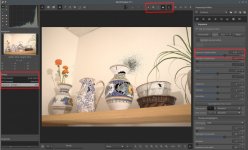
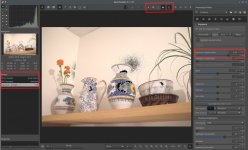
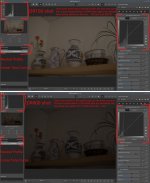
0_auto-matched.jpg 1_neutral.jpg
 
Last edited:
@ntz

In the link you provided earlier to dpreview, a commenter mentions that Rawtherapee, the app I see in your screenshots, does not read the DR data in Fuji (and possibly other brands) RAWs and so can appear under exposed.

Based on the fact that 3 of our longest serving and most experienced forum members have confirmed, via screenshot, that your RAWs look fine in Lightroom, I think that we have enough evidence here to show that Rawtherapee may be the culprit.

Additionally, just because the camera writes an exposure bias to the EXIF data doesn’t mean it is necessarily true - if the EXIF metadata doesn’t have ways to record the way in which Fuji uses dynamic range; Fuji may just choose to report DR400 as -2. At the end of the day, camera manufacturers decide how and what a camera records to a RAW file’s EXIF data. So in some respects yes, EXIF data could ‘lie’. I don’t believe there is any particular standard or certification they have to stick to; although I could well be wrong (and I’m sure you’ll let me know if I am…)

And with that in mind - this is a very friendly, knowledgeable forum where I have received a lot of welcome and help.

Reading over these last few pages, I can see the people who have replied to you here have been incredibly patient and kind.

I think before you make any further remarks regarding what people here know, that they are denying or belittling you, maybe spend some time here to get a feel for the tone of the place. We’re just trying to help.
 
@colourofsound


Based on the fact that 3 of our longest serving and most experienced forum members have confirmed, via screenshot, that your RAWs look fine in Lightroom, I think that we have enough evidence here to show that Rawtherapee may be the culprit.

no, just no .. what I demonstrated happens in any program .. It will happen in Lightroom too .. it has nothing to do with RawTherapee .. I mentioned and explained 10 times why files appear to our longest serving and most experienced forum members OK in LR .. They appear OK in RawTherapee also until I switch the color profile to verify the Raw data .. the files are even of different size

Code:
> du -h DSCF1069.RAF DSCF1070.RAF
25M     DSCF1069.RAF
19M     DSCF1070.RAF

because smaller file contains -2EV data exactly ..

I think that what is primarily offensive, frustrating and hurting is denying in such a demonstrative manner somebody's else experience and knowledge. Especially if he or she provided all the meaningful data and analysis and reproduced and explained the issue.


I think before you make any further remarks regarding what people here know, that they are denying or belittling you, maybe spend some time here to get a feel for the tone of the place. We’re just trying to help.
I am here for quite some time already ... to be more precise I am here actually longer than you ...


Screenshot_20251004_031220.png

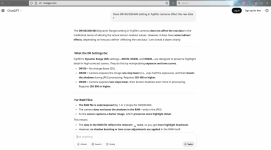
edit: full talk with Ai here ... our longest serving and most experienced forum members should read that primarily .. All answers are there .. I hope that somebody will tell me `sorry' at least ...
 
Last edited:
@colourofsound


no, just no .. what I demonstrated happens in any program .. It will happen in Lightroom too .. it has nothing to do with RawTherapee .. I mentioned and explained 10 times why files appear to our longest serving and most experienced forum members OK in LR .. They appear OK in RawTherapee also until I switch the color profile to verify the Raw data .. the files are even of different size

Code:
> du -h DSCF1069.RAF DSCF1070.RAF
25M     DSCF1069.RAF
19M     DSCF1070.RAF

because smaller file contains -2EV data exactly ..

I think that what is primarily offensive, frustrating and hurting is denying in such a demonstrative manner somebody's else experience and knowledge. Especially if he or she provided all the meaningful data and analysis and reproduced and explained the issue.


I am here for quite some time already ... to be more precise I am here actually longer than you ...


View attachment 464720

edit: full talk with Ai here ... our longest serving and most experienced forum members should read that primarily .. All answers are there .. I hope that somebody will tell me `sorry' at least ...
Blimey mate. No-one is trying to belittle you, and I don't think anyone owes you an apology for trying to help!
 
Hi Graham,

again, please check my original post where I provide link to the hard data which inevitably demonstrates what I am saying ... I did final demonstration:

here are two raw files shot with ISO1600, A mode and one with DR400 and other with DR100, it is what it is, please look below, RAW files don't lie

Code:
> exiftool DSCF1069.RAF | egrep 'Exposure Compensation|Raw Exposure Bias|Development Dynamic Range'
Exposure Compensation           : 0
Development Dynamic Range       : 100
Raw Exposure Bias               : -0.7

> exiftool DSCF1070.RAF | egrep 'Exposure Compensation|Raw Exposure Bias|Development Dynamic Range'
Exposure Compensation           : 0
Development Dynamic Range       : 400
Raw Exposure Bias               : -2.7

File with Development Dynamic Range 400 has -2.7 Exposure Bias Vs file with DR100 which has -0.7 == -2EV data captured .. one file contains -2EV data less .. it can be clearly seen on the image quality when you look for the detail ... Or at least X100F is not ISO invariant with ISO1600 at least (two shots below)

In practical numbers you really have to push the file with lesser data +2EV to reach clipping and there's also the difference in the IQ because of that

View attachment 464705 View attachment 464706

This is really weird design ... But OK, it is what it is ... I'm glad that I've figured out .. it's OK on shots with lot of light but on shots with high ISO and low light conditions is the impact significant ..

So I really don't know what else to do, I've demonstrated, analyzed and explained problem and provided the `hard data' (raw files) which don't lie and additionally pointed to external sources which are describing the issue as well, so no matter how furiously will particular people deny the issue, it is just real :D ... analyzed, proven, demonstrated ...

regards, ~d

ps.


thank you :) .. I can absolutely recommend it .. these guitars have quality and feel of 2+ more times expensive instruments .. It's almost an investment, Vola is very young brand and they will be only more expensive over the time (if they will maintain the quality)
OK,

I wasn't offering an opinion on how Fuji DR works, but relaying how Fuji says it works, and the EXIF tag doesn't necessarily mean a "global" reduction in that exposure value, but is more likely just a tag to record the strength of DR applied.

If you want to provide evidence that Fuji are misleading its customers, you will need to do a bit more work

You need a file with DR disabled to use as a baseline, and you need to consider that in low contrast lighting (with a low tonal range) you are asking DR to work in an environment it isn't designed to work in. So you also need to test it where you have a full tonal range, and blowing out highlight is a problem (where it's meant to help. With low contrast subjects, where you can add a lot of exposure to move the histogram to the right, I still find DR (or highlight weighted metering) useful because it still seems to protect the highlights if I add too much exposure compensation. But I haven't tested this.

You also need to use the exposure compensation dial (with DR switched off) and manually apply compensation to see if it matches the files produced with DR on.

Also it's relevant you are using Darktable, as by default it renders raw files differently from Lightroom, DXO or Capture One. Hence the people using Lightroom that downloaded your files aren't having the same issue.

If I have time, I will download your files and have a look in Darktable and Capture One.

Edit: I've just realised that DR100 is actually DR off, so sorry about that. It's years since I read up on how this worked and set it up.
 
Last edited:
Hi Lee ...

this is my last input into it .. I cannot help further :D .. I've provided both RAW files already, link above ... No matter how furiously you will deny or belittle what I am saying, DR400 shots contain -2EV less data by design .. if the design is reasonable it is certainly for a debate .. point here is that other camera systems simply don't behave like that and DR adjustments do not affect the RAW especially in such a drastic way like -2EV of data ... and I am speaking about big brands like Nikon, Canon and Sony ..

Again, I am happy that I've figured out what it is .. This seems to be specific behaviour of Fuji cameras - probably or perhaps not all but my Fuji x100f and x-t30 are doing it ...

View attachment 464713 View attachment 464714

You can't help further, you say? I think it's everyone else trying to help you. Members have downloaded your files, opened them in editing programs, studied them, compared them and given you their findings.....

I got my X100f out, took two images at ISO 1600 the same as your examples at the same DR settings and gave you my findings.

Yet you are still arguing and belittling :) us over it.....

How do your DR100 & DR400 images look on the camera LCD? Or EVF? Are they under exposed on there?
 
You can't help further, you say? I think it's everyone else trying to help you. Members have downloaded your files, opened them in editing programs, studied them, compared them and given you their findings.....

I got my X100f out, took two images at ISO 1600 the same as your examples at the same DR settings and gave you my findings.

Yet you are still arguing and belittling :) us over it.....

How do your DR100 & DR400 images look on the camera LCD? Or EVF? Are they under exposed on there?
He's getting the same response and displaying the same attitude elsewhere - pointless discussion IMO.
 
@colourofsound


no, just no .. what I demonstrated happens in any program .. It will happen in Lightroom too .. it has nothing to do with RawTherapee .. I mentioned and explained 10 times why files appear to our longest serving and most experienced forum members OK in LR .. They appear OK in RawTherapee also until I switch the color profile to verify the Raw data .. the files are even of different size

Code:
> du -h DSCF1069.RAF DSCF1070.RAF
25M     DSCF1069.RAF
19M     DSCF1070.RAF

because smaller file contains -2EV data exactly ..

I think that what is primarily offensive, frustrating and hurting is denying in such a demonstrative manner somebody's else experience and knowledge. Especially if he or she provided all the meaningful data and analysis and reproduced and explained the issue.


I am here for quite some time already ... to be more precise I am here actually longer than you ...


View attachment 464720

edit: full talk with Ai here ... our longest serving and most experienced forum members should read that primarily .. All answers are there .. I hope that somebody will tell me `sorry' at least ...
If these images appear ok in Rawtherapee before switching the colour profile, I’m struggling to understand what the problem is.

I highlight how long and experienced people here are to try and rend some respect out of you. How long I have been here isn’t really relevant; it’s not a competition.

You have asked for help, received very polite and measured replies, and yet continue to talk in condescending tones. If you’ve already decided what the ‘problem’ is, then I’m not sure what we’re discussing anymore.

At no point has anyone told you that you are wrong; and they’ve not denied your experiences; they have simply offered potential solutions as well as testing the files you provided, as you requested. At no point that I can see have you thanked anyone for these efforts.
 
He's getting the same response and displaying the same attitude elsewhere - pointless discussion IMO.

Similar thread running on Fuji-X Forum...................similar responses

It does seem a bit crazy, for some reason....

The two X100f shots I took look identical to each other on the camera LCD, the RAW's in LR & in Windows with the SOOC jpeg.
 
Street photography has never been my preferred genre but my parents in law live in one of the best locations in the world for street photography. Can’t decide which of these two I prefer, taken seconds apart and basically SOC. The old man is more striking but the other has the detail of the protestor’s sign (x100vi resolution coming in helpful):


East Village September 2025-13


East Village September 2025-12


(and no exposure problems :))
 
Last edited:
If you want to provide evidence that Fuji are misleading its customers, you will need to do a bit more work
Hi Graham .. I've never said it ... it's not about that .. We're only talking about the impact of DR100 Vs DR400 on RAW files .. Please go and see yourself ... Use my photos or take yours, it will be always same since the exposure offset is hardoced and applied flat .. just

1) take two photos with same exposure (shutter speed, aperture and ISO) one \w DR100 and other with DR400 (take like this as many "pairs" as you wish)
2) review them, you can immediately see that DR400 files are smaller (from my fuji x100f NEF files with DR100 have 25MBs and with DR400 19MB) and the exif differs
3) after you will load them in some raw processing software that suports work with processing profiles switch to "neutral" or "linear" mode and you will immediately see that files with DR400 are underexposed exactly with -2EV to files with DR100 so they contain -2EV raw data and it makes them smaller .. more on this here or here

anybody can check it .. point here is to understand what raw data are and what is the role of `processing profiles' when you're developing the raster/bitmap image from them ..


How do your DR100 & DR400 images look on the camera LCD? Or EVF? Are they under exposed on there?
uff .. images that you see on the camera LCD are images with applied a processing profile on them that amplifies them from that ugly flat and desaturated prenatal state where they are when they are stored as the raw data .. image == bitmap or raster map, raw == data .. you need to apply a processing profile on them, amplify them to render them as images. It's same like with guitars, pickups and sound amplification .. Think of photo RAW data as of DI signal from guitar pickups (recorded with your DAW) .. two different pickups will produce two different records with different quality, gain and so on .. When you process it further in your signal chain (preamp and poweramp) you can `normalize' both records by applying gain on them that they will match the desired output dB level but they will be different in quality. Signal from expensive hi-gain pickups will always provide better results than signal from cheap non-brand low-gain pickups .. With amplifying that you also amplify the irregularities which makes the difference. This is the principle of ETTR (exposing to the right) .. If your camera is underexposing your raw data like fuji cameras with DR400 Vs DR100 do then you loose the quality when you apply gain on them to adjust them on level where you want them ...
 
uff .. images that you see on the camera LCD are images with applied a processing profile on them that amplifies them from that ugly flat and desaturated prenatal state where they are when they are stored as the raw data .. image == bitmap or raster map, raw == data .. you need to apply a processing profile on them, amplify them to render them as images. It's same like with guitars, pickups and sound amplification .. Think of photo RAW data as of DI signal from guitar pickups (recorded with your DAW) .. two different pickups will produce two different records with different quality, gain and so on .. When you process it further in your signal chain (preamp and poweramp) you can `normalize' both records by applying gain on them that they will match the desired output dB level but they will be different in quality. Signal from expensive hi-gain pickups will always provide better results than signal from cheap non-brand low-gain pickups .. With amplifying that you also amplify the irregularities which makes the difference. This is the principle of ETTR (exposing to the right) .. If your camera is underexposing your raw data like fuji cameras with DR400 Vs DR100 do then you loose the quality when you apply gain on them to adjust t :ROFLMAO: hem on level where you want them ...
Thank you for talking to me like I'm a kid :) Much appreciated. It's taken me 12 years to use the ignore button on just 1 person. You've succeeded to be number 2 in 20 hours.

But I'm done. Good luck with your future photography and all the issues that it brings you :)
 
Hi Graham .. I've never said it ... it's not about that .. We're only talking about the impact of DR100 Vs DR400 on RAW files .. Please go and see yourself ... Use my photos or take yours, it will be always same since the exposure offset is hardoced and applied flat .. just

1) take two photos with same exposure (shutter speed, aperture and ISO) one \w DR100 and other with DR400 (take like this as many "pairs" as you wish)
2) review them, you can immediately see that DR400 files are smaller (from my fuji x100f NEF files with DR100 have 25MBs and with DR400 19MB) and the exif differs
3) after you will load them in some raw processing software that suports work with processing profiles switch to "neutral" or "linear" mode and you will immediately see that files with DR400 are underexposed exactly with -2EV to files with DR100 so they contain -2EV raw data and it makes them smaller .. more on this here or here

anybody can check it .. point here is to understand what raw data are and what is the role of `processing profiles' when you're developing the raster/bitmap image from them ..
I tested the DR settings years ago, after initially ignoring them because I had assumed they would only work with Jpegs.

After reading some Fuji literature on how DR worked with Raws, I did some tests and started to use the DR settings as they worked well at managing highlights without affecting the shadows. I was already using the highlight weighted metering on my Nikons, and hoped the DR setting on the Fujis would perform the same function, which I have found to be largely the case.

However, as it was some years ago, I did a brief test this morning.

My test was with high contrast scene with bright outside daylight through a glass door on one side of the frame along with interior subjects (TV, speakers etc) in deep shadows. Plus a range of tonal values in between. I used ISO 800, with manual exposure and exposed at DR100, DR200 and DR 400.

I used the linear curve option in Capture One (which isn't a scientifically linear curve, but very close), and used the colour and exposure read outs, by placing them on the max highlight value, a mid tone value and deep shadow value. The linear curve is my default in C1 and C1 is my everyday raw processor, so very familiar in how files should look with a linear tone curve.

I didn't adjust the overall exposure as files rendered with a linear profile are always darker than the non-linear tone mapping that most raw processors use. How dull, or apparently underexposed it is, depends on the subject tonal range. But in this case the highlights were blown and the mid tones looked about right.

My highlight area with the DR100 setting was blown out, but reduced by slightly more than 2 stops with the DR200 setting and slightly more than 3 stops with the DR400 setting. The higher than expected highlight recovery is probably down to the linear curve in C1, not being a full linear curve. The DR200 setting fully recovered the highlights.

In the deepest shadows however, the exposure had only been reduced by about 1/3 stop, and mid-tones by around 2/3 stop.

So, as far as I can remember, I'm getting the same results as the last time I tested it, it's pulling down the highlights a lot, while largely protecting shadows and mid-tones. Which is what I want it to do.

This is with a Fuji X100s, and all three files are the same size. 34.4Mb. I'm not sure why your RAF files ( I assume the NEF, is a typo) are so small.

EDIT: I have deleted the comments on RT, as I'm not at sure what is going on with RT. Usually, the results in RT closely matches C1, but I'm getting much more underexposure in the shadows with RT than I am with C1.


uff .. images that you see on the camera LCD are images with applied a processing profile on them that amplifies them from that ugly flat and desaturated prenatal state where they are when they are stored as the raw data .. image == bitmap or raster map, raw == data .. you need to apply a processing profile on them, amplify them to render them as images. It's same like with guitars, pickups and sound amplification .. Think of photo RAW data as of DI signal from guitar pickups (recorded with your DAW) .. two different pickups will produce two different records with different quality, gain and so on .. When you process it further in your signal chain (preamp and poweramp) you can `normalize' both records by applying gain on them that they will match the desired output dB level but they will be different in quality. Signal from expensive hi-gain pickups will always provide better results than signal from cheap non-brand low-gain pickups .. With amplifying that you also amplify the irregularities which makes the difference. This is the principle of ETTR (exposing to the right) .. If your camera is underexposing your raw data like fuji cameras with DR400 Vs DR100 do then you loose the quality when you apply gain on them to adjust them on level where you want them ...
 
Last edited:
Thank you for talking to me like I'm a kid :) Much appreciated. It's taken me 12 years to use the ignore button on just 1 person. You've succeeded to be number 2 in 20 hours.

But I'm done. Good luck with your future photography and all the issues that it brings you :)
I'm also now up to 2.
 
Street photography has never been my preferred genre but my parents in law live in one of the best locations in the world for street photography. Can’t decide which of these two I prefer, taken seconds apart and basically SOC. The old man is more striking but the other has the detail of the protestor’s sign (x100vi resolution coming in helpful):


East Village September 2025-13


East Village September 2025-12


(and no exposure problems :))

#1 for me. (y)
 
@myotis

Hi Graham,

thanks for your input and testing that .. Would you please mind to share your DR100 and DR400 shots ? Just NEF files only (not jpegs) ..

regards, ~d
 
Hello guys,

I am very frustrated on what has happened here ... I've hit some problem which I did not understand in the beginning, asked here, didn't get the answer and in the meanwhile after I did ask here I've figured out what the problem is. I've explained, demonstrated and proved my findings and analysis and provided all my input data including RAW files.

I've got in return absolutely frustrating and irrational denying and blaming me, that my software is wrong, my thinking is wrong, my camera is wrong, my conclusions are wrong and so on ..

I've gave out everything and doing it again - it's undeniable:


There's flat offset of -2EV applied between DR100 and DR400 no matter on grey level (in-camera exposure) or ISO .. Files with

Code:
Development Dynamic Range       : 400
Raw Exposure Bias               : -2.7

are smaller because they contain less sensor data (-2EV). DR settings in Fuji cameras directly influences the RAW files.

I've verified this conclusion in multiple ways and in multiple programs using
  • completely generic processing profiles
  • Adobe X100F profile from Adobe CameraRaw
  • Adobe X100F profile from Adobe CameraRaw + raw-bundled-DCP (contains tone curve, base table, look table)

Above attachments are two pairs of the shots (out of camera RAF+JPG + "Fujifilm X100F Adobe Standard.dcp" from Adobe CameraRaw to be on the same page). Both shot with exactly same settings in Manual mode. One is with ISO1600 and normally exposed (according to camera) and other is with the lowest possible ISO to be able to use DR400 and overexposed (according to camera's metering) by 2 stops ..

If you will feel to spark more denying because after opening raw images they look same and OK in your computer and on your screen (here, here, here, here ...) PLEASE don't do it. If this is the case then with all my dearest apologize and with all my respect to you as to fellow photographers and human beings you don't understand to how exactly the raw file works and what's the relation between raw data and processing profiles.

regards, ~dan
 
IMG_4153.jpeg


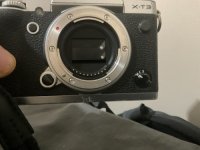
Dreaded shutter curtain stuck open. I’ve tried all the fixes, no luck. I’m not sure sending to Fuji to be repaired will be worth it.
They used to give quotes but seems like you have to send the item now.
 
View attachment 464796


Dreaded shutter curtain stuck open. I’ve tried all the fixes, no luck. I’m not sure sending to Fuji to be repaired will be worth it.
They used to give quotes but seems like you have to send the item now.
I’d send it to get a price. They’ve always been a reasonably priced repair.
 
@myotis

Hi Graham,

thanks for your input and testing that .. Would you please mind to share your DR100 and DR400 shots ? Just NEF files only (not jpegs) ..

regards, ~d
I know this isn't very helpful, but I would prefer not to get involved beyond the forum. And I've exhausted the amount of time I want to spend on this.

Sorry

My pictures in RT look very much like yours. However, I'm not looking at the overall exposure but at the changes in exposure in the shadows compared to the highlights, and this doesn't seem linear. I have double checked the raw RAF file sizes and the DR100 and DR400 are both 33.4Mb: the DR200 is 33.5Mb
 
View attachment 464796


Dreaded shutter curtain stuck open. I’ve tried all the fixes, no luck. I’m not sure sending to Fuji to be repaired will be worth it.
They used to give quotes but seems like you have to send the item now.
Only last Thursday I used A.J. Johnstone & Co Limited (Professional Camera Repairs) based in Glasgow city centre for a clean & check over of my camera body …..along with four lenses, absolutely fabulous service from them…….they work on Fuji gear no problems whatsoever…!

Hope this helps…


Regards.
Peter
Central Scotland
 
@ntz I think you have clearly demonstrated something that explains an issue that you identified with your equipment and images. Maybe it affects other users maybe not, clearly others are not actually concerned about what you found irrespective of the effort and science you have applied to identify your issue. The lack of appreciation by others of your findings seems to have bothered you, but it all seems to be your issue, or put another way, you found a problem apparently affecting you, you wanted to share it, which you have, but others don't recognise it. I'd suggest drawing a line under it and moving on in whatever direction that may be, in discussion or photographing. There's no point in falling out over it.
 
Only last Thursday I used A.J. Johnstone & Co Limited (Professional Camera Repairs) based in Glasgow city centre for a clean & check over of my camera body …..along with four lenses, absolutely fabulous service from them…….they work on Fuji gear no problems whatsoever…!

Hope this helps…


Regards.
Peter
Central Scotland
Thanks, Peter :)
 
DSCF0157.jpeg

I don’t remember the last time I used a TCL on any of my X100’s. Clicking around in the garden just now. Animal detection used. This is SOOC. Largest screen to view has been my iPhone. I’m thinking it’s (the X100vi) has found the eye.
 
Hello guys,

I am very frustrated on what has happened here ... I've hit some problem which I did not understand in the beginning, asked here, didn't get the answer and in the meanwhile after I did ask here I've figured out what the problem is. I've explained, demonstrated and proved my findings and analysis and provided all my input data including RAW files.

I've got in return absolutely frustrating and irrational denying and blaming me, that my software is wrong, my thinking is wrong, my camera is wrong, my conclusions are wrong and so on ..

I'm late to the party on this 'issue'.

My understanding going back some time ago is that the DR settings don't magically get you something for nothing. The image is underexposed. I don't think this underlying 'cost' has been hidden but if you switch your camera to DR400 it may not be immediately obvious. There's not much magic going on.

If Nikon or Canon or any other manufacturer is doing it differently then that's just a design decision. Fuji have taken a design decision that isn't just playing with in-camera processing but manipulates the exposure as well. They obviously think that it is a better way of doing things. Mileage may vary for those who use these features.

I would say that I'm quite cynical about these sorts of features as they clutter up cameras menus and functionality. And i suspect hat there many here who don't use these sorts of features because they would naturally control the exposure and offset by -2 or whatever themselves with the intention of then applying post processing, So it just doesn't matter to a lot of us.
 
Back
Top