The Fabulous Fuji X owners thread

A candid street style Snap captured a “Market Stall Holder” in a bustling London market, sitting and taking a break between customers.

"Market Stall Holder (1)"

Market Stall Holder (1)-04011 by G.K.Jnr., on Flickr
 
Hello,

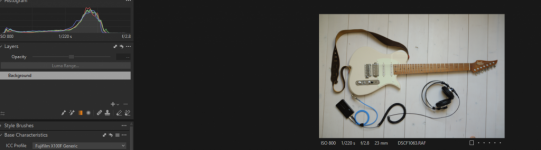
please see this shot, look on the exif ... it says +2/3EV and yet the raw clearly shows, that it's underexposed as hell ... I don't shoot with my x100f that often, returned from the vacation and started processing my images and I can see that literally all the images from vacation are crippled like this ... JPG is in-camera developed to look somehow OK but images under the hood (while checking the raw data) are basically all underexposed massively ...

what the f..... o.O

thanks much and regards, ~dan
 

Attachments

  • Screenshot_20251003_102607.jpg
    Screenshot_20251003_102607.jpg
    68.7 KB · Views: 29
@ntz

what was metering mode?
It's in the EXIF ;) and it is the dafault "Matrix" mode (it's internally called by Fuji `Multi-segment') .. no changes here to settings or camera metering defaults .. I've demonstrated purposely on this shot because bright light shots are `less' underexposed but still massively underexposed compared to any other camera that I have (or have experience with)
 
Hello,

please see this shot, look on the exif ... it says +2/3EV and yet the raw clearly shows, that it's underexposed as hell ... I don't shoot with my x100f that often, returned from the vacation and started processing my images and I can see that literally all the images from vacation are crippled like this ... JPG is in-camera developed to look somehow OK but images under the hood (while checking the raw data) are basically all underexposed massively ...

what the f..... o_O

thanks much and regards, ~dan

Do you have any other RAW processing software you could try just to rule out a bug or misconfiguration?

After that, I guess to narrow down if it's a problem with the meter or a hardware problem you could set up a scene and compare with your phone. Most have a "pro" mode that let you set the exposure triangle yourself - Simply meter with the camera then enter those settings in the phone and see what the exposure looks like.

If the settings the camera gives look underexposed on the phone, there's a metering problem. If the settings the camera gives look fine on the phone, my best guess would be either a stuck/faulty aperture, a faulty shutter, or the ND filter is stuck in place...
 
Do you have any other RAW processing software you could try just to rule out a bug or misconfiguration?

please read my question again .. I've even provided my photo - there's a link pointing to the zip file with both raw and jpeg (there's link, don't you see that ???) .. it contains out-of-camera-jpeg and raw-file (which contains raw-embedded-jpeg and full exif data) .. It has absolutely nothing to do with processing software ...

ok, perhaps you don't understand how metering and developing the photo works in the camera - camera applies a picture profile, wb-settings and additional settings (like for instance DR or noise reduction and/or other processing) and this is what you see in EVF (electronic viewfinder) with mirrorless cameras .. It even doesn't matter if you use A mode (aperture) or M mode (manual) because camera calculates the aperture and shows that in EVF or LV (live view) based on the profile tone curve and mentioned parameters unrelated to shooting mode. This is what you see as an out-of-camera-processed-jpeg or in-raw-file-embedded-jpeg .. then if you check the real raw data you'll find, that exposure in raw data after switching to neutral (flat) profile could differ a lot.

Maybe you perhaps noticed sometimes, that if you will look how cameras calculate exposure, that the tone S-curve heavily gravitates towards favouring mids, highlights and whites over the shadows and blacks - means that the S curve will have the majority of her volume (aka 90:10) above the diagonal line in histogram (shadows left, highlights right, black is at the bottom and white is at the top) and my fuji camera as I've demonstrated above and discussing here does this processing in way-too-much aggressive and unusual manner ..
 
Last edited:
@ntz please this is a freindly forum and members genuinely try to help each other, try not to school us :)

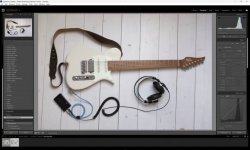
I have taken the trouble to download your images, and can find nothing wrong, I loaded both into Lightroom Classic and the histograms are virually identical (give a bit for the JPG profile)

Your RAW image in LRC - note I've not touched the sliders (so maybe @jimmyjamjojo had a point!) - nice toe BTW :ROFLMAO:

ntz.jpg
 
Last edited:
Just catching up on some images that I shot at the end of August...

Great White Egret up closw as it passed the hide.

GWE by Steve Jelly, on Flickr

One of my favourite birds, the Lapwing

Lapwing by Steve Jelly, on Flickr

And what I think is a Common Sandpiper

Sandpiper by Steve Jelly, on Flickr

All shot on the T5 & 100-400
 
I have taken the trouble to download your images, and can find nothing wrong, I loaded both into Lightroom Classic and the histograms are virually identical (give a bit for the JPG profile)

Your RAW image in LRC - note I've not touched the sliders (so maybe @jimmyjamjojo had a point!) - nice toe BTW :ROFLMAO:

View attachment 464659

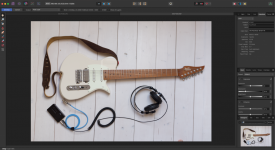
Same here - this is how your RAW image looks in Affinity, with no adjustments made:
Screenshot 2025-10-03 at 14.40.41.png

Nice guitar - I've always liked the look of Vola stuff (y)
 
please read my question again .. I've even provided my photo - there's a link pointing to the zip file with both raw and jpeg (there's link, don't you see that ???) .. it contains out-of-camera-jpeg and raw-file (which contains raw-embedded-jpeg and full exif data) .. It has absolutely nothing to do with processing software ...

ok, perhaps you don't understand how metering and developing the photo works in the camera - camera applies a picture profile, wb-settings and additional settings (like for instance DR or noise reduction and/or other processing) and this is what you see in EVF (electronic viewfinder) with mirrorless cameras .. It even doesn't matter if you use A mode (aperture) or M mode (manual) because camera calculates the aperture and shows that in EVF or LV (live view) based on the profile tone curve and mentioned parameters unrelated to shooting mode. This is what you see as an out-of-camera-processed-jpeg or in-raw-file-embedded-jpeg .. then if you check the real raw data you'll find, that exposure in raw data after switching to neutral (flat) profile could differ a lot.

Maybe you perhaps noticed sometimes, that if you will look how cameras calculate exposure, that the tone S-curve heavily gravitates towards favouring mids, highlights and whites over the shadows and blacks - means that the S curve will have the majority of her volume (aka 90:10) above the diagonal line in histogram (shadows left, highlights right, black is at the bottom and white is at the top) and my fuji camera as I've demonstrated above and discussing here does this processing in way-too-much aggressive and unusual manner ..

I've been shooting Fuji for over a decade. I know the cameras, I know the tone curve, and I know the files. I definitely know how jpg vs raw works, and I'm well aware that the WYSIWYG displayed in the evf is different from the flat profile of the raw (unless you have natural live view enabled). While the tone curve adjustments made in camera do apply to the metering and the in-camera histogram, even at maximum settings they'd never be enough to skew exposure from +2/3 to being underexposed.

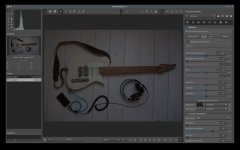
I must confess I didn't see the link. Now that I have, I can see the same as the others - Both images look the same exposure-wise. Here's the raw, in capture one, with no adjustments. Granted you have some headroom, but it certainly isn't "underexposed as hell".


1759502324794.png


Your files are fine. It seems your developer is interpreting them incorrectly - Please read the first line of my previous reply.

Best of luck finding a solution.
 
OK guys, mystery solved ... I don't blame you that you don't know how raw date Vs color profiles work :D (joke but true) .. I was googling further and found this


and indeed .. I had there DR400 which is underexposing photos ... On Canon or Nikon cameras this feature works differently and it doesn't affect the RAW (ie notice here for example)

lesson taken, solution:

DR400 is severely damaging the raw data because Fuji camera underexpose with it images by 2 stops ... So if you're shooting to both RAW and JPEG make sure that your recipe (https://fujixweekly.com/fujifilm-x-trans-iii-recipes/) is not employing DR400 ...

I am shooting many years but I've never noticed this with any other camera .. as I said, I returned from vacation and found all shots taken crippled and damaged by underexposing ... this is just the real thing .. I've tested it now .. it's DR400 .. no need to look further .. this is just something that shall be avoided if you want to use RAWs as well

 
OK guys, mystery solved ... I don't blame you that you don't know how raw date Vs color profiles work :D (joke but true) .. I was googling further and found this


and indeed .. I had there DR400 which is underexposing photos ... On Canon or Nikon cameras this feature works differently and it doesn't affect the RAW (ie notice here for example)

lesson taken, solution:

DR400 is severely damaging the raw data because Fuji camera underexpose with it images by 2 stops ... So if you're shooting to both RAW and JPEG make sure that your recipe (https://fujixweekly.com/fujifilm-x-trans-iii-recipes/) is not employing DR400 ...

I am shooting many years but I've never noticed this with any other camera .. as I said, I returned from vacation and found all shots taken crippled and damaged by underexposing ... this is just the real thing .. I've tested it now .. it's DR400 .. no need to look further .. this is just something that shall be avoided if you want to use RAWs as well


The DR function is to protect the highlights in very contrasty scenes. It shouldn't globally under expose, just drop the highlights. I think I've pretty much shot in DR Auto since getting my X100f and never had any full under exposure issues.
 
The DR function is to protect the highlights in very contrasty scenes. It shouldn't globally under expose, just drop the highlights. I think I've pretty much shot in DR Auto since getting my X100f and never had any full under exposure issues.
I also use the DR setting with Fuji and highlight weighted metering, which does something similar, in my Nikon nearly all the time.

I don't have an issue with underexposure, but it seems to "compress" the dynamic range if the picture contains a lot of light areas.
 
Back
Top