

You are using an out of date browser. It may not display this or other websites correctly.
You should upgrade or use an alternative browser.
You should upgrade or use an alternative browser.
The Fabulous Fuji X owners thread
- Thread starter mart77
- Start date

tijuana taxi
Suspended / Banned
- Messages
- 15,748
- Name
- Rich
- Edit My Images
- Yes
Nah, this is the snerkler funky bokeh effect
Who needs the Northern Lights or St Elmos Fire with these new natural phenomena courtesy of Fuji
tijuana taxi
Suspended / Banned
- Messages
- 15,748
- Name
- Rich
- Edit My Images
- Yes
Are the Fuji 55-200 a snappy lens at AF indoor like now when lamps are on?
As on my current sony 70-200 it sometime sluggish and miss focus
Depends what lamps you have, some people have bulbs about as bright as a glow worms arse in the fog

rookies
Suspended / Banned
- Messages
- 8,064
- Name
- Andrew
- Edit My Images
- No
Depends what lamps you have, some people have bulbs about as bright as a glow worms arse in the fog
Some time it bright lamp sometime it dull lamp and the sony does still hunt

macvisual
Suspended / Banned
- Messages
- 7,193
- Name
- Peter
- Edit My Images
- No
Very nice Steve, have you owned the XF100-400mm lens long..? What do you think of it..?When I bought the X-T2 I wanted to know if it could replace my 7D2 for wildlife. This was shot with the 100-400 and 1.4EX.
Crested Tit by Steve Jelly, on Flickr
This is JPG, straight from camera, just resized in PS. I have to say I'm quite pleased... I'll play with the RAW file when I have more time.
I'm currently looking closely at one to add to my XF line-up.

addicknchips
Suspended / Banned
- Messages
- 9,795
- Name
- Jonathan
- Edit My Images
- No
Very nice Steve, have you owned the XF100-400mm lens long..? What do you think of it..?
I'm currently looking closely at one to add to my XF line-up.
You'll love it Peter.

mickledore
Suspended / Banned
- Messages
- 9,372
- Edit My Images
- Yes


Jelster
Suspended / Banned
- Messages
- 9,986
- Name
- Steve
- Edit My Images
- Yes
Very nice Steve, have you owned the XF100-400mm lens long..? What do you think of it..?
I'm currently looking closely at one to add to my XF line-up.
I've currently got it on loan Peter, from LFH. I intend to replace my 7D2 & Sigma 150-600 Sport set up with the Fuji combo, but I wanted to test it first. It's just so much lighter than my existing wildlife kit, which I tried to use today but put back as it was just too heavy to handhold while chasing little birds like Tits...

G.K.Jnr.
Suspended / Banned
- Messages
- 34,213
- Name
- George.
- Edit My Images
- No
Blimey guys, I've only been off line for 2 weeks and I had 80 pages to catch up on [emoji849]
So what's your excuse for going AWOL Gregg, It had better be good or well just have to put you on a fizz.

George.

Nuzik
Suspended / Banned
- Messages
- 1,363
- Name
- Neil
- Edit My Images
- No
Actually made my day this.Depends what lamps you have, some people have bulbs about as bright as a glow worms arse in the fog

snerkler
Suspended / Banned
- Messages
- 26,078
- Name
- Toby
- Edit My Images
- No
Unfortunately funky bokeh's not limited to FujiWho needs the Northern Lights or St Elmos Fire with these new natural phenomena courtesy of Fuji
G.K.Jnr.
Suspended / Banned
- Messages
- 34,213
- Name
- George.
- Edit My Images
- No
Depends what lamps you have, some people have bulbs about as bright as a glow worms arse in the fog
"BRILLIANT"

dave.hallett
Suspended / Banned
- Messages
- 1,361
- Name
- Dave
- Edit My Images
- Yes
True dat. To further complicate the issue, I have the issue that Chrome isn't using the ICC profile for my Spyder. It may be using the one for my monitor, not sure. The upshot is that whenever I upload a pic to any website (or indeed just open the image file in Chrome directly) it's notably darker than the same file in Photoshop, Lightroom, Irfanview, whatever. Viewing the same website in MS Edge it looks OK. On Googling this seems to be a known Chrome bug, one that Google can't be bothered to fix because it only affects graphics professionals and keen amateur togs. Sigh...Unfortunately funky bokeh's not limited to Fuji
dave.hallett
Suspended / Banned
- Messages
- 1,361
- Name
- Dave
- Edit My Images
- Yes
Anyway, here's a bit of magic from last night. I was struggling with the fading light on this riverbank on the south edge of Port Meadow, wondering about getting the tripod out, wondering whether the shot was really worth the effort, when these ghostly swans glided silently out of the gloom. There wan't much time to react, and in retrospect I should probably have upped the ISO from 640 where I had it. If I had a X-T1 with an ISO dial, things might have been different  But I bracketed a lot and managed to get the swans reasonably sharp in some underexposed shots, and then used the longer exposures with blurry swans to at least reduce the noise in the dark pics when I opened them up a little. I could have done better, no doubt, but at least I came away with a picture...

Ghost swans, Port Meadow by David Hallett, on Flickr
But I bracketed a lot and managed to get the swans reasonably sharp in some underexposed shots, and then used the longer exposures with blurry swans to at least reduce the noise in the dark pics when I opened them up a little. I could have done better, no doubt, but at least I came away with a picture... Ghost swans, Port Meadow by David Hallett, on Flickr
Nuzik
Suspended / Banned
- Messages
- 1,363
- Name
- Neil
- Edit My Images
- No
Could you not change the screens settings rather than use a software option to change the screen? Some screens have great options for calibrations some sadly don'tTrue dat. To further complicate the issue, I have the issue that Chrome isn't using the ICC profile for my Spyder. It may be using the one for my monitor, not sure. The upshot is that whenever I upload a pic to any website (or indeed just open the image file in Chrome directly) it's notably darker than the same file in Photoshop, Lightroom, Irfanview, whatever. Viewing the same website in MS Edge it looks OK. On Googling this seems to be a known Chrome bug, one that Google can't be bothered to fix because it only affects graphics professionals and keen amateur togs. Sigh...
dave.hallett
Suspended / Banned
- Messages
- 1,361
- Name
- Dave
- Edit My Images
- Yes
Yeah, I think it should be possible to adjust the monitor so that the brightness setting uncalibrated is closer to that calibrated. Right now I can't quite work out what I need to do, but I guess the answer is probably turn the brightness up a bit and recalibrate. My monitor is a Dell Ultrasharp 2209WA, so hardly state of the art. But I like the picture.Could you not change the screens settings rather than use a software option to change the screen? Some screens have great options for calibrations some sadly don't
I just don't really understand why Chrome can't get something right that even a Microsoft browser (OMG!) can manage correctly.
Nuzik
Suspended / Banned
- Messages
- 1,363
- Name
- Neil
- Edit My Images
- No
I do quite a bit of graphic and web site work as well. And IE tends to make images look s*** where as Chrome doesn't. Some become so bad I have to start again. It's an issue with all really.Yeah, I think it should be possible to adjust the monitor so that the brightness setting uncalibrated is closer to that calibrated. Right now I can't quite work out what I need to do, but I guess the answer is probably turn the brightness up a bit and recalibrate. My monitor is a Dell Ultrasharp 2209WA, so hardly state of the art. But I like the picture.
Nuzik
Suspended / Banned
- Messages
- 1,363
- Name
- Neil
- Edit My Images
- No


jimmyjamjojo
Suspended / Banned
- Messages
- 1,885
- Name
- Jamie
- Edit My Images
- Yes
I like it. Not every photo needs to be stretched to full dynamic range. I think the darkness adds to the composition. What matters is the lovely sky, a bit of balance from the reflections, and the surprisingly accurate ethereal glow that the swans give off in such light.Anyway, here's a bit of magic from last night. I was struggling with the fading light on this riverbank on the south edge of Port Meadow, wondering about getting the tripod out, wondering whether the shot was really worth the effort, when these ghostly swans glided silently out of the gloom. There wan't much time to react, and in retrospect I should probably have upped the ISO from 640 where I had it. If I had a X-T1 with an ISO dial, things might have been different
Ghost swans, Port Meadow by David Hallett, on Flickr
(also, I have iso as the top left option on my q menu so it is litterally one button press, then wheel it in
)
macvisual
Suspended / Banned
- Messages
- 7,193
- Name
- Peter
- Edit My Images
- No
I've heard/read it's got 5 stops OIS which seems amazing to be honest......! wOwI've currently got it on loan Peter, from LFH. I intend to replace my 7D2 & Sigma 150-600 Sport set up with the Fuji combo, but I wanted to test it first. It's just so much lighter than my existing wildlife kit, which I tried to use today but put back as it was just too heavy to handhold while chasing little birds like Tits...

- Messages
- 7,468
- Name
- Stephen
- Edit My Images
- No
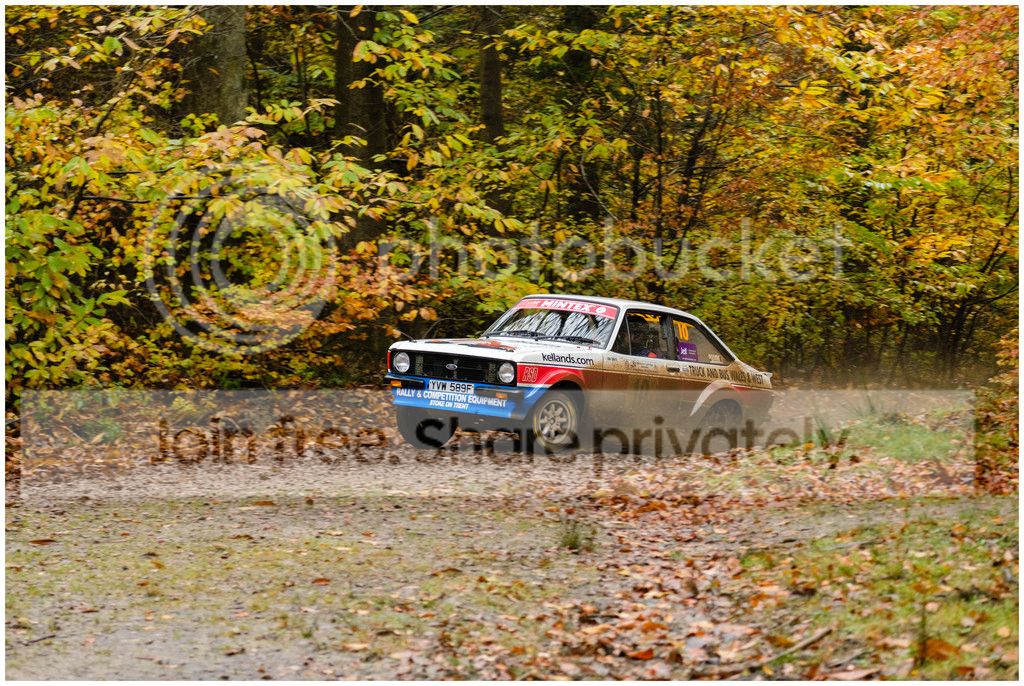
Some nice cars there like wot I used to navigate in my dim and distant past. Before I was wed. Sigh.A couple from the Wyedean Rally, all taken with XT-2 and 55-200mm lens
ISO 6400
ISO 12800
ISO 2500
ISO 2500
ISO 2000
ISO 1600

Thunderbird010
Suspended / Banned
- Messages
- 2,610
- Name
- Andy
- Edit My Images
- Yes
PmslDepends what lamps you have, some people have bulbs about as bright as a glow worms arse in the fog
snerkler
Suspended / Banned
- Messages
- 26,078
- Name
- Toby
- Edit My Images
- No
Doesn't your calibrator tell you what your monitor's luminance/brightness level should be?Yeah, I think it should be possible to adjust the monitor so that the brightness setting uncalibrated is closer to that calibrated. Right now I can't quite work out what I need to do, but I guess the answer is probably turn the brightness up a bit and recalibrate. My monitor is a Dell Ultrasharp 2209WA, so hardly state of the art. But I like the picture.
snerkler
Suspended / Banned
- Messages
- 26,078
- Name
- Toby
- Edit My Images
- No
Love a good rally picA couple from the Wyedean Rally, all taken with XT-2 and 55-200mm lens
ISO 6400
ISO 12800
ISO 2500
ISO 2500
ISO 2000
ISO 1600
 I wish they still came through Chatsworth like they did in the good old Lombard RAC days.
dave.hallett
Suspended / Banned
- Messages
- 1,361
- Name
- Dave
- Edit My Images
- Yes
Well, of course IE is rubbish. Always has been. That's why I was surprised to see Edge get it right!I do quite a bit of graphic and web site work as well. And IE tends to make images look s*** where as Chrome doesn't. Some become so bad I have to start again. It's an issue with all really.
No. Or not that I've noticed. The Spyder4Express instructions just say to adjust your monitor brightness to a level you find comfortable. I think I've been trying to get it lower to make the difference with prints less pronounced. I seem to remember reading that there's some more sophisticated software available for free that can use the Spyder 4 sensor, although it's reputed to have quite a learning curve. Maybe I should look into it.Doesn't your calibrator tell you what your monitor's luminance/brightness level should be?
dave.hallett
Suspended / Banned
- Messages
- 1,361
- Name
- Dave
- Edit My Images
- Yes
Thanks! And yes, I have ISO on the front wheel, so I can't really blame the X-T10 for my lack of presence of mind!I like it. Not every photo needs to be stretched to full dynamic range. I think the darkness adds to the composition. What matters is the lovely sky, a bit of balance from the reflections, and the surprisingly accurate ethereal glow that the swans give off in such light.
(also, I have iso as the top left option on my q menu so it is litterally one button press, then wheel it in
snerkler
Suspended / Banned
- Messages
- 26,078
- Name
- Toby
- Edit My Images
- No
Ahh right. First time I properly calibrated my screen I was surprised just how dim it's supposed to be.Well, of course IE is rubbish. Always has been. That's why I was surprised to see Edge get it right!
No. Or not that I've noticed. The Spyder4Express instructions just say to adjust your monitor brightness to a level you find comfortable. I think I've been trying to get it lower to make the difference with prints less pronounced. I seem to remember reading that there's some more sophisticated software available for free that can use the Spyder 4 sensor, although it's reputed to have quite a learning curve. Maybe I should look into it.
Nuzik
Suspended / Banned
- Messages
- 1,363
- Name
- Neil
- Edit My Images
- No
Not as dim as youAhh right. First time I properly calibrated my screen I was surprised just how dim it's supposed to be.

jimgallaher
Suspended / Banned
- Messages
- 2,864
- Name
- Jim
- Edit My Images
- Yes
snerkler
Suspended / Banned
- Messages
- 26,078
- Name
- Toby
- Edit My Images
- No
Not much that dim TBH, probably only a glow worm's arse in the fogNot as dim as you

- Messages
- 1,819
- Name
- Gregg
- Edit My Images
- Yes
So what's your excuse for going AWOL Gregg, It had better be good or well just have to put you on a fizz.
George.
Nothing sinister George, just got REALLY busy - sold the Mercedes which has been bankrupting me, bought a Volvo, bought a pipe and slippers [emoji38], work went crazy, and I'm having the front room insulated and plastered. All of my camera gear is in a cabinet which I've dust proofed with a roll of masking tape [emoji3]
- Messages
- 1,819
- Name
- Gregg
- Edit My Images
- Yes
[emoji106][emoji106]

Mr Perceptive
Suspended / Banned
- Messages
- 9,347
- Name
- David
- Edit My Images
- Yes

161113 Sarsia, Birkenhead by Mr Perceptive X100, on Flickr

chrism_scotland
Suspended / Banned
- Messages
- 7,958
- Name
- Chris
- Edit My Images
- Yes
Nothing sinister George, just got REALLY busy - sold the Mercedes which has been bankrupting me, bought a Volvo, bought a pipe and slippers [emoji38], work went crazy, and I'm having the front room insulated and plastered. All of my camera gear is in a cabinet which I've dust proofed with a roll of masking tape [emoji3]
Nothing wrong with a Volvo.. although all I ever see is old men driving them... which one did you go for?

BacktotheFuji
Suspended / Banned
- Messages
- 4,918
- Name
- Graham
- Edit My Images
- No
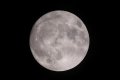
Has anyone seen the moon tonight yet? Disaster! Tried last night as well but there was still too much cloud to get a sharp shot. Looking through the EVF it looked OOF most of the time until parts of the cloud passed, revealing the real detail.
Anyway, here's one of the best of a bad bunch. Shot with the Canon FD 300/2.8L + 2x TC
Anyway, here's one of the best of a bad bunch. Shot with the Canon FD 300/2.8L + 2x TC
Last edited:
rookies
Suspended / Banned
- Messages
- 8,064
- Name
- Andrew
- Edit My Images
- No
Has anyone seen the moon tonight yet? Disaster! Tried last night as well but there was still too much cloud to get a sharp shot. Looking through the EVF it looked OOF most of the time until parts of the cloud passed, revealing the real detail.
Anyway, here's one of the best of a bad bunch. Shot with the Canon FD 300/2.8L + 2x TC
View attachment 77444
Yeah I've taken a few and posted one up over the sony thread. Was hard tonight with all the clouds keep flying past..
BacktotheFuji
Suspended / Banned
- Messages
- 4,918
- Name
- Graham
- Edit My Images
- No
mickledore
Suspended / Banned
- Messages
- 9,372
- Edit My Images
- Yes
Saw it last night and was distinctly underwhelmed. Too much cloud tonight. Won't be staying up waiting for clear skies.Has anyone seen the moon tonight yet? Disaster! Tried last night as well but there was still too much cloud to get a sharp shot. Looking through the EVF it looked OOF most of the time until parts of the cloud passed, revealing the real detail.
Anyway, here's one of the best of a bad bunch. Shot with the Canon FD 300/2.8L + 2x TC
View attachment 77444
BacktotheFuji
Suspended / Banned
- Messages
- 4,918
- Name
- Graham
- Edit My Images
- No
Yeah I've taken a few and posted one up over the sony thread. Was hard tonight with all the clouds keep flying past..
Your moon looks a bit like the one we've got here, but smaller