The Fabulous Fuji X owners thread

I wonder if anyone can solve a mystery for me?
Over the last 10-14 days I have noticed that one of my X-Pro2 cameras seems to change the active card slot it uses.
I have it set to record 'F+RAW' on the card in slot 1 and 'Sequential' to allow 'overwrite' on the card in slot 2, this has worked fine until recently.
After a photowalk now, I remove the card in slot 1 to find it empty ... all jpeg & RAW files have been written to slot 2 and I manually change the setting in the menu.
Is there a setting that I am missing ... or am I changing a setting by sloppy handling in use (I often do M/S/C or exp. comp)!
TIA
 
I wonder if anyone can solve a mystery for me?
Over the last 10-14 days I have noticed that one of my X-Pro2 cameras seems to change the active card slot it uses.
I have it set to record 'F+RAW' on the card in slot 1 and 'Sequential' to allow 'overwrite' on the card in slot 2, this has worked fine until recently.
After a photowalk now, I remove the card in slot 1 to find it empty ... all jpeg & RAW files have been written to slot 2 and I manually change the setting in the menu.
Is there a setting that I am missing ... or am I changing a setting by sloppy handling in use (I often do M/S/C or exp. comp)!
TIA
A few times I manage to change mine over to slot 2 (xt5). Only shooting raw, but I think it's something to do with the sequence of viewing and deleting. Like if you hit the bin button without the selected image etc. I've never really been able to get to the real cause, but it's happened when I'm doing that ;)
 
I wonder if anyone can solve a mystery for me?
Over the last 10-14 days I have noticed that one of my X-Pro2 cameras seems to change the active card slot it uses.
I have it set to record 'F+RAW' on the card in slot 1 and 'Sequential' to allow 'overwrite' on the card in slot 2, this has worked fine until recently.
After a photowalk now, I remove the card in slot 1 to find it empty ... all jpeg & RAW files have been written to slot 2 and I manually change the setting in the menu.
Is there a setting that I am missing ... or am I changing a setting by sloppy handling in use (I often do M/S/C or exp. comp)!
TIA

Off the top of my head - Check that the card in slot one isn't physically write-protected, or try swapping the cards and confirming settings before trying again. The camera will silently fail-over to slot 2 if there is a problem in slot 1.
If you swap cards and it still does the same, it could be the slot that's failing.
 
Last edited:
Like if you hit the bin button without the selected image etc.
Possible, i'll keep an eye out for that as I sometimes delete in camera.
Off the top of my head - Check that the card in slot one isn't physically write-protected, or try swapping the cards and confirming settings before trying again. The camera will silently fail-over to slot 2 if there is a problem in slot 1.
If you swap cards and it still does the same, it could be the slot that's failing.
Definitely not write-protected so potential concern - still under warranty though.
I've coincidentally got a new card coming today so can do a reliable test, card or slot.
 
Just found this on another forum:
to quickly change card slots on an X-T2 and X-Pro2, enter review mode and double press the joystick!
Not sure i've done that but something else to watch out for. :)
 
I read Thomas Fitzgerald blog about processing the latest Fuji raw files. I never actually knew there was a new button in lightroom called Raw Detail (not enhance detail) which changes the way lightroom renders the Raw File and it better for X-Trans files. My X-T5 files are noticeably better with it. Using the AI denoise tool also automatically applies this.

He also mentions DXO Pure Raw which have an X-Trans dedicated Raw Converter. Tried the 2 week free trial. The files are better but not £100 better than the Lightroom Raw Detail files IMO.

 
Last edited:
I read Thomas Fitzgerald blog about processing the latest Fuji raw files. I never actually new there was a new button in lightroom called Raw Detail (not enhance detail) which changes the way lightroom renders the Raw File and it better for X-Trans files. My X-T5 files are noticeably better with it. Using the AI denoise tool also automatically applies this.

He also mentions DXO Pure Raw which have an X-Trans dedicated Raw Converter. Tried the 2 week free trial. The files are better but not £100 better than the Lightroom Raw Detail files IMO.


DXO PureRAW is a lot faster on machines with less modern graphics cards - I've found it extracts slightly more detail than LR, but it can get a bit excited with "Greens" when using it with X-Trans sensors

PureRAW is also excellent on High ISO images
 
Just found this on another forum:

Not sure i've done that but something else to watch out for. :)

I did think about that, but AFAIK it only changes the card that you're looking at in review mode. Shooting/recording should remain the same.
 
X-T30III on the way, according to my YouTube feed today:

View: https://youtu.be/5UPv6H4FnQg


I wonder how it will be priced. If it's a good chunk less than the X-T50 I can see it selling well...

EDIT: looks like I'm a bit late to this; there are already reviews everywhere. Can't find it for sale (although I only looked very quickly).
 
Last edited:
Sorry for spamming the thread. But wanted to say how impressed I am with Subject detection on the X100vi. These taken with me holding the camera down low. Pointing in the general direction of Willow and trusting the camera.
Uploaded via my phone after transferring from the camera via the X App. Seems to work well.
HEIF with a small crop.
 

Attachments

  • DSCF0223.jpeg
    DSCF0223.jpeg
    153.8 KB · Views: 14
  • DSCF0222.jpeg
    DSCF0222.jpeg
    143.9 KB · Views: 14
I have just popped an XC 50-230 up in the classifieds is anyone is interested in a cheap zoom.

Also added a Fuji mount Viltrox 25 f1.7
 
Last edited:
Have just had email from Adobe saying they are raising my subscription from 9.99 to 14.99. I use C1 99% of the time and only use LR for denoise when I need it. Was thinking of sacking Adobe and getting Luminar Neo mainly for something to replace denoise but also like the look of some of the other tools it has. What are people thoughts on Luminar?
 
Have just had email from Adobe saying they are raising my subscription from 9.99 to 14.99. I use C1 99% of the time and only use LR for denoise when I need it. Was thinking of sacking Adobe and getting Luminar Neo mainly for something to replace denoise but also like the look of some of the other tools it has. What are people thoughts on Luminar?
Are you too late to switch to paying Adobe, annually rather than monthly, which will keep the cost at the old rate?

There have been several posts on here about people doing this.

I don't know anything about Luminar, but both Topaz Photo and ON1 Denoise have plugins for C1, which is useful. DXO Pure Raw is probably the *best* of the three, but it doesn't have a plugin for C1.

If you use C1 sessions, this doesn't matter because the session automatically updates, but with a C1 catalogue, you need to manually sync the catalogue after DXO has created the DNG.

*best* ?

My tests comparing Adobe denoise, Topaz, DXO and ON1 show that the "best" varies depending on the individual file being tested, and there is no clear winner, but if I could only have one program, it would be DXO. On1 Denoise was my least favourite. Adobe, was "solid" but couldn't match DXO for detail. Topaz was the most unpredictable, but still capable of giving the best results on some files.

Having said that, the most recent release of Topaz, "seems" to give me better results, than DXO or Adobe (I don't have the most recent version of ON1 Denoise to compare, and I have made no detailed comparisons with this new version of Topaz). But the new Topaz subscription is more than the cost of your Adobe updated price.

For medium ISOs (up to about 5000ISO), most of the time, I still prefer the results from C1, which seems to give good results as long as I use it with selective masking (for detailed subject areas and shadows).

 
Are you too late to switch to paying Adobe, annually rather than monthly, which will keep the cost at the old rate?

There have been several posts on here about people doing this.

I don't know anything about Luminar, but both Topaz Photo and ON1 Denoise have plugins for C1, which is useful. DXO Pure Raw is probably the *best* of the three, but it doesn't have a plugin for C1.

If you use C1 sessions, this doesn't matter because the session automatically updates, but with a C1 catalogue, you need to manually sync the catalogue after DXO has created the DNG.

*best* ?

My tests comparing Adobe denoise, Topaz, DXO and ON1 show that the "best" varies depending on the individual file being tested, and there is no clear winner, but if I could only have one program, it would be DXO. On1 Denoise was my least favourite. Adobe, was "solid" but couldn't match DXO for detail. Topaz was the most unpredictable, but still capable of giving the best results on some files.

Having said that, the most recent release of Topaz, "seems" to give me better results, than DXO or Adobe (I don't have the most recent version of ON1 Denoise to compare, and I have made no detailed comparisons with this new version of Topaz). But the new Topaz subscription is more than the cost of your Adobe updated price.

For medium ISOs (up to about 5000ISO), most of the time, I still prefer the results from C1, which seems to give good results as long as I use it with selective masking (for detailed subject areas and shadows).

Thanks for the detailed reply. Dxo would certainly be a great choice but also one of the dearest especially as I would be tempted by the Silver Effects pack also. I never bothered to learn Photoshop and not keen on Light Room for my Fuji where as C1 for me is far superior. In all honesty the only reason I keep Adobe is for the denoise function.
 
Thanks for the detailed reply. Dxo would certainly be a great choice but also one of the dearest especially as I would be tempted by the Silver Effects pack also. I never bothered to learn Photoshop and not keen on Light Room for my Fuji where as C1 for me is far superior. In all honesty the only reason I keep Adobe is for the denoise function.
There is no reason not to be tempted by Silver Effex pro anyway, as it works as a stand alone plugin for C1, with no need for DXO PhotoLab or DXO Pure RAW. And, it integrates better with C1 than it does with DXO Pure Raw. As far as I am aware, Silver Effex pro doesn't integrate at all with Pure Raw.

Although I have DXO Photolab, it would be Pure Raw that I would go for, as I only use it for denoising. I'm surprised they haven't produced a C1 plugin for PureRaw.

I've been working on some 5000iso/6400iso files from my fuji x100s this morning, and I'm getting noticeably better results from DXO PhotoLab 8 (round tripped from C1). I've not been impressed at all with Adobe denoise AI in this instance. Nor Topaz for that matter.
 
Sorry guys. I haven't used the X100f much lately. I'm still going through my Snowdonia images and most of those were Sony!

I did carry the Fuji on a few days where dedicated landscape wasn't on the menu though :)

Rhosneigr, Anglesey.


*** by Lee, on Flickr


*** by Lee, on Flickr


*** by Lee, on Flickr


*** by Lee, on Flickr
 
There is no reason not to be tempted by Silver Effex pro anyway, as it works as a stand alone plugin for C1, with no need for DXO PhotoLab or DXO Pure RAW. And, it integrates better with C1 than it does with DXO Pure Raw. As far as I am aware, Silver Effex pro doesn't integrate at all with Pure Raw.

Although I have DXO Photolab, it would be Pure Raw that I would go for, as I only use it for denoising. I'm surprised they haven't produced a C1 plugin for PureRaw.

I've been working on some 5000iso/6400iso files from my fuji x100s this morning, and I'm getting noticeably better results from DXO PhotoLab 8 (round tripped from C1). I've not been impressed at all with Adobe denoise AI in this instance. Nor Topaz for that matter.
Thanks Graham lot of food for thought here and getting sorely tempted to get rid of Adobe soon.
 
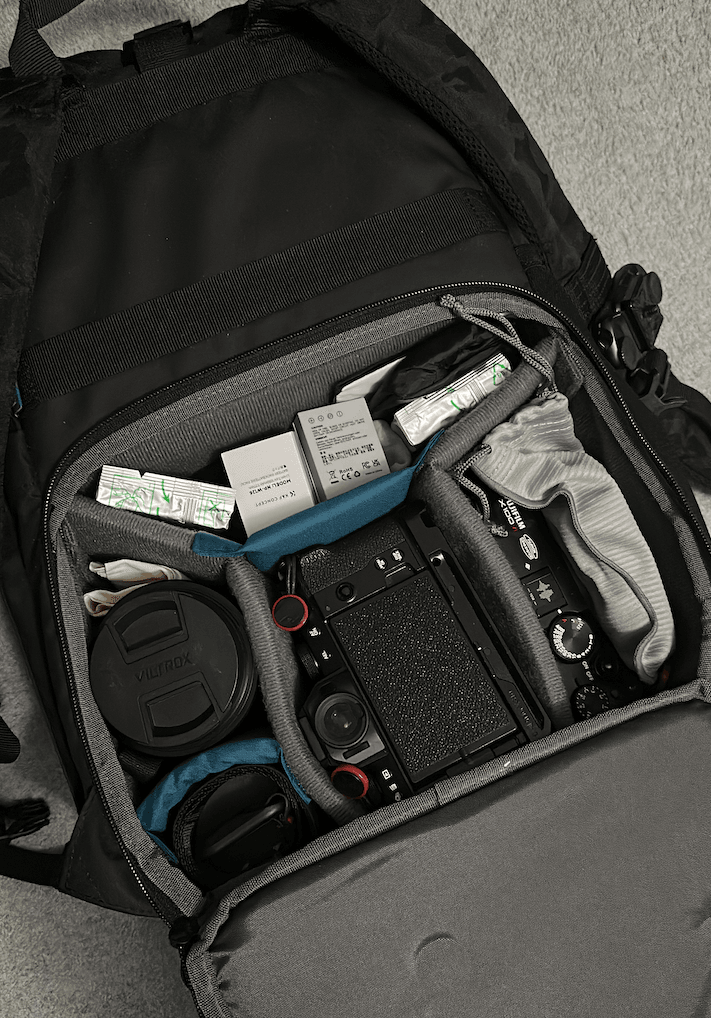
You got to love how small the X-mount is.

X-100VI (Covers the 35mm)
X-S10 with 27/1.2, 35/1.4 and 56/1.2. - I can basically do my 35/85 combo with 2 bodies, with PD capture clip on the shoulder to put my X100VI on it.
Godox Flash and trigger
Flash softbox
2 spare batteries, PD strap, cuff x 2.
2 pack of Instax film for the camera (main compartment)

1761559293739-Screenshot%202025-10-27%20at%2010.01.22.png
 
Last edited:
You got to love how small the X-mount is.

X-100VI (Covers the 35mm)
X-S10 with 27/1.2, 35/1.4 and 56/1.2. - I can basically do my 35/85 combo with 2 bodies, with PD capture clip on the shoulder to put my X100VI on it.
Godox Flash and trigger
Flash softbox
2 spare batteries, PD strap, cuff x 2.
2 pack of Instax film for the camera (main compartment)

1761559293739-Screenshot%202025-10-27%20at%2010.01.22.png

Raymond. How do you find the handling of the X-S10 with the Viltrox 27 f1.2 ?
 
LCE has an X-Pro 2 for £699 in great condition (according to the photos) but no box!

I am very tempted. Although do I really need it? If I get it, I won't take it on my trip because by all measurements the X-S10 is a more capable camera.
 
Last edited:
LCE has an X-Pro 2 for £699 in great condition (according to the photos) but no box!

I am very tempted. By all measurements the X-S10 is a more capable camera.
I think you`ve answered your own question, Raymond ;)
 
I know....I just "want" it if that make sense. I don't even use the X-Pro 1 really and between the two, the X-Pro 1 has more charm.

I just have an itch that's all.
Well if you've got an itch, it really should be scratched then ;)

Wants and needs eh
 
Back
Top