The Amazing Sony A1/A7/A9/APS-C & Anything else welcome Mega Thread!

I have too many external drives already but an SSD external might be worthwhile as it'll be quicker.

I've been processing pictures for over an hour now including panoramas and the fan hasn't kicked in once. I'm pretty convinced that noise isn't a problem with this 5 years old one and if new ones are as quiet it won't be a problem.

Just thought of an issue I could have with an Apple, plugging my printer into it.
With a Mac you don’t need to install software or anything for a printer just plug it in or connect to it using WiFi and you are good to go..

If it’s an older printer you might have issues with Windows 11 as it may not support it. You might be able to download new Windows 11 drivers from the manufacturers website.
 
It's relatively new, Canon Pro 200.

Just Googled it and there are adapters for existing leads and new leads so it's not a biggie.
 
That you’ve linked to is new I believe, the same spec new from Apple is £3099. In theory Apple Official Refurbed are just as good as new machines, although the external might show signs of being used but from my experience they’re indistinguishable. I’m not sure the warranty is as good though, I’d need to look into it.
 
A refurb direct from Apple would be a safe buy not sure if that applies to AO or not though. Is it an Apple refurb or a refurb of their own?

Not sure you would need that sort of spec tbh with a Mac either for what you use it for. You won’t need the amount of ram you would need on a windows p.c for example as it’s unified memory. Although if you are gonna go all in at tha sort of money might as well get the extra ram.
 
Last edited:
A refurb direct from Apple would be a safe buy not sure if that applies to AO or not though. Is it an Apple refurb or a refurb of their own?

Not sure you would need that sort of spec tbh with a Mac either for what you use it for. You won’t need the amount of ram you would need on a windows p.c for example as it’s unified memory.
I’d say the GPU couldn’t be important, even with my spec it can take a split second to render high res images (50mp +) when opening exported images in preview. I assume this is down to the GPU anyway? :thinking:
 
I’d say the GPU couldn’t be important, even with my spec it can take a split second to render high res images (50mp +) when opening exported images in preview. I assume this is down to the GPU anyway? :thinking:
64mp images are instant on my Mac Studio. Can’t tell any difference between any of our bodies.

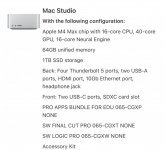
That’s the spec I have.

IMG_4448.jpeg

All my images are on an external TB5 enclosure with a Samsung 990 pro.
 
Last edited:
64mp images are instant on my Mac Studio. Can’t tell any difference between any of our bodies.

That’s the spec I have.

View attachment 473691

All my images are on an external TB5 enclosure with a Samsung 990 pro.
Probably the 40-core GPU vs my 32-core and 3 gen newer chip (y). Also, I guess it depends on the screen resolution.
 
Probably the 40-core GPU vs my 32-core and 3 gen newer chip (y). Also, I guess it depends on the screen resolution.
This is my monitor although I might be changing it soon. I am in 2 minds about getting Apple display. Mainly because they charge £300 just to get it with height adjustment.

IMG_4458.jpeg
 
Probably the 40-core GPU vs my 32-core and 3 gen newer chip (y). Also, I guess it depends on the screen resolution.
I had the M1 Pro 16 inch 32gb ram and now have an M4 max studio 16/40 core with 64gb of ram. The studio is a bit faster in Lightroom but not huge and that's with A7R v raw files - though I don't do anything complex with it. :)
The apple refurb studio was £2539 in July 2025, so prices have gone up a bit since then
 
Last edited:
64mp images are instant on my Mac Studio. Can’t tell any difference between any of our bodies.

That’s the spec I have.

I use Faststone to view pictures. When I click on a picture it takes about 3 seconds to open Faststone and show the picture but going from one to the next once Faststone is open with pictures 70, 57, 20 and 76mb is instant. Opening the 76mp JPEG picture in PS2026 takes 3 seconds and about the same for a 95.9mb DNG. I'm pretty happy with the speed of my current pc but it could be faster running Denoise and doing panoramas and it's now struggling when I load a lot of raws but one thing I'm not sure of is what it's doing in the background and what effect this has on speed. Just now I've noticed that an update has been carried out without me seeing any notification at all and that is annoying. I'm sure these unseen background tasks affect speed as sometimes the pc seems to run fast and at other times it struggles. I suppose this is all part of the joy of Windows,

I'll have a think about an Apple but I don't fancy paying £3k+.
 
Last edited:
For those posting Mac specs can you include how long applying Lightroom denoise takes. On my base spec M2 Pro setup rendering and export times are more than fast enough but 25-35 seconds per image to apply denoise soon adds up for batch processing.
 
I had the M1 Pro 16 inch 32gb ram and now have an M4 max studio 16/40 core with 64gb of ram. The studio is a bit faster in Lightroom but not huge and that's with A7R v raw files - though I don't do anything complex with it. :)
The apple refurb studio was £2539 in July 2025, so prices have gone up a bit since then
Lightroom is pretty instant, it's when I export and then open in preview. Here's a screen recording, look how it opens up instantly but then after a split second you can see the bike sharpen up. It could be due to export settings such as screen sharpening, but I don't notice it on smaller res files (the one in the video is about 43mp). Also, some are more noticeable than others, for example I just opened a 61mp photos of Betty and it's really hard to see, at first glance it seems to open up and be sharp straight away.

View: https://youtu.be/UiQzZYpeF1c

Here it is in slow motion
View: https://youtu.be/CX_bin3wKvU
 
Last edited:
Lightroom is pretty instant, it's when I export and then open in preview. Here's a screen recording, look how it opens up instantly but then after a split second you can see the bike sharpen up. It could be due to export settings such as screen sharpening, but I don't notice it on smaller res files (the one in the video is about 43mp). Also, some are more noticeable than others, for example I just opened a 61mp photos of Betty and it's really hard to see, at first glance it seems to open up and be sharp straight away.

View: https://youtu.be/UiQzZYpeF1c

Here it is in slow motion
View: https://youtu.be/CX_bin3wKvU
Video is private?
 
I use Faststone to view pictures.
I think I might give this a go on my Asus laptop. Not that bothered about buying the latest AcdSee - got an old version on my PC, and been pretty loyal - used it since it first came out but it does pause sometimes between photos, full of stuff I don't use too.
 
Yes working ok now, never noticed that delay - will check later when on PC
It could be preview in mac, it's not thebest photo viewer. I've just tried different sharpening on export including off and it makes no difference so it's not that. However I've just tried different export qualities (I usually export at 100 for best quality) and files exported with a quality up to 80 opens and sharpens instantly, anything over 80 and it's how I showed in the video, i.e. it opens immediately but takes a split second to sharpen/render fully.

It's far from an issue, it's a few milseconds, but I was just pointing it out ;)
 
Just tried and no delay with export set at 100%.

Just denoised 10 pics and takes between 6 and 15 seconds, I remember on the Mac book pro it was around 30 seconds but Adobe have speeded denoise since I had the MacBook Pro
 
I use Faststone to view pictures. When I click on a picture it takes about 3 seconds to open Faststone and show the picture but going from one to the next once Faststone is open with pictures 70, 57, 20 and 76mb is instant. Opening the 76mp JPEG picture in PS2026 takes 3 seconds and about the same for a 95.9mb DNG. I'm pretty happy with the speed of my current pc but it could be faster running Denoise and doing panoramas and it's now struggling when I load a lot of raws but one thing I'm not sure of is what it's doing in the background and what effect this has on speed. Just now I've noticed that an update has been carried out without me seeing any notification at all and that is annoying. I'm sure these unseen background tasks affect speed as sometimes the pc seems to run fast and at other times it struggles. I suppose this is all part of the joy of Windows,

I'll have a think about an Apple but I don't fancy paying £3k+.

Yeah you don’t need to spend 3k. I don’t use faststone so don’t know if that is normal or not, sounds very slow.

I spent a ridiculous amount of money but if I had of been buying a windows p.c I would have spent a similar amount. I am processing a lot of images though.

When I decided to change my computer my mate kept harping on about Macs and tbh in the first instance I ignored it, called him a fan boy and was going to buy another windows p.c. Once I started looking though there hadn’t really been much of a change compared to what I already had. Windows hardware really seems to have stagnated a bit.

That got me looking at Macs again and I struggled to wrap my head around how a Mac with less ram etc. could be better than a p.c with seemingly more of everything. I did a bit of reading up and pretty much everything I read said that because the M Series processors are so ridiculously quick and because Mac’s use unified memory they would always outperform a similarly priced windows computer using creative apps anyway. Obviously Windows would be better for gaming etc.

My mate let me use his Mac Mini which wasn’t much newer than the P.C I already had, that I had paid 4k for. His Mac Mini was a lot quicker for all of the apps I use. He had paid a lot less for his Mac Mini.

Then it was just of matter of finding a spec that suited me and would give me a bit of headroom down the road.

I guess you have to just compare like for like in terms of pricing. A Mac at £1500 for creative apps is going to outperform a windows computer at £1500. A Mac at £2000 is going to outperform a windows computer at £2000 etc. There is maybe even an argument that a Mac at £1500 will outperform a windows computer at £2000 for creative apps.

Then on top of that you have a lot less hassle in terms of windows updates causing issues and all of the usual windows hassle with drivers and compatibility etc. Once you wrap your head around the O.S everything on the Mac’s seems to make more sense and feel easier. Security is a good bit better as well. While it’s no big deal really they are also a lot more power efficient, my mate kept banging on about that he is a bit of a save the planet type guy. They also run a lot quieter, as I mentioned before the noise from my old computer never bothered me until I had a Mac that was completely silent all of the time.

However that’s not to say that a Mac is the right option for you. With your only option being a laptop and you preferring a 17” screen. Everyone will want different things. Personally I would always choose a smaller higher end display with better colour accuracy over a larger display because colour accuracy etc is important to me, that does not mean you have to though.

The thing that nearly put me off using a Mac was needing external rather than internal drives. My p.c had 4 drives and I had a system tha suited me great in terms of having a drive for cache, having a drive for Lightroom etc. I was able to get around that by using extremely fast external drives and reducing it to 1 x internal and 2 external instead of the 4 I had been using as I no longer need the cache drive with the Mac being so ridiculously fast. Because the drives are Thunderbolt 5 they are a massive improvement over the internal drives I had before.

If you go for a new windows laptop you will be able to get the 17” display you want but even with it being 5 years since you got your last one which in computer terms would usually be an age you may not see a huge improvement in speed without spending a lot more money and it will still be slower and less refined than if you had got a similarly priced Mac.

At the moment for image processing and video as well to be fair Apple are the best option in terms of performance. However that doesn’t mean it’s the best option for you.

 
Last edited:
Faststone seems very slow? It takes a few seconds to come alive but once the package is up and running displaying 70mp plus files seems to be pretty much instant even on my creaking old pc.

I'm impressed by the denoise times above. Mine takes ordering a take away, eating it and washing up timeframes. Is this a result of my limited ram?

Yesterday I thought Apples were too expensive but today I'm thinking "Why not?" so I need to have a think but I think I want 1tb ssd as 420gb mb is full now with not a lot of pictures stored internally.

How much ram should I want in an Apple?
 
Last edited:
I think I might give this a go on my Asus laptop. Not that bothered about buying the latest AcdSee - got an old version on my PC, and been pretty loyal - used it since it first came out but it does pause sometimes between photos, full of stuff I don't use too.

I use this mostly for looking at pictures and slideshows but have also used it to resize pictures for printing. It seems fine for £ free :D
 
Faststone seems very slow? It takes a few seconds to come alive but once the package is up and running displaying 70mp plus files seems to be pretty much instant even on my creaking old pc.

I'm impressed by the denoise times above. Mine takes odering a take away, eating it and waship up timeframes. 8s this a result of my limited ram?

Yesterday I thought Apples were too expensive but today I'm thinking "Why not?" so I need to have a think but I think I want 1tb ssd as 420gb mb is full now with not a lot of pictures stored internally.

How much ram should I want in an Apple?
Yes 3 seconds sounds slow to me.

It won't just be only having 8gb of ram that will effect things like denoise, your processor will effect that as well. 16GB will be grand on a Mac although its always best to buy as high as spec as you can in terms of giving yourself some headroom. Maybe just set yourself a budget and then see what is the best you can get for that is the best way forward.

You will know better than anyone else what storage space you need. Most people even on windows laptops that are used for editing tend to have as fast as possible hard drive for working and then export to an external once completed.
 
New Leica 35mm f1.2.


I haven't used my Voigtlander 35mm f1.2 for quite a while.
 
Yes 3 seconds sounds slow to me.

It won't just be only having 8gb of ram that will effect things like denoise, your processor will effect that as well. 16GB will be grand on a Mac although its always best to buy as high as spec as you can in terms of giving yourself some headroom. Maybe just set yourself a budget and then see what is the best you can get for that is the best way forward.

You will know better than anyone else what storage space you need. Most people even on windows laptops that are used for editing tend to have as fast as possible hard drive for working and then export to an external once completed.

3 seconds slow to open a package? I must be behind the times.

Looking at the refurb Apples I'm limited to what they have and their spec is fixed hence one I looked at yesterday which had a 1tb ssd but much more ram than I need.

I'd like to store a more pictures in the pc rather than on external drives as sometimes I remember a picture and want to look at it and of course it'll be on an external and they're not ideal for sat on the sofa with the machine on my knee use. On my pc with its 1tb ssd all I have is the pictures I've taken over the last few weeks and haven't backed up yet and a favourites folder which is 11.5gb with 800 and odd jpegs and I've used 453gb. With a 500gb drive I'm going to be very limited unless the operating system and programs take up significantly less space.

A workstation would be the most cost effective way but as above I don't want a static pc at home. The only tech I have on show is the TV and three boxes. Everything else is brought out for use and then put out of sight, the printer is set up and ready to go but in a storage room.

I'll try and make a decision but life moves on and things just get pushed back.
 
3 seconds slow to open a package? I must be behind the times.

Looking at the refurb Apples I'm limited to what they have and their spec is fixed hence one I looked at yesterday which had a 1tb ssd but much more ram than I need.

I'd like to store a more pictures in the pc rather than on external drives as sometimes I remember a picture and want to look at it and of course it'll be on an external and they're not ideal for sat on the sofa with the machine on my knee use. On my pc with its 1tb ssd all I have is the pictures I've taken over the last few weeks and haven't backed up yet and a favourites folder which is 11.5gb with 800 and odd jpegs and I've used 453gb. With a 500gb drive I'm going to be very limited unless the operating system and programs take up significantly less space.

A workstation would be the most cost effective way but as above I don't want a static pc at home. The only tech I have on show is the TV and three boxes. Everything else is brought out for use and then put out of sight, the printer is set up and ready to go but in a storage room.

I'll try and make a decision but life moves on and things just get pushed back.

The O.S does use less space than Windows but yeah 1tb drive is probably a good idea. I am using 190gb of storage for the O.S, all of my apps and maybe 4k of photos that I have sitting there temporarily for now plus a few other things like my accounts etc. You could get a very nice MacBook Air for less money new but then would mean dropping down again in screen size to 15". A 15" MacBook Air with 16gb ram and a 1tb hard drive is around £1599. A 16" Macbook Pro with 24gb of ram and a 1tb hard drive is about £2699.

My daughter is looking for one at the moment as well, but she is probably gonna get the MacBook Air non refurb as she gets the education discount.

Yeah for a lot less money you could get a very good Mac Mini but then you need a monitor etc. We also debated a mac mini for my daughter but realistically she needs to be able to take it into uni.
 
Last edited:
This is my monitor although I might be changing it soon. I am in 2 minds about getting Apple display. Mainly because they charge £300 just to get it with height adjustment.

View attachment 473705

I have the same monitor, the Benq SW272U. I am just curious as to why you are thinking of changing it. Much as I like mine, the matte coating drives me up the wall as it seems to get marks on it for no apparent reason and they are a pig to get off. The cleaning cloth supplied by Benq is a joke.
 
The O.S does use less space than Windows but yeah 1tb drive is probably a good idea. I am using 190gb of storage for the O.S, all of my apps and maybe 4k of photos that I have sitting there temporarily for now plus a few other things like my accounts etc. You could get a very nice MacBook Air for less money new but then would mean dropping down again in screen size to 15". A 15" MacBook Air with 16gb ram and a 1tb hard drive is around £1599. A 16" Macbook Pro with 24gb of ram and a 1tb hard drive is about £2699.

My daughter is looking for one at the moment as well, but she is probably gonna get the MacBook Air non refurb as she gets the education discount.

Yeah for a lot less money you could get a very good Mac Mini but then you need a monitor etc.

Yes, Macbook Air is cheap but only 15" and I really don't want to go that small. The pro is 16" and £2,199 refurb or £2,699 new so for an extra £400 I might as well get a new one if going for an Apple. A 17", 1tb, 32gig ram Windows laptop seems to be in the region of £1,000, + or - a few hundred.

If I knew anyone with a 15" lap top I'd ask if I could borrow it for a few hours just to sit and look at some pictures on it. Actually I probably do know someone with a 15" lap top but but as you might guess as I have no interest in these things so they're never a topic of conversation. The nearest Apple centre is Gateshead or Leeds so might as well be on the moon.

Thanks for all your help :D
 
Last edited:
I have the same monitor, the Benq SW272U. I am just curious as to why you are thinking of changing it. Much as I like mine, the matte coating drives me up the wall as it seems to get marks on it for no apparent reason and they are a pig to get off. The cleaning cloth supplied by Benq is a joke.

Its a fantastic monitor I have just had it a while and prefer the looks of the Apple Studio display and because I am an idiot I think I am missing out not having 5k.

I am in 2 minds about it as I think I would want the height adjustment and it feels like a kick in the balls to have to pay an extra £300 for the privilege. The Benq is probably a better monitor for work and I really like having the hood as well because of where the window is in my office.

I haven't even noticed it came with a cleaning cloth. I use some lens cleaning cloths and some cheap monitor cleaning stuff from the local office supplies place. Can't say I have noticed it being more difficult to keep clean than the Benq it replaced.
 
Yes, Macbook Air is cheap but only 15" and I really don't want to go that small. The pro is 16" and £2,199 refurb or £2,699 new so for an extra £400 I might as well get a new one if going for an Apple. A 17", 1tb, 32gig ram Windows laptop seems to be in the region of £1,000, + or - a few hundred.

If I knew anyone with a 15" lap top I'd ask if I could borrow it for a few hours just to sit and look at some pictures on it. Actually I probably do know someone with a 15" lap top but but as you might guess as I have no interest in these things so they're never a topic of conversation. The nearest Apple centre is Gateshead or Leeds so might as well be on the moon.

Thanks for all your help :D

If you have a Currys near by they will have the full range of Apple products on display if that would be easier for you. Don't buy there though, I hate those guys. :D
 
Its a fantastic monitor I have just had it a while and prefer the looks of the Apple Studio display and because I am an idiot I think I am missing out not having 5k.

I am in 2 minds about it as I think I would want the height adjustment and it feels like a kick in the balls to have to pay an extra £300 for the privilege. The Benq is probably a better monitor for work and I really like having the hood as well because of where the window is in my office.

I haven't even noticed it came with a cleaning cloth. I use some lens cleaning cloths and some cheap monitor cleaning stuff from the local office supplies place. Can't say I have noticed it being more difficult to keep clean than the Benq it replaced.
Benq stated that you should not use lens cleaning clothes etc but just their magic cleaning cloth. I think there is a concern that using lens clothes etc .can remove the matte screen layer, if I recall rightly. I tend to use ionised water and clothes. maybe I should go back to using lens clothes myself :)
 
Benq stated that you should not use lens cleaning clothes etc but just their magic cleaning cloth. I think there is a concern that using lens clothes etc .can remove the matte screen layer, if I recall rightly. I tend to use ionised water and clothes. maybe I should go back to using lens clothes myself :)
You must have read the instructions, :D I never did, haven't noticed any problems so far.
 
Just tried and no delay with export set at 100%.

Just denoised 10 pics and takes between 6 and 15 seconds, I remember on the Mac book pro it was around 30 seconds but Adobe have speeded denoise since I had the MacBook Pro
Windows viewer might be better then preview. There's apparently better photo viewers available for Mac but I can't be bothered, preview's good enough for me, I don't care if it takes a milisecond to render ;)

LR denoise on my RX1R II 42mp raws takes 18-19s on my MBP, I've just tried on some old D750 24mp raws and they took around 11s.

I'd be interested to know how quick M4 macs take.
 
Denoising one picture on mine takes several minutes which is ok because I very rarely take very low light pictures. A few seconds would be nice though.
 
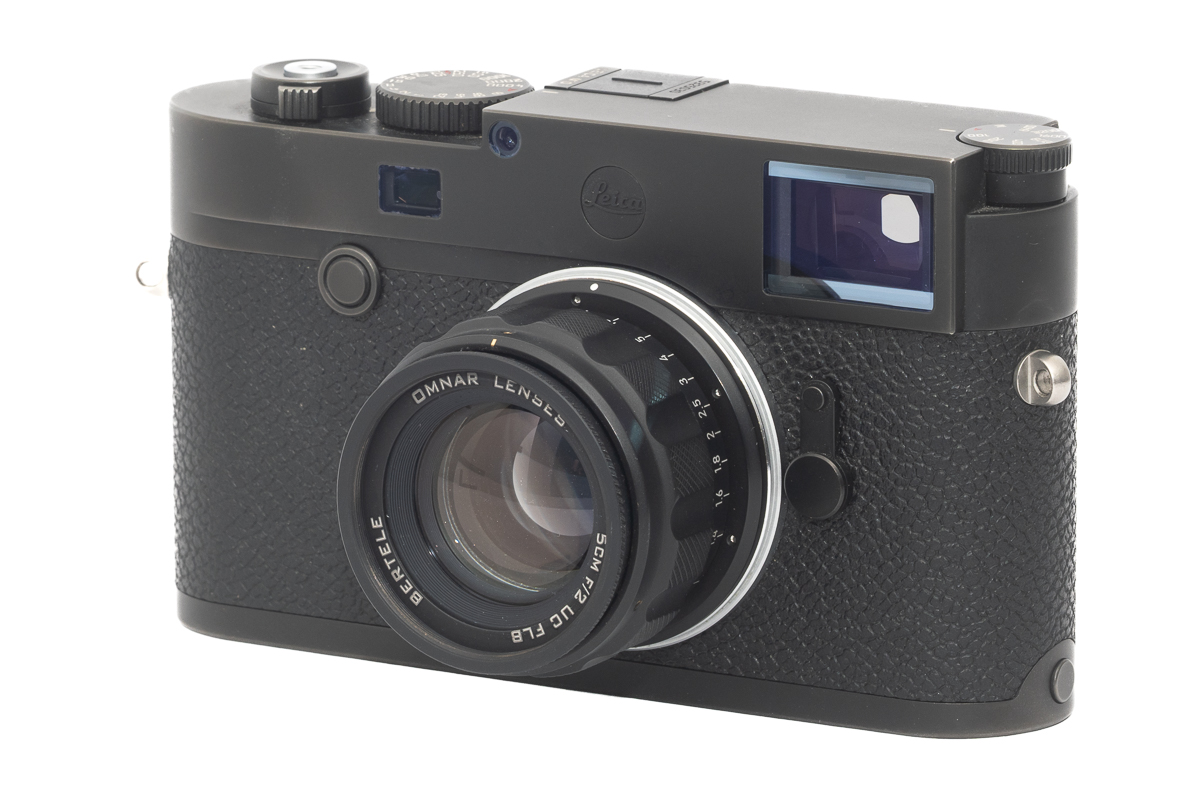
A 50mm f2 in M mount and it's made in UK.


Just for fun here's their website.


And I thought my TTArtisan 50mm f2 was dear. I sort of miss that lens but it was prone to giving a purple tint towards the edges on my A7. I wonder how one would perform on my A7III or A7cII.
 
Last edited:
Windows viewer might be better then preview. There's apparently better photo viewers available for Mac but I can't be bothered, preview's good enough for me, I don't care if it takes a milisecond to render ;)

LR denoise on my RX1R II 42mp raws takes 18-19s on my MBP, I've just tried on some old D750 24mp raws and they took around 11s.

I'd be interested to know how quick M4 macs take.

LR Denoise and all other Lightroom AI functions rely heavily on the GPU - on my desktop they take a long time as the Graphics Card is old (in comparison DXO PureRAW is a lot fatser)
 
Yes, Macbook Air is cheap but only 15" and I really don't want to go that small. The pro is 16" and £2,199 refurb or £2,699 new so for an extra £400 I might as well get a new one if going for an Apple. A 17", 1tb, 32gig ram Windows laptop seems to be in the region of £1,000, + or - a few hundred.

If I knew anyone with a 15" lap top I'd ask if I could borrow it for a few hours just to sit and look at some pictures on it. Actually I probably do know someone with a 15" lap top but but as you might guess as I have no interest in these things so they're never a topic of conversation. The nearest Apple centre is Gateshead or Leeds so might as well be on the moon.

Thanks for all your help :D

I thought I'd suffer getting a 13inch as I'm used to having a 34inch ultra wide in the office, but honestly it doesn't affect me as much as I thought it would, do it's worth trying a 15inch MacBook Air. As said previously I don't use the 34inch ultra wide for work much.


Is having a smaller laptop and a screen you can plug into an option? As this MacBook Air 15 would suit and if you were looking at spending £2k that leaves a healthy budget for a screen:

 
I use a 15" MacBook Air for running Affinity, Photo Mechanic, et al and it does a stellar job. For detailed or bulk processing, I plug it in to my 27" BenQ which sits discreetly in an alcove in the corner of the lounge.
 
Last edited:
"Apple discontinued the 17-inch MacBook Pro in 2012 primarily due to low sales (approx. 2% of total,) and a strategic shift toward thinner, lighter, and more portable devices. Other key factors included the technological shift towards high-resolution Retina displays which were difficult to produce in larger sizes, and the high cost of the 17-inch model."

Thinner and lighter doesn't matter to me as it'll probably never leave the house and screen size is much more important and will probably be more important to me than quality as that extra quality wont always be visible but the size will be. Shame that Apple decided to drop even just 2% of their sales at least partly due to manufacturing difficulties. All in all I like the idea of moving away from Windows and its many issues but the thought of buying from a company with a history of doing what they want with the main box tech and connectivity and leaving customers to live with it or find workarounds doesn't appeal either. I don't want a headache every time I want to plug something in or connect with the world.

I'll have a look at Apples in Currys (no Apple centres here) but I'm 99% certain I'll go for a Windows laptop again and accept that it'll need replacing in 4 years or so if it lasts that long.
 
Back
Top