Talk to me about filters!

Colin44

Suspended / Banned
Messages
193
Name
Colin
Edit My Images
Yes
Seems like every time I'm out shooting I end up with the sky blown out, too many white patches in the sky. Some shots are nice (well I think so) but would I benefit from using a filter, if so what type?


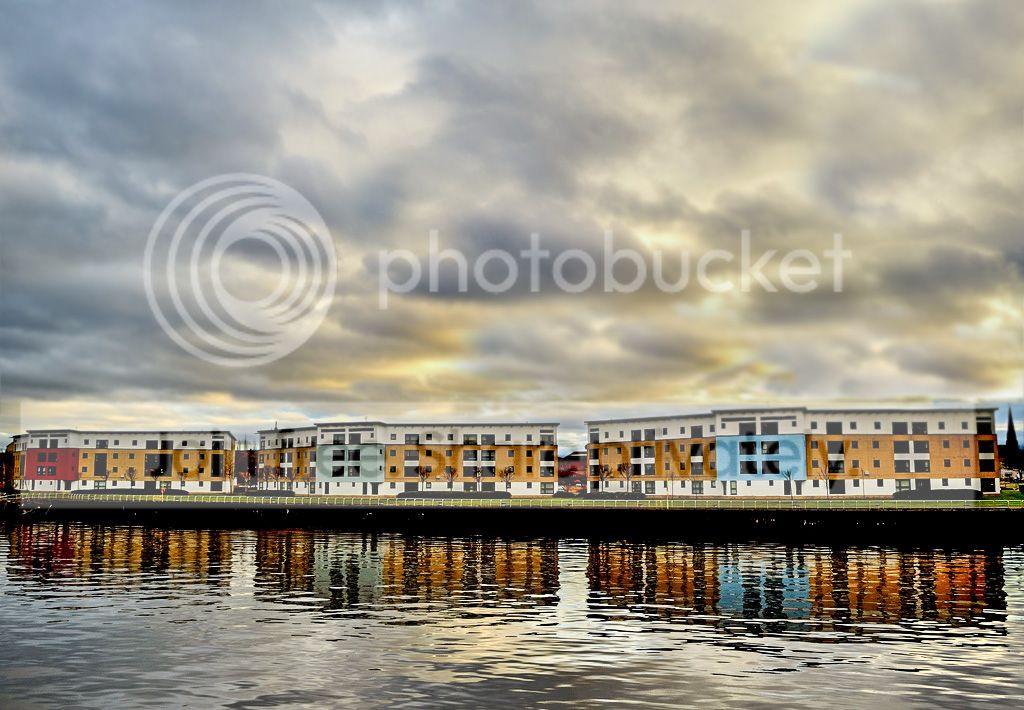
Example photo below, reflections look good in the water but the sky is horrid.


DSC_1675-M by Jester_Colin, on Flickr


Taking too many landscape pictures and keeping getting these skys.
 
The shot you illustrate doesn't look too bad. assuming you have done little or no PP and it was shot in RAW, it should be a relatively easy job to lift the shadows and pull the highlights to get a reasonable balance.

Don't forget that if there is a poor sky, all the filters/PP in the world won't make it otherwise.

Another option with the above shot is to clone out the blown areas.
 
Well you look to be shooting into the sun there... wont help.
Picture looks pretty well exposed, given so much light in the sky.
Before asking about filters, I'd be asking about exposure.
What meter-mode were you using?
Any exposure compensation?
What sort of 'look' are you hoping for?
If you want to hold back the sky, you are talking ND filters; neutral shade of grey that limits light entering the camera without altering colour. effect is akin to firing at a faster shutter speed or smaller apature and will tend to under expose the whole frame. So unless you have run out of faster shutter speeds or tighter appatures.... or are wanting to use large appature to get a limited depth of focus (usual reason for using ND)... bit pointless really.
What I think you are hinting at, is use of grads, specifically the grey grad. Usually for system filter holders, they are an ND grey (or other effect tint) one end, and clear the other, the tint fading from one to the other.
Provided your horizon is fairly flat... you can use one to hold back exposure in the top of the frame, fading the tint to the middle where the sky runs out. top of frame gets less light hence is under exposed, bottom of frame gets full light so normal exposure...
Job-Jobbed..... ish.
Tired mimicking effect in PP on your shot... but cant... well, not well.
Basically, wouldn't work.
the grad would have to run out at the horizon-ish.
Your shooting into a low sun, so you want the ND tint low in the sky...exactly where the tint would be weakest on a grey-grad. So the sky thats actually well exposed would be dark, and you'd still get blown out sun spots.
Move grad down or even flip it upside down to put the tint over the bright bits... its going to be also toning down your buildings.
Ergo, I don't think that this is a problem solved by filters.
You need to look at and think about the exposure and what you are exposing for, sky or ground.
Its age old problem, and looking for 'the moment'.
Maybe shooting that subject at a different time of day, so that the sun isn't direct in the lens, or waiting for sun to be masked by clouds better of hidden by the building to reduce contrast.
That's the challenge of the shot posed.
Or we are into the realms of using multiple exposure-merges, with exposured for sky and shade.
 
The shot you illustrate doesn't look too bad. assuming you have done little or no PP and it was shot in RAW, it should be a relatively easy job to lift the shadows and pull the highlights to get a reasonable balance.

Don't forget that if there is a poor sky, all the filters/PP in the world won't make it otherwise.

Another option with the above shot is to clone out the blown areas.

One or two tweaks with the Nikon software but no other PP.

But filters would help and give better look to the finished shot? Think I'll pop but my local(ish) shop and maybe try get a set, got loads of other shots (beach shots) that just don't quite look right.
 
Don't run away with the idea that filters are the panacea. Sure there are occasion where, to get the money shot, filters are neede, but I would estimate that 70% of my landscapes are taken with no filter other than a skylight.
 
Well you look to be shooting into the sun there... wont help.
Picture looks pretty well exposed, given so much light in the sky.
Before asking about filters, I'd be asking about exposure.
What meter-mode were you using?
Any exposure compensation?
What sort of 'look' are you hoping for?
If you want to hold back the sky, you are talking ND filters; neutral shade of grey that limits light entering the camera without altering colour. effect is akin to firing at a faster shutter speed or smaller apature and will tend to under expose the whole frame. So unless you have run out of faster shutter speeds or tighter appatures.... or are wanting to use large appature to get a limited depth of focus (usual reason for using ND)... bit pointless really.
What I think you are hinting at, is use of grads, specifically the grey grad. Usually for system filter holders, they are an ND grey (or other effect tint) one end, and clear the other, the tint fading from one to the other.
Provided your horizon is fairly flat... you can use one to hold back exposure in the top of the frame, fading the tint to the middle where the sky runs out. top of frame gets less light hence is under exposed, bottom of frame gets full light so normal exposure...
Job-Jobbed..... ish.
Tired mimicking effect in PP on your shot... but cant... well, not well.
Basically, wouldn't work.
the grad would have to run out at the horizon-ish.
Your shooting into a low sun, so you want the ND tint low in the sky...exactly where the tint would be weakest on a grey-grad. So the sky thats actually well exposed would be dark, and you'd still get blown out sun spots.
Move grad down or even flip it upside down to put the tint over the bright bits... its going to be also toning down your buildings.
Ergo, I don't think that this is a problem solved by filters.
You need to look at and think about the exposure and what you are exposing for, sky or ground.
Its age old problem, and looking for 'the moment'.
Maybe shooting that subject at a different time of day, so that the sun isn't direct in the lens, or waiting for sun to be masked by clouds better of hidden by the building to reduce contrast.
That's the challenge of the shot posed.
Or we are into the realms of using multiple exposure-merges, with exposured for sky and shade.

Essssh! A lot to take in....

Metering mode, spot.
White balance, cloudy.

I was trying to get an even balance of the sky and water reflections without the sky looking so blown out, it was someone else that actually pointed the sky out to me.

I'm still very new to photography in general so that day was a rare afternoon to myself without the kids and Mrs, it was a walk about pointing and shooting. Maybe some more thought has to go into my shots, I'm not planning my shots, just taking the camera everywhere I go.
 
Buy a cheap ND filter or a cheap ND grad filter and practise with that and then decide as to whether you will use a drop in kit which is what I think you'll benefit from more. :)
 
I know D3100 can't do it, but have you thought about bracketing the shots? eg take 3 shots, 1 normal, 1 under and 1 over exposed. Do this with a tripod and adjust exposure comp after each shot. Then use a graduated layer filter on one of the image to get the correct exposure.

Another technique is to expose to the right, meaning get the exposure correct for brightest parts you want to preserve (the sky, the bright area around the sun) and then bring under exposed parts up in post processing. Unfortunately this method will have a lot of noise in dark areas.

Filters are hard to use and get right when you are shooting a sunset. It may worth just waiting for the sun to set even more and the sky has same brightness as the ground. Of course the look will be changed.
 
Sorry to piggyback this thread but also did not want to start a new filter thread when this one exists.

Regarding CPL filters, can I just leave mine on my super WAL and be ok or are there drawbacks in certain situations to doing this? Seems like it would be beneficial in most shooting situations?
 
Regarding CPL filters, can I just leave mine on my super WAL and be ok or are there drawbacks in certain situations to doing this? Seems like it would be beneficial in most shooting situations?

There is a few drawbacks to just leaving it on.

1) you lose somewhere between 1 and 2 stops of light meaning your shutter speeds might get too low for handholding. I use a tripod for all my landscapes no matter what the light so it wouldn't bother me but it might you depending on how you work.

2) The polarisation effect is at its maximum shooting at 90 degrees to the sun, shooting into the sun you risk flare, depending on how high a quality CPL you buy.

3) Most importantly IMO, you mention using it on a wide angle. CPLs and very wide lenses don't mix terribly well, the field of view is so wide that the level of polarisation will vary across the scene. This usually manifests itself with an unsightly dark U shape in the top of your sky which would be a pig to get rid of in PP.

I leave my CPL off and only use it when the situation demands.
 
There is a few drawbacks to just leaving it on.

1) you lose somewhere between 1 and 2 stops of light meaning your shutter speeds might get too low for handholding. I use a tripod for all my landscapes no matter what the light so it wouldn't bother me but it might you depending on how you work.

2) The polarisation effect is at its maximum shooting at 90 degrees to the sun, shooting into the sun you risk flare, depending on how high a quality CPL you buy.

3) Most importantly IMO, you mention using it on a wide angle. CPLs and very wide lenses don't mix terribly well, the field of view is so wide that the level of polarisation will vary across the scene. This usually manifests itself with an unsightly dark U shape in the top of your sky which would be a pig to get rid of in PP.

I leave my CPL off and only use it when the situation demands.

Thanks for the detailed reply, appreciate it. I heard of people leaving their uv filters on permanently so wondered if this applied to Cpl as well. Cheers
 
Thanks for the detailed reply, appreciate it. I heard of people leaving their uv filters on permanently so wondered if this applied to Cpl as well. Cheers

No problem.

I don't recommend a UV filter either, unless you're in somewhere high risk (eg photographing rallying where there is a lot of stones and mud thrown up).
 
I know D3100 can't do it, but have you thought about bracketing the shots? eg take 3 shots, 1 normal, 1 under and 1 over exposed. Do this with a tripod and adjust exposure comp after each shot. Then use a graduated layer filter on one of the image to get the correct exposure.

Another technique is to expose to the right, meaning get the exposure correct for brightest parts you want to preserve (the sky, the bright area around the sun) and then bring under exposed parts up in post processing. Unfortunately this method will have a lot of noise in dark areas.

Filters are hard to use and get right when you are shooting a sunset. It may worth just waiting for the sun to set even more and the sky has same brightness as the ground. Of course the look will be changed.

This was suggested to me by a friend, however at the time it looked 'ok' in the view finder until I actually got the chance to see it on the laptop and even in my eyes it was still a decent shot.

Suppose thats the idea of forums, others can point you in the right direction when you go wrong. Will try taking a few shots of the same scene and layer them just to see what can be done.
 
A good idea is to have highlight warnings switched on in your camera menu, if you're getting to the point of blowing the highlights, like the sections of sky above the central and right hand buildings above, it will flash those sections on the LCD screen when you review the shot. Also keep an eye on the histogram as that will also let you know how close you're getting to blowing sections.
 
As a newcomer I faced the same problems as yourself and tried various filters to try and improve things - the mistake I made was to think that all filters are the same.

Its like most things though I have found the more expensive the filter the better the end result can be.

As I couldnt afford top of the range filters, I decided to experiment in Photoshop just to see what could be done.

Im a total novice at it, but in 2 minutes I was able to edit your photo around by sharpening and cloning and arrived at this. Ok it might not be acceptable to some people but most importantly I like it.

So I suggest yes continue to research filters inline with your budget, but also dont rule out PP

8480378586_2c773b5d05_b.jpg
 
Quite like that mystery but I'd have no idea how to do that. Limited PS skills.
 
PS can be as easy or difficult as anyone wants - at the moment Im struggling to use the layers feature.

The biggest tip I would give until accomplished more in PS that you constantly save your file, with a different name to the original then if you do make a mistake it can be retrieved and started again.

On this picture I saved it from your upload as a JPEG. Then I used the Open As command selecting RAW format, this gave me access to a useful window of tools.

From here you can sharpen the picture up using clarity, change the highlight and shadow levels using the respective commands and see what is happening to the picture. I also increased the saturation level slightly.

When it looked acceptable I then opened the ongoing image into the main PS window, where I used the clone tool - this really is an easy tool to use and theres masses of information on the internet about all the tools.

Try it and see, I think you might be surprised how you can get on.
 
That's the problem with using PS, you may have to keep saving.
Lightroom being a data based system, creates virtual copies without destroying the original and can achieve the same effects in this case, but is more simple to use.
For a more general view on the relative merits of different software approaches, I suggest this
http://thelightroomlab.com/2010/02/adobe-photoshop-lightroom-vs-the-adobe-bridge/
may help before getting too deep into PP.
Apologies for wandering away from the point of your original question, about filters. I think the advice given above by others on camera settings, filters etc is excellent. Nice to get the image correctly in the camera before PP.
 
Everyone to their own though Peter, I didnt get on with Lightroom myself when I tried the trial. Now Im learning layers the continual saving in PS is not so critical, the OP said he had limited skills at this stage, and sometimes experimenting with a trial version of software is more viable than the expense of buying lots of filters.

Yes its nice to get the image correct first time, but for most amateurs and novices this doesnt always happen. Furthermore more and more people are saving in RAW format these days so a degree of PP has to be actioned, as the user is not letting the camera make the final decisions on the picture when it is saved otherwise in JPEG format.
 
I trust the OP will forgive me for continuing the discussion on pp systems, which is wandering away from the original thread.
Indeed, Andrew, you are correct, of course, that if working in raw, then pp is inevitable and I myself shoot everything in raw format.
Without wishing to dissuade you from what you do, I reckon it is important that people understand the main difference between various systems. They are not alternatives but designed for different purposes. So when someone, a beginner, asks what software should they use, any advice should be given with clarification.
LR is a data based system with a simple work flow and with all the advantages of speed of search and preservation of original data. It is designed for photographers who do not wish for the special facilities of retouching, multiple layering, cloning etc that for example, graphic designers or studio editors need. However it will give them a lot of post production facilities for raw images, but it will only recognize a limited number of file formats, (tiff, psd, jpegs, dng and original camera raw)
PS/Bridge is a file browser system which is designed for more complex interfaces with file formats not recognized by LR; for people who need to work across software boundaries with packages like Dreamweaver, Premier etc.
Some day I will delve deeper into PS's magic, but meantime I consider myself a beginner who doesn't so far want or need to manipulate my images beyond working from the raw camera data. LR4 meets my needs so far.
 
I think the advice given above by others on camera settings, filters etc is excellent. Nice to get the image correctly in the camera before PP.
Twenty years ago, I thought the 'sniffy-ness' of the old hands about a lot of stuff, actually.... zoom lenses for instance... they were a one-trick-dog, good only for long exposure 'racking' effects... you know, like when the milenium falcon jumps into hyper-space and leaves star trails.....
The goal of the photographer, then was to get it totally right 'in-camera', in one shot, 'clean'.
Even cropping was frowned on. And filters? Well, yellow, green and red filters to boost contrast in Black & White were 'just' about acceptable.... polarisers? Hmmm... maybe to saturate colour... BUT you ought to be using slide film and under-exposing to do that any way... and slide-film means it HAS to be done 'in-camera', because there's no chance to do much post-process, as once the films developed its chopped up and that's what the viewer gets to see.
Star-burst Filters? Soft-Focus filters? Centre-spots? Pah! Gimmicks! Mere Gimmicks. If the photo cant cut it shot straight, no stupid effects will make it presentable!
And grads? GRADS! Even worse, coloured grads... blue-grad to saturate skys, Tobacco-grads to tint sunsets, or green-grads to boost hills..... ?!?!?!?!?
"You want pictures like that...." They would say.... "go to Athena!" and they didn't mean somewhere in Greece.
Historical note: (For those who may only have been eligible to vote in the Cameron/Brown debacle) Athena was a Poster-Shop, that made famouse such 70's kitch as:-
tenniis.jpg

But by the 80's had 'matured' into such delights of interior design as this:-
dailysnap-july8.jpg

Colour provided by e-number!
Anyway... I found such photo-elitism, rather stiflling, stuffy and nonsensical... where's the creativity, if you are denied all the tools in the toy-box?
I wanted to get into the dark-room and 'play'... dodging & burning, montaging, tinting, toning, this was the stuff I reckoned made photo-fun!

Yes its nice to get the image correct first time, but for most amateurs and novices this doesnt always happen.

No, it doesn't... BUT... wisdom of experience.... if you dont get it right, or NEAR right 'in-camera'... then in post processing you are often flogging a dead horse. Silk-Purses and Sow's-Ears.

For all I found the pretensions of in-camera perfection, rediculouse, and stuffy, there was a HECK of a lot of wisdom behind it.

Mid-90's I discovered the digital dark-room; and paid a rediculouse amount of money to get a scanner, then a propper negative scanner to get images into it. My preffered photo-editing suite, is archaic, MicroGrafix Picture-Publisher, version one point something... that is how old it is! And I believe the company was bought by Adobe in the late 90's for thier masking tools. It was a remarkeably good bit of software and very intuative to a Dark-Room Jockey, and I still use it as there's a lot of stuff I can do in it, and do quickly and easily that I just cant in Photo-Shop, which I got a full version off when that was still in single digit versions... and have never fully got to grips with.

Any-how... dark-room trained, the revalation of the Digi-Dark-Room was I could suddenly do stuff in seconds that had taken minutes or hours in the dark room, AND mistakes could be corrected, and back-ups reverted to to save having to go back and repeat long and tiome consuming chores to re-create an image pre-error. It was 'great'....

BUT... when I started using a dark-room.... first I had to learn the tools and techniques, at a basic level, then having learned what I could do in the dark room....

I then had to work three times as hard on my in-camera image capture......... knowing what was and wasn't possible in post-processing, to either get it right first time, or make negatives that COULD be post-processed sucessfully.

Very few photo's I create for 'display' these days, even family snap-shots make it to screen without any post-processing.... most have to at least be re-sized to display resolution if nothing else, and along the way almost all get a little cropping to tidy them up, if nothing more.

But Post-Processing is NOT the answer to poor picture taking.

And that's the crux here. Collin's original blown-out sunset was a bit dissapointing. And his question was whether filters would have helped him get a cleaner shot.

The answer is no. ND filters would have pulled back the whole frame, and left everything but the hot-spots under exposed. Grads would have pulled back the top of the sky, and left the low sun hot spots, or, would have left 'banding' where the grad cut other subject matter leaving uneven under exposure in other parts of the shot.

Mystery, has made something of the shot, but, I have to say I'm not that keen on it.... the exposure over-lays have toned down the contrast in the sky, and saturated the colour in the buildings... which I think I like... that is the 'interest' in the picture.... but the reflected colour in the water is too strong and 'metalic' for my liking, and un-natural.

Yes, it has worked 'sort of'... BUT the prime-error here was at the capture stage.

Getting it clean-in-camera. And that is a matter of understanding exposure and looking at the scene and working out how to 'best' capture what you see or want to see.

This post-process 'salvage' has made a dissapointing shot a bit better; but not brilliant.

For the 'brilliant' shot, and exploiting post-processing, you would have shot TO post-process, and set up on tripod, and made three close timed exposures on manual, one exposing for mid-tones, one for high-lights, one for shaddows, at least two stops apart on shutter speed alone, to maintain Depth-of-Fiels on all three images... then used THOSE to create the post-process over-lays, from an extended exposure range, rather than trying to work within the exposure range captured in the single shot.

Collin admits that he is at an early elevation of the learning curve doing it in camera and has very little PP know-how. And after initial comments agreed that the problem probably was in the fact he is little more than point & press photo-taking.

Subject, I personally find a little 'boring'. It's got interest... but... what is it? Is it the drama in the sky? Is it the colour in those block-buildings? Is it the reflections in the water? Well, it is I suppose all three, but where should the attension be, and how to draw that out of the image?

Helping & encouraging Collin, then.... advice to mess with filters or post processing is somewhat diverting, and implying that fundemental capture errors aren't important and you can get a better picture with more toys or technology...... you can.... but 90% of the photo is in the eye that takes it and 9% more in the know-how behind that eye... only 1% in the hardware that translates it... better tools then will only make improvements in that 1%...... improving his know-how, so that he can get more out of the hardware he has, can give ten times the benefit, and improving his eye.... ten times more even than that.

It's not 'bad' advice, all adds to the know how so he might be able to plan his shots better and utilise some of those tools to better effect... but fundemental of getting it clean-in-camera remains, and already admitted, he didn't plan the shot.... so that's what ought to be tackled first.

And that starts by identifying the 'interest' in the scene, and working out best technique to draw it out.

Where to put the emphasis?

Being honest; I would probably have shot it much the same; but... I would probably have also shot a few perms on it.

First, ignoring the drama sky, and the problem of the hot-spots; framing low, to get the tops of the buildings accross the top of the frame and capture that sky, muted by the water in reflection.

There's also a church spire in the right side of frame next to the block-building. That detail interests me, and I cant walk around in the picture, but had it been me, I would as like explored some angles to see if I could get one that justopositioned that bit of gothic architecture between the two bits of modern.

Concentrating on the bold colour in the block-buildings; there is another bit of interest that might be drawn out by tighter cropping, to concentrate attension on that feature; and again, a different angle; perhaps raking obliquely down the fronts of the blocks from one side or other, would have shifted the direct lighting to the edge of frame or even out of it all together, and made a completely different and more interesting picture.

I cant say for sure, becouse I wasn't there.... but the possibilities are endless, AND all are shootable....

Back to primary problem.... not THIS shot, but getting A shot... from an 'interesting' scene.

This is the leap from snapper to photographer. Not just looking at something and going "Oh! Thats interesting" Putting camera to face and clicking... but going "Oh! That's interesting..... Hmm... WHAT makes it interesting? Now.... how can I BEST capture that interest?"

Questioning what you are doing, looking not just at what you see, but seeing how you MIGHT see it. Looking around the subject, taking in the little details and considering what to include, what to exclude, and how to emphasise or de-emphasise the different elements....

Planning.

Auto-Focus and Program exposure place an awful lot of expertise in the camera, and we CAN rely on it to do a pretty good job an awful lot of the time... no point taking manual control or trying to get clever with the programs just for the sake of it, especially if you dont really understand what they are doing or not doing for you... it's taking your attension away from whats important, the subject, just so you feel that you have done something!

This is actually rather perverse, and photography shouldn't be that hard! Especially if you have a fancy all singing all dancing digital SLR that can do pretty much everything for you BUT tell you were to point the camera!

And spending even more time to try and make something in Post-Processing? Well, even more work made for yourself, for the sake of just a LITTLE thought at the very beginning to get it 'Clean-In-Camera'....

That is why it was the soap-box of my mentors so many years ago.... and may have been a strained point, BUT getting the fundementals in place, putting in the time to aquire the core skills and discipline to use them.... is important.

You get good pictures straight away, least fuss, least effort, and you can use other tools and techniques to make THEM better.... rather than starting with something fairly poor and dissapointing, and fighting from behind JUST trying to make it 'OK'.

 
Some good points made in this thread I think. Going back to the original question I think that if you are finding the sky blown out you the main options would seem to be:

1. Bracket exposures and use software afterwards to add in the correctly exposed sky. I do not do this as I have almost zero PP skills, and so prefer to try and get things right first time.
2. Use an approprite graduated filter, having metered the scene properly. I almost always use ND grads, but this is due to a lack of PP skills, and my predominantly using a lot of slide film than anything else so I am not able to PP even if I want to.
3. Expose for the sky and pull back as much as you can afterwards from the shadows in software, but this will likely create noise in the shadow areas.
 
How good to see the spirit of Ansel Adams is alive and well in the work of Nguss!
 
Back
Top