

You are using an out of date browser. It may not display this or other websites correctly.
You should upgrade or use an alternative browser.
You should upgrade or use an alternative browser.
Storage
- Thread starter stewie m
- Start date

hunnymonster
Suspended / Banned
- Messages
- 2,263
- Name
- Jason
- Edit My Images
- Yes
Storage capacity? Budget? Risk appetite?
I'd never use a cloud service for anything I wish to maintain control over.
I subscribe to the rule of three: back it up, back it up (again), back it up (somewhere else) - for me that is a removable hard drive (at home); a removable hard drive (at my brother-in-law's house - I have one of his here); a removable hard drive (different manufacturer; at work) - each switched/updated on a regular basis.
Sync with bro-in-law is using rsync (RaspberryPi both ends) over a (self-managed) VPN and the drive is only online when I ask him to put it online.
I'd never use a cloud service for anything I wish to maintain control over.
I subscribe to the rule of three: back it up, back it up (again), back it up (somewhere else) - for me that is a removable hard drive (at home); a removable hard drive (at my brother-in-law's house - I have one of his here); a removable hard drive (different manufacturer; at work) - each switched/updated on a regular basis.
Sync with bro-in-law is using rsync (RaspberryPi both ends) over a (self-managed) VPN and the drive is only online when I ask him to put it online.
AndrewFlannigan
Suspended / Banned
- Messages
- 11,977
- Edit My Images
- No
As Jason points out above, you want at least two backup drives and preferably three if your data is important to you.
As recent events have shown, cloud storage is not entirely safe, so your least bad option is probably to have a couple of local drives plus a cloud storage account as your last resort. If you choose such a solution, your least bad option is to to work out how much storage you really need, then choose your local drives from a reliable manufacturer.
You also need reliable backup software. Systems I've used in commercial environment include Acronis, Macrium Reflect and AOMEI (which is free to use but requires a little more effort from the user).
As recent events have shown, cloud storage is not entirely safe, so your least bad option is probably to have a couple of local drives plus a cloud storage account as your last resort. If you choose such a solution, your least bad option is to to work out how much storage you really need, then choose your local drives from a reliable manufacturer.
You also need reliable backup software. Systems I've used in commercial environment include Acronis, Macrium Reflect and AOMEI (which is free to use but requires a little more effort from the user).
I use a Western Digital myCloud on my windows 11 pc. What is the problem with yours and if you dont mind me asking what Windows is your old PC running.
I can’t map it or access it on,y windows 11 pc my old pc is windows 10

wilki
Suspended / Banned
- Messages
- 293
- Name
- Ian
- Edit My Images
- Yes
I've got the same problem. My wdmycloud is no longer supported by WD. I've copied all the files from it to a WD 2TB external hard drive using my old windows 10 computer.Can anyone recommend a hard drive or cloud storage for windows 11
I’m last something to replace my old wd my cloud drive as I can’t get this to work with my new windows 11 pc
Last edited:

Craig1912
Suspended / Banned
- Messages
- 1,205
- Edit My Images
- Yes
What recent events?As Jason points out above, you want at least two backup drives and preferably three if your data is important to you.
As recent events have shown, cloud storage is not entirely safe,
I’m not even sure how old mine is if had it since windows 7I've got the same problem. My wdmycloud is no longer supported by WD. I've copied all the files from it to a WD 2TB external hard drive using my old windows 10 computer.
I’ve pretty much followed all the solutions onlineI’ll have a look later what settings I changed to get mine to work and let you know.. it was some settings that needed turning on to enable it to be mapped.
AndrewFlannigan
Suspended / Banned
- Messages
- 11,977
- Edit My Images
- No
What recent events?

10 real-life cloud security failures and what we can learn from them
We explore 10 high-profile cloud security failures, each one providing a vital lesson in the importance of robust security practices.
 www.cloudcomputing-news.net

Oldbones
Suspended / Banned
- Messages
- 422
- Edit My Images
- Yes
I have just got a new laptop, HP with windows 11.I’ve pretty much followed all the solutions online
Was trying to install Nikons NX Studio, and it would not work, not allowed because is was not an app that is on the windows or Microsoft shop.
But I did have the option of resetting to S mode which then allowed it to work, I think its like using windows 10 but its actually a windows 11 machine.
Craig1912
Suspended / Banned
- Messages
- 1,205
- Edit My Images
- Yes
Recent? The most recent of those is 5 years ago and the oldest is 13 years ago. Anything more recent?10 real-life cloud security failures and what we can learn from them
We explore 10 high-profile cloud security failures, each one providing a vital lesson in the importance of robust security practices.


Dave Canon
Suspended / Banned
- Messages
- 1,980
- Name
- David
- Edit My Images
- No
I also have a WD MyCloud EX4 which did not originally function for my new W11 but I also overcame this issue and it is fine now. I cannot remember the details but I googled the problem and at least one of the response threads provided a solution. I have also mapped the drive as Z:
Perhaps others will record the details.
Dave
Perhaps others will record the details.
Dave

ChrisH
Suspended / Banned
- Messages
- 4,146
- Name
- Chris
- Edit My Images
- Yes
Try following this tutorial on how to enable SMB1.0 file handling. This is how I got my old MyCloud drive to map in explorer

 www.solveyourtech.com
How to Enable SMB1 on Windows 11: A Step-by-Step Guide
Learn how to enable SMB1 on Windows 11 with our easy step-by-step guide to restore access to legacy network devices and share files seamlessly.
www.solveyourtech.com
Try following this tutorial on how to enable SMB1.0 file handling. This is how I got my old MyCloud drive to map in explorer
How to Enable SMB1 on Windows 11: A Step-by-Step Guide
Learn how to enable SMB1 on Windows 11 with our easy step-by-step guide to restore access to legacy network devices and share files seamlessly.
I have done this and it made no difference
ChrisH
Suspended / Banned
- Messages
- 4,146
- Name
- Chris
- Edit My Images
- Yes
Windows 11 requires a username and password. Have you tried mapping it using your admin login as the user. I went into my drive via its web interface using the admin user and password and set up a second user with full access rights. Then mapped it using those credentials.

Hanley
Suspended / Banned
- Messages
- 1,667
- Name
- Paul
- Edit My Images
- No
I'm very similar, my thinking is what if my house burns down, no point having all my backups here, so I also have an offsite copy.Storage capacity? Budget? Risk appetite?
I'd never use a cloud service for anything I wish to maintain control over.
I subscribe to the rule of three: back it up, back it up (again), back it up (somewhere else) - for me that is a removable hard drive (at home); a removable hard drive (at my brother-in-law's house - I have one of his here); a removable hard drive (different manufacturer; at work) - each switched/updated on a regular basis.
Sync with bro-in-law is using rsync (RaspberryPi both ends) over a (self-managed) VPN and the drive is only online when I ask him to put it online.
It may sound extreme but our sons are 19 and 20 and we have their entire life growing up in pictures and home movies, it would be a disaster to lose it all.
No Iv given up with it to be honest Iv spent ages messing around with it with solutions from google and YouTube I’m currently using it via my old pc but I cant be bothered to keep transferring stuff between 3 devicesWindows 11 requires a username and password. Have you tried mapping it using your admin login as the user. I went into my drive via its web interface using the admin user and password and set up a second user with full access rights. Then mapped it using those credentials.
So I want a couple of external hard drives
Hanley
Suspended / Banned
- Messages
- 1,667
- Name
- Paul
- Edit My Images
- No
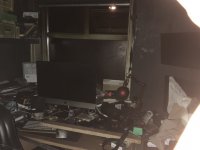
Is that a fire?I always back up 3 ways just because of September 14th 2019 and this happened. I actually lost a 4tb NAS drive but luckily had two others, one in my loft and one in my shed.
View attachment 471102
 That's why I always think an offsite copy is a good idea
AndrewFlannigan
Suspended / Banned
- Messages
- 11,977
- Edit My Images
- No
I make it a rule to set up my backups to run automatically in the background....but I cant be bothered to keep transferring stuff between 3 devices
It's a bad idea to do backups manually. The one time you really need them, will be the time you forget to do it.
I make it a rule to set up my backups to run automatically in the background.
It's a bad idea to do backups manually. The one time you really need them, will be the time you forget to do it.
If my old pc stops working I will loos them as I won’t be able to access mywdcloud on any thing
Hanley
Suspended / Banned
- Messages
- 1,667
- Name
- Paul
- Edit My Images
- No
This should resolve your connection issue to your WD MyCloud, very easy to fix.
 techcommunity.microsoft.com
Accessing a third-party NAS with SMB in Windows 11 24H2 may fail | Microsoft Community Hub
Changes to SMB security in Windows 11 24H2 release preview may prevent access to third party NAS appliances or other devices.
techcommunity.microsoft.com
AndrewFlannigan
Suspended / Banned
- Messages
- 11,977
- Edit My Images
- No
Perhaps this is the point at which you should pull down all your data and get it on a local drive?If my old pc stops working I will loos them as I won’t be able to access mywdcloud on any thing
This is why I asked for hard drive and cloud recommendationsPerhaps this is the point at which you should pull down all your data and get it on a local drive?

Brentor
Suspended / Banned
- Messages
- 1,596
- Name
- Steve
- Edit My Images
- No
This this common with 3D printers? My daughter uses one and it is often on 24/7.Yes mate it was after my office went up in flames in the early hours of the morning when a 3d printer set on fire. You can see mt Fuji XT-2 with 100-400 on my desk, still works unbelievably.
AndrewFlannigan
Suspended / Banned
- Messages
- 11,977
- Edit My Images
- No
Not common but, depending on design, materials and usage, electrical components do get hot.This this common with 3D printers?
I once had a new laptop that was running hot. I took it back to the dealership, where the manager poo-pooed my worries but finally agreed to put it on test. Wife and I went off, returning a few hours later to find not one but two fire engines outside the premises. The laptop had, in the words of one of the firemen, "gone up like a Roman candle!"

ChrisH
Suspended / Banned
- Messages
- 4,146
- Name
- Chris
- Edit My Images
- Yes
No it’s now very uncommon. I run a Bamboolabs P1S literally for days with no problems. In 2019 the easy way to get into 3d printing was an Anet A8 kit printer from China that came as a kit. They came with no overload or thermal protection. It was known for setting on fire. I got complacent and left it switched on. My fault that nearly cost me my life. Fire brigade forensics took an unbuilt one I had and their report was shocking. No need to worry so much with modern ones but invest in smoke detectors and a fire extinguisher in any hobby room.

inkiboo
Suspended / Banned
- Messages
- 1,115
- Name
- Gerard
- Edit My Images
- No
Those were brief outages that would have meant your data was unavailable for a few hours. That’s it.10 real-life cloud security failures and what we can learn from them
We explore 10 high-profile cloud security failures, each one providing a vital lesson in the importance of robust security practices.
inkiboo
Suspended / Banned
- Messages
- 1,115
- Name
- Gerard
- Edit My Images
- No
I edit on my Mac or Surface, move the RAWs to a multi bay QNap (NAS) and then backup to the cloud with Amazon Photos.
Whatever you do, I would not buy a single hard drive. Having a multi hard drive solution like a QNap offers protection if a drive fails, and you can always expand the space needed at a later date.
Yes it is more expensive initially but worth it in the long run.
Whatever you do, I would not buy a single hard drive. Having a multi hard drive solution like a QNap offers protection if a drive fails, and you can always expand the space needed at a later date.
Yes it is more expensive initially but worth it in the long run.
AndrewFlannigan
Suspended / Banned
- Messages
- 11,977
- Edit My Images
- No
I should have referenced this instead ...Those were brief outages that would have meant your data was unavailable for a few hours. That’s it.

The 10 Biggest Cloud Outages Of 2025: AWS, Google And Microsoft
Tech cloud outages in 2025 caused from cybersecurity attacks, software issues and IT errors came via AWS, Microsoft Azure, Google Cloud, Cloudflare, Salesforce and Ingram Micro.
 www.crn.com
In any case, I take the view that, if you want to keep your data secure, the only safe route is to keep it in your possession at all times, be it a picture or a password. Other opinions are, of course, available,
AndrewFlannigan
Suspended / Banned
- Messages
- 11,977
- Edit My Images
- No
I agree.Whatever you do, I would not buy a single hard drive.
You can instead buy three hard drives and run an automatic backup to each in turn. This appears to be much less expensive than a dedicated backup machine. I use Carbon Copy Cloner on OSX to control the backups on an hourly cycle but several alternatives are available.Having a multi hard drive solution like a QNap offers protection if a drive fails,
inkiboo
Suspended / Banned
- Messages
- 1,115
- Name
- Gerard
- Edit My Images
- No
With that solution, your computer needs to always be on. With a nas, you just don’t have to worry and it just works.I agree.
You can instead buy three hard drives and run an automatic backup to each in turn. This appears to be much less expensive than a dedicated backup machine. I use Carbon Copy Cloner on OSX to control the backups on an hourly cycle but several alternatives are available.