


AdzJackson
Suspended / Banned
- Messages
- 908
- Name
- Adam
- Edit My Images
- Yes
Nice portraits....Gotta say that there is definetly more beauty in the second shot.........perhaps best just to frame that one

Haha I've got to agree with you there!
Nice portraits


 Dungeon-Ghyll-b&w by Andy, on Flickr
 Dungeon-Ghyll2 by Andy, on Flickr
OK, I've realised that I had the scanner set up wrongly so that wasn't helping and so I've re-scanned the neg and tried all the things suggested in the original post. I still can't tell if this is anywhere near so here are both shots as a comparison.

OK, I've realised that I had the scanner set up wrongly so that wasn't helping and so I've re-scanned the neg and tried all the things suggested in the original post. I still can't tell if this is anywhere near so here are both shots as a comparison.
Original
Re-scan
Ta very much.
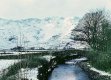

Right, have you been playing around with some of the individual colour channels or something? I tried to have a quick edit and when I adjusted the colour balance, the trees and foliage still remained strangely green relatively to the rest of the image. To reduce that green tint, I'd need to introduce even more magenta, but then the rest of the image would go wacky.
Are you doing more than colour balancing?
View attachment 55375


 ASQ by Kyle, on Flickr
 Chain Links by Kyle, on Flickr
 Tallship by Kyle, on Flickr
 Tallship3 by Kyle, on Flickr
 Kebab Shop by Jon, on Flickr
 Late night bus by Jon, on Flickr
Right, have you been playing around with some of the individual colour channels or something? I tried to have a quick edit and when I adjusted the colour balance, the trees and foliage still remained strangely green relatively to the rest of the image. To reduce that green tint, I'd need to introduce even more magenta, but then the rest of the image would go wacky.
Are you doing more than colour balancing?
View attachment 55375
You say strangely green, I'll have to take your word for it, I can just about tell it doesn't look right but I have no idea how to correct it. I have used every auto correct on PS13, still didn't look right, so I went back to the original and tried messing with individual colour channels. Reduced the cyan a bit and upped the red and green a touch, still doesn't look right. :banghead: Oh well, looks like I'll have to pass it off as an experiment or convert it to mono. 
Here's the thing RJ, I haven't got a Scooby what magenta/cyan/purple etc look like.
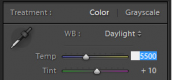
I would try keeping things simple and stick to the colour balance tool. The one below is the one I use in Lightroom. There's a slider that goes from blue to yellow (temp) and another that goes from green to magenta (tint). Does your photo editor have this?
To get rid of a blue cast, you'd move the slider to the right to add yellow. You would move left to balance out a yellow cast by introducing blue.
To get rid of green, you add magenta (so you move the slider right) and vice versa.
View attachment 55390
For cyan, you need to move the green/magenta slider to the right and move the blue/yellow slider to the right as well, I think.


Photographer?? You?? ....Nah, you're a PS13 technician, with a technical problem!Now that looks very much like the slider in the RAW editor of PS13, I'll give it a go. I think the main problem is not with the photo but with the photographer....


 Dungeon-Ghyll3 by Andy, on Flickr
 Dungeon-Ghyll4 by Andy, on Flickr
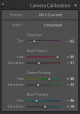
Ok, following @skysh4rk advice I slid the sliders to the right.....
I felt this still looked a bit green so I reduced the green channel a smidge.....
The Sun was shining from over my left shoulder, quite low and strong, which may have given the foliage a kick up it's colourful backside but I think the 2nd of these looks a bit nearer what I was after. Thoughts?
Andy

 Dungeon-Ghyll-b&w by Andy, on Flickr
Andy's colour blind Brian so as far as he can see, it's white.
I've imported it into Lightroom, and using the eye dropper tool gives me white snow . . . and rivers of blood. I wonder if the film is kaput.
Don't blame you for giving up, Andy. Just remember what Henri Cartier Bresson said:
Reality is like a chaotic deluge and within this reality, one must make choices that bring form and content together in a balanced way; just imagine having to think about colour on top of all this!
Ok, following @skysh4rk advice I slid the sliders to the right.....
I felt this still looked a bit green so I reduced the green channel a smidge.....
The Sun was shining from over my left shoulder, quite low and strong, which may have given the foliage a kick up it's colourful backside but I think the 2nd of these looks a bit nearer what I was after. Thoughts?
Andy
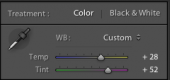
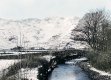


That's pretty nice, RJ, although it's left with a bit of pink (magenta?) in the snow. I had the feeling one would expect snow under cloud to be bluer (or is that the effect in open shade on a sunny day?). I keep reading but not understanding about colour temperatures!
...but it's nearly B\W ..maybe that's what it was like but erm surely there was some moss around or weeds.....small conifers? I reckon Andy should drive back up there and retake the shot
Second, how much colour would you realistically expect in this scene? It's winter, so it's a lot of greys and dull browns with the exception of the sky and water.

 Fiji Stamp by Peter Elgar, on Flickr
 Bahrain Stamp by Peter Elgar, on Flickr
 hp5r09rb67010 by Madison S, on Flickr

 East Usk Lighthouse by Kyle, on Flickr

So she didn't offer to give you à makeover then Brian. @ Excalibur2
she is old enough to realise that only plastic surgery would work on my face  film (2 of 1)
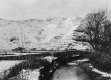
 Winter