Show us yer film shots then!

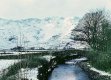
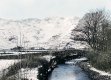
OK, I've realised that I had the scanner set up wrongly so that wasn't helping and so I've re-scanned the neg and tried all the things suggested in the original post. I still can't tell if this is anywhere near so here are both shots as a comparison.

Original

Dungeon-Ghyll-b&w by Andy, on Flickr

Re-scan

Dungeon-Ghyll2 by Andy, on Flickr

Ta very much.
 
OK, I've realised that I had the scanner set up wrongly so that wasn't helping and so I've re-scanned the neg and tried all the things suggested in the original post. I still can't tell if this is anywhere near so here are both shots as a comparison.

Even the re-scan looks a bit too heavy on the cyan to my inexpert eyes. I downloaded the original and used Gimp and its auto white balance tool on the copy and that looked a bit better to my eyes. It might be worth you giving that a go. Gimp is free by the way!
 
Both are very turqouise / green Andy @Andysnap , the second one less so , but it still needs some adjustment
 
OK, I've realised that I had the scanner set up wrongly so that wasn't helping and so I've re-scanned the neg and tried all the things suggested in the original post. I still can't tell if this is anywhere near so here are both shots as a comparison.

Original

Dungeon-Ghyll-b&w by Andy, on Flickr

Re-scan

Dungeon-Ghyll2 by Andy, on Flickr

Ta very much.

Right, have you been playing around with some of the individual colour channels or something? I tried to have a quick edit and when I adjusted the colour balance, the trees and foliage still remained strangely green relatively to the rest of the image. To reduce that green tint, I'd need to introduce even more magenta, but then the rest of the image would go wacky.

Are you doing more than colour balancing?


2399.jpg
 
Last edited:
Right, have you been playing around with some of the individual colour channels or something? I tried to have a quick edit and when I adjusted the colour balance, the trees and foliage still remained strangely green relatively to the rest of the image. To reduce that green tint, I'd need to introduce even more magenta, but then the rest of the image would go wacky.

Are you doing more than colour balancing?


View attachment 55375


Well I had a problem too in Photoshop and class it amongst some of my shots as un-scannable or I get this result using 12 year OOD pro film
 
As RJ said, the tree trunks look too green and the snow looks too cyan.

I've never seen anything come this bad out of a scanner, though - usually it's just slightly off. Which software and which settings are you using, Andy?
 
^Selective tinting of the affected areas would probably work but it would be quite time consuming. I've had quite a lot of trouble with older colour negative films where it is nearly impossible to get a decent colour balance on them.


A couple of older shots taken using my Mamiya 645 AFD which had a shutter fault and ended up going back to ffordes back in October last year. Basically shutter speeds above 1/125s remained at 1/125s leading to heavy overexposure and a lot of blurred images. I lost my last roll of fuji astia to this camera too. I finally got a replacement back today after ffordes confirmed that the shutter was in need of replacement and that mamiya were having difficulty sourcing one as it's different to the AFDIII and newer. (gulp) Good news is that it seems to work properly and that it is in better condition than the one I originally bought.

All taken on Agfa Optima 200 dated 09/1997.
ASQ by Kyle, on Flickr

Chain Links by Kyle, on Flickr

Tallship by Kyle, on Flickr

Tallship3 by Kyle, on Flickr
 
A couple taken with my Olympus Trip on Portra 400.

Kebab Shop by Jon, on Flickr

Late night bus by Jon, on Flickr

Much of the roll was severely underexposed which I've diagnosed as intermittently sticking shutter blades. I've loved having it as a little walk around so I've bought one on ebay which has been fully serviced. If I attempted to do it myself I'd destroy it :)
 
Right, have you been playing around with some of the individual colour channels or something? I tried to have a quick edit and when I adjusted the colour balance, the trees and foliage still remained strangely green relatively to the rest of the image. To reduce that green tint, I'd need to introduce even more magenta, but then the rest of the image would go wacky.

Are you doing more than colour balancing?


View attachment 55375

Here's the thing RJ, I haven't got a Scooby what magenta/cyan/purple etc look like. :D You say strangely green, I'll have to take your word for it, I can just about tell it doesn't look right but I have no idea how to correct it. I have used every auto correct on PS13, still didn't look right, so I went back to the original and tried messing with individual colour channels. Reduced the cyan a bit and upped the red and green a touch, still doesn't look right. :banghead: Oh well, looks like I'll have to pass it off as an experiment or convert it to mono. ;)
 
Here's the thing RJ, I haven't got a Scooby what magenta/cyan/purple etc look like. :D You say strangely green, I'll have to take your word for it, I can just about tell it doesn't look right but I have no idea how to correct it. I have used every auto correct on PS13, still didn't look right, so I went back to the original and tried messing with individual colour channels. Reduced the cyan a bit and upped the red and green a touch, still doesn't look right. :banghead: Oh well, looks like I'll have to pass it off as an experiment or convert it to mono. ;)
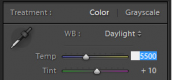
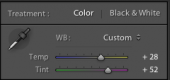
I would try keeping things simple and stick to the colour balance tool. The one below is the one I use in Lightroom. There's a slider that goes from blue to yellow (temp) and another that goes from green to magenta (tint). Does your photo editor have this?

To get rid of a blue cast, you'd move the slider to the right to add yellow. You would move left to balance out a yellow cast by introducing blue.

To get rid of green, you add magenta (so you move the slider right) and vice versa.

Screen Shot 2016-01-26 at 16.28.40.png

For cyan, you need to move the green/magenta slider to the right and move the blue/yellow slider to the right as well, I think.
 
Last edited:
I would try keeping things simple and stick to the colour balance tool. The one below is the one I use in Lightroom. There's a slider that goes from blue to yellow (temp) and another that goes from green to magenta (tint). Does your photo editor have this?

To get rid of a blue cast, you'd move the slider to the right to add yellow. You would move left to balance out a yellow cast by introducing blue.

To get rid of green, you add magenta (so you move the slider right) and vice versa.

View attachment 55390

For cyan, you need to move the green/magenta slider to the right and move the blue/yellow slider to the right as well, I think.

Now that looks very much like the slider in the RAW editor of PS13, I'll give it a go. I think the main problem is not with the photo but with the photographer....:thinking:
 
Now that looks very much like the slider in the RAW editor of PS13, I'll give it a go. I think the main problem is not with the photo but with the photographer....:thinking:
Photographer?? You?? ....Nah, you're a PS13 technician, with a technical problem! :ROFLMAO:

Sorry Andy, It has to be dreadful not being able to interpret colours correctly, .....could be worse though, you could have a growing disability like you know who ( @RaglanSurf ) :exit::D:D
 
Ok, following @skysh4rk advice I slid the sliders to the right.....
Dungeon-Ghyll3 by Andy, on Flickr

I felt this still looked a bit green so I reduced the green channel a smidge.....
Dungeon-Ghyll4 by Andy, on Flickr

The Sun was shining from over my left shoulder, quite low and strong, which may have given the foliage a kick up it's colourful backside but I think the 2nd of these looks a bit nearer what I was after. Thoughts?

Andy
 
Last edited:
Ok, following @skysh4rk advice I slid the sliders to the right.....
Dungeon-Ghyll3 by Andy, on Flickr

I felt this still looked a bit green so I reduced the green channel a smidge.....
Dungeon-Ghyll4 by Andy, on Flickr

The Sun was shining from over my left shoulder, quite low and strong, which may have given the foliage a kick up it's colourful backside but I think the 2nd of these looks a bit nearer what I was after. Thoughts?

Andy

Still way cyan. You need to seriously boost magenta and yellow.

Can you post a straight, flat scan?
 
Last edited:
....well Andy ignoring how you want your shot to look....how can you have blue\cyan snow in the fields, maybe an iceberg or glacier but there's none.
 
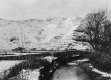
Ok, last one, this is as good as I can get it. :whistle:

Dungeon-Ghyll-b&w by Andy, on Flickr

Thanks for all the help folks but I think this is just too difficult for me to get right. I can see changes are being made with all the adjustments but I can't see if they are the right changes so I'm giving up and falling back to my standard stance of mono is best. (y)
 
Andy's colour blind Brian so as far as he can see, it's white.

Yes Steve I did know that but thought he might be using his wife to OK the colour shots before asking us for a final opinion. A few of us have had a go at trying to get a lovely colour picture but some thing is wrong and the interest would be why? was it the film, dev or exposure causing the problem?
 
Last edited:
Sorry Brian, I didn't think you knew. To be fair though, if Mrs Snap was signing off on that he'd be better making it up himself :0)
 
I've imported it into Lightroom, and using the eye dropper tool gives me white snow . . . and rivers of blood. I wonder if the film is kaput.

Don't blame you for giving up, Andy. Just remember what Henri Cartier Bresson said:

Reality is like a chaotic deluge and within this reality, one must make choices that bring form and content together in a balanced way; just imagine having to think about colour on top of all this!
 
I've imported it into Lightroom, and using the eye dropper tool gives me white snow . . . and rivers of blood. I wonder if the film is kaput.

Don't blame you for giving up, Andy. Just remember what Henri Cartier Bresson said:

Reality is like a chaotic deluge and within this reality, one must make choices that bring form and content together in a balanced way; just imagine having to think about colour on top of all this!

Yeah, the relationships between all the colours is completely off. I thought it was because Andy had been playing with individual colour channels, but old film, bad processing, and poor scanning can also lead to strange colour shifts.

To satisfy my curiosity, I'd love to see a flat, linear scan of the negative.
 
Ok, following @skysh4rk advice I slid the sliders to the right.....
Dungeon-Ghyll3 by Andy, on Flickr

I felt this still looked a bit green so I reduced the green channel a smidge.....
Dungeon-Ghyll4 by Andy, on Flickr

The Sun was shining from over my left shoulder, quite low and strong, which may have given the foliage a kick up it's colourful backside but I think the 2nd of these looks a bit nearer what I was after. Thoughts?

Andy
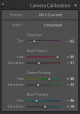
Right, I tried to more seriously colour balance the image in Lightroom. I had previously just been using the simple Preview app on my MacBook.

The relationships between the colours seems to have been altered/shifted somewhere along the line; whether that's due to the condition of the film, the development, or the scanning, I can't be sure. To address this, I used the camera calibration tool to try to counter these colour shifts. This tool isn't something that I would ordinarily use.

Screen Shot 2016-01-27 at 13.48.47.png

From there, I boosted yellow and magenta to counter the cyan using the colour balance tool. This would typically be the only tool I would use for colour balancing.

Screen Shot 2016-01-27 at 13.49.56.png

Anyway, I don't know if it's any help or not, but this is the result that I got. Better results could probably be achieved with the original scan, rather than the small jpeg I used, and a little more time. Colour balancing is a pain and it's why I've largely outsourced my colour negatives.

23994135134_1db89ba284_b-2.jpg
 
That's pretty nice, RJ, although it's left with a bit of pink (magenta?) in the snow. I had the feeling one would expect snow under cloud to be bluer (or is that the effect in open shade on a sunny day?). I keep reading but not understanding about colour temperatures!
 
...but it's nearly B\W ..maybe that's what it was like but erm surely there was some moss around or weeds.....small conifers? I reckon Andy should drive back up there and retake the shot o_O
 
Last edited:
That's pretty nice, RJ, although it's left with a bit of pink (magenta?) in the snow. I had the feeling one would expect snow under cloud to be bluer (or is that the effect in open shade on a sunny day?). I keep reading but not understanding about colour temperatures!

Well, it's possible, as I'm no expert, but I can't say that I'm seeing magenta in the snow. If there were more magenta, that would mean that I'd need to add more green.

In theory, open shade would be blue and there would be blue under overcast skies, I believe. Most colour negative film, however, isn't very saturated and doesn't render particularly blue shadows, perhaps with the exception of Ektar. Also, you would try to adjust the colour balance so that the snow didn't appear blue, but white.

...but it's nearly B\W ..maybe that's what it was like but erm surely there was some moss around or weeds.....small conifers? I reckon Andy should drive back up there and retake the shot o_O

First, it's a quick edit with a jpeg, so don't look too much into this.

Second, how much colour would you realistically expect in this scene? It's winter, so it's a lot of greys and dull browns with the exception of the sky and water.
 
Second, how much colour would you realistically expect in this scene? It's winter, so it's a lot of greys and dull browns with the exception of the sky and water.

Yes you are right, and at times some scenes are better in B\W esp if there ain't much colour ;)
 
I have had great trouble with PRINT scanners since I gave away ( on Wife's Orders' my old but FREE Gateway Computer with 502MB RAM) and took possession of my Daughter's HP ENVY M6 with 8 GB RAM BUT the old 'MUSTEK 1200UB; print scanner would not work with Windows 10 -- then I got FREE from Havering Freegle an HP Scanjet 4570C flatbed but again it will not work -- Vuscan says 'Scanner not found' and HP site no longer supports that model . I have got my old Epson 1650 flatbed working with the print scanner thingy at last with Vuescan 32 bit and scanned a couple of old prints of stamps that were used in the 'Pentax magazine' years ago -- now i can scan more prints at last !
Asahi Pentax Spotmatic I + 50mm f4 SMC Macro=Takumar, Ilford Pan F , twin flash heads on copy stand, print on fibre based paper.
'Man in Boat ' Variety -- Islanders complained that their outrigger canoe could not sail itself so the engraver had to re-engrave the plate with a native boatman !
Fiji Stamp by Peter Elgar, on Flickr
Flaw on letter 'B' of Bahrain overprint.

Bahrain Stamp by Peter Elgar, on Flickr
 
The best way of rendering a human being is by natural light. Discuss.
 
So she didn't offer to give you à makeover then Brian. @ Excalibur2:D
 
Back
Top