Sharpness

  • Thread starter Thread starter DOH
  • Start date Start date

DOH

Suspended / Banned
Messages
6
Name
Debbie
Edit My Images
No
Hi I was wondering if anyone could give me some technical advice? I am looking at how to make my photos of still life subjects even sharper. They are generally sharp but I think they could be sharper still. I am using the Canon 50d with canon macro 100mm lens 2.8. I ensure that I use a tripod and an aperture of F16 or F22 which leaves me needing a shutterspeed of around 1/4with the 10 second timer. I usually stick to a low ISO of 100 - 200 and for most of my still life I am using lights. Any ideas or suggestions would be gratefully received?

Thanks, Debbie
 
You could also use mirror lockup and a remote shutter release. Can you show us an example of a picture where you do not feel it is sharp enough?
 
If I remember rightly, diffraction softening will come into play at apertures smaller than f/7.1 (according to the DP Review review or was it another review) on the 50D. Although small apertures will give you a greater DOF they will actually soften the whole image overall. Unless you really need the DOF then I suggest you try to open up the aperture a bit if you can. I shot an album of test images to show how reducing the aperture affects sharpness. At small image sizes the effect is hardly noticeable, but if you are enlarging or cropping in then those effects soon become obvious. On the 50D, as the pixels are so densely packed, those effects will become obvious sooner if you view at 100%. Here's the album (Shot with a 40D. A 50D would emphasise the problem)....

http://picasaweb.google.co.uk/EezyTiger/POTNDiffractionTestWithFStop?authkey=Gv1sRgCMum1sn3v9iWzgE#

Tripod and timer sounds good but is the tripod itself solid, on solid ground and possibly weighed down? Are you using mirror lockup or Live View to prevent mirror slap from causing vibration?

Are you focusing with Live View at 10X magnification to check that your focus point is exactly where you want it?

What is the quality of your light like? Is it hard or soft (contrasty or flat)? Are you lighting from the side or directly from the front? Side lighting emphasises shape and contrast, improving perceived sharpness. Front lighting fills dips with light and make shape and contrast disappear, compared to side lighting.

Are you shooting raw or JPEG? What are your sharpening parameters? If shooting raw, how are you sharpening? If you are resizing your images do you sharpen them after resizing?

See what Canon has to say about sharpening....

http://www.usa.canon.com/dlc/controller?act=GetArticleAct&articleID=287&fromTips=1

Oh, and welcome to the forum :)

EDIT : p.s. if you'd like to post a sample image maybe someone can offer further advice.
 
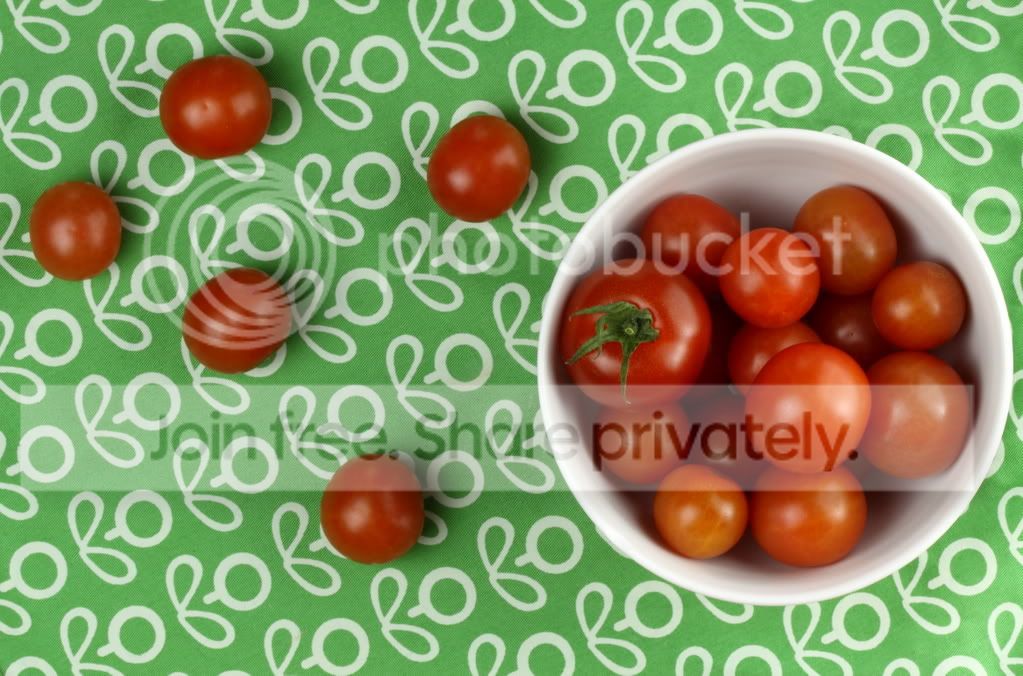
Hi thanks for all the replies - I will read through them. In the meantime I've attached a photo as an example. If feel it could be sharper still.

Thank you

tomatoes.jpg
 
Hi Tim, thank you for your reply. I found your test shots really interesting but I'm confused - I thought the whole idea of stopping down was to increase sharpness? I don't use Live view at the moment but will perhaps try. I shoot in raw and tend to sharpen using digital photo professional though I'm always worried about over sharpening due to noise. I have borrowed a couple of my friends lights which I used either side if the photo. Do you think the solution is changing to F8 to F11? Thank you, Debbie
 
It's hard to be sure, with an image this size, and not knowing what has been done to it, but my guess is that it has not been adequately sharpened when processing and/or resizing. It does sharpen up quite easily with some small tweaks. It would be much better to have the original file with which to work though.

I'm not sure what your shooting distance was for this - maybe 8'-10'? If so, f/8 would give you a DOF of 7"-10" or so, more than enough and then some. You do not need f/16 or f/22 for this. Open up a bit.

Article on diffraction softening - http://www.cambridgeincolour.com/tutorials/diffraction-photography.htm.

If you look at the MTF (resolution/sharpness) data for your lens you will see you get optimum sharpness at around f/5.6. AT f/16 it is quite poor and a f/32 it is disastrous....

http://www.photozone.de/canon-eos/167-canon-ef-100mm-f28-usm-macro-test-report--review?start=1

On a crop body camera you really need to consider whether stopping down (a lot) is a good idea. Most lenses peak in performance at around f/8, the better lenses, epecially primes, might peak as soon as f/4 or f/5.6. It would be unusual to see a lens improving at f/11 and beyond that you are on a downhill slope.

Another thing to consider with this shot is that actually there is not much detail to "look" sharp. Apart from the tuft of green on one of the toms most of them are just featureless blobs. You need detail (and lighting) that generates edges of contrast. Without that there is no sharpness to be "seen" even if the image is in perfect focus. Look up at a clear blue sky - does it look sharp? How can it? There is no edge there to appear sharp. It's pretty much the same with tomatoes. A squirt of water to cover them in droplets would give the eye something to lock onto in terms of edge detail.

If using DPP then malke sure your picture style is set to Standard, to give the image a bit of pep, and set sharpening to 3. Zero out any noise reduction. You might bump contrast up to +1. If the picture is a good'un then that should see you set. If you want to jazz up the sharpening then maybe go to 5, but no more.
 
I just fired off a quick test shot with my 50D and 85/1.8 as that's the sharpest prime I have. Shot in raw and processed in DPP with settings for picture style, sharpening and NR as I suggested, here are the results. (I'm afraid I only have one tomato :( ). I tried to make the tomato about the same size in the frame as yours. My shooting distance for this was 69" giving a DOF (at normal reproduction sizes) of almost 5".

EXIF is - 85mm, 100 ISO, f/8, 1/5. Tripod on carpet, Live View to focus at 10X, 10 second timer.


20090305_151026_5146_DPP.JPG


100% crop....
20090305_151026_5146_DPP_crop.JPG


It looks sharp to me. Actually, it looks oversharpened, even at just +3. You can see nasty halos along the edge betwen the tomato and the candle. Perhaps sharpening of +2 would have been better.
 
Wow! Thank you for your input and I really appreciate the time taken to answer my query. I have to be honest a lot of the technical jargon a bit hard to get my head around and sometimes it's knowing where to look for relevant articles etc - thank you for the links though - they will be very useful. Are the shooting distances you mentioned relevant with any lens or the one that I used? Thanks again, Debbie
 
There is an online Depth Of Field calculator that a lot of people use, including myself. Depth of field differs depending on which camera format you are using, which focal length, which f/stop and the distance to the subject.

You just plug in data for the above and out will pop the values for nearest point of acceptable focus and farthest, and the total DOF that gives you. Here is the calculator....

http://www.dofmaster.com/dofjs.html

As I used an 85mm lens vs your 100mm lens I had to move in a bit closer to get similar framing. In fact I should have shot 15% closer than you did, but I don't know how far away you were so I just guessed.

What you may find interesting is that if we were both set up at the correct equivalent distances and matching apertures our DOF would have been the same. e.g. Assuming you were shooting from 100" away with your 100mm lens I would have had to shoot from 85" away with my 85mm lens. If we both shot at f/8 look at the DOF figure for each scenario....

Data and calculations for my lens....
MWSnap%202009-03-05%2C%2016_19_16.jpg


Data and calculations for your lens....
MWSnap%202009-03-05%2C%2016_19_34.jpg


See that in both cases the DOF is 7.43". That should be sufficient to cover some tomatoes, even the ones stacked in the bowl, but you do need to be very careful about where you place your focus as you will be needing a lot of that DOF. If you focused on the tomato nearest to the camera you would be wasting almost half your DOF in the thin air in front of it (3.58" to be precise). Your useful DOF would only be the 3.85" behind your point of focus. So you need to choose how far into the scene to focus, very carefully. That is why Live View at 10X magnification is so useful. You can focus manually or automatically with absolute precision. Contrast detect AF is good for this sort of thing, if you don't want to focus manually, but you must place the focusing reticule very precisely on a suitable target.

It's also worth pointing out that when you reach the DOF boundary things don't suddenly switch from sharp to soft. The only point at which things are truly sharp is the point/plane on which you focused. Anything in front of or behind that point/plane will become progressively softer the further away it is from the plane of focus. All that the DOF figures indicate is the point at which that softness will become unacceptable when viewed at certain magnifications. I think that magnification is meant to be a 9"x6" print viewed from 10", or something like that. If you enlarge more than that, and/or view from a shorter distance, then that changes the DOF boundaries. For a 17" widescreen monitor the DOF calculations should hold good for viewing at about 20" from the screen.

 
Tim is spot on regarding diffraction causing softening, I would never go beyond f12 to be honest.

The other important aspect of that type of shot is the lighting set up, the use of white reflectors, and black cutters to create a more 3D effect.

A simple off camera flash to the left, a white bounce card to the side and rear, and a black cutter to the other side, would add contrast, definition and improve the sharpness, or perceived sharpness.

It may be worth googling 'product photography' or 'pack photography' to see if you can find something with some illustrations of simple lighting set ups for this type of shot.

I have also seen focus bracketing used on macro stuff, then layered in a similar manner to HDR in photoshop to get everything in focus.
 
I can see I've got soooooo much to learn but thanks so much for all the responses - brilliant & honest feedback. I thought the live view was a bit of a gimmick to be honest but having tried it yesterday, I can see what you mean about the x10 magnification - brilliant focusing & I will definitely try the DOF calculator. I have tried using the DOF button but to be honest I haven't got to grips with that one yet. My other big 'bug bears' are the lighting (as mentioned) - I thought I'd try still life as it's something I can do when the kids are in bed (I happened to have tomatoes in the fridge) & I was using my friends lights which are 240 watt (daylight bulbs) & a reflector but I find I have to have the lights virtually on top of the toms otherwise photo is too dark. The other subject I struggle to get to grips with is white balance but I'll save that for another thread!!! Glad I found this forum, thanks, Debbie
 
I can see I've got soooooo much to learn but thanks so much for all the responses - brilliant & honest feedback. I thought the live view was a bit of a gimmick to be honest but having tried it yesterday, I can see what you mean about the x10 magnification - brilliant focusing & I will definitely try the DOF calculator. I have tried using the DOF button but to be honest I haven't got to grips with that one yet. My other big 'bug bears' are the lighting (as mentioned) - I thought I'd try still life as it's something I can do when the kids are in bed (I happened to have tomatoes in the fridge) & I was using my friends lights which are 240 watt (daylight bulbs) & a reflector but I find I have to have the lights virtually on top of the toms otherwise photo is too dark.

I'd like to add to other comments that if you will use your lens sweet spot (i.e. sharpest aperture) and won't go above f/11-f/13 to avoid diffraction induced softness, then your DOF may be limited giving you less choice (i.e. use longer distance to subject to have greater DOF which limits lens choice really) than usual. If you will fill that you need to get greater DOF there is one technique that can cater for this (only works with still subjects which should be fine in your case). It's called DOF of Focus stacking. What you do is take a couple of shots with focus point set differently on each of them moving progressively further away with each shot to cover the range you need to be in focus. Then you can blend them into one photo either in Photoshop (pretty manual process) or by using specialised software like Photo Acute Studio. There are a few good free softwares that will do it as well here is the list.
 
Setting white balance is pretty easy if you shoot raw. Just make sure one shot in your series contains something "pure" white and that it is not overexposed. There are proper calibrated cards such as the Whibal Card, which should yield perfect results, but they cost £££. Personally I am happy to use a sheet of white printer paper, so long as it is not discoloured through age etc..

In DPP all you need to do is to select all the images in the series that have the same lighting. Then hit CTRL-T to bring up the tool palette. Then click the little eye-dropper icon on the Raw tab and then click on the "white" item in your calibration image. That image and all the other selected images should immediately change to that WB setting. If, aesthetically, you don't like what you see you can always fine tune the WB to taste.

If you were shooting to JPEG instead of raw this approach would not work. You would need to set a custom white balance within the camera before shooting your subject. The camera manual will explain how to do this.
 
Should bookmark this thread as an educational tool. It really IS that good.

Fabulous responses and a superb lesson from Tim on product photography.

Simply wonderful.
 
Thank you so much everyone (especially Tim)! I shall look forward to putting all your tips into practice. I knew about the white piece of paper for WB but I didn't know the next part so thank you very much. Kind regards, Debbie
 
Back
Top