Beginner Rubbish at Black & White.

Messages
9
Edit My Images
No
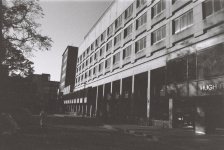
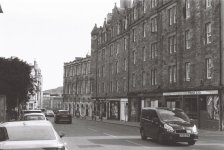
I thought I would have a shot at black and white 35mm. It was not very good. I could use some advice on where I went off the rails. Manual exposure and focus with a Canon FTb.

I think I allowed it to take the exposure for the 'whole area' when what I needed was to take a reading to the darkest point in shadow?

But hey, there's probably much wrong going on here. But, I'd like the next roll of wasted film to die for a better cause.


Rubbish 3.JPG
 
Last edited:
Yes, looks underexposed. You can see why if you squint and look at the overall scene - Roughly 50% is bright, 50% is dark. For a meter that is trying to achieve an overall average of middle grey, it's working as intended.

It's not as simple as metering for the darkest point, as that will likely mean your highlights are blown. People always say film does better being overexposed than underexposed, and while that's true, it still doesn't have the dynamic range that we've become used to on our modern digital cameras. Most scenes will require some sort of compromise in the shadows or highlights, or both.

If you have a spot meter, just meter the area that you want to be the main focus of the image, unless there is particular secondary interest in the shadows or the highlights, in which case shift towards them slightly.
If you don't have a spot meter and rely on the camera's average meter, then it's just a case of getting to know it, and knowing that when you shoot a scene like the above, you need to bump it up a stop.

Using this scene as an example, you'd ask yourself "Is the street or the building more important?". There is no right or wrong answer there, it's whatever you want, but judging by the fact you aren't happy with the image, I'd say you'd rather the street was correctly exposed. If you had a spot meter, you could check the street, then the building, and see how far apart they are. Then you'd know how bright the building would be if you exposed for the street, and would know if the building would blow out at that exposure.

For example, let's say your film has 12 stops of dynamic range. if you meter for the street, then meter for the building and you find there are less than say 4-5 stops difference, you'll be fine metering for the street. If it were pushing 5-6 stops I'd meter for the street and maybe drop it down a stop or so - The street would fall into "shadow", but would certainly not as dark as above.

If you don't have a spot meter, in this example you could point the camera down until you cut out the sky and building, and take a meter reading. That will be the correct exposure for the street, then point it up until only the sky and building are in the scene and do the same to get a reading for the bright spots. It's less precise than a spot meter, but will get you pretty darn close most of the time.
 
People always say film does better being overexposed than underexposed, and while that's true, it still doesn't have the dynamic range that we've become used to on our modern digital cameras.
Fascinating, because I was brought up with exposing for film, and when I moved to digital I learned that digital has a similar exposure latitude to slide film (not a lot) and certainly nowhere near the latitude of print film (which was quite a bit).

Obviously I’m aware that digital has loads more latitude nowadays, but I expect print film to have several stops of latitude. And I’d say that negative really ought to be usable. Id guess the bad exposing for the print has doubled up the original error.
 
Yes, looks underexposed. You can see why if you squint and look at the overall scene - Roughly 50% is bright, 50% is dark. For a meter that is trying to achieve an overall average of middle grey, it's working as intended.

Thank you for the detailed response. Very helpful thoughts. I've ordered a spot meter to give me more control over the choice. I've gotten too reliant on digital cameras making all the choices for me. Which is fine, they're really good at it. But, it's not what I want to do at the moment. I want to make my images and not ask the camera to make one for me, if that makes sense.
 
Fascinating, because I was brought up with exposing for film, and when I moved to digital I learned that digital has a similar exposure latitude to slide film (not a lot) and certainly nowhere near the latitude of print film (which was quite a bit).

Obviously I’m aware that digital has loads more latitude nowadays, but I expect print film to have several stops of latitude. And I’d say that negative really ought to be usable. Id guess the bad exposing for the print has doubled up the original error.

Latitude and dynamic range are different things.

Dynamic Range is a measurement of the size of the range of tones that a camera can record from completely black to completely white. In simple terms, the greater the dynamic range, the more detail you can see the shadows and highlights of a picture. Different film stocks had different dynamic range properties, especially from type to type. As a rule of thumb traditional black & white film has the most, then colour negative film, and finally colour slide film the least at about 7 stops.

Latitude is more a measure of how much you can adjust exposure. It's useful when an image doesn't use the entire dynamic range available - For example a film stock with 10 stops of dynamic range, shooting a scene with only 6 stops between the darkest and brightest parts, you'd have ~2 stops of dynamic range at either end. So, you could shoot up to 2 stops over or under and still retain details in those areas when adjusting in post.
 
Latitude and dynamic range are different things.

Dynamic Range is a measurement of the size of the range of tones that a camera can record from completely black to completely white. In simple terms, the greater the dynamic range, the more detail you can see the shadows and highlights of a picture. Different film stocks had different dynamic range properties, especially from type to type. As a rule of thumb traditional black & white film has the most, then colour negative film, and finally colour slide film the least at about 7 stops.

Latitude is more a measure of how much you can adjust exposure. It's useful when an image doesn't use the entire dynamic range available - For example a film stock with 10 stops of dynamic range, shooting a scene with only 6 stops between the darkest and brightest parts, you'd have ~2 stops of dynamic range at either end. So, you could shoot up to 2 stops over or under and still retain details in those areas when adjusting in post.

It amounts to the same thing, total dynamic range gives a hard stop to exposure latitude at both ends.ISO invariant sensors (later Sony’s) bend that considerably.


Also early digital SLR’s didn’t have the DR that film had. And honestly I don’t think most digital cameras in existence compete for DR with B&W film.

I suppose for people who started their photographic life with Sony, they’d think digital sensors had much better DR than film. But I’m not sure many of my Canon cameras, from the 300d to the R6 have had better DR than B&W film. In fact the R6 is fairly similar to B&W film at 10-14 stops, where B&W film is rated at 10-12 (and up to 20 with specialist processing).
 
More importantly tha. The latitude, exposure value or a different meter though @Tilly Teak is that I genuinely think you can get a print out of that negative if you’ve had it scanned and you process it properly.

Whilst it’s underexposed, there doesn’t appear to be any completely blocked shadows, and whilst the image might not ultimately be worth saving, you’ll learn a ton from the process.
 
I want to make my images and not ask the camera to make one for me, if that makes sense.
Also without being argumentative, I use auto all sorts on my cameras. And I grew up in the fully manual world, I’d been shooting 17 yrs before I got my first auto focus camera.

But I never think ‘the camera has made a picture for me’, because I’ve left my cameras hanging around for months on end, and they’ve never made a single photo.

In order to make a picture I have to get up pack a camera, find something interesting and choose when to press the buttons. My camera is doing exactly the things I’ve controlled, and also doing the unimportant maths I didn’t need to control.

It’s not made any ‘decisions’ for me, it’s just filled in the gaps I didn’t think were important. I made all the decisions.
 
Thank you for the detailed response. Very helpful thoughts. I've ordered a spot meter to give me more control over the choice. I've gotten too reliant on digital cameras making all the choices for me. Which is fine, they're really good at it. But, it's not what I want to do at the moment. I want to make my images and not ask the camera to make one for me, if that makes sense.

Hi Tilly, like Phil above, I'm another old'un who started with film and at one time did a lot of printing too, colour and mono.

First question - is that a raw scan file from the people who processed your film, or did you make that scan after developing the film yourself? Reason I ask is that I've had scans of negatives come back looking quite a bit like that even though they were correctly exposed and very printable in the normal way of things. Don't worry.

And this is where the second part of your reply that I've copied about comes into play - you need to treat this like a digital negative and not a finished print. What you need to do is import this into a digital development package like Lightroom and then develop the image yourself: start off by setting the overall exposure and adjust highlights and shadows to where you like what you see, then set black and white points to control the brightest and darkest points of the image. If I had a low-contrast image to print in a wet darkroom then I would select a paper that had a high contrast to give it some punch. OTOH if my negative was very contrasty then I'd choose a soft contrast paper that would manage the highlights and shadows in the way I wanted. In some cases of very high contrast I might even pre-flash the paper to bring up highlight detail. Where there were areas that were very bright (i.e. the negative was dark and dense) then these could be burned in, and areas that were dark would be held back for part of the exposure by masking them during the exposure. Printing from film is not just about 'getting it right in camera' and with the exception of slide film, is much more about knowing how to get the best from a negative.

And talking of digital, that is also true in that medium.

The digital RAW film is your negative, and the starting point, not the finish for your image. All the requirements of printing from film apply to digital too, but it's just easier, faster and cheaper. Instead of masking with your hands under the enlarger while counting to get the right exposure, now you just brush with the mouse. No more carefully retouching a print to remove dust marks, because I can do that in software. But I still have to do it. In many ways, image development is much more like film printing now we have digital cameras with a wide dynamic range, since I can go finding details in highlights and shadows that would be lost in a Boots print or the modern equivalent - a .jpeg file SOOC.

For a scene like this, average metering is fine with film because you have lots of bright bits and lots of dark bits. Metering of one or the other is going to cause more problems, although you could meter off the bright bits and then open up a stop or 2 for more exposure.

Hope that's useful.

 
Last edited:
Just another point; there’s shedloads of nonsense written about the merits of different metering patterns. But IMO it doesn’t matter whether you’re using matrix metering, centre weighted, partial or spot.

They’re all capable of perfect results, and terrible results too. Because like every tool, it’s down to the operator understanding its use.

Whatever metering pattern you choose, the important thing is what are you pointing it at, and do you understand how far away that is from ‘average’.
 
I'm another long time film user, and still use film preferentially. I'm also a Black and white photographer.

I'll just make a few comments, but I'm happy to expand if needed.

1. In Elements of Transition, a book about printing by inkjet from negatives, the late Barry Thornton made the point that negatives incapable of a fine darkroom print could produce a fine inkjet one, so how are you intending to print your negatives?

2. In support of that statement, I have a couple of large format negatives that I thought were ones I'd processed but not exposed. Then I noticed a very faint image on one of them when moving it around. Short story - I scanned both, both had images that made very, very poor prints, but the subject was recognisable. So you can retrieve digitally a  LOT more than you'd think.

3. I used to use a spotmeter. I no longer do. Too much trouble for me to find what to meter, when my standard reflective meter always gave me perfectly acceptable results. Though I admit my usage was to effectively measure the light falling on the subject, not that reflected from it.

Final thought. I rarely venture out of the Film and Conventional section of the forum. It was your title with Black and white in it that drew me here. And I always now try to remember to start the word Black with a capital letter since Oxford University mandated it, or at least strongly suggested the usage.

Efir to add a PS. Welcome to the forum.
 
Oh, since we were talking metering, if doing it manually outside of from the camera, I would prefer incident metering to spot, since that measures the light falling on the scene for a more logical exposure. :)
 
I don't want to get into arguments about what incident metering means. I take the view, which many think is wrong, that all it means is getting a measurement that depends only on the incident light. I've been taken to task for this incorrect view, on the grounds that the very definition of incident light measurement requires a white home that you measure through.

My "effective incident light measurement" which I've used without problems since c1965 is to put my hand into the same light that's falling on the subject, take a reflected reading from my palm (because it doesn't tan) and open up a stop. The extra stop is because my palm shouldn't be rendered as mid grey, but lighter.

Probably unimportant in most practical situations, but spot meters measure light from a narrower angle than general reflected light ones. That can mean that there is not enough light being reflected back for them to read. I encountered this situation in Holy Trinity church in York. Anyone who's visited will know it's dark even for a church, and even though it was during the day, I had to use my Lunasix to get a reading rather than my Sekonic spot meters.
 
I don't want to get into arguments about what incident metering means. I take the view, which many think is wrong, that all it means is getting a measurement that depends only on the incident light. I've been taken to task for this incorrect view, on the grounds that the very definition of incident light measurement requires a white home that you measure through.

My "effective incident light measurement" which I've used without problems since c1965 is to put my hand into the same light that's falling on the subject, take a reflected reading from my palm (because it doesn't tan) and open up a stop. The extra stop is because my palm shouldn't be rendered as mid grey, but lighter.

Probably unimportant in most practical situations, but spot meters measure light from a narrower angle than general reflected light ones. That can mean that there is not enough light being reflected back for them to read. I encountered this situation in Holy Trinity church in York. Anyone who's visited will know it's dark even for a church, and even though it was during the day, I had to use my Lunasix to get a reading rather than my Sekonic spot meters.

I tend to spot-meter with digital cameras, finding that the most controllable way of getting the exposure I want while looking at the live view in the viewfinder. But for manual film cameras I used to use an old Sekonic light metter that had the white dome you mention, just because that's what I had. It's just as valid to take a reflected reading off a controlled surface like an 18% grey card or the palm of you hand and adjust exposure accordingly.
 
That was my view. I can't recall which forum the exchange of views took place on.

There's a whole new area of discussion about the whole "18% grey" though. Ctein in Post Exposure goes into detail explaining why Kodak recommend the 45 degree angle for measuring. Spoiler - because, from his calculation and official standards, meters are actually calibrated for 12%. For more details, see the book and don't shoot the messenger.
 
I thought I would have a shot at black and white 35mm. It was not very good. I could use some advice on where I went off the rails. Manual exposure and focus with a Canon FTb.

I think I allowed it to take the exposure for the 'whole area' when what I needed was to take a reading to the darkest point in shadow?

But hey, there's probably much wrong going on here. But, I'd like the next roll of wasted film to die for a better cause.


View attachment 466696
That's not too bad for a first attempt. I don't know that camera but most matrix type metering methods are averages and in a fairly high contrast scene like that it oftentimes better to select your own meter position. The wall at the first bike rack after the shop looks like it would have been middleish or the kerbed area at the far end. You will soon get practiced at looking for something in between the lightest and darkest.

Is the whole roll similar or this the best of a bad bunch?

Great first effort!
 
Also without being argumentative, I use auto all sorts on my cameras. And I grew up in the fully manual world, I’d been shooting 17 yrs before I got my first auto focus camera.

But I never think ‘the camera has made a picture for me’, because I’ve left my cameras hanging around for months on end, and they’ve never made a single photo.

In order to make a picture I have to get up pack a camera, find something interesting and choose when to press the buttons. My camera is doing exactly the things I’ve controlled, and also doing the unimportant maths I didn’t need to control.

It’s not made any ‘decisions’ for me, it’s just filled in the gaps I didn’t think were important. I made all the decisions.
I'd love to be able to understand the "I don't let the camera make decisions for me" mentality.

When you take basic camera classes, they usually require you to have a camera that can be set to all-manual mode. The reason for this should be obvious: they want to teach you how a camera works, and the relationship between shutter and aperture, etc. Once you understand the principles, you learn to use the meter, and the semi-automatic modes become just tools to get the image, which is what it's all about in the first place.

There is no magic in manual mode all the time; there is no shame in shooting aperture or shutter priority, or using autofocus. If basics are so important to being a "real" photographer, we should all be making our own emulsions to coat our glass plates and grinding our own lenses.
 
In my film days, I used to use a 18% grey card if lighting was tricky. I was told that you could also use the palm of your hand. The advantage, I suppose, was that you didn't have to focus, or frame or really do anything difficult to set your manual meter since all you were doing was checking the general light level. Of course, I could have been wrong but it seemed to work.

I used a Nikon FM2n with it's amazingly complex light meter—one green and two red LEDs. The [button] batteries in that camera used to last for years—oh, if only it was still like that.
 
I'd love to be able to understand the "I don't let the camera make decisions for me" mentality.

When you take basic camera classes, they usually require you to have a camera that can be set to all-manual mode. The reason for this should be obvious: they want to teach you how a camera works, and the relationship between shutter and aperture, etc. Once you understand the principles, you learn to use the meter, and the semi-automatic modes become just tools to get the image, which is what it's all about in the first place.

There is no magic in manual mode all the time; there is no shame in shooting aperture or shutter priority, or using autofocus. If basics are so important to being a "real" photographer, we should all be making our own emulsions to coat our glass plates and grinding our own lenses.

It's amazing how camera manufacturers can make us buy all sorts of things in our very expensive devices, and yet, in the end, all they do, in a fancy way, is control shutter, aperture and sensitivity. They make the control of three simple things VERY complicated sometimes, but they do do it faster.
 
It's amazing how camera manufacturers can make us buy all sorts of things in our very expensive devices, and yet, in the end, all they do, in a fancy way, is control shutter, aperture and sensitivity. They make the control of three simple things VERY complicated sometimes, but they do do it faster.
I guess we have different definitions of "simple" and "complicated." Full auto point and shoot is simple. Metering, setting shutter speed, setting aperture to be sure they are working together to get the right depth of field, exposure, sharpness or blur—all that is complicated. There are (as far as I am concerned, anyway) very legitimate reasons for using all the various modes on a modern camera. No one looking at the final image is going to know what your camera settings were; they only know if they like what they see.

Oh, and no manufacturer ever "made" me buy anything. I can always keep my old stuff and keep using it, or buy used if I don't like a feature on a new camera. Or, I can buy the new camera and turn all that off, and brag that "I only shoot in manual."
 
I guess we have different definitions of "simple" and "complicated."

True. I find all the different settings on a modern digital camera confusing, and mainly irrelevant as when I use a Sony a7r2 I'm using manual lenses, mainly OM from my film system, set in program mode and adjusting the exposure according to what I see.

I still find my large format cameras easier to use, and understand, because they have no hidden surprises. In the same way as I find writing code in BAL (IBM mainframe assembler) simple, and always found BASIC a total mystery. I suppose I use large format in aperture priority, as I choose the aperture and then use the meter to tell me the shutter speed.
 
I guess we have different definitions of "simple" and "complicated." Full auto point and shoot is simple. Metering, setting shutter speed, setting aperture to be sure they are working together to get the right depth of field, exposure, sharpness or blur—all that is complicated. There are (as far as I am concerned, anyway) very legitimate reasons for using all the various modes on a modern camera. No one looking at the final image is going to know what your camera settings were; they only know if they like what they see.

Oh, and no manufacturer ever "made" me buy anything. I can always keep my old stuff and keep using it, or buy used if I don't like a feature on a new camera. Or, I can buy the new camera and turn all that off, and brag that "I only shoot in manual."
Simple is choosing a shutter speed, an aperture and an ISO.

Complicated is finding how to set the interval timer from what seems like a thousand menu choices or trying to decide what any one of three control wheels should do; this is what I meant by complicated.
 
I struggled with exposures like this for years when using film until I started to do a few things, in order of cheapness

Meter off the palm of your hand, just hold it in front of your lens so you get a blurry pink viewfinder - then from his meter reading add
one stop of exposure. This is not 100% precise but most of the time will get you close to a usable general exposure. You must however have the same light falling on your hand as your subject.

Buy an 18% grey card and use as above. You must however have the same light falling on your hand as your subject.

Buy a hand held meter and use it in incident light mode (as others have said) with an invercone. You must however have the same light falling on your hand as your subject.

And if you are doing your own processing (you don't specify) then you technique must be spot on so you have repeatable results from the developing - otherwise you'll be chasing your tail round and round !!

HTH

David

PS well done for trying this B&W film lark in the first place, I thank my lucky stars for modern digital cameras every time I use mine but I think I would have a B&W darkroom set up back in an instant if I had space :)
 
Last edited:
Efir to add a PS. Welcome to the forum.


Thank you for your advice. I got some prints from the developer subsequently and I'd say it was in no way as poor as the scan was. I probably do need to look into my own developing and the post photography work. For the moment, I just wanted to get back to 'taking images' instead of clever cameras 'making images' again. They're baby steps. I do love how the old Canon feels, but I need to get better acquainted with its foibles!
 
Is the whole roll similar or this the best of a bad bunch?

Thank you for your reply. That was the nastiest image of my batch to be fair. A few were pretty decent. Not brilliant, but pretty decent. But at least I have a clearer idea of what to watch out for.

It was also Fomapan, which I have read isn't the most kindly regarded of black and white film stocks.

I've bought some Ilford. I do suspect if I'd tried my hand at developing, that I might have been able to retrieve a better output though.
 
Last edited:
Thank you for your reply. That was the nastiest image of my batch to be fair. A few were pretty decent. Not brilliant, but pretty decent. But at least I have a clearer idea of what to watch out for.

It was also Fomapan, which I have read isn't the most kindly regarded of black and white film stocks.

I've bought some Ilford. I do suspect if I'd tried my hand at developing, that I might have been able to retrieve a better output though.

R1-03638-0007.JPG

This came off the same roll. And I'm not going to say it was good, but the exposure at least I think is pretty good. So the Canon is more than able so far as I can tell.
 
Are you planning to make your own prints? If you do have scans as Toni asked, you should be able to make prints that are better, if only because you will be gving individual attention to each one.
 
Last edited:
So that is a scan of a print? Did you get any scans from the developer too?

BTW thanks for coming back to the thread. :)

The first image was a scan provided by the developer which came through by email, Honestly felt a bit tempted to put the camera into the cupboard and forget about it and just shoot digital. But no... I subsequently got prints in the post which are a bit better. So, I kind of feel the developing maybe isn't the best and the scan is definitely sloppy and poor.

But, my original exposure is the start of the 'bad', because with more thought, it would have been better.
 
Meter off the palm of your hand, just hold it in front of your lens so you get a blurry pink viewfinder - then from his meter reading add
one stop of exposure. This is not 100% precise but most of the time will get you close to a usable general exposure. You must however have the same light falling on your hand as your subject.
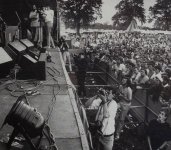
This is a pic from an album cover, that's me at the front in the white shirt...anyway, see that bloke at the back in black doing just as you describe! :cool:

_DSC0962a.jpg
 
Last edited:
Hi Tilly, I would echo what Ancient Mariner said:

Hi Tilly, like Phil above, I'm another old'un who started with film and at one time did a lot of printing too, colour and mono.

First question - is that a raw scan file from the people who processed your film, or did you make that scan after developing the film yourself? Reason I ask is that I've had scans of negatives come back looking quite a bit like that even though they were correctly exposed and very printable in the normal way of things. Don't worry.

And this is where the second part of your reply that I've copied about comes into play - you need to treat this like a digital negative and not a finished print. What you need to do is import this into a digital development package like Lightroom and then develop the image yourself: start off by setting the overall exposure and adjust highlights and shadows to where you like what you see, then set black and white points to control the brightest and darkest points of the image. If I had a low-contrast image to print in a wet darkroom then I would select a paper that had a high contrast to give it some punch. OTOH if my negative was very contrasty then I'd choose a soft contrast paper that would manage the highlights and shadows in the way I wanted. In some cases of very high contrast I might even pre-flash the paper to bring up highlight detail. Where there were areas that were very bright (i.e. the negative was dark and dense) then these could be burned in, and areas that were dark would be held back for part of the exposure by masking them during the exposure. Printing from film is not just about 'getting it right in camera' and with the exception of slide film, is much more about knowing how to get the best from a negative.
And would say if you can , take a look at some of the Magnum group contact prints, you will learn a lot from the notes made to the (darkroom) printer, areas of the negative will be marked as to requiring burning in or dodging and by how many stops. A good B&W print was never just a straight print it always required a lot of skilled manipulation by the printer in the darkroom, we are fortunate that we can easily do this sort of manipulation on our computers before sending the image to a web site or printer.
That said a good (computer) processing of a B&W scan needs a good starting point, typically I would increase the contrast and set the mid tone level using the exposure and contrast sliders. Then set the white points and black points, not every print needs detail down to the darkest shadow but try to avoid a white canvas in the highlights though a bit of clipping is fine, how much you will learn as you subconsciously develop a style. I would then put on a s shaped curve, in a traditional negative & print wet process each stage adds to the contrast curve, even the softest of papers adds to the curve all be it in - direction but it still changes the curve between shadow and high light.

The file you posted at the beginning of this thread could be much enhanced but will still have areas of dark shade, this is where the dodge and burn come in and guess what on a computer you get to increase or decrease just the shadows, midtones or highlights which kind of could be done with split grade printing but it was not easy.

Don't get disheartened, go have a look at the film thread of the exhibition part of this forum, most of the people posting there have links in their signature to either web sites or Flickr etc. the best way to learn is to see what other people are doing, I promise you we all start out with 'flat' scans. With a bit of experience you will be looking at B&W images and thinking of how it has been processed, would you have done it the same. Remember there is no right way, just the way that pleases you unless you have clients or club judges to pander to but lets not go there.
 
Back
Top