Panning

salixius

Suspended / Banned
Messages
344
Name
niki
Edit My Images
Yes
Hi there i would really like to do a couple of panoramics for my landscape project...I do not have a wide angle lens..neither can i afford one yet as i have spent such alot of money so far.I wanted to try the technique in photo shop elements 9..how would i best get the images to do this..i know i need a tripod and to use manual exposure..but how much do i overlap the subject shots to get a clean stitch...
thanks for any advice
niki
x
 
Tiny amount of overlap and always take the shots in portrait. That is what a camera instructor told me when on a course recently
 
Tiny amount of overlap and always take the shots in portrait. That is what a camera instructor told me when on a course recently[/

really? im glad you pointed that out to me..thankyou..
I shall go and do some practice shots in a short while..thanks again

niki
x
 
Do take them in portrait, but I'd overlap them more than a tiny bit, if you accidentaly leave a gap, the pano is ruined. The general consensus is around 25%.

You don't need to take them on a tripod either, I've taken quite a few panoramas handheld.
 
Yea, sorry, overlap buy a nice margin. My error above! sorry
 
I use a nice small aperture to ensure a great DoF, manual exposure, manual focus and a cable release. Level your tripod up before you start otherwise as you pan round you'll do so in an arc vertically meaning you have to crop out the middle of the resulting panorama. Set up in portrait, set your exposure up and shoot a test shot.

Once you're happy with the exposure stick your hand in front of the lens and take a shot, when you're back home you'll see the hand shot and know that is when your panorama shots start, then rotate around overlapping each shot. After your last shot take another with your hand in front of the lens so again you know which shots to process.

I shoot in raw, make the adjustments I want to the first shot (usually the furthest left for me), then copy the adjustments to the resulting files. From there I export the files as Tiffs to a new folder, then open that folder in Bridge, select all the files and tell it to merge them in Photoshop.

Here is one of mine from the Lake District earlier in the year, made up of 12 portrait shots, at one point it reached 1.37Gb in size!
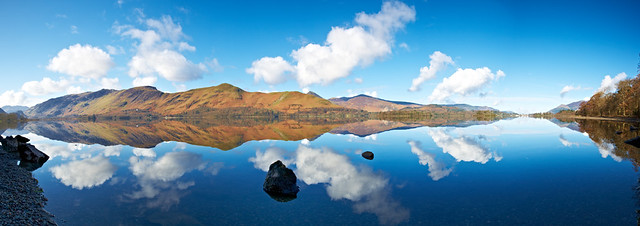

Derwentwater Reflections Panorma by mark_mullen, on Flickr

 
I use a nice small aperture to ensure a great DoF, manual exposure, manual focus and a cable release. Level your tripod up before you start otherwise as you pan round you'll do so in an arc vertically meaning you have to crop out the middle of the resulting panorama. Set up in portrait, set your exposure up and shoot a test shot.

Once you're happy with the exposure stick your hand in front of the lens and take a shot, when you're back home you'll see the hand shot and know that is when your panorama shots start, then rotate around overlapping each shot. After your last shot take another with your hand in front of the lens so again you know which shots to process.

I shoot in raw, make the adjustments I want to the first shot (usually the furthest left for me), then copy the adjustments to the resulting files. From there I export the files as Tiffs to a new folder, then open that folder in Bridge, select all the files and tell it to merge them in Photoshop.

Here is one of mine from the Lake District earlier in the year, made up of 12 portrait shots, at one point it reached 1.37Gb in size!

http://www.flickr.com/photos/markmullen/6848823104/
Derwentwater Reflections Panorma by mark_mullen, on Flickr

great post Mark... everything you need to know right there :thumbs:
 
I use a nice small aperture to ensure a great DoF, manual exposure, manual focus and a cable release. Level your tripod up before you start otherwise as you pan round you'll do so in an arc vertically meaning you have to crop out the middle of the resulting panorama. Set up in portrait, set your exposure up and shoot a test shot.

Once you're happy with the exposure stick your hand in front of the lens and take a shot, when you're back home you'll see the hand shot and know that is when your panorama shots start, then rotate around overlapping each shot. After your last shot take another with your hand in front of the lens so again you know which shots to process.

I shoot in raw, make the adjustments I want to the first shot (usually the furthest left for me), then copy the adjustments to the resulting files. From there I export the files as Tiffs to a new folder, then open that folder in Bridge, select all the files and tell it to merge them in Photoshop.

Here is one of mine from the Lake District earlier in the year, made up of 12 portrait shots, at one point it reached 1.37Gb in size!

I agree with all the above! I use the same approach even down to the hand hahaha!

For stitching I use a little known microsoft research programme. Known as ICE...

http://research.microsoft.com/en-us/um/redmond/groups/ivm/ice/

Works well for me, very small, quick and enough options but not overly complicated. Granted it isn't perfect and you'll need to use JPEG (I export RAWs from LR).

Eats RAM like nobodies business though.
 
wow thanks guys..im off out in a min to have a shoot..been waiting for the light to die down a little(been very sunny)as i can never shoot well in baking sunlight ;((always over exposed)..have just down loaded ICE..was amazed it was free!..going to shoot quite a few different subjects..its only the beacon not really that interesting but enough land to practice with.Thankyou about the hand tip..shall defo be doing that..got it all noted so lets go shoot..il show you later my attempts lol..thanks guys..again some great feedback and help..Love these forums ;)

niki
x
 
I use a nice small aperture to ensure a great DoF, manual exposure, manual focus and a cable release. Level your tripod up before you start otherwise as you pan round you'll do so in an arc vertically meaning you have to crop out the middle of the resulting panorama. Set up in portrait, set your exposure up and shoot a test shot.

Once you're happy with the exposure stick your hand in front of the lens and take a shot, when you're back home you'll see the hand shot and know that is when your panorama shots start, then rotate around overlapping each shot. After your last shot take another with your hand in front of the lens so again you know which shots to process.

I shoot in raw, make the adjustments I want to the first shot (usually the furthest left for me), then copy the adjustments to the resulting files. From there I export the files as Tiffs to a new folder, then open that folder in Bridge, select all the files and tell it to merge them in Photoshop.

Here is one of mine from the Lake District earlier in the year, made up of 12 portrait shots, at one point it reached 1.37Gb in size!


Derwentwater Reflections Panorma by mark_mullen, on Flickr

BTW..your image is stunning..thanks for sharing..dont think il get that standard lol..hopefully with enough practice and a decent subject i will in time..

niki
x
 
The title of this thread got me a bit confused ... I was expecting it to be about panning !
 
The title of this thread got me a bit confused ... I was expecting it to be about panning !

:lol: - glad i wasnt the only one.

I suck at panoramas - unless i'm just cropping a shot to them of course. I did look at using serif panorama plus but the results were very inconsistent.
 
The title of this thread got me a bit confused ... I was expecting it to be about panning !

well it is..as i wanted to understand how i would pan the landscape before attempting the panoramic..you need to pan images before doing this in photoshop..maybe you misunderstood.
 
well it is..as i wanted to understand how i would pan the landscape before attempting the panoramic..you need to pan images before doing this in photoshop..maybe you misunderstood.

To be fair to Bee Jay , I suspect he meant the motorsport type of panning - ie where you use a reasonably slow shutter speed and pan the camera keeping the subject in centre frame and fire one shot on tracking servo AF so you wind up with a sharpish subject and a background with linear blur ( nI suck at that as well - I usually wind up with an 'artfully blurred' subject as well

that said you are absolutely right there's more than one sort of panning so I can see why you picked that thread title

How did your panoramic shooting go anyway ?
 
oh ok..i dont know a thing about panning..just that you move the camera on your desired subject with small following movements after selecting focus points of subjects.Admittedly most panning does involve moving subjects..but yes also used for panoramics without the use of a wide angle lens..
As for the image..im reasonably happy with the panning i did lol..bit like animation except you move the camera not the subject..im in the process of merging and stitching one now..so il post as soon as its done ;)

Sorry to have confused anyone
niki
 
ok so heres how i got on..
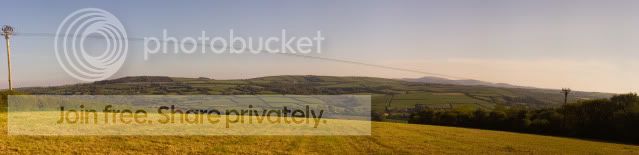
i set panoramic setting in auto..and got this from photoshop..its done a decent enough job..but i can see white lines running through it slightly..must be due to a bad stitch..maybe another setting would work better.On a whole..its calculated the scene quite accuratly..now il move on to better subjects lol..

was a set of about 20 images in all
Untitled_Panorama1copy.jpg

any feedback would be most welcome..including helpful advice,critique and how to improve..
again thanks for looking
niki
x
 
As a panorama technique goes , its better than anything i've put to gether lately :thumbs:

However imo what lets it down is the subject matter - it doesnt have an obvious focal point to draw the eye , and those power lines don't add anything positive, if you can find a better landscape to photograph (which in cornwall shouldn't be too hard) then you could be on your way to something special.

Incidentally don't neglect the potential for vertical panoramas - if you've got a long thin subject like a waterfall that can work really well (though its a good idea not to include too much sky in those as exposure can be tricky).
 
Last edited:
As a panorama technique goes , its better than anything i've put to gether lately :thumbs:

However imo what lets it down is the subject matter - it doesnt have an obvious focal point to draw the eye , and those power lines don't add anything positive, if you can find a better landscape to photograph (which in cornwall shouldn't be too hard) then you could be on your way to something special.

Incidentally don't neglect the potential for vertical panoramas - if you've got a long thin subject like a waterfall that can work really well (though its a good idea not to include too much sky in those as exposure can be tricky).

Thanks Pete..i understand theres alot wrong with it in terms of lopsy angles and not enough of the land in the frame..i just wanted to have a go..i wouldnt use this as a final piece i must admitt.Im off college on thursday due to study day so may have a wonder down padstow and attempt the harbour thereIt took quite along time in PS to actually convert to a pano..coming on half hour i think,then the alterations before hand in raw on the images..so quite time consuming.May attempt HDR when im happy with the pano shots i get..but il keep at it..as its quite good fun to do.Would much prefer a wide angle lol..which is on the agenda for my birthday..haha
anyway thanks for your feedback and everyone elses..il keep at it.
niki
x
x
 
Last edited:
Padstow is a good choice , another good one is Fowey shot from the Pol Ruan side (that works quite nicely as a low light shot I've got that somewhere as a pano though its cropped rather than stiched)

Another good one is the view from trevose head near padstow looking south towards newquay

There are also some great panos to be had off the top of rough tor up on the moor - ideally you want to be there either for sunset or sunrise (I'll see if i can find my shots to put up)

or from the cheese wring on the liskeard side where the interestingly stacked stones provide a good foreground anchor

if you want to try a vertical pano Golitha falls is good (if a bit over photographed)
 
I agree with all the above! I use the same approach even down to the hand hahaha!

For stitching I use a little known microsoft research programme. Known as ICE...

http://research.microsoft.com/en-us/um/redmond/groups/ivm/ice/

Works well for me, very small, quick and enough options but not overly complicated. Granted it isn't perfect and you'll need to use JPEG (I export RAWs from LR).

Eats RAM like nobodies business though.

Ive used ICE and if you get the correct plugin it supports raw files ( for Nikon at least, i think i got the file from Nikon ), I took 20 pictures hand held at 50mm focal lenght in portrait, overlapped by about 20%, it took ICE 20mins to stitch it together on a 2.5Gh quad core with 8Mb ram:lol:
 
Back
Top