

- Messages
- 7,468
- Name
- Stephen
- Edit My Images
- No
And not a feather to be seen! My first process using DxO PL5
 East Gill Force (2) by Stephen Lee, on Flickr
East Gill Force (2) by Stephen Lee, on Flickr East Gill Force (2) by Stephen Lee, on Flickr

 :
: STONECHAT MALE ON THE LOOKOUT by Robin Procter, on Flickr
..... OMDS seem to be keeping all their retailers in the dark about when they can expect deliveries of anything, even just batteries! I think that the retailers are also in the difficult position of having no idea of the quantities they will receive too.Still no news on when the OM1 might come into stock again - I contacted Wex yesterday and they were unable to tell me anything.
Has anyone received one since the first lot came into stock?

Still no news on when the OM1 might come into stock again - I contacted Wex yesterday and they were unable to tell me anything.
Has anyone received one since the first lot came into stock?
..... OMDS seem to be keeping all their retailers in the dark about when they can expect deliveries of anything, even just batteries! I think that the retailers are also in the difficult position of having no idea of the quantities they will receive too.
I don't know what the position is if ordering via the OMDS online shop.

I pre ordered 6 weeks ago from LCE and not heard a thing as to when I will get mine. The shine of owning the om-1 has worn off somewhat now tbh.Still no news on when the OM1 might come into stock again - I contacted Wex yesterday and they were unable to tell me anything.
Has anyone received one since the first lot came into stock?

A Portugese Stonechat by Robin as opposed to a Welsh Stonechat by Jeff @the black fox

Happy to confirm I didn’t use any. Tried Topaz, didn’t like the results.That is impressive at ISO 5000.
I'm assuming you mean you haven't used any noise reduction.... as opposed to having used NoNoise from On1 ... just checking
.... I no longer use Topaz and occasionally use ON1 NoNoise AI but the OM-1 really does have good noise performance. A few self-appointed experts on the hyperinterwebbynet have suggested that the OM-1 doesn't deliver what OMDS claim but I find that to my naked eye, it does.Happy to confirm I didn’t use any. Tried Topaz, didn’t like the results.
Pro cap shortcut. Yep. I’ve set C3 to pro cap. Then custom button. The one beside the lens. The top one of the pair to toggle on off. What I’d like but cannot set up is to have the custom button press to work when I’m in C1 or C2.... That's a fun launch! The branch looks as if it is a catapult.
Have you customised a Pro Cap shortcut on your OM-1, Trevor?
I have, currently, both the DoF Preview button and the WB button (the two next to the lens mount set up for C1 and C2......and stating the obvious. If I am in S-AF Tv mode with single AF point, clicking DoF Preview takes me to Custom Mode 1 and by clicking back to the previous settings then pressing the WB button goes to C2 mode settings. What you cannot do is be in C1 via the custom button and then press the other custom button to go to C2....you have to do do two buttons clicks but IMO It is quite rapid compared the way the M1X responded ~ it seem to be a tad fussy and lagged a bitPro cap shortcut. Yep. I’ve set C3 to pro cap. Then custom button. The one beside the lens. The top one of the pair to toggle on off. What I’d like but cannot set up is to have the custom button press to work when I’m in C1 or C2

 www.dpreview.com

Personally I think with both those shots Trevor it’s down to pure and simple there a small bird target in a big bright sky and I’ll guarantee you didn’t apply + exp compensation resulting in a dark lacking detail bird
Thanks Jeff, I need to get closer. Yep only had 1/3rd stop Exp CompPersonally I think with both those shots Trevor it’s down to pure and simple there a small bird target in a big bright sky and I’ll guarantee you didn’t apply + exp compensation resulting in a dark lacking detail bird
.... Personally I don't see the benefit of enabling Handheld Assistant - It simply displays the camera motion which the IS system is taking care of anyway and it adds more clutter in the viewfinder.I watched a recent video of/by OM Systems by someone using the OM-1 & the 'big white' lens. He showed some liveview screenshots which displayed a focus box I did not recognise.
Then I saw this DPReview page about something called camera motion (Handheld Assistant).
Discuss
OM-1 • Stabilization assistant - anyone?: Micro Four Thirds Talk Forum: Digital Photography Review
Expert news, reviews and videos of the latest digital cameras, lenses, accessories, and phones. Get answers to your questions in our photography forums.
PS on phone now but will add the video link once back on the PC.
Edit ~ the link was in an OMS email....here is the link.
View: https://youtu.be/TkP64rYaZwI
This is where it becomes tricky ,I have that many buttons assigned to different operations it’s sometimes hard to remember what does what .Thanks Jeff, I need to get closer. Yep only had 1/3rd stop Exp Comp
A lot to learn..
I take your point, that is one reason I said "Discuss".... Personally I don't see the benefit of enabling Handheld Assistant - It simply displays the camera motion which the IS system is taking care of anyway and it adds more clutter in the viewfinder.
When you have C-AF[M] + TR + Detection AI, that's enough boxes to distract you from your composition.
I think it is very tricky if one minute the bird is against the sky and then it's against a darker background. I've recently been shooting a bird with white on it and deliberately under exposing. At times the highlights were still blowing, even though I was having to raise the exposure in post too much for my taste.Thanks Jeff, I need to get closer. Yep only had 1/3rd stop Exp Comp
A lot to learn..
.... Select a spot metering option rather than evaluative?I think it is very tricky if one minute the bird is against the sky and then it's against a darker background. I've recently been shooting a bird with white on it and deliberately under exposing. At times the highlights were still blowing, even though I was having to raise the exposure in post too much for my taste.


 untitled by mazdaman2008, on Flickr
 Interesting old SqAriel 1930's ?? by Trevor, on Flickr
 I think it's a Gold Flash by Trevor, on FlickrInteresting old SqAriel 1930's ?? by Trevor, on Flickr
 T120R by Trevor, on Flickr
 ) Completely agree about practising... I do a lot of that and there's always room for improvement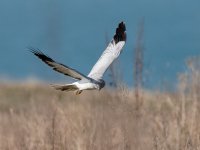

Oops. I’ve posted the Ariel twice..

Love that story ToniA squariel is so good its worth posting twice.
I had a mate with one in the 70's and it absolutely flew, but he did get through a lot of engines.
Love that story Toni
Thank you so much Jeff. That means a lot coming from you. The bright sunlight wasn't doing me any favours. Contrary to what I remembered, I hadn't blown the highlights, but was struggling to preserve them when processing and exporting, so I probably exposed about right. It was the jpegs that were blown.That’s a superb shot of a hard to get right subject ,I don’t think there’s a camera made that could . Yes selective processing would probably help but only a tiny bit .. not knowing what you have used/done so far though is the main problem to offering advice ,and I know from previous posts that EVERYONE will do it slightly differently
If it’s any consolation I find all the harrier types the hardest to take a photo of . Your settings need to be spot on every time but they move to fast fo4 that , owls are predictable ,harriers are notThank you so much Jeff. That means a lot coming from you. The bright sunlight wasn't doing me any favours. Contrary to what I remembered, I hadn't blown the highlights, but was struggling to preserve them when processing and exporting, so I probably exposed about right. It was the jpegs that were blown.
I used the default Photolab process, then raised the exposure of the whole scene. I definitely lowered the highlights on the bird and possibly for the whole scene - can't quite remember, but I think it could be improved. Unfortunately I clipped his wing on my favourite capture, but you could see his eyes on that one - a beautiful bird!
At some point I will have another go and as you say, selectively process the bird and the background separately - I think that is what is needed. I've just started playing with Capture One and I think that may have a bit more latitude for processing on shots like this.


