

You are using an out of date browser. It may not display this or other websites correctly.
You should upgrade or use an alternative browser.
You should upgrade or use an alternative browser.
Nikon D800......
- Thread starter cowasaki
- Start date
Oh, ok.
I do like taking photo of it but i"m more in to portrait and street photography.

architectfadi
Suspended / Banned
- Messages
- 3,436
- Edit My Images
- Yes
Very nice, now get yourself down to that castle for some cool historical images
+1. Lightroom is so easy to use and IMO the simplest out there. I am so glad Adobe left it out of their CC (Creative Cloud)
+1. Lightroom is so easy to use and IMO the simplest out there. I am so glad Adobe left it out of their CC (Creative Cloud)
Bought Lightroom this evening, they have a deal up to the 27 may 33% off , I payed £70 I think.

Cagey75
Suspended / Banned
- Messages
- 17,146
- Name
- Keith
- Edit My Images
- No
I got LR4 for around same at Christmas during a Sale on Amazon. Best value ever, considering how much we use it. I pretty much use it for all my images, whether it's just a very minor tweak to a full on processing - since it's cheaper than most of the gear I buy ... well worth it. I paid as much for a Black rapid strap.
Cagey75 said:I got LR4 for around same at Christmas during a Sale on Amazon. Best value ever, considering how much we use it. I pretty much use it for all my images, whether it's just a very minor tweak to a full on processing - since it's cheaper than most of the gear I buy ... well worth it. I paid as much for a Black rapid strap.
It is very intuitive and straight forward i think.

AchimT
Suspended / Banned
- Messages
- 340
- Edit My Images
- No
If you do a lot of b&w have a look at the Nik plugins for Lightroom. Personally I like LR a lot. Intuitive, powerful, produces good quality results and on top of it comes with a great image database feature. Excellent value for the money.

OldCarlos
Suspended / Banned
- Messages
- 6,882
- Name
- Carl
- Edit My Images
- Yes
Just messing about for an hour after lunch & thought i'd see if focus would lock on to a hover.
About 10' away & not good light, but quite pleased really.
.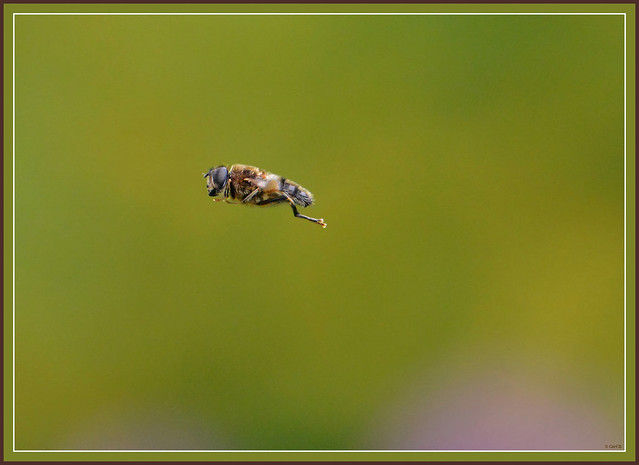
Hover-fly in flight by Carl B.1, on Flickr
About 10' away & not good light, but quite pleased really.
.
Hover-fly in flight by Carl B.1, on Flickr

john_e
Suspended / Banned
- Messages
- 459
- Name
- John
- Edit My Images
- No
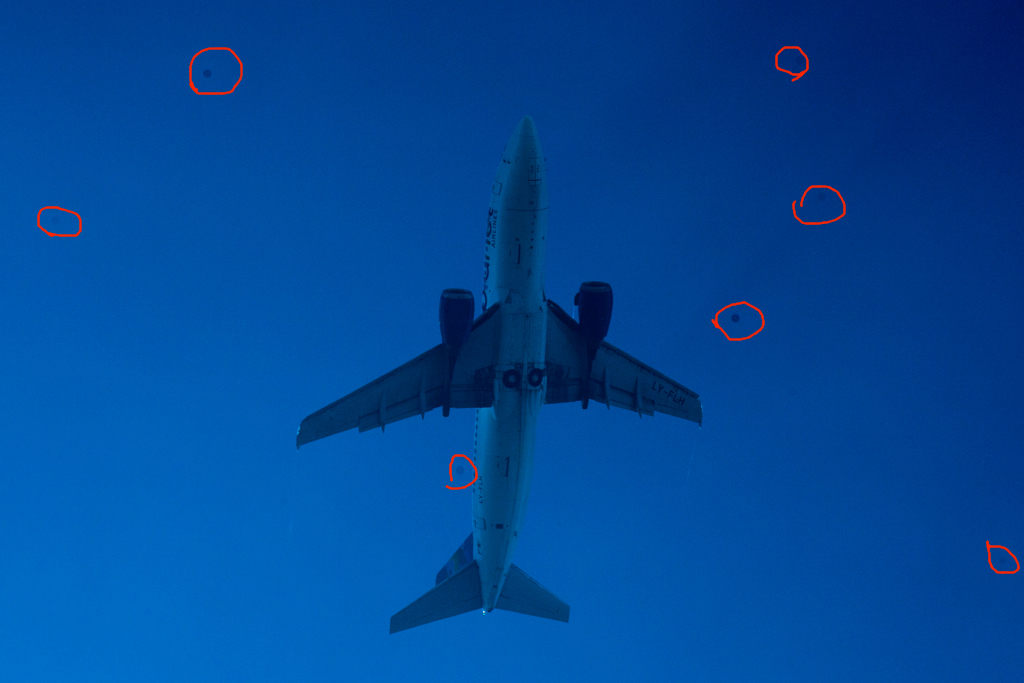
I've had my D800 less than 2 weeks and took it out duck shooting at the park yesterday, whilst out an airliner flew over so I grabbed a few shots, they were massively overexposed so I had a play with them in LR to see how recoverable they were and as I tweaked them spots started appearing so I pushed the sliders a bit further and ended up with the image below. Now I know that this isn't a real world image but I've never wet cleaned a sensor before and have no intentions of starting now. I'm guessing it's oil given the circular nature of the spots rather than dust. Any thoughts...?

Cleaning the sensor of any SLR is pretty straightforward, in fact it's **** easy! Just get the right swabs for your sensor size and some proper solution for them and bobs your uncle.
Another clean rip off in the photographic industry. Lol
Another clean rip off in the photographic industry. Lol
Cleaning the sensor of any SLR is pretty straightforward, in fact it's **** easy! Just get the right swabs for your sensor size and some proper solution for them and bobs your uncle.
Another clean rip off in the photographic industry. Lol
Agreed, it is incredibly easy.
john_e
Suspended / Banned
- Messages
- 459
- Name
- John
- Edit My Images
- No
Looks like blobs of oil with it being perfectly round.
That's what I thought, most dust bunnies I've experienced have looked like fibres or irregular shapes.

Pookeyhead
Suspended / Banned
- Messages
- 11,746
- Name
- David
- Edit My Images
- No
I know I bang on about this, but seriously... what is the big deal about cleaning a sensor? You can't touch the sensor... it's buried behind a thick layer of plastic.. you won't break it. It explains how to do it in the manual... there's a lock up feature built in to allow you, the user to clean it. It's dead easy, and safe, and above all.. it;s routine maintenance you are EXPECTED to do. It's a SLR.. you take the lens off, and crap gets in.. fact. If you are not prepared to clean your sensor, or send it away to be cleaned, then sell your SLR now and buy a fixed lens camera because it happens.. it's normal.
Buy some of these and just clean your sensor. Make sure you battery is fully charged before you lock up the mirror, and use the camera's menu option for sensor cleaning lock up... do not just use "B" and you'll be fine.
You can NOT touch the surface of the sensor.. it's impossible.
It's up to you. Either clean it, or have spots.. your call.
Buy some of these and just clean your sensor. Make sure you battery is fully charged before you lock up the mirror, and use the camera's menu option for sensor cleaning lock up... do not just use "B" and you'll be fine.
You can NOT touch the surface of the sensor.. it's impossible.
It's up to you. Either clean it, or have spots.. your call.
I know I bang on about this, but seriously... what is the big deal about cleaning a sensor? You can't touch the sensor... it's buried behind a thick layer of plastic.. you won't break it. It explains how to do it in the manual... there's a lock up feature built in to allow you, the user to clean it. It's dead easy, and safe, and above all.. it;s routine maintenance you are EXPECTED to do. It's a SLR.. you take the lens off, and crap gets in.. fact. If you are not prepared to clean your sensor, or send it away to be cleaned, then sell your SLR now and buy a fixed lens camera because it happens.. it's normal.
Buy some of these and just clean your sensor. Make sure you battery is fully charged before you lock up the mirror, and use the camera's menu option for sensor cleaning lock up... do not just use "B" and you'll be fine.
You can NOT touch the surface of the sensor.. it's impossible.
It's up to you. Either clean it, or have spots.. your call.
+1 this are awesome , and if you travel they are easy to pack
It may be oil spots, which certainly was a big issue on early D800's and D600's, it was on mine. Not sure if this is still occurring as bad as it was on earlier models.
Cleaning oil spots off is the same procedure but with a different swab made for oil.
If you use a normal swab then the oil can just smear.
The oil spots stop showing after about 3000 clicks
Incidentally, if you are going to clean your own sensor then it is worth buying a decent sensor loupe such as this
http://www.wexphotographic.com/buy-...se-extension&gclid=cmqjqznyprccfziptaodphoalw
expensive but it means you can really see your sensor
Cleaning oil spots off is the same procedure but with a different swab made for oil.
If you use a normal swab then the oil can just smear.
The oil spots stop showing after about 3000 clicks
Incidentally, if you are going to clean your own sensor then it is worth buying a decent sensor loupe such as this
http://www.wexphotographic.com/buy-...se-extension&gclid=cmqjqznyprccfziptaodphoalw
expensive but it means you can really see your sensor
Last edited:
Moreorless
Suspended / Banned
- Messages
- 989
- Edit My Images
- No
Just picked up a used Sigma 24mm 1.8 as rather an impulse by at £160, mainly for the macro ability.

gramps said:Looks a bargain!
+1
Moreorless
Suspended / Banned
- Messages
- 989
- Edit My Images
- No
Looks a bargain!
Supprizingly from MPB, bought it sharpish before they realised they'd undervalued it.

Definitely more of a "flower" rather than "insect" lens I'd say, 1:2.7 max magnification and you need to get very close, shooting wideangle makes for some more interesting compositional options though.

Last edited:

stormcrow
Suspended / Banned
- Messages
- 1,503
- Name
- Dale
- Edit My Images
- Yes
I've been thinking of getting myself a 70-200 to go with my D800 but I decided to rent one first to get a better idea of if I would like it. I've done some very random test shots this afternoon and so far I am impressed. I'm off to a wedding on Thurs so I will see how it works out there.
The bird shots are taken through some rather dirty double glazed windows.




The bird shots are taken through some rather dirty double glazed windows.

Kevin O'Brian
Suspended / Banned
- Messages
- 5,311
- Name
- Kevin
- Edit My Images
- No
Thank you for that crops are great.
architectfadi
Suspended / Banned
- Messages
- 3,436
- Edit My Images
- Yes
Thank you for that crops are great.
+1
Pookeyhead
Suspended / Banned
- Messages
- 11,746
- Name
- David
- Edit My Images
- No
You'll love it. I'm convinced that for still photography, this is the best digital (35mm sensor sized) SLR ever made.. providing you stick to what it was designed to do.... or rather avoid what it was NOT designed to do, e.g. anything that requires a fast frame rate and huge buffer.
No matter what lens you put on it, that lens will be it's limiting factor, not the camera. If you want better quality, next step medium format digital.
I hope you have some nice lenses.
No matter what lens you put on it, that lens will be it's limiting factor, not the camera. If you want better quality, next step medium format digital.
I hope you have some nice lenses.
Last edited:

realspeed
Suspended / Banned
- Messages
- 8,827
- Name
- Bazza
- Edit My Images
- No
David
Yep got a couple of lenses suitable, check out my camera bag. think the main one that will stay on the camera is the 24-70 mm one I have. My D300 and my camcorders will do for most other things.
So why should I keep my camcorder you may ask? good question and I have a good answer. Some of the places I go on holiday flashing a big expensive camera is asking for trouble but my Panasonic HC-X900M slips easily into a trouser pocket. This camcorder not only does video but 16megpix stills as well.
Realspeed
Yep got a couple of lenses suitable, check out my camera bag. think the main one that will stay on the camera is the 24-70 mm one I have. My D300 and my camcorders will do for most other things.
So why should I keep my camcorder you may ask? good question and I have a good answer. Some of the places I go on holiday flashing a big expensive camera is asking for trouble but my Panasonic HC-X900M slips easily into a trouser pocket. This camcorder not only does video but 16megpix stills as well.
Realspeed
Last edited:

Cagey75
Suspended / Banned
- Messages
- 17,146
- Name
- Keith
- Edit My Images
- No
I'd still shoot RAW. Use a bunch of cards to split the files up. Edit one card at a time and process over a couple of days. You're not going to shoot any more than you would for say, a wedding ... but the processing should be a lot less strenuous. Should be more a case of copy and paste the settings across most files, as the lighting should be about same for most outdoors.
Last edited:
I'd still shoot RAW. Use a bunch of cards to split the files up. Edit one card at a time and process over a couple of days. You're not going to shoot any more than you would for say, a wedding ... but the processing should be a lot less strenuous. Should be more a case of copy and paste the settings across most files, as the lighting should be about same for most outdoors.
Thx for quick reply, I think I will follow your advice as I don't really like jpeg limitation in editing.
Just started in Lightroom , but I'm sure it will be some sort of video on YouTube to explain how to copy and paste the setting.
So far I'm really enjoying Lightroom more then Aperture3.
Cagey75
Suspended / Banned
- Messages
- 17,146
- Name
- Keith
- Edit My Images
- No
After you've done your first image tweaks, click copy down the bottom left side, under the preset channel. A box will pop up asking you to select exactly which tweaks you want copied, you can, for example choose to include any cropping in the copy ... or not. On your next similarly lit image click to paste, it may take some minor adjustments, you'll know yourself.
After you've done your first image tweaks, click copy down the bottom left side, under the preset channel. A box will pop up asking you to select exactly which tweaks you want copied, you can, for example choose to include any cropping in the copy ... or not. On your next similarly lit image click to paste, it may take some minor adjustments, you'll know yourself.
Thank you, your a star
Quick question for that event i"m doing with 300 kids about.
My only 2 nikon lenses at he moment are the 24-85VR not that sharp and the 50mm 1.8 a lot sharper.
Just move from fuji to Nikon so budget tight £3500 for the month of may i need to cool it down for a wile but will get the 85 1.8G this week
My dilemma is shooting all day with 85 1.8G + 50 1.8G all day or 24_85VR all day
Sharpness and fast focusing against practicality :bonk:
My only 2 nikon lenses at he moment are the 24-85VR not that sharp and the 50mm 1.8 a lot sharper.
Just move from fuji to Nikon so budget tight £3500 for the month of may i need to cool it down for a wile but will get the 85 1.8G this week
My dilemma is shooting all day with 85 1.8G + 50 1.8G all day or 24_85VR all day
Sharpness and fast focusing against practicality :bonk: