Nikon D750 & D780

Toby, repeat the test using a non manual mode - it will affect the raw file. The reason why it didn't affect the raw in manual was that you didn't make any changes as such and the camera won't (because it is in manual!!). In any automated (semi or otherwise) mode if it affect the meter, it affects the exposure it therefore MUST affect the raw file ...
I think you missed my point, that's exactly what I said ;) All the d-lighting appears to do is 'trick' the light meter into under exposing so that post processing (whether done in camera via jpeg or using Nikon's Capture NX) can lift the shadows and the overall exposure. If you go back and read my post you will see that I took two shots with d-lighting on. One with the exposure settings as they originally were and hence no change to the RAW file, and one set how the light meter would have it read with d-lighting set and hence the RAW file under exposed.

So to summarise it would appear that d-lighting does not change the RAW file other than changing the exposure. It doesn't do any fancy lifting of shadows etc like it does with the jpeg (or with the processing added by capture NX).

EDIT: I have just double checked this in post with the two files, the one with the exposure set originally, and one with the exposure set according to the light meter with d-lighting active. If I add 0.6 ev to the file taken with d-lighting it is identical to the one shot with 'normal' exposure. The histogram is identical. This confirms (to me at least) that all d-lighting does to the RAW file is affect exposure, it does nothing to the actual curve.

The histogram on the jpeg does look different as you would expect, even when overall exposure is matched. The actual curve is different, with more/less luminosity in the shadows.
 
Last edited:
I think you missed my point, that's exactly what I said ;) All the d-lighting appears to do is 'trick' the light meter into under exposing so that post processing (whether done in camera via jpeg or using Nikon's Capture NX) can lift the shadows and the overall exposure. If you go back and read my post you will see that I took two shots with d-lighting on. One with the exposure settings as they originally were and hence no change to the RAW file, and one set how the light meter would have it read with d-lighting set and hence the RAW file under exposed.

So to summarise it would appear that d-lighting does not change the RAW file other than changing the exposure. It doesn't do any fancy lifting of shadows etc like it does with the jpeg (or with the processing added by capture NX).
No, I got your point. In truth ADL changes the values at both ends and sometimes in the middle values depending on scene. If you shoot in manual it is sort of defeating the purpose of ADL - that was MY point - ADL is targeted at auto modes (as most of these types of thing are). Shooting in manual basically says "I'll take control" and all you did was use the suggested exposure setting. It does suppress highlights and lift shadows, but it can also tweak midtones - so it is not entirely accurate to say it tricks the meter. I'm out of this as it now seems somewhat pointless.
 
No, I got your point. In truth ADL changes the values at both ends and sometimes in the middle values depending on scene. If you shoot in manual it is sort of defeating the purpose of ADL - that was MY point - ADL is targeted at auto modes (as most of these types of thing are). Shooting in manual basically says "I'll take control" and all you did was use the suggested exposure setting. It does suppress highlights and lift shadows, but it can also tweak midtones - so it is not entirely accurate to say it tricks the meter. I'm out of this as it now seems somewhat pointless.
Sorry it sounds like you've been offended, this wasn't my intention :( I was just discussing (not arguing) how it works and trying to get it straight in my head. I did add an edit to my last post but you'd already replied by then.

I'll try it on different scenes and see if it behaves differently then. In my high DR scene this morning it did not directly affect lights or shadows with RAW, just the overall exposure. Maybe it does affect lights and shadows in different scenes.
 
Sorry it sounds like you've been offended, this wasn't my intention :( I was just discussing (not arguing) how it works and trying to get it straight in my head. I did add an edit to my last post but you'd already replied by then.

I'll try it on different scenes and see if it behaves differently then. In my high DR scene this morning it did not directly affect lights or shadows with RAW, just the overall exposure. Maybe it does affect lights and shadows in different scenes.
No, not offended, you weren't rude in anyway. Just to clarify, ADL is aimed at auto modes (A, P, scene modes etc). In manual - you will be in control. Caveat - it will still affect the jpeg though, but that is not the point of this. In an auto/semi auto mode the raw file will be affected. Also, the buffer capacity will reduce as the processor takes longer to process the image. That last point may or may not be important (it isn't to me, but it may be to some).
 
My point is simple. If you use jpeg, ADL is excellent and can help in several situations. I don't shoot jpeg as such.

I agree that there is no point in using it in Manual as it defeats the purpose of using manual irrespective of what it does to exposure with ADL.

For raw processing, I use CNX2 (or View NX/CNXD) and it does two things

1. Retains ADL settings as set in Camera as you open the raw file and renders it accordingly. You can turn the settings on/off in raw file - I don't use ADL in Camera, but those who do, this can be handy as you can change settings.
2. It also allows to add ADL after a shot is taken without one set in Camera- This is what I use for certain shots in post. I can achieve the same using exposure/shadow etc, but with certain scenes, it does a one click trick very well.My last shot of my daughter with the frisbee was using ADL command in CNX2.

If you are shooting raw and using non Nikon converter, don't bother with ADL at all.
 
No, not offended, you weren't rude in anyway. Just to clarify, ADL is aimed at auto modes (A, P, scene modes etc). In manual - you will be in control. Caveat - it will still affect the jpeg though, but that is not the point of this. In an auto/semi auto mode the raw file will be affected. Also, the buffer capacity will reduce as the processor takes longer to process the image. That last point may or may not be important (it isn't to me, but it may be to some).

My point is simple. If you use jpeg, ADL is excellent and can help in several situations. I don't shoot jpeg as such.

I agree that there is no point in using it in Manual as it defeats the purpose of using manual irrespective of what it does to exposure with ADL.

For raw processing, I use CNX2 (or View NX/CNXD) and it does two things

1. Retains ADL settings as set in Camera as you open the raw file and renders it accordingly. You can turn the settings on/off in raw file - I don't use ADL in Camera, but those who do, this can be handy as you can change settings.
2. It also allows to add ADL after a shot is taken without one set in Camera- This is what I use for certain shots in post. I can achieve the same using exposure/shadow etc, but with certain scenes, it does a one click trick very well.My last shot of my daughter with the frisbee was using ADL command in CNX2.

If you are shooting raw and using non Nikon converter, don't bother with ADL at all.
Thanks for this. The only reason I shot in manual mode was to see the effect is was/wasn't having. I will try it in one of the semi auto modes too out of curiosity. I know it will affect exposure but am interested to see what it does to the curve. I won't use it though, I just like to know how things work :oops: :$:oops: :$:oops: :$:LOL:
 
I like this one too :D:D

13266016_10153514979382120_868312254194886207_n.jpg
 
I'm sure I will, although I will also be jumping back to a D3 for doing the odd wedding..
It won't be long before you have two D750s. :D

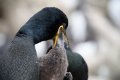
I've only been using my D750 for fishing photos lately. So I won't bore you with pictures of fish. That's a great crested grebe on the water. Or possibly a pelican.

_7522929.jpg
 
Anyone ordered through https://flubit.com/

They beat Amazon prices but not convinced that you would get UK stock lenses etc.

Yep, but not for camera kit, I think it's UK or EU stock but don't always trust their prices, I've often got a quote for them that is higher than the item I originally found
 
Yep, but not for camera kit, I think it's UK or EU stock but don't always trust their prices, I've often got a quote for them that is higher than the item I originally found

Got a couple of quotes for camera gear that are lower than amazon but only by about £10-£15. No idea where there stock comes from though so not sure whether its a yes or a no!
 
No, not offended, you weren't rude in anyway. Just to clarify, ADL is aimed at auto modes (A, P, scene modes etc). In manual - you will be in control. Caveat - it will still affect the jpeg though, but that is not the point of this. In an auto/semi auto mode the raw file will be affected. Also, the buffer capacity will reduce as the processor takes longer to process the image. That last point may or may not be important (it isn't to me, but it may be to some).
OK so on aperture priority it does change the curve ;) I find this very bizarre as all priority mode did was decrease ISO 2/3 stop for ADL, exactly the same as I did with manual. I tried manual again and it doesn't affect the curve (just the exposure). Most odd as A priority is (in theory) doing nothing different to shooting in manual accept changing the ISO for me (in this example). Seems like there's some voodoo magic going off which is turned off in manual mode for some reason ;)
 
Got a couple of quotes for camera gear that are lower than amazon but only by about £10-£15. No idea where there stock comes from though so not sure whether its a yes or a no!

One thing I forgot to mention is that quite a few of the stuff I ordered came in Amazon packaging, no idea what's going on, I guess they did order from EU sites but no idea really
 
OK so on aperture priority it does change the curve ;) I find this very bizarre as all priority mode did was decrease ISO 2/3 stop for ADL, exactly the same as I did with manual. I tried manual again and it doesn't affect the curve (just the exposure). Most odd as A priority is (in theory) doing nothing different to shooting in manual accept changing the ISO for me (in this example). Seems like there's some voodoo magic going off which is turned off in manual mode for some reason ;)
Yep, that is what I've been trying to explain :) - I'm not the best at articulating things on forums, so ... It is designed for high contrast scenes at or above the DR of the camera. It isn't really odd as such in respect of manual, once in manual mode all ADL will do is affect the starting point for the meter. I guess if I was in a situation where i had to shoot jpeg and it was a high contrast scene and I had no real re-course to any filters/pp s/w I may just consider using it ... but even then I probably wouldn't (as I'd have forgotten about it again). The other thing with ADL is there is no real way of understanding how it will affect any given scene, I'd rather rely on metering modes and exposure comp when needed.

 
Yep, that is what I've been trying to explain :) - I'm not the best at articulating things on forums, so ... It is designed for high contrast scenes at or above the DR of the camera. It isn't really odd as such in respect of manual, once in manual mode all ADL will do is affect the starting point for the meter. I guess if I was in a situation where i had to shoot jpeg and it was a high contrast scene and I had no real re-course to any filters/pp s/w I may just consider using it ... but even then I probably wouldn't (as I'd have forgotten about it again). The other thing with ADL is there is no real way of understanding how it will affect any given scene, I'd rather rely on metering modes and exposure comp when needed.
Yeah I understood what you meant about manual, my confusion comes from why it then affects Aperture priority. My understanding for aperture priority is that it uses the light meter and adjust ISO and shutter speed accordingly, exactly the same as if you were to do it manually. I can also understand that, for a given shot the camera can process the data differently to give a different output, just as we can adjust the file in PP. What I don't understand is why it chooses a different algorithm between manual mode and aperture priority. If this was the case it would therefore make more sense to me to just deactiviate ADL in manual ie grey out the menu. I realise that I have to accept that that's obviously the way Nikon's designed it though ;) :p
 
Whatcha buying??? 35 and 85 1.4's?
Sigma 35, Sigma 85, Tamron 85, Tamron 35, Nikon 35, Nikon 85 1.8G/1.4G.... in no particular order I guess :D:p :exit:
 
Yeah I understood what you meant about manual, my confusion comes from why it then affects Aperture priority. My understanding for aperture priority is that it uses the light meter and adjust ISO and shutter speed accordingly, exactly the same as if you were to do it manually. I can also understand that, for a given shot the camera can process the data differently to give a different output, just as we can adjust the file in PP. What I don't understand is why it chooses a different algorithm between manual mode and aperture priority. If this was the case it would therefore make more sense to me to just deactiviate ADL in manual ie grey out the menu. I realise that I have to accept that that's obviously the way Nikon's designed it though ;) :p
You are correct in your understanding of aperture priority (assuming you have auto iso set ;)) and without ADL on that is how it works to the best of my understanding, i.e. I can achieve the exact same output using the same settings in either M or A - BUT if ADL is switched on we are telling the camera to process the out put differently and because these types of settings are meant for auto modes they don't affect manual. To me the results from ADL can be unpredictable so I don't use it, and as I don't use Nikon s/w it makes even less sense to use it for me. Sometimes there are just too many options in the camera ...
 
To me the results from ADL can be unpredictable so I don't use it, and as I don't use Nikon s/w it makes even less sense to use it for me. Sometimes there are just too many options in the camera ...

For the same reasons, I don't use it, rather like the option of adding in in post for certain scenes.

I wonder how many use 'Effects' and 'Scene' mode on their D750. The placement of the 'Effects' mode is rather weird. It should have been after 'Scene'.
 
Sigma 35, Sigma 85, Tamron 85, Tamron 35, Nikon 35, Nikon 85 1.8G/1.4G.... in no particular order I guess :D:p :exit:

Sony A7 RII

or

All of Sigma 35, Sigma 85, Tamron 85, Tamron 35 as not tried any of them.
 
Sony A7 RII

or

All of Sigma 35, Sigma 85, Tamron 85, Tamron 35 as not tried any of them.

Sony A7 RII you know you want to
 
You are correct in your understanding of aperture priority (assuming you have auto iso set ;)) and without ADL on that is how it works to the best of my understanding, i.e. I can achieve the exact same output using the same settings in either M or A - BUT if ADL is switched on we are telling the camera to process the out put differently and because these types of settings are meant for auto modes they don't affect manual. To me the results from ADL can be unpredictable so I don't use it, and as I don't use Nikon s/w it makes even less sense to use it for me. Sometimes there are just too many options in the camera ...
Thanks. Glad I found out what it effects, always useful to try for yourself. Will put it back to off now and will stay that way ;)
 
For the same reasons, I don't use it, rather like the option of adding in in post for certain scenes.

I wonder how many use 'Effects' and 'Scene' mode on their D750. The placement of the 'Effects' mode is rather weird. It should have been after 'Scene'.
There are effects and scene modes???? ;)
 
I did briefly look in to a change of system, but it wasnt going to acheive anything!
 
I did briefly look in to a change of system, but it wasnt going to acheive anything!

Suppose it depends what you want on the system :)
 
Back
Top