Negative scanners

Last edited:
I'm looking at Plustek's, some 7xxx series and some 8xxx series. Obvs the higher the number the newer the model but does anyone know, will I have any trouble running the older ones/any of them on a modern laptop with windows 11? It looks like they all have a standard usb cable for connection so should be pretty straight forward to get them chooching right?
I have a Plustek 7500i, running it on a M1 MacBook Pro under Vuescan Pro. The original version of Silverfast that came with it stopped working aeons ago; I could upgrade just the one scanner to SF 9, or for about the same money buy Vuescan Pro for any scanner (I also have an Epson V500 and an all-in-one printer/scanner or two). AFAIK you'd need one or the other of these (SF or VP) to run a 7000 series scanner on modern Macs; not sure what the story is in Window-land.

Both my scanners have old-style USB cables; I plug them into my Mac via a USB-USBc converter cable (£25 from Apple or a couple of quid from fleabay).
 
Hmmm, might be changing my mind having read how slow Plusteks are. Should be faster doing B&W but maybe I'd be better spending time refining my DSLR scanning routine as I'm sure that it should be possible to batch crop in lightroom right?
With most of the Plusteks (or Epsons) you have to load the film holder first (you'll get better at this!). With most of the Plusteks you have to manually move the film holder for each new frame, and then fine tune the crop. A preview takes a few seconds (mine is at 900 samples per inch), then I do a two scan multi-scan at 3600 spi. I used to scan at 2400 spi but since that's not a native resolution, you're relying on Vuescan to do the interpolation.

@StephenM recommends a RAW scan, which allows you to revisit the scan at any time and adjust the chosen settings. I only do this very occasionally (mostly slide film so far), as I've found negative inversion from RAW tricky (I don't use LR, so no NLP). Besides, I'm averse to taking up huge amounts of disk space for mostly so-so images, so it's nearly always JPEGs for me.

I probably spend around 1-2 hours per roll of 135 film, usually done off and on during the evening while listening to the radio or checking social media! Makes no difference whether it's colour or black and white (apart from fiddling around in the Color Tab to try and get improved negative conversion), or whether it's JPEG or RAW. 3600 spi scans do take longer than 1800 spi scans.

The Plustek 135i has an interesting feature that a film strip in its holder once fed in will automatically advance. I've never seen or used one, so I don't know how well this works, but it should save you some time, potentially with the loss of small areas round the edge (?). In theory it works with Vuescan, but I was worried about this paragraph: "This scanner is supported on Mac OS X 10.6 (Snow Leopard) and later if you first install the Plustek drivers for Mac OS X 10.6 or later (these will work on newer versions of Mac OS X). Also, run the x32 (not x64) version of VueScan with these drivers." I don't think x32 Vuescan will work in modern MacOS, but that might not be a problem for you!

 
I probably spend around 1-2 hours per roll of 135 film,

Ouch!

DSLR scanning is probably taking my between 5 minutes to 10 minutes for a film to it into 6 frame strips and scan. Set up time is around 15-20 minutes but that'll hopefully come down a once I have this adapter made to use my enlarger as a copy stand. I think the cropping was just getting to me as I'd scanned like four films the other day.

I think I'll also refine my lightbox setup to hold the neg holder better and that'll hopefully make it that the crop is a repeatable action.
 
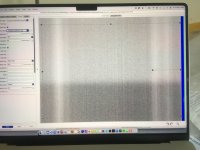
Since this thread is on the front page, I'll post this here. I'm currently scanning a roll of FP4+, and accidentally scanned a preview of an empty frame at the start, on my 12-year-old Plustek 7500i. This was the result (taken on my 1st gen iPhone SE):

IMG_2109 blank scanner.jpeg

Lots of vertical banding and the lower third considerably darker! (That's scanned at 900 samples per inch for the preview, which might have had some effect on the finer banding.) That's clearly going to have an effect on the final image (though I probably should do a full scan at target resolution to check).

So it's beginning to look like a new scanner is in my future! (Before you suggest DSLR scanning, please note I don't have a suitable digital camera.) However, before I get too much scanner GAS going, I wonder if anyone with a more recent Plustek 8000 series (preferably the 8200i) would do me a favour and share a blank frame scan? I'd just like to have some idea how far out of whack mine is!
 
Tomas on Mastodon writes: " it might just need cleaning, I don’t know if it works the same way as the Epson v850, but I imagine it might; the latter has a calibration area where it scans a section of the empty glass to calibre the individual pixels, and if you get that bit dirty, it produces this kind of striped output."

Clearly there are huge design differences between the two scanners, and cleaning the Plustek would require disassembly (quite possibly beyond me), but does anyone think there might be something in this?
 
I just re-ran the empty frame scan, right through to the final result, scanning as a negative. What I see as it scans is a completely black frame (the white light inverted), that looks pretty uniform to me. The histogram is a narrow band to the right. Then when the scan is finished an image very like the one above appears. I think it's taking that very narrow band and expanding it to make an image, and that some (hopefully minor) flaws in the sensors get magnified by that. I'm not sure if that explanation makes any sense, but it sort of explains to me why I don't see huge tonal shifts top and bottom of my normal scans...
 
Not sure about cleaning, Chris, but this might be a possible workaround while you seek a more permanent solution.

 
Back
Top