MacBook pro 15-inch screen yay or nay

Iren

Suspended / Banned
Messages
624
Name
Irina
Edit My Images
Yes
Hi!
I am thinking of getting MacBook pro to be my main computer/laptop for work in LR and PS.

15-inch is the max you can getwith their laptops. Does anyone have same/similar laptop and use it for photo editing? Any comments regarding your experience would be appreciated.

The specifications of what i am thinking of getting are below:

15-inch MacBook Pro with Retina display
2.2GHz Processor
256 GB Storage

  • 2.2GHz quad-core Intel Core i7
  • Turbo Boost up to 3.4GHz
  • 16GB 1600MHz memory
  • 256GB PCIe-based flash storage1
  • Intel Iris Pro Graphics
P.S. Descrop is not an option for me, i might get second, bigger screen if i really need to later on
 
I purchased my first Mac almost 2 years ago and it was a MacBook Pro with retina display.

It was one of the best purchases I've made the screen and build quality is amazing. I've used it daily and taken it all over the place and it still feels like new. The size was one of the other deciding factors at the time, quite often with a laptop of this performance they are quite bulky. It's also quite easy to use with a monitor at home if you wanted to and a lot of people do that.

I may be tempted to get the 512GB flash though if you can stretch that far..
 
Last edited:
There are two problems with laptop displays - the size, and the fact that they can't be properly calibrated. You can calibrate colours and adjust the brightness but there isn't normally any contrast adjustment.

Glossy screens can be an issue too. It depends on your working environment.

It's also worth noting that super-high resolution displays - like Retina - can be problematic with some operating systems and applications. Check your chosen combination before buying. They'll also need more powerful graphics cards.
 
I purchased my first Mac almost 2 years ago and it was a MacBook Pro with retina display.

It was one of the best purchases I've made the screen and build quality is amazing. I've used it daily and taken it all over the place and it still feels like new. The size was one of the other deciding factors at the time, quite often with a laptop of this performance they are quite bulky. It's also quite easy to use with a monitor at home if you wanted to and a lot of people do that.

I may be tempted to get the 512GB flash though if you can stretch that far..

Thank you! Did you get 15inch display?
Dont think i can go as far as 512GB though :/
 
There are two problems with laptop displays - the size, and the fact that they can't be properly calibrated. You can calibrate colours and adjust the brightness but there isn't normally any contrast adjustment.

Glossy screens can be an issue too. It depends on your working environment.

It's also worth noting that super-high resolution displays - like Retina - can be problematic with some operating systems and applications. Check your chosen combination before buying. They'll also need more powerful graphics cards.

I guess i cant choose whats inside, what more powerful graphic cars (or lack of them) will do to the process?
 
Thank you! Did you get 15inch display?
Dont think i can go as far as 512GB though :/

Yeah I went for the 15" Retina display, the 13 " was just too small yet the 15" looked ideal and would still fit in my camera bag.

I think Juggler was referring more to a Windows based laptop and not the mac, windows used to be terrible (now a bit better) with high res as the OS just didn't scale very well.

With the Mac apple have full control over the OS and Hardware but as you know you can customise the MacBook Pro slightly on the model your have chosen and you could get a better GPU in the next one up at £1999, thats the one I went with + upgrades but the options were different then.
 
I got totally sick of windows, especially Windows 10, so I bought a MacBook Pro 15" retina display, 256gb SSD, 16gb RAM. Works well for me although I'm not a pro photographer. I use photoshop cc2015 and haven't had any problems with it, or any other programme for that matter, and I certainly don't regret ditching Windows.
 
I've been using a 15" MBPr for years w/o issue. I don't find the glossy screen a problem, but I don't sit/edit in direct light. I find it calibrates quite well w/ the Spyder5, and it's quite tolerant of positioning/viewing angle. That's not to say any laptop is optimal, it's not.

I run LR and PS in "low resolution mode" because I want a better idea of how my images will look to others on the web... and to me in a web browser. The other option is to edit/evaluate at 2x (not necessarily 200%).

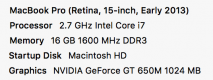
These are the specs on my machine... the drive is a 480GB SSD. TBH, there are times where it acts a bit slow/goofy w/ PS/LR. I think that has more to do with the programs graphics acceleration implementation (I sometimes have to turn it off).
Screen Shot 2016-08-08 at 11.34.20 AM.png
 
There is a new model due out later this year................just saying
 
Thanks for the detailed reply!
Knowing the specifications along side your comment was very helpful

Do you use any other apple products likemagic mousr? How do you find it?

I've been using a 15" MBPr for years w/o issue. I don't find the glossy screen a problem, but I don't sit/edit in direct light. I find it calibrates quite well w/ the Spyder5, and it's quite tolerant of positioning/viewing angle. That's not to say any laptop is optimal, it's not.

I run LR and PS in "low resolution mode" because I want a better idea of how my images will look to others on the web... and to me in a web browser. The other option is to edit/evaluate at 2x (not necessarily 200%).

These are the specs on my machine... the drive is a 480GB SSD. TBH, there are times where it acts a bit slow/goofy w/ PS/LR. I think that has more to do with the programs graphics acceleration implementation (I sometimes have to turn it off).
View attachment 71086
 
Last edited:
I got totally sick of windows, especially Windows 10, so I bought a MacBook Pro 15" retina display, 256gb SSD, 16gb RAM. Works well for me although I'm not a pro photographer. I use photoshop cc2015 and haven't had any problems with it, or any other programme for that matter, and I certainly don't regret ditching Windows.

Thats another reason i want to try macBook, had enouch of windows
Do you use magic mouse or external hard drive from apple?
 
Thanks for the details, its good to know
Ive asked and they dont customize it anymore, which is a shame

Yeah I went for the 15" Retina display, the 13 " was just too small yet the 15" looked ideal and would still fit in my camera bag.

I think Juggler was referring more to a Windows based laptop and not the mac, windows used to be terrible (now a bit better) with high res as the OS just didn't scale very well.

With the Mac apple have full control over the OS and Hardware but as you know you can customise the MacBook Pro slightly on the model your have chosen and you could get a better GPU in the next one up at £1999, thats the one I went with + upgrades but the options were different then.
 
Irina
I have a rMBP, in fact one of the first available, and it's works just fine with Lightroom and Photoshop. The current screen is very near sRGB and calibrates just fine . It matches my iMac display no problem. Glossy screen : never found that to be a problem. I just wonder if the rumoured New Retina MacBook pro will have the new P3 display like the iMac. Much wider gamut than the old machine. September October is the usual time for upgrades. I'd wait till then, as you may get the current model at a bit of a discount.
 
Thanks for the detailed reply!
Knowing the specifications along side your comment was very helpful

Do you use any other apple products likemagic mousr? How do you find it?
I don't use a mouse w/ it, just the trackpad. I do use a Wacom Tablet (wireless) for heavy editing though.
 
I also have one of the first rMBP i7 512gb ssd and 16gb. It was ridiculously expensive but I use it daily, LR and Aperture. I also use it for web, watching movies etc My wife has been through 3 or 4 Windoze based laptops in the time I've had my Mac , they really are built to last. I would never go back to a Windiws based machine. I have to use one at work and I hate it.
 
The screen is absolutely fine. Never had a problem with it, but I do use mine indoors and are nearly always at a 90 degree angle to the window. What is great about OSX is that it can automatically have zones at 1:1 pixel mapping whilst others scaled. That way you can read the UK whilst the image for editing is using the hires. All fully automatic.

However I really would NOT buy one now. The tech hasn't been updated for way too long it's one or two generations behind current. Desperately in need for an upgrade.

There is a new model due out later this year................just saying

I am sure there will be one soon, but it will be more expensive and i need something now

If you need something now then so be it, traditionally they haven't been in a habit to make new models more expensive.
 
Last edited:
I've been using a 15" MBPr for years w/o issue. I don't find the glossy screen a problem, but I don't sit/edit in direct light. I find it calibrates quite well w/ the Spyder5, and it's quite tolerant of positioning/viewing angle. That's not to say any laptop is optimal, it's not.

its not necessarily just about the reflections from the gloss (which give me personally a headache) but the gloss can introduce a false sense of contrast and this should be taken into account (also a reason why top end displays are all matte).
 
I have the same spec as yours - and love it. I don't find it an issue with the screen either.
 
Laptops are not perfect if you are critical of the output, but having been using this 15" one for four years, I am certainly not disappointed. Did have it upgraded prior to purchase to 750Gb SSD though.

r8i6w0.jpg
 
Last edited:
Thanks everyone for the comments!
After all the comments here and numerous trips to apple store with questions, i am convinced that its right choice for me ( i am impressed with their service and customer support)

Just need to decide if i need magic mouse or additional trackpad
 
its not necessarily just about the reflections from the gloss (which give me personally a headache) but the gloss can introduce a false sense of contrast and this should be taken into account (also a reason why top end displays are all matte).
A "false sense of contrast?" In a darker environment a glossy screen delivers more saturated colors, better contrast, and a sharper image than a mat screen does. That doesn't make one or the either "false."
It is only false if it doesn't align with the final output/display... that's where calibration and printing profiles come into play.
 
maybe false was the wrong word. increased sense of contrast would perhaps have been better.

whether this can be calibrated out reliably or not is another matter, like I said it should be accounted for. but again, pro displays are always matte.
 
like I said it should be accounted for. but again, pro displays are always matte.
I suppose we should clarify the terms then... with matte being "anti glare" and not "matte texture."
The top line Eizo photography/graphics monitors (among others) are using "glossy plate" IPS screens treated against glare... for results similar to a retina screen in a darkened environment (in terms of "glossy/matte" characteristics).
 
Thanks everyone for the comments!
After all the comments here and numerous trips to apple store with questions, i am convinced that its right choice for me ( i am impressed with their service and customer support)

Just need to decide if i need magic mouse or additional trackpad
The magic mouse didn't do it for me and I returned to my Logitec ball mouse, when not using a track pad. Never really understood what was so 'magic' about the mouse anyway. But a lot of that is down to user preference rather than the other questions discussed here.
 
The magic mouse didn't do it for me and I returned to my Logitec ball mouse, when not using a track pad. Never really understood what was so 'magic' about the mouse anyway. But a lot of that is down to user preference rather than the other questions discussed here.

Ive tried one in store today and looks like one click mouse instead of 2 buttons :)
Will see how i go with track pad first
 
Ive tried one in store today and looks like one click mouse instead of 2 buttons :)
Will see how i go with track pad first

Trackpad is fine for general work in LR, but you'll probably find you want something else. I'd put the money towards an Wacom Intuos Pro (small) which is what I use when editing on the laptop etc.

If you've got a USB mouse now that will work on the mac anyway.
 
Last edited:
Trackpad is fine for general work in LR, but you'll probably find you want something else. I'd put the money towards an Wacom Intuos Pro (small) which is what I use when editing on the laptop etc.

If you've got a USB mouse now that will work on the mac anyway.

Hmmm, never heard of it before the comments in this post. I had a quick look at their website and watched few youtube videos, so it works like track pad but bigger and with pen?
 
Yep, and a lot more accurate when using variable pressure pen.
 
I think it all depends on what someone actually means by editing. Unless seriously changing images in Photoshop such that they are altered or retouched I find a normal track pad is just fine and no need to spend hundreds for a pen to do that. I also find that small pen based tablets are really annoying to use with large high resolution screens. I've got a medium one and found that too small to deal accurately with my old 30" monitor my apple, let alone with my current 4K screen setup.
 
I think it all depends on what someone actually means by editing. Unless seriously changing images in Photoshop such that they are altered or retouched I find a normal track pad is just fine and no need to spend hundreds for a pen to do that. I also find that small pen based tablets are really annoying to use with large high resolution screens. I've got a medium one and found that too small to deal accurately with my old 30" monitor my apple, let alone with my current 4K screen setup.

I think its down to individual preferences
I'll stick with just MacBook pro for now and wont get any devices before i'll master it and figure out what would be useful for me
But its good to know how it works for others, thanks
 
I think it all depends on what someone actually means by editing. Unless seriously changing images in Photoshop such that they are altered or retouched I find a normal track pad is just fine and no need to spend hundreds for a pen to do that. I also find that small pen based tablets are really annoying to use with large high resolution screens. I've got a medium one and found that too small to deal accurately with my old 30" monitor my apple, let alone with my current 4K screen setup.

That's strange as I find the small is fine, in fact I have a medium which I used to use with a 5K iMac and remapped it so I only used quarter of the area on the medium and that is more than enough for sensitive work on a 5K monitor.

On the small I actually use all the area but could use less without any problem.

I got the idea from Aaron Nace who is the man behind phlearn.com and he only every uses a fraction of his Small Intuos Pro, he reckoned it worked better for him so I tried and and sure enough using the smaller area helped a lot, still very very accurate, no problems.
 
For me - I've changed to using MacBook Pro and external screen few years ago...
Mostly for me it was the convenience of things... I travel a lot on assignments abroad/around the country.
So having a laptop where I had everything I needed... and no need to transfer between desktop and laptop.. it was a no-brainer.
My MacBook Pro works fast enough to do editing on PhotoShop and video editing on Adobe PremierPro ... so I can't complain about the speed either.

I do think that for Home Office work having an external screen is a good idea... but the 15" screen is plenty for me to do my editing on the road.
 
For me - I've changed to using MacBook Pro and external screen few years ago...
Mostly for me it was the convenience of things... I travel a lot on assignments abroad/around the country.
So having a laptop where I had everything I needed... and no need to transfer between desktop and laptop.. it was a no-brainer.
My MacBook Pro works fast enough to do editing on PhotoShop and video editing on Adobe PremierPro ... so I can't complain about the speed either.

I do think that for Home Office work having an external screen is a good idea... but the 15" screen is plenty for me to do my editing on the road.

Great! Thanks for reply! Its good to get as much feedback as possible before the big purchase :)
 
Back
Top