Predictive text and typing late at night isn't a good recipe.... Sorry

What I mean is just think about lighting the object, rather than the whole scene. Because the object will be cut out, it doesn't matter if the background is white, grey, off white, whatever.... providing the background isn't creating a colour cast that could reflect back onto the object, all you need to do is think about the lighting ON the object and not around it.
The way we do cut-outs is to photograph on white but to make sure the edge of the object is well defined. By this I mean if, for example, you're photographing a red bottle with a white top, the main body of the bottle (which is red) will be clearly defined against the background but light it too evenly and the white bottle top could just disappear into the white background. By underexposing the background then the white bottle top has a more defined edge. We then use the path tool on our cut-outs, which is basically done because paths allow us to wrap text around an image in InDesign.
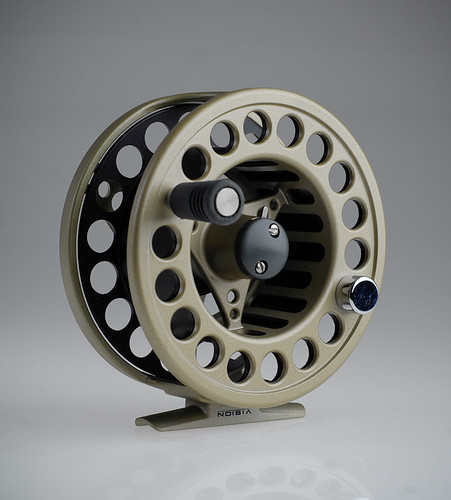
For example, this could be an easy cut-out because the outer edges of the reel, plus the holes in the spool, are clearly defined so can be cut out easily using selection tools and the path tool:
 Reel
Reel by
Pat MacInnes, on Flickr
This wasn't shot for this purpose, but you get my drift hopefully. The only area where there is a problem is the slight gap on the left between the spool and the main body of the reel; there's a thin sliver of background peeping through that if ignored, would stay grey if this was laid over a white background.
Some lighting purists will say that it's best to get everything shot as perfect as can be in the studio and not rely on software. This is good thinking in reality but not all subjects (like the bottle with a white top) will be easy to cut-out so what I'm suggesting is a bit of a cheat, especially if you're not able to use a lot of light to get everything spot-on.
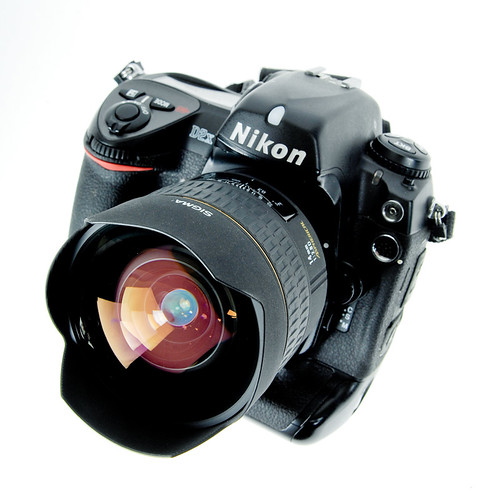
This shot was done to try and get it as close as damn-it to white.
 Sigma 14mm & D2x
 by
Pat MacInnes, on Flickr
It's a black object so I've got the leeway to overexpose slightly to get the white background even whiter, but you can see in the top left corner that there's some fall-off that giving a bit of density so would need to be brushed out. But this is an easy one to cut-out because of the defined edges (albeit they're slightly OOF because of the shallow DoF). However, look at the bottom right of the camera where the battery cover is and if there was any more light on that surface, it could easily go to white and blend into the background. It's just about making sure you are mindful of edges.
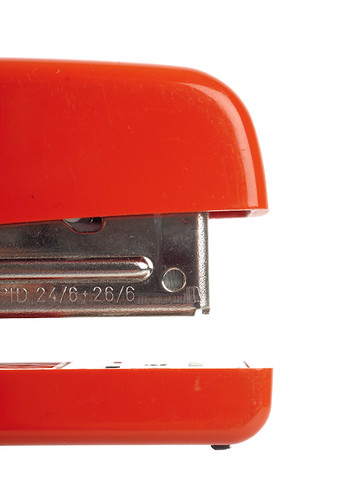
Here's one where edges have been lost:
 Stapler
 by
Pat MacInnes, on Flickr
This wasn't designed as a cut-out but if I wanted to use it as so, I'd basically have to goes where that rear edge was against the white background. There probably is a slight tonal difference but not enough to make it easy. A light grey background would solve this issue without affecting the colour or exposure of the main subject.
The light cubes like the one you have linked to will do a job, no doubt, but the lighting on the subject will probably be felt and boring, although you may want this for illustrative purposes. But if texture or details play a big part in an objects appeal, flat lighting can sometimes not show this to full effect so you need to get more creative with lighting, which continuous won't allow as easily as adjustable speed lights and/or flash heads.
I forget myself at times so hopefully this makes sense but pull me up on anything that sounds bonkers and I'll try to explain further