Lighting set ups for cut out.

Doog

Suspended / Banned
Messages
1,812
Name
Dougie
Edit My Images
Yes
Thinking of buying some gear for table top photography. I've been doing the odd cut out items with nothing more than indoor lighting and post processing but it's not an ideal setup and getting just 'ok' results. So, that explained, what do you think of this kind of set up? http://www.stevesphotoshop.co.uk/light_tent_cube_80cm.html
Is it the way to go? This would be my first ever lighting purchase and so I'd like to go down the right road to start with. Would much appreciate any advice.:)
 
I've always done this kind of stuff using separate heads to shape the light, whereas these cubes look like they'll do a decent enough job but the light is totally diffused and directionless.

I do a lot of white background stuff for magazines where they'll be cut out and to be honest, it's more about the light falling on the subject than off it. If you're cutting out then it's no biggie if the background is grey or off-white.... provided you have an edge defined so you can use the path tool then that's all that matters. Just make sure that a y reflected light off backgrounds isn't bunching a cast back, which is white a white paper roll can help.

I can get fine results from just one soft box and a reflector, although the more heads you have the better to get light into areas that a single head may not reach.

For larger items (large bags, groups of objects) then I use a softbox overhead on a boom with one or two large soft boxes positioned around the objects to give the coverage I want.

Blister packs are a bit of a pain but you can quite easily back it with white paper so when you cut out, you have a defined package.
 
I've always done this kind of stuff using separate heads to shape the light, whereas these cubes look like they'll do a decent enough job but the light is totally diffused and directionless.

I do a lot of white background stuff for magazines where they'll be cut out and to be honest, it's more about the light falling on the subject than off it. If you're cutting out then it's no biggie if the background is grey or off-white.... provided you have an edge defined so you can use the path tool then that's all that matters. Just make sure that a y reflected light off backgrounds isn't bunching a cast back, which is white a white paper roll can help.

I can get fine results from just one soft box and a reflector, although the more heads you have the better to get light into areas that a single head may not reach.

For larger items (large bags, groups of objects) then I use a softbox overhead on a boom with one or two large soft boxes positioned around the objects to give the coverage I want.

Blister packs are a bit of a pain but you can quite easily back it with white paper so when you cut out, you have a defined package.

I think I understand where you're coming from regarding the diffused light of the tents, but this bit I do a lot of white background stuff for magazines where they'll be cut out and to be honest, it's more about the light falling on the subject than off it. If you're cutting out then it's no biggie if the background is grey or off-white.... provided you have an edge defined so you can use the path tool then that's all that matters. Just make sure that a y reflected light off backgrounds isn't bunching a cast back, which is white a white paper roll can help. left me a little confused. Any links to good beginners setups or information for beginners would be appreciated.:bonk:
 
Last edited:
Predictive text and typing late at night isn't a good recipe.... Sorry :)

What I mean is just think about lighting the object, rather than the whole scene. Because the object will be cut out, it doesn't matter if the background is white, grey, off white, whatever.... providing the background isn't creating a colour cast that could reflect back onto the object, all you need to do is think about the lighting ON the object and not around it.

The way we do cut-outs is to photograph on white but to make sure the edge of the object is well defined. By this I mean if, for example, you're photographing a red bottle with a white top, the main body of the bottle (which is red) will be clearly defined against the background but light it too evenly and the white bottle top could just disappear into the white background. By underexposing the background then the white bottle top has a more defined edge. We then use the path tool on our cut-outs, which is basically done because paths allow us to wrap text around an image in InDesign.

For example, this could be an easy cut-out because the outer edges of the reel, plus the holes in the spool, are clearly defined so can be cut out easily using selection tools and the path tool:
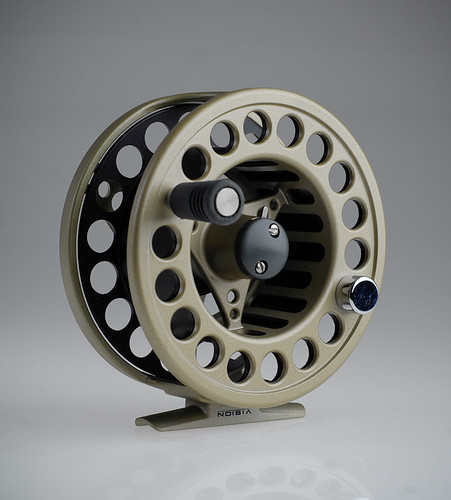

Reel by Pat MacInnes, on Flickr

This wasn't shot for this purpose, but you get my drift hopefully. The only area where there is a problem is the slight gap on the left between the spool and the main body of the reel; there's a thin sliver of background peeping through that if ignored, would stay grey if this was laid over a white background.

Some lighting purists will say that it's best to get everything shot as perfect as can be in the studio and not rely on software. This is good thinking in reality but not all subjects (like the bottle with a white top) will be easy to cut-out so what I'm suggesting is a bit of a cheat, especially if you're not able to use a lot of light to get everything spot-on.

This shot was done to try and get it as close as damn-it to white.
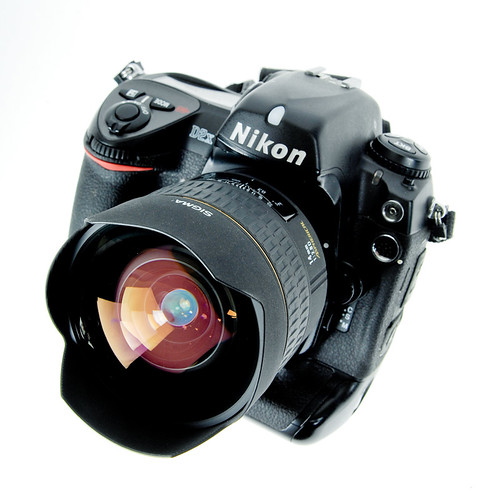

Sigma 14mm & D2x by Pat MacInnes, on Flickr

It's a black object so I've got the leeway to overexpose slightly to get the white background even whiter, but you can see in the top left corner that there's some fall-off that giving a bit of density so would need to be brushed out. But this is an easy one to cut-out because of the defined edges (albeit they're slightly OOF because of the shallow DoF). However, look at the bottom right of the camera where the battery cover is and if there was any more light on that surface, it could easily go to white and blend into the background. It's just about making sure you are mindful of edges.

Here's one where edges have been lost:
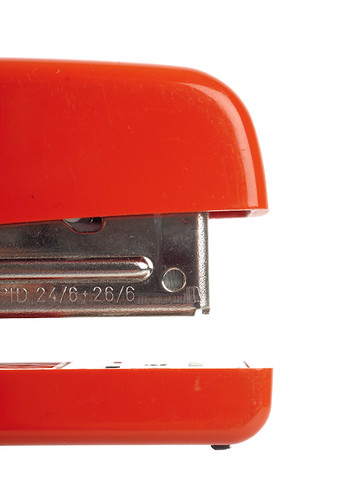

Stapler by Pat MacInnes, on Flickr

This wasn't designed as a cut-out but if I wanted to use it as so, I'd basically have to goes where that rear edge was against the white background. There probably is a slight tonal difference but not enough to make it easy. A light grey background would solve this issue without affecting the colour or exposure of the main subject.

The light cubes like the one you have linked to will do a job, no doubt, but the lighting on the subject will probably be felt and boring, although you may want this for illustrative purposes. But if texture or details play a big part in an objects appeal, flat lighting can sometimes not show this to full effect so you need to get more creative with lighting, which continuous won't allow as easily as adjustable speed lights and/or flash heads.

I forget myself at times so hopefully this makes sense but pull me up on anything that sounds bonkers and I'll try to explain further :)

BTW, this is not the only way to approach this type of photography, but its how I go about it :)
 
Last edited:
Predictive text and typing late at night isn't a good recipe.... Sorry :)

What I mean is just think about lighting the object, rather than the whole scene. Because the object will be cut out, it doesn't matter if the background is white, grey, off white, whatever.... providing the background isn't creating a colour cast that could reflect back onto the object, all you need to do is think about the lighting ON the object and not around it.

The way we do cut-outs is to photograph on white but to make sure the edge of the object is well defined. By this I mean if, for example, you're photographing a red bottle with a white top, the main body of the bottle (which is red) will be clearly defined against the background but light it too evenly and the white bottle top could just disappear into the white background. By underexposing the background then the white bottle top has a more defined edge. We then use the path tool on our cut-outs, which is basically done because paths allow us to wrap text around an image in InDesign.

For example, this could be an easy cut-out because the outer edges of the reel, plus the holes in the spool, are clearly defined so can be cut out easily using selection tools and the path tool:


Reel by Pat MacInnes, on Flickr

This wasn't shot for this purpose, but you get my drift hopefully. The only area where there is a problem is the slight gap on the left between the spool and the main body of the reel; there's a thin sliver of background peeping through that if ignored, would stay grey if this was laid over a white background.

Some lighting purists will say that it's best to get everything shot as perfect as can be in the studio and not rely on software. This is good thinking in reality but not all subjects (like the bottle with a white top) will be easy to cut-out so what I'm suggesting is a bit of a cheat, especially if you're not able to use a lot of light to get everything spot-on.

This shot was done to try and get it as close as damn-it to white.


Sigma 14mm & D2x by Pat MacInnes, on Flickr

It's a black object so I've got the leeway to overexpose slightly to get the white background even whiter, but you can see in the top left corner that there's some fall-off that giving a bit of density so would need to be brushed out. But this is an easy one to cut-out because of the defined edges (albeit they're slightly OOF because of the shallow DoF). However, look at the bottom right of the camera where the battery cover is and if there was any more light on that surface, it could easily go to white and blend into the background. It's just about making sure you are mindful of edges.

Here's one where edges have been lost:


Stapler by Pat MacInnes, on Flickr

This wasn't designed as a cut-out but if I wanted to use it as so, I'd basically have to goes where that rear edge was against the white background. There probably is a slight tonal difference but not enough to make it easy. A light grey background would solve this issue without affecting the colour or exposure of the main subject.

The light cubes like the one you have linked to will do a job, no doubt, but the lighting on the subject will probably be felt and boring, although you may want this for illustrative purposes. But if texture or details play a big part in an objects appeal, flat lighting can sometimes not show this to full effect so you need to get more creative with lighting, which continuous won't allow as easily as adjustable speed lights and/or flash heads.

I forget myself at times so hopefully this makes sense but pull me up on anything that sounds bonkers and I'll try to explain further :)

Thank you for taking the time to explain in detail some of the pitfalls regarding lighting and cut outs. I'll rethink what to do as regards lighting. If I'm honest, lighting with lights is a totally new experience and a bit of a mysterious animal to me. A little bit scary too especially with what to buy. You've explained things well even if I did have to google InDesign:) I take it path tool is just a cut out tool in the InDesign program?
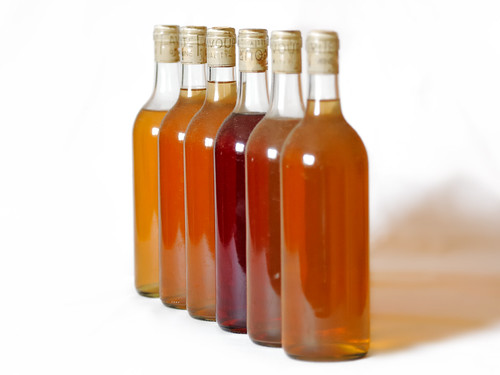
The few examples I have of cut outs have been produced rather crudely using Capture NX2 control points to alter the colour of the background to white. It works ok with some images but I have recognised that I have to be a bit more professional about this if shooting for stock which is my intention. Here's one of my latest experimental shots using NX2.


Home made wine by Doog E, on Flickr

Constant lighting would have an advantage for me initially as I could clearly see how I was lighting objects. How do you approach this with flash? Excuse my ignorance. :thinking:
 
With standard studio flash then you have modelling lights in most cases, that will allow you to see where the light is falling. With speed light flash then you lose the modelling flash.

The main thing about flash is the ability to cut out ambient light all together so you have total control over the light going into the exposure. With continuous then the exposures are possibly longer (depending on the type of continuous used) and unless the room is sealed off from outside light sources, then you won't have total control over what light is adding to the exposure.

I know what you want to do now that you've posted a shot.

What you want to do is shoot with a pure white background - sorry if I confused matters..... I got all 'designy' when you wrote cut-out. You just want a clean background.

The thing about the white bottle top in the previous post still stands - I'd rather employ a bit of photoshoppery to white-out the background than lose definition on the subject. But as for getting an all-white background, I just make sure the lighting is even. On smaller items like bags, fishing reel, bags of bait, I just put a soft box directly over the top, just out of frame with it either reflectors either side to fill in shadows, or flash heads at equal angles and distances so they push light in and even everything out. I generally get a clean background but it's worth making sure the flash heads all output the same so you avoid shadowing on the background, unless that's an effect you want to achieve. I then just import into Lightroom and go around the object, looking at the histogram to make sure it reads the background as zero, meaning there's no data there and it will render as white.

Going back to the shot of the bottles you've posted, the light sure is either small and/or far way because you have a small highlight. Bottles have all sorts of flat and curved surfaces so need attention to placing lights, often requiring light from behind to give the liquid inside a more lush look.

BTW, the shadow is far too long and dense on the shot above; it needs filling in from a light on camera-right so the density is dialled down. Plus, you want to get that shadow under control so it's no going out of frame and being cropped off.

There are all sorts of tutorials online about bottle photography and there's a good book called 'Light: Science & Magic' that gives good advice on lighting objects like bottles and metallic objects. It's worth a read, if only to give yourself an inkling of just how far you can go to make shots look the nuts.

BTW, InDesign is the page layout software we use to produce magazines. It's part of the Adobe Creative Suite. Pathing is just making a selection around something in photoshop that is recognised by software like InDesign. What it does is tell InDesign that it can run text around an object until it meets the outline (the path). It's all pretty mundane stuff until you need it :lol:

Anyway, just keep at it and think about how you want to move forward. Good lighting needn't be expensive - you can light something quite effectively with a single soft box, a cheap flash, some trigger system and a big reflector. Do you need to shoot against white? It makes an object stand out but conversely, it's not a particularly eye-catching style unless you get all tricky with multiple lights. Shooting against a medium tone background can introduce nice shadows and highlight definition and could help the objects look really classy.

Anyway, I'm waffling now.... :)
 
Back
Top