Learn with MD Lesson No4

I've read through this thread, finding it very interesting and a bit confusing.
Here's mine,

'Correct'
LWTP_4_Histogram_Correct.jpg


'Under'
LWTP_4_Histogram_Under.jpg


'Over'
LWTP_4_Histogram_Over.jpg


Am I right in saying that the histograms represent the exposures correctly, no clipping on the correct one, some shadows clipped in the under and highlights clipped in the over exposed?

Or have I still got the wrong end of the stick here...........
 
I've read through this thread, finding it very interesting and a bit confusing.

Am I right in saying that the histograms represent the exposures correctly, no clipping on the correct one, some shadows clipped in the under and highlights clipped in the over exposed?

Or have I still got the wrong end of the stick here...........

Nope, pretty much bang on!
 
I've read through this thread, finding it very interesting and a bit confusing.
Here's mine,
Am I right in saying that the histograms represent the exposures correctly, no clipping on the correct one, some shadows clipped in the under and highlights clipped in the over exposed?

Or have I still got the wrong end of the stick here...........


Looks right to me..

MD


Today is Tuesday .

Your idea is interesting ... But not sure if WE might find it a little hard to do on a BASIC level..?


"Not everyone knows how to meter from different parts of a image and the best way to do this..."

Examples would be needed me thinks...

MD
 
Last edited:
I would like to see a lesson at some time on previsualisation!

This is to understand that in an image with a full range of tones with a reasonable amount of contrast how much the sensor will resolve, is also a lesson in metering!


On a sensor the average range of tones able to be resolved is between 6 & 7 stops.

Taking Zone V as mid grey then each zone either way is approximately 1/2 stop.

Using spot metering if possible or partial metering if not my suggestion would be to take three images of a reasonably contrasty scene with a full range of tones:

1st image, meter from the brightest tone within the scene in which you would wish to retain detail and then overexpose by +2 stops.

2nd image, meter from the darkest tone in which you wish to retain detail and underexpose by -2 stops.

3rd image (if required), looking at each histogram adjust the exposure to give you the result you expected/wanted if you have not already got what you want!

Thoughts?

Eh?

That'll need some explaining in the 'previsualisation for dummy's' kind of way! :thumbs:
 
Today is Tuesday. Don't understand the relevance of this :thinking:

Your idea is interesting ... But not sure if WE might find it a little hard to do on a BASIC level..?


"Not everyone knows how to meter from different parts of a image and the best way to do this..."

Examples would be needed me thinks...

MD

Example's shouldn't be a problem. If people can get their heads around pre-visualization then they should benefit quite a lot!
 
I thought the "AND" was in revevance to the next lesson.. " which will start thursday"

Sorry for any mistunderstanding...


MD
 
I dunna do engljsh lessooons


sud it
 
Last edited:
I was going to run with the theme I have had so far for lesson 5

Metoring modes.. [ Same image shot with different modes]

Then from this we could work onto your idea..?

MD

Seems reasonable to me. :thumbs:

Is that shooting asteroids? :lol:
 
I wondered if, as MD suggested that we could leave this open for a bit longer.

I've taken a few bracketed shots and would like some help getting to the bottom of this.

EdBray - take your feet off the gas for a bit :love:
 
I've read through this thread, finding it very interesting and a bit confusing.
Here's mine,

Am I right in saying that the histograms represent the exposures correctly, no clipping on the correct one, some shadows clipped in the under and highlights clipped in the over exposed?

Or have I still got the wrong end of the stick here...........

I keep collecting snippets of information from books, dvds, podcasts, forums etc and that was one I'll keep hold of.

I suspect there have been hole books written that have taken 100s of pages to explain what you said there...
 
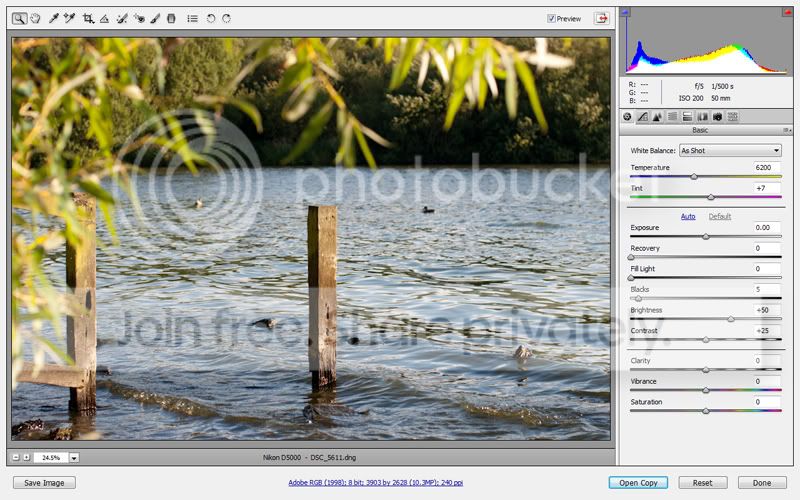
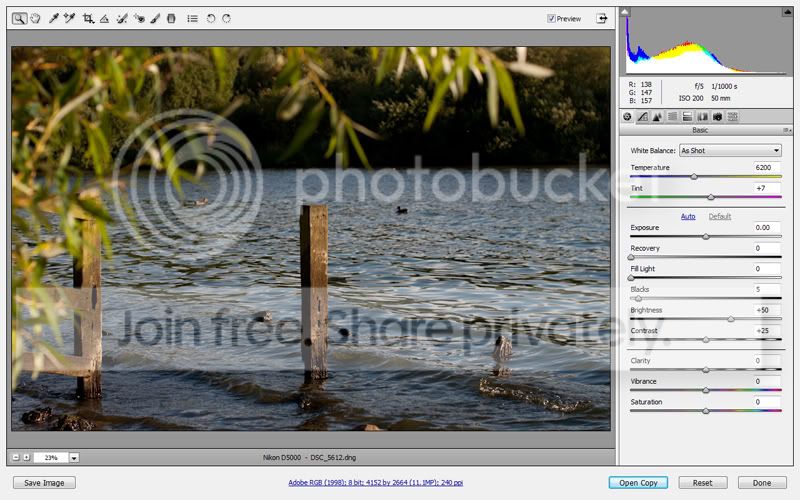
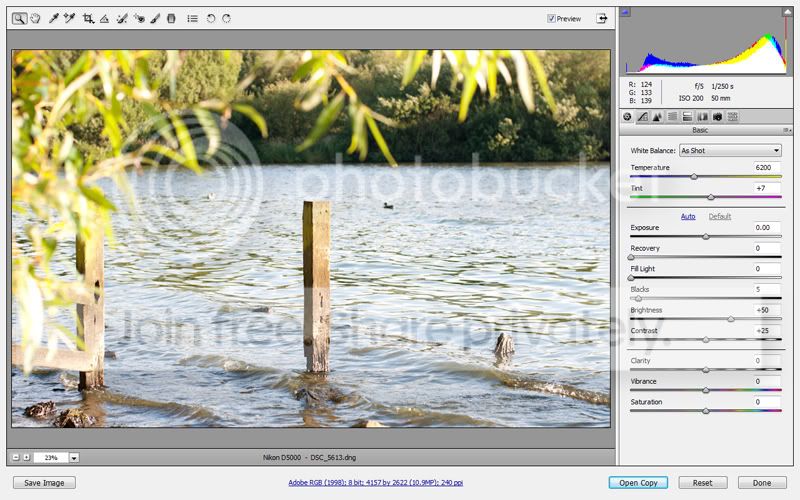
I have a few shots from the lake district but at +/- 0.7

-0.7


+0.7


Will add some new shots later.

Hi, how come there appears to be white vertical band on each side of these shots?

PaulF's under and over shots doesn't seem have these?

Also I follow where Lasagne's going as well.

Thanks.
 
Here are my photos.

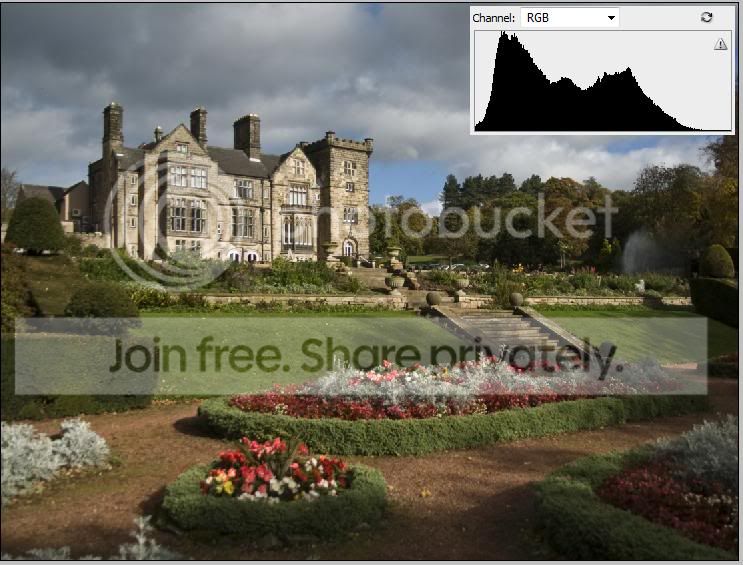
I've taken an old photo of Breadsall Hall near Derby and used Photoshop to under and over expose from the RAW file. I have to admit, I've never really used the histogram to correct the exposure before, I've usually just done it by eye.

Under Exposed
1Under.jpg


To me, I prefer this shot that isn't technically correct, as you noted.

I especially like the sky.
 
Hi, how come there appears to be white vertical band on each side of these shots?

PaulF's under and over shots doesn't seem have these?

Also I follow where Lasagne's going as well.

Thanks.

PaulF's shots are being displayed in ACR (Adobe Camera Raw) software, whereas foggy4ever's shots are being displayed in some software I'm not familiar with. Therefore the presentation of the histogram information is different.

Furthermore, if you look closely at foggy's +0.7 shot you will note that there do not appear to be any clipped highlights (perhaps just a very few). Thus the histogram is peaking near the right hand edge, not actually at the right hand edge.
 
To me, I prefer this shot that isn't technically correct, as you noted.

I especially like the sky.

That is why the histogram is just another tool in the photographers arsenal. Knowing how to use it is an advantage, but often a more aesthetically pleasing image will be had by deviating from it!

This is the reason previsualisation is so important, YOU can then decide where you want the tones to fall, not the histogram!
 
Hi, how come there appears to be white vertical band on each side of these shots?

PaulF's under and over shots doesn't seem have these?

Also I follow where Lasagne's going as well.

Thanks.

If you do not have any 100% white in the photo then the histogram for the "correct" exposure will not extend all the way to the right.
If you do not have any 100% black in the photo then the histogram for the "correct" exposure will not extend all the way to the left.
If the subject did have 100% white then you can use PP to get 100% white in your photo, the same applies to 100% blacks.

I am not sure if it has been clearly stated before but you need to view the histogram and the photo together. Many people seem to want a histogram with a nice smooth curve that is higher in the middle. This is OK for lots of normal shots with a few dark areas, a few light areas and lots of mid-tones.

If your subject is very contrasty with dark and light tones and no mid-tones the histogram will have a LH peak (for the shadows), a RH peak (for the highlights) and a dip in the middle.

A high key shot will have the histogram at the RH end.

A low key shot will have the histogram at the LH end.
 
Last edited:
I keep collecting snippets of information from books, dvds, podcasts, forums etc and that was one I'll keep hold of.

I suspect there have been hole books written that have taken 100s of pages to explain what you said there...

Your very welcome, happy to help.......
 
All images straight out camera.

correct

-1

+1


The difference in SS in these is as I expected, ie 1 stop over X2 correct SS and 1 stop under 1/2 correct SS.

However when I used the 3 stop bracketing on other images earlier today this was not the case - Why ?

Q2
My camera offer 3 shots stacked in one and the manual says better images will result. What's that all about ?
Here's example from above
 
Last edited:
Is calibrating your camera's correct exposure just a matter of personal taste to what you feel is a balanced exposure, or is there some technical way of shooting a specific image and adjusting exposure until histogram is correct ?
 
The difference in SS in these is as I expected, ie 1 stop over X2 correct SS and 1 stop under 1/2 correct SS.

However when I used the 3 stop bracketing on other images earlier today this was not the case - Why ?]
I don't know what you mean when you say "3 stop bracketing". To me that sounds like you are bracketing at -3, 0 and +3, which obviously is not the same as -1, 0, +1. You can of course bracket three exposures, but depending on the camera you should be able to bracket by fractional stops or anything up to 2, 3 or maybe even 5 stops.
Q2
My camera offer 3 shots stacked in one and the manual says better images will result. What's that all about ?
This is a complete guess, because again I don't know which camera you have, and none of mine do anything like that, but I imagine the camera is doing buiilt in HDR (high dynamic range) by taking bracketed exposures and combining them in camera. This means you can record and preserve detail over an extended dynamic range, from very dark shadows up to bright highlights.
Is calibrating your camera's correct exposure just a matter of personal taste to what you feel is a balanced exposure, or is there some technical way of shooting a specific image and adjusting exposure until histogram is correct ?

There are two ways of looking at this (maybe three). You can have an exposure that is technically correct, perhaps set according to the brightness of the light hitting the scene, but there may be artistic reasons why you would purposely want to make the image darker or lighter. You have the choice whether to expose with the technically correct exposure and then adjust later in your editing software, or to deliberately shoot with an exposure that suits your aesthetic goals in the first place. As the photographer, and the creator of the photograph, the artistic vision is yours. If you are going to make adjustments in editing it is usually quite OK to darken the image if you wish, but brightening it can cause problems with noise or posterisation (banding) of what should be smooth tonal gradients. So if you want a scene to appear bright it is better to shoot it bright than to edit it bright.

The third option, which follows on from the last bit of the paragraph above, and this applies especially if you shoot raw instead of JPEG, is to deliberately expose as brightly as you can (Expose To The Right) regardless of your artistic intent for the image. This technique will capture as much tonal detail as possible, even though the image may initially look to bright. The idea then is that you can reduce the brightness in your editing software if you need to, and in so doing you will reduce noise further and yet have recorded more shadow detail than a "normal" exposure would have managed.

So to recap...

- You can shoot a "correct" exposure and leave it at that.
- You can shoot a "correct" exposure and adjust brightness up or down to suit your artistic objectives.
- You can shoot an exposure that may not be "correct" but which accomplishes your creative vision without the need for further edits.
- You can expose to the right, thus maximising data captured and minimising noise and then adjust brightness as required.
- Brightening an exposure is theoretically a poor option where ultimate IQ is concerned, although in practice you may not see obvious problems for small adjustments at low ISO values. Nonetheless, shooting as you would like, or brighter is usually the better approach.

One things that is really important to understand, and this throws a lot of people for a while.....

When you point the camera at a subject/scene it has no idea what sort of subject and scene you have. It is reading light reflected back from the scene. Dark things will not reflect much light. Pale things will reflect lots of light. A pale thing in dim light may reflect back less light than a dark thing in lots of light. The camera does not know what you are pointing it at and it does not know how bright that thing should be. It therefore plays safe and assumes that the thing (subject or scene) that you are pointing at averages out as a neutral tone, neither too dark or too bright. If you shoot in Av mode or similar with exposure compensation at 0, or in manual mode with the meter needle at 0 then you are telling the camera that the scene does average out to a neutral, middle tone. Shoot a close up of a black dog and the camera will give you a grey dog. Shoot a close up of a white dog and the camera will give you a grey dog. That's how it works.

If the subject/scene, or whatever it is you are metering from, is brighter or darker than a neutral mid tone then you have to tell the camera. Either you can dial in some exposure compensation if shooting in some sort of auto mode or for manual shooters you can set an exposure that places the meter needle above 0 for bright scenes (e.g. a snowy mountain or sunlit white dog) and below 0 for dark ones (e.g. within a forest or a shadowy black dog).

Judging how much adjustment to make really comes with experience. If you don't have the experience then use the histogram as your friend. It will tell you whether you are losing data in the shadows, or the highlights, or both, or neither. Based on the information presented you can decide whether or not you need to adjust the exposure.

What I would say is that given how camera metering works, if the exposures are coming out poorly it is rarely the camera that is at fault. They have their rules and limitations, which the photographer needs to be aware of, and they work well for "average" scenes. When things get more complicated - e.g. a white bride in a white dress standing in front of a white wall, or a dark groom in a dark suit in front of some dark trees, or the moon at night - then the photographer needs to take some control from the camera and straighten things out.

If you look on the Sekonic website (remembering it is their intent to sell you a light meter :)) you will see a nice example of the different outcomes when metering for incident light (which a light meter does) vs metering for reflected light (which is what a camera does). Here is the example....

http://www.sekonic.com/classroom/classroom_2.asp

In the first three examples, shot with an exposure set for the incident light, the exposures are identical because the incident light is not changing. The fruit remains correctly exposed and the white plate reamins white, the grey plate grey and the black plate black. Manual exposure has been used to stop the exposure bouncing all over the place as the subject was changed.

In the second group of examples, with exposures set based on reading light reflected back from the scene, we have a bit of a disaster. Each exposure is different by 2 stops. The white plate is underexposed by 2 stops and now looks grey, with the fruit too dark. They grey (mid tone!) plate an its fruit look good, but the black plate is now overexposed by 2 stops and looks very washed out - rather an odd type of grey. The fruit looks terrible.

So, if you cant trust your camera's metering to know what on earth to do, and you don't have the skill/experience to allow you to make the necessary adjustments prior to taking the shot, trust your histogram.

 
Last edited:
Hi Tim

Thanks for your detailed post.
There's a lot there to deal with, so I'll digest it slowly.

In 3 stops I mentioned I meant -1, 0, +1.

Using the camers's evaluative metering I had the feeling the shots were slightly over-exposed for my tastes, so I generally have to increase the SS to darken them a little or later in PP.

Will try to make more use of the histogram from now on.

On the link - I take it that using the camera's spot metering on the fruit on the plates would have produced close to correct exposure without the need for a light meter and then use the histogram to tweak to correct.

Cheers
 
Last edited:
Charles, if the scene contains things which overall are a bit darker than "middle grey" then a camera's automatic exposure system will make them a little brighter, as it strives to get the scene averaging out to "middle grey". In other words the camera will overexpose the scene. You will need to dial in some negative exposure compensation to nudge the exposure back to where you would like it to be.

Conversely, if the scene overall averages out a bit brighter than "middle grey" then the camera will give you a lower exposure to again render the scene as "middle grey" overall. In other words the camera will unerexpose the scene. You will need to dial in some positive exposure compensation to nudge the exposure back to where you would like it to be.

One thing to be wary of - a poorly adjusted monitor, or the LCD on the back of the camera, or viewing an image in unusually bright (sunlit room or outdoors during the day) or dark (living room or street or field at night) ambient light, can fool your eyes and give a false sense of the exposure. The histogram is not fooled by these things and can be a useful tool when it comes to evaluating and adjusting images. It's a bit like a thermometer. The thermometer does not tell you whether it is too hot or too cold. It just tells you what the temperature is. Same with a car speedo. It tells you exactly how fast you are going. It does not say whether that speed is too fast or too slow. A histogram does not tell you whether your image looks to bright or dark. It passes no judgement. It just shows you the distribution of tones in the image.

I use the histogram when shooting, to aim for an "Expose To The Right" exposure, and when adjusting my image, to make sure that the bits of the picture which should be black actually are, and those which should be white also are. Having locked my black and white points I can then jiggle about with the bit in the middle (the mid tones) to make the image look darker or lighter, but without clipping or missing highlights and shadows.

Now my shooting style is generally to avoid all that guesswork with the mid tones and fiddling about with exposure compensation. I shoot raw, with manual exposure, and often Expose To The Right, paying close attention to metering my highlights and exposing for them. All the other tones will end up wherever they may fall and I'll sort out how the picture looks back at my PC.

Here is a recent example. I spot metered off the sky at +3, pushing the sky to the absolute limit of clipping, and with a standard tone curve applied, a little beyond in some parts. Without adjustment the photo looks absolutely dreadful, and had I shot this as a JPEG it is likely it would have stayed that way. However, in my raw editor it was very simple to bring the levels down and create a picture with a good tonal balance. As a bonus, by pushing my exposure to the limit I was able to shoot at a slower shutter speed and thus achieve extra rotor blur.

Here is the image as shot....

20100730_101855_.JPG


As you will see, bits of the sky look a bit clipped, and there are several areas of the chopper (either white paintwork or specular highlights) that also look clipped. The image is awful. It looks overexposed and fit only for the bin.

However, guided by the histogram it was a piece of cake to adjust my black and white points and restore the image to the way it should look with a "correct" exposure (assuming haze free conditions). Here's the adjusted version....

20100730_102039_.JPG


See how the histogram extends virtually the whole way from the left hand edge to the right hand edge. It makes sense that somewhere in the image there should be something properly black, and I've adjusted the image so that the histogram shows that.

Here is the corrected image....

20100626_100151_8768_LR.jpg


This is a technique I use a lot when shooting into the sky, whether for birds in flight or aircraft, and also when my subject is especially white/bright, such as a sunlit swan, race car or bride's dress.

The histogram is a very powerful tool. :)

By the way, spot metering highlights at +3 works well for raw shooters using Canon gear. I understand that for Nikon users the clipping threshold is more like +2 1/3. I don't know about other camera brands or the limits for those shooting JPEG.
 
Last edited:
Wow - in awe - I would have binned that without giving it a 2nd chance
 
Cheers Tim
Thanks for those very useful tips. Think I've got a lot of experimenting / practising to do.

Fantastic / impressive work on the copter - I'm well impressed :thumbs:
 
Wow - in awe - I would have binned that without giving it a 2nd chance

Im my opinion one way to look at shooting in raw is that you are capturing DATA, and the more DATA you capture - the brighter you expose - the more options you have available for crafting your final image. The objective of Expose To The Right technique is to capture as much DATA as you can, without going too far and destroying your highlight details. You don't much care at the moment you shoot whether the image will look correct, only that you have sufficient DATA to manipulate.

Raw image files actually contain more DATA than a JPEG file and give more flexibility when making adjustments. This can sometimes dig you out of a hole if you cock up, or can simply allow you to squeeze more performance out of your gear if you know what you are doing.

When you shoot straight to JPEG the camera does several things to the file that mean some of the data is destroyed and can never be saved. It's gone for good. An overexposed JPEG file, if it has a lot of highlight clipping, is probably only fit for the bin. With a raw file it may look overexposed and clipped, but beneath the apparent overexposure you may actually have perfectly good data that simply needs processing in a different way. With a JPEG from the camera the processing has already been decided by the camera. Think of a JPEG image as like a cake that is already baked. You can't unbake it and start again. A raw file is more like having the ingredients with which to bake a cake. The beauty is that you can bake it any way you like, and if you don't like what you've done you can go back to the ingredients and rebake it again, trying different things to get a different result.

Sticking with the cake analogy, overexposing a JPEG file is rather like burning your cake. Once it's burnt there is really little or nothing you can do.
 
Last edited:
A raw file is more like having the ingredients with which to bake a cake. The beauty is that you can bake it any way you like, and if you don't like what you've done you can go back to the ingredients and rebake it again, trying different things to get a different result.

This analogy I like :)

But I was led to believe that you lost more when you over exposed than when you under exposed. Having said that though, I prefer my pics lighter than darker. More of a high key girl than a low key one.
 
Tim, i have a few questions to ask you about the whole "expose to the right" theory, as something in my mind is not making sense. sorry if it's an aside from the main topic..

Noise, as i understand it is caused by overspill from one pixel to its surrounding pixels. Why, then, does exposing to the right reduce this effect? I would have thought opening the shutter for longer allows more photons into the pixels causing more overspill. Also, you mention that you expose to the right for birds in flight (BIF's). surely this slows the shutter speed, which means upping the iso to compensate, thus creating more noise :thinking:
 
Bomberman, if you're as old as me you may remember the days of LP records and audio tape. If so you may remember the hiss (and crackles and pops) that were audible during quiet passages of music, and even worse when you turned the volume up.

Digital image noise is much like the hiss in audio recordings of old. As audio noise is most obvious in the quiet moments (low signal level) so image noise is most obvious in the dark areas (low light level) of an image. Brightening up an image in eidting is a lot like turning up the volume to hear an audio recording that is too quiet. When you amplify/brighten the music/image you also amplify the noise.

In much the same way that an audio engineer will strive to record the maximum dynamic range of the music, peaking the level meters only occasionally to +3dB, the photographer should seek to do the same kind of thing when recording an image - get the image data just about to clipping point, maybe letting a few unimportant parts actually get there.

With a high quality recording, with maximum dynamic range safely captured, instead of increasing the volume/brightness you can play things back just as they were intended, without the noise being evident.

The phenomenon you are talking about is nothing to do with noise, as far as I know. It causes a different effect, called "blooming", where the pixel data overflows and contaminates neighbouring pixels. This distorts colours and robs the image of detail. However, since your pixels are filled to bursting point, and then some, noise is the last thing they will suffer from.

The thing with overexposure is that ultimately there is a hard edge - 100% saturation - which when you reach it and go beyond, loses you all detail in those pixels. At the other end of the scale, there is a soft edge, where darker and darker image detail gradually gets gobbled up in random noise. The higher you can lift your signal above the noise the better. The weaker the signal you capture the more caught up in the noise it becomes.

Moving on to birds in flight, increasing the ISO does not increase the noise. Only reducing the number of photons recorded increases the noise. The ISO value has no effect on how many photons are captured. That is determined only by how big the aperture is and how long you leave it open (plus how bright the light is, obviously). So, if you aren't capturing enough photons to fill the pixels in the highlights there will be noise.

So let's say you have an f/5.6 lens and you want a shutter speed of 1/800 minimum in order to minimise camera shake and subject blur. On a bright, sunny day, with the sun behind you it would be possible to shoot that scene at 100 ISO and get a full exposure in the highlights from a sunlit, white feathered bird. Your highlights would be approaching saturation point and your exposure would be to the right.

Now suppose the light is not so good, perhaps 1 stop dimmer than bright sunshine, but your lens won't open up wider than f/5.6 and you still need a shutter speed of 1/800 minimum. You basically have two options. Either you can stick at 100 ISO, knowing the shot will be underexposed by 1 stop, or you can increase the ISO to 200. How about if the light is 2 stops dimmer than sunny lighting? Would you prefer to stick at 100 ISO and underexpose by 2 stops, or would you rather increase your ISO to 400. I know which route I'd prefer to take. Certainly at ISO values up to 1600 at least it is nearly always better to increase your ISO to nudge your exposure to the right, rather than leave the ISO lower and purposely underexpose.

But what if you are getting too much shake/blur at 1/800 and decide that you would be better off shooting at 1/1600. Going back to the example of full sunshine, if you stayed at 100 ISO you would be a stop underexposed. You can fix that by raising the ISO to 200. Will the image be noisier? Yes. Why? Well, not because you raised the ISO to 200, but because you doubled the shutter speed and captured only half as many photons.

Another example - I'm shooting a wedding with no flash and my f/2.8 lens is wide open andI'm struggling with the light. At 1/60 I need 3200 ISO for a correct exposure. I can't slow my shutter any more, especially shooting at 200mm on a crop body! Am I better off reducing the ISO to 1600 and underxposing by a stop, or reducing it further to 800 and underxposing by 2 stops? Well, no. I should expose correctly. Increasing the ISO will not increase the noise. It will actually help a little. High ISO is not the enemy. Insufficient photons is.


The reasons for this are quite complex and I don't have the technical knowledge to explain the reasons for this properly, but it is quite well understood by those who have a passion for getting to the bottom of these things. If you want to get into some heavy reading then you could try this - http://theory.uchicago.edu/~ejm/pix/20d/tests/noise/index.html. It's the long winded way of saying "To achieve minimum noise and maximum dynamic range for any given combination of aperture and shutter speed you are better off increasing ISO until you have an ETTR exposure rather than leaving your ISO lower and your shot underexposed.".

If you want to put theory into practice then try this experiment....

Set up a combination of aperture and shutter speed that gives you a "correct" exposure at 1600 ISO for a scene in front of you. Take a shot. Now reduce the ISO to 800 and without adjusting anything else take another shot. Reduce ISO to 400 and repeat. Now 200 and finally 100 ISO.

So you have...

At 1600 ISO a correctly exposed shot;
At 800 ISO a shot that is underexposed by 1 stop;
At 400 ISO a shot that is underexposed by 2 stops;
At 200 ISO a shot that is underexposed by 3 stops;
At 100 ISO a shot that is underexposed by 4 stops.

Now open each of these files in your editing software and adjust the underexposed images so they match the original image with the correct exposure. How close can you get? What does the noise look like? Are there any peculiar artefacts? How much detail is there in the shadow areas?

If the original shot looks the best then you have your answer - high ISO is not your enemy; it is your friend. Underexposure is your enemy.
 
Last edited:
Tim.......I'm in awe, you should be a lecturer, no, sorry, a professor :thumbs:

Your last few posts here are some of the most cogent things I've ever come across on t'interweb!!!

Thank you for all the effort you put in to help us mortals!

Off to ETTR every single thing in my viewfinder..........
 
Tim
As above poster said.
You explain things very well,unfortunatly every new thing I learn seems to nudge the last bit of information back out of my memory.
Really great info though and thanks for taking so much time to help others.
Gaz
 
Glad to help, guys and gals. :)

I know this has probably gone quite a bit beyond noob level but as long as people are understanding the discussions and getting something useful from the information then I think it's all to the good. If there are things that are said which are not clear then please ask and I'm sure that I or some other kind soul will do their best to help. :)

We're only up to lesson four but I hope that things are tieing up together. Exposure is a big topic, but quite fundamental to achieving the best results, both artistically and technically. We've covered....

1. Aperture and how it affects Depth Of Field;
2. Shutter Speed and how it affects Motion/Blur;
3. ISO, which you can vary in order to allow you to use the aperture and shutter speed you desire and still get a correctly exposed shot, but at the price of some image noise if you have to push the ISO really high.
4. Using the histogram to guide you in adjusting your exposure to perfection, and (covered only in passing) to help you put the final polish on your images.

I think a natural progression would be to cover exposure metering, so that you can get your exposure correct (or very close) first time, rather than having to review the histogram and adjust, but that alone is a big topic so let's wait and see what lessons five brings. :)

p.s. I don't know what MD has planned for lesson five, but maybe if people suggest ideas for topics they'd like to see covered in the future it might help keep things moving along.
 
Last edited:
On the link - I take it that using the camera's spot metering on the fruit on the plates would have produced close to correct exposure without the need for a light meter and then use the histogram to tweak to correct.

Sorry, I seem to have overlooked that part of your post. Yes, you're pretty much correct. The fruit should have the same exposure regardless of the shade/tone/colour of the plate behind it. Spot metering from the fruit (I recommend isolating one single fruit of even tone, such as the orange, and you'd need to ensure it was oriented and lit the same way from shot to shot) would indeed give you a consistent exposure from one shot to the next. The only question is - is the fruit a perfectly neutral shade, perched perfectly in the middle between black and white? That's a tough call to make, and I don't have the skill/experience to figure out exactly whereabouts the orange, for example, should be. I might well try spot metering from the orange at 0 and see how things turned out, but I think I would probably need to go a little above 0, perhaps +2/3.

The image with the white plate would give me the best clue as to how I was doing, because the brightest parts of the plate should be nudging the histogram over to the right hand edge. If I saw a distinct gap at the right I might want to increase the exposure a little. The black and grey plates are interesting, because they both have those little shiny patches, which themselves should be over towards the right, even though the vast majority of the scene, and the resulting histogram would be in the mid tones and darker.

Those reflections are so small that you might struggle to see them represented in the histogram on the back of the camera. If your camera has a highlight alert feature then those areas might well flash a warning to you. I'd be happy enough if I saw small flashes in parts of the reflections. That would mean I was not wasting useful dynamic range in the brightest (yet not very important) parts of the image. If I saw no such warnings I think that would be a strong clue that my exposure was not bright enough.
 
Last edited:
Sorry, I seem to have overlooked that part of your post. Yes, you're pretty much correct. The fruit should have the same exposure regardless of the shade/tone/colour of the plate behind it. Spot metering from the fruit (I recommend isolating one single fruit of even tone, such as the orange, and you'd need to ensure it was oriented and lit the same way from shot to shot) would indeed give you a consistent exposure from one shot to the next. The only question is - is the fruit a perfectly neutral shade, perched perfectly in the middle between black and white? That's a tough call to make, and I don't have the skill/experience to figure out exactly whereabouts the orange, for example, should be. I might well try spot metering from the orange at 0 and see how things turned out, but I think I would probably need to go a little above 0, perhaps +2/3.

The image with the white plate would give me the best clue as to how I was doing, because the brightest parts of the plate should be nudging the histogram over to the right hand edge. If I saw a distinct gap at the right I might want to increase the exposure a little. The black and grey plates are interesting, because they both have those little shiny patches, which themselves should be over towards the right, even though the vast majority of the scene, and the resulting histogram would be in the mid tones and darker.

Those reflections are so small that you might struggle to see them represented in the histogram on the back of the camera. If your camera has a highlight alert feature then those areas might well flash a warning to you. I'd be happy enough if I saw small flashes in parts of the reflections. That would mean I was not wasting useful dynamic range in the brightest (yet not very important) parts of the image. If I saw no such warnings I think that would be a strong clue that my exposure was not bright enough.

Thanks Tim
The mist is clearing ... and your answer to bomberman's question was very enlightening too.

Cheers :thumbs:
 
Tim you do haave a knock of making things simple to understand - Thank you

Ideas for future topics - Composition probably more than one week though as it is an enormous subject. Metering for exposure - yes, please. Lighting and Flash - again a huge topic to be broken down - will think on
 
Back
Top