Image Sharpness

Kim

Suspended / Banned
Messages
759
Name
Kim
Edit My Images
Yes
Can I ask a stupid question please...............?????

Other than with the aid of a tripod, how do you guys get such pin sharp images?

I just can't seem to manage it. I use a tripod where I can and I know a cable release may help (need a new one as my current one does not fit the 20D).

Maybe my lens just are not up to it?
I keep seeing such sharp shot on here I would love at achieve the same qualitiy.

So an tips???
 
what lens , what are you photographing etc ? :)
 
Could you post some images you're not happy with, preferably with the EXIF intact? It might help people spot any weaknesses in your technique.

Other than that, what sharpening do you do to your images... if any?
 
Hi Kim

It's a bit of a vague question since you don't say what kind of photography you are doing or the kit and settings you use.

A tripod shouldn't really be necessary unless your shutter speed is slow. Using a single focus point sometimes helps so you can get the sharp focus on a specific element in the picture rather than leaving the camera to work out an average point.

And of course people do use different methods to sharpen their images in Photoshop or whatever - even though a lot of people post images saying they haven't done anything to them I suspect many forget they added sharpening at the conversion stage.

Anyway if you post an example of a picture it might be possible to help

Andy
 
What is it you are trying to take photo's of and how would you go about it? Landscapes / people / macro stuff etc? I'm no expert but I'm thinking there are different things to look out for and techniques for each that might help you.

Maybe if you post a few shots and say what setting you were using some of the kind folks here will be able to give you a few pointers.
 
It's a LOT to do with post processing Kim. Bear in mind that if you are shooting in RAW, your image has absolutely zero sharpening applied to it in the camera. RAW shots always look as soft as a soft thing from softhampton and do need sharpening in PP.

A good rule of thumb to bear in mind when shooting is that your shutter speed should be at least the equivelant of your focal length. So if shooting at 300mm you should be aiming for at least 1.300th if hand holding. This doesn't apply if tripod mounted of course, but then you have to bear in mind subject movement too

HTH :)
 
There are many factors to consider. Without seeing an example or two, with EXIF intact, and knowing your workflow, it is hard to give advice on how best you might improve. Here are some thoughts....

- Good quality glass helps
- A prime will generally be sharper than a zoom
- IS/VR can help reduce camera shake at slow shutter speeds
- IS/VR must be given time to settle before releasing the shutter
- A tripod can help reduce camera shake at slow shutter speeds
- Good shutter release technique will help reduce camera shake
- A good stance, relaxed posture, controlled breathing will reduce camera shake
- With a tripod, use of mirror lockup will reduce camera shake
- With a tripod, use of a remote or timer release will reduce camera shake
- A fast shutter speed will reduce camera shake. The recommended minimum for handheld shooting with a crop body (no IS/VR) is 1/(focal length * crop factor). Some people need to shoot faster; others can shoot slower
- Shutter speed must be appropriate for any movement in your subject, to freeze subject motion to imperceptible levels
- If panning then practice, practice. Perfect panning take skill and that comes with practice. I'm far from competent at this and tend to suffer from jerky finger syndrome when releasing the shutter on panning shots
- Firing a short burst of 3-5 shots may give you sharper images in the middle of the sequence, as the first and last are often susceptible to jerky finger syndrome.
- Stopping down a lens from wide open will increase lens sharpness
- Stopping down too far will cause lens softness from diffraction
- AF must be calibrated accurately and given time to lock onto the subject properly
- For difficult subjects, like BIF, focus point aiming must be very precise
- Contrasty light, like sunlight, makes things look sharper than flat light, like light from an overcast sky
- Front lighting can reduce the apparent sharpness by disguising shape and texture detail. Side lighting will accentuate these things, creating the appearance of more detail/sharpness
- Shooting at high ISO may require strong NR, which may soften an image
- Cropping heavily degrades IQ
- Excessive JPEG compression to achieve a small file size degrades IQ
- If you shoot to JPEG in camera you immediately throw away image detail and any further edits/saves degrade quality further. Be aware of your workflow when shooting.
- Good post processing will enhance the perception of sharpness, perhaps considerably. For maximum IQ shoot raw and then tailor your post processing to the needs of the subject, lighting, ISO, output size and format.
- When you downsize an image file the final step before saving should be to sharpen the image.

That's a quick hit list off the top of my head. Equipment is only a small part of the equation. Much of the solution comes down to technique in the handling of the camera, the settings chosen and the processing of the image file. Pretty much all DSLRs are capable of producing sharp images but a cheap consumer grade kit lens can give IQ a bit of a knock. Nonetheless, there is much for the photographer to consider before simply upgrading glass or any other equipment.

This was shot with a 30D and 17-85 zoom lens. It was shot raw and processed in DPP using only modest amounts of sharpening. To my eyes it looks plenty sharp enough.

20070405_172352_DPP.JPG


This was shot with my 40D and 17-55 zoom lens at 35mm, 1600 ISO, f/2.8, 1/100 and processed in DPP with no edits....

20080816_222531_7342_DPP.JPG


Sharp enough?
 
So many people sharpen using PP too. In fact, most sharp images you see and think "Wow, that's sharp!" will have been sharpened after the shot was taken.
 
I go against sharpening in PP as I generally do whatever I can to get good results without the need for it.

Good light (use a flash if necessary), a fast shutter speed, tripod or monopod if required, and a good lens which you know how to use (in terms of getting optimum results) will do more than any sharpening tool.

I use fast primes and although they're pretty sharp wide open, I'll stop them down 2 or 3 stops if I can in order to improve sharpness. Almost every single lens ever made will become more sharp when you stop it down a bit.

Which lens(es) are you using?

George.
 
I've wondered this too... Alamy says my images are too soft, I shot in RAW at the time no PP. Should I have used the unsharp mask? Bearing in mind I was using the kit lens too.
 
to the OP, not a stupid question at all
I think it's down to glass quality, how things are resized, aperture, shutter speed vs focal lenght, IS and many more factors.
Tdodd deserves some +REP for the quality and depth of his post
give it a good read and then ask for more specifics
 
i have been struggling to get any sharp images and the ones i have got i have put down to luck more than skill lol

but over the last couple of days i have been playing with it a bit more and have seen a few improvements in my images mainly i have stopped the lens down a bit to more like f9-f11 and upped the iso and shutter speed i just need to find the time to get out down the coast or to a nice scenic location to have a good session and play with a few more settings
 
The maxiumum IQ of a lens is usually about 2 stops down from the maximum and it may seem prudent to always stop it down to a couple of stops below its maximum and this may well at times be the correct aperture to use for your subject but there are many other times when it will not, and you cannot let your quest for maximum lens IQ be dictated by the aperture alone, ootherwise you had just as will buy a fixed aperture lens.

As stated there are many things that effect image sharpness. Good technique will help with many including, the use of something to stabilise the camera during the shot, keeping the shutter speed as high as possible, & keeping the ISO as low as possible (ensuring the correct exposure) whilst using the aperture which will give you the depth of field (or lack of it) you need for the shot you are taking.

Other potential problems may be eradicated by checking if your lens focusses on the correct plane and, checking that if you If you have a protection filter on the lens it does not degrade image quality.
 
Most DSLRs, at least those with a Bayer style sensor rather than Foevon, have a filter in front of the sensor that is designed intentionally to soften the image. Although that sounds quite moronic it is necessary in order to reduce or remove moire patterns (interference patterns) between shapes in a scene and the sub-pixel grid of the sensor. It is a necessary requirement to sharpen images captured in most (all?) DSLR cameras available today.

If you shoot raw then the first thing you would do is to perform capture sharpening to compensate for the softening effect of the anti-aliasing filter over the sensor.

Later in your workflow, probably as a last step before resizing, you would apply additional creative sharpening to increase visual appeal/punch etc.

Finally, after you've resized, and perhaps mashed (technical term) several original pixels into one output pixel then much of that sharpening you've done so far will be largely lost. The last step before saving should be output sharpening, to bring back the punch that was lost. If you don't perform output sharpening you are missing a trick. This is not really a trick as such, merely proper workflow. You will struggle to compete for sharpness with the best on the web if you ignore this important step.

If you shoot to JPEG then the camera will probably do your sharpening for you, or at least some of it, but that depends on exactly how you have the camera set up. It is not necessarily the case. If you shoot raw then you will need to sharpen your files. That is not an admission of poor picture taking. It is not cheating. It is a requirements of the technology. If you shoot with a Canon DSLR and process your raw files with DPP then the software will interpret the camera settings and apply them to the file. On default settings a Neutral picture style will have no sharpening at all. You will need to add some. Standard picture style will have sharpening set to 3 and may not need further sharpening at all. Landscape picture style has default sharpening of 4, for added punch.

This may be splitting hairs but if you have your camera perform your sharpening before writing a JPEG then it is doing your post processing for you. Don't kid yourself otherwise. The camera first captures raw data internally, the same as any raw file, and then applies a bunch of settings to that data to process it out to a JPEG in the camera. Of course, that gives you limited control and you can't easily, if at all, undo the processing that the camera does for you.

Personally I like to postpone my processing and take the time to fine tune adjustments as each image requires, not blat them all with the same standard settings that shooting to JPEG spits out from the camera. Thus I shoot raw and perform my adjustments as I see fit, not as the camera sees fit. Some subjects benefit from more or different sharpening, others from less. Some need more noise reduction, others less. Some may need highlight recovery, others not. And so on and so on.

Here's what Canon says about sharpening (video)....

http://www.usa.canon.com/dlc/contro...t&articleID=287&productID=249&articleTypeID=5

Sharpening tutorial/FAQ on POTN....

http://photography-on-the.net/forum/showthread.php?t=466333

By the way, some people actually have their cameras modified to remove the AA filter and then the images produced have astonishing detail/clarity/sharpness....

http://www.maxmax.com/hot_rod_visible.htm
 
So, with a 50D and a 24-105L... What's the way I can get the sharpest images possibly?

f/6.3, on a tripod with IS off, shot via a remote on a non-windy date, shooting a static object at a fast shutter speed.

Any other tips? What aperture is the sharpest on the 24-105L?
 
Accoring to the MTF charts here - http://www.wlcastleman.com/equip/reviews/24-105/index.htm - it looks like peak sharpness does vary with focal length, a little, but generally you will get the best results between f/7.1 - f/11, as far as the lens goes.

However, due to the high pixel density of the 50D you will see the effects of diffraction softening affecting ultimate IQ as you stop down below f/7.1. With that in mind you will probably achieve optimum sharpness at f/7.1-f/8, but the lens is hardly poor, even at f/4, so use the aperture you want for DOF control. Stopping down needlessly, purely in the pursuit of ultimate lens sharpness might lead to compromises in shutter speed or ISO, or both, that do more harm than good. e.g. it might be better to shoot at 1/60, 400 ISO and f/4 than 1/30, 800 ISO and f/8.
 
Stupid Question.

Whats DPP?

The free raw processing software supplied with all Canon DSLRs - Digital Photo Professional.

If you shoot raw with a Canon camera then you can fiddle with all the image tailoring controls in software after you take the shot. e.g. picture style, sharpening, contrast, saturation, WB, colour tone, noise reduction, lens distortion correction etc.. You can change them as many times as you like, or revert back to the original settings all without any loss of IQ.

e.g. if you shot with the Monochrome picture style in camera and saved to JPEG then a black and white file is what you would get, with no conceivable way to ever recover the original colours. However, if you shoot raw with the Monochrome picture style then your raw data is still in full colour glory. The picture style is just a little field of data that tells DPP to make the image look black and white. You can easily change the picture style to something else and the colours will magically return.

Basically, shooting raw and using DPP to process is just like deciding how best to set up the camera parameters after taking the shot rather than beforehand. It is no less pure to choose your sharpening setting in DPP after shooting than deciding what it should be, in camera, before shooting. For the images I included above I would have had sharpening in DPP set to 3, exactly the same as I would have done if I had been shooting to JPEG to begin with. Those images are both effectively just as they would have been had I shot straight to JPEG in the first place. The difference is that by shooting raw I left myself options to change things after shooting. With these images I didn't need to change a thing.
 
Most DSLRs, at least those with a Bayer style sensor rather than Foevon, have a filter in front of the sensor that is designed intentionally to soften the image. Although that sounds quite moronic it is necessary in order to reduce or remove moire patterns (interference patterns) between shapes in a scene and the sub-pixel grid of the sensor. It is a necessary requirement to sharpen images captured in most (all?) DSLR cameras available today.

If you shoot raw then the first thing you would do is to perform capture sharpening to compensate for the softening effect of the anti-aliasing filter over the sensor.

Later in your workflow, probably as a last step before resizing, you would apply additional creative sharpening to increase visual appeal/punch etc.

Finally, after you've resized, and perhaps mashed (technical term) several original pixels into one output pixel then much of that sharpening you've done so far will be largely lost. The last step before saving should be output sharpening, to bring back the punch that was lost. If you don't perform output sharpening you are missing a trick. This is not really a trick as such, merely proper workflow. You will struggle to compete for sharpness with the best on the web if you ignore this important step.

I understand output sharpening, but what are capture and creative sharpening, please?
Are these terms specific to Canon software?
 
I understand output sharpening, but what are capture and creative sharpening, please?
Are these terms specific to Canon software?
Capture sharpening is intended to address the softness introduced by the AA filter. It is applied across the whole image frame, not selectively, and should be fairly light handed in the expectation of further sharpening to come. For a Photoshop user you would perform capture sharpening in ACR, before you even got to Photoshop.

Creative sharpening is making the image "look nice" and can be performed irrespective of the final output image size. You would sharpen at this stage regardless of whether you would be resizing your image. After all, you may not be. You may want to perform selective sharpening, such as on eyes and hair, while avoiding sharpening skin (and pores/imperfections) or the background.

Output sharpening is specific to the final image size and the display medium, whether that be a display panel or print.

These are not Canon specific terms, just generic terms for three stages of sharpening. If you follow the link I provided to the POTN article (also not Canon specific) you should see each stage explained more clearly and with examples to illustrate. You may be surprised at the improvement accomplished by following the stages.

Canon's software only has one stage of sharpening available to the user. Quite how the software applies that sharpening to the final product I do not know.

Sharpening is not intended as a cure for problems such as poor focus accuracy, camera shake or subject blur and, indeed, it is not terribly successful at combating those problems. So you do still need to shoot well in the first place. Sharpening properly is simply icing on the cake.
 
I've wondered this too... Alamy says my images are too soft, I shot in RAW at the time no PP. Should I have used the unsharp mask? Bearing in mind I was using the kit lens too.

This issue would be down to the equipment used or technique, not pp'ing. Alamy require images with no sharpening applied at any stage. Shooting raw is the way to go and then convert the image to a jpeg meeting the size requirements but at no point should any sharpening be applied to the image. To pass the first QC it is essential that you view the images at 100% and ensure they are sharp, if it looks soft it probably won't pass. You need to be brutal with your own QC
 
Thanks to tdodd for your fast reply to my query re captue and creative sharpening.
Very helpfull.
 
Hi there, years ago as trainee photographers, we used to take a look at professional PR shots which were pin sharp compared to our 35mm pictures. We found out that the photographers were using medium format and fill in flash.

From this experience we found that using a fill in flash on 35mm, sharpened the image, by using the speed of the flash on fill in, and gave it a cleaner look if used appropriately.

tDodd has it wrapped up with the advice apart from this addition of using fill in. Of course for landscapes there is a lot of running around to do ;-)
 
Thanks everyone for your replies, especially Tdodd who has put great effort and info into their replies.

My kit that I used is as follows:
Canon 20D
Canon 17-85mm IS lens
Canon 80-200mm USM lens
Sigma 170-500mm lens

I shot a variety of subject...........wildlife, buildings, people etc........so a bit of everything.

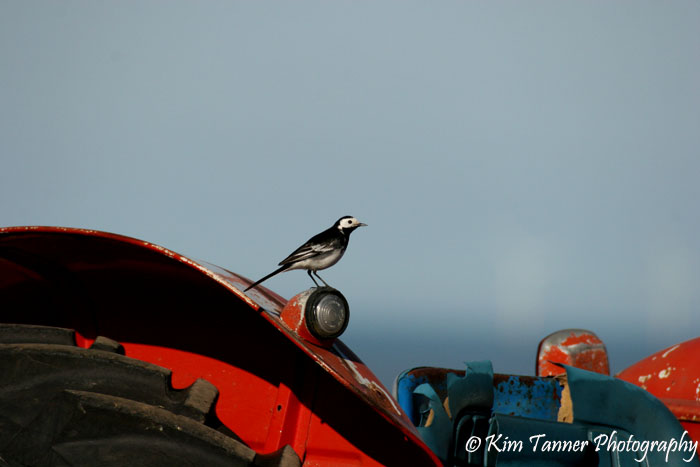
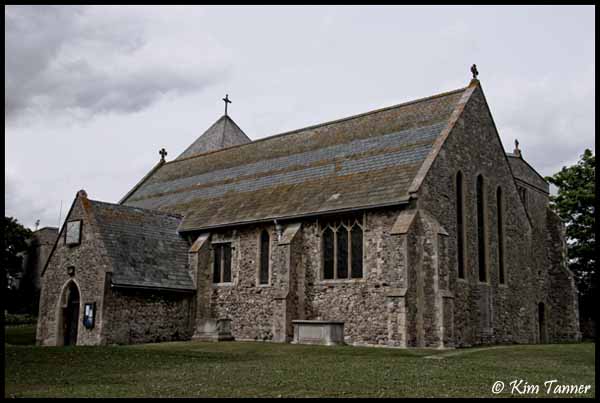
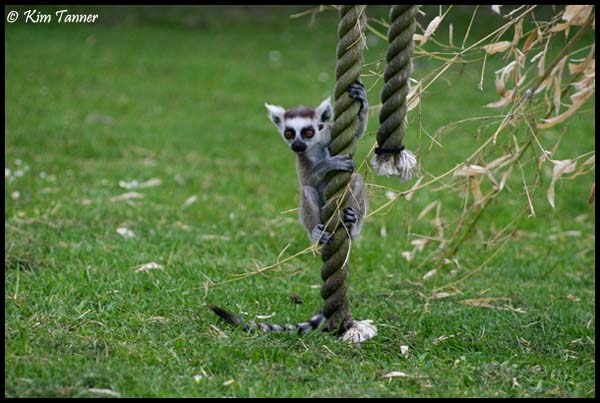
Here are a few example of my work (as promised) that I personally feel are not clear/sharp enough:

No.1
3589670453_b1378209e0_o.jpg


No.2
3559346876_e8ea874627_o.jpg


No.3
3548729174_637c4cc2d0_o.jpg


I am probably being un-necercerially harsh on myself, but it is always worth asking if you don't know.
 
Kim, I'm afraid you are right. These do look soft. Unfortunately, without access to the original unedited files it is really hard to determine whereabouts the problem arose. Looking at each one in turn....

1. EXIF says 500mm, 1/2000, f/7.1, 400 ISO.
These all seem like very sensible settings to enable you to achieve sharp images. What I do not know is....
- how sharp the 170-500 lens should be at 500mm;
- what picture parameters you had set in the camera for sharpness etc.
- what software you used and what the process was for downsizing the images, adding borders etc..

There are far too many uncertainties here for me to be able to offer any concrete advice to remedy sharpness issues. What I would say is that your subject, assuming it to be primarily the bird, is really too small in the frame. At this size there are hardly any pixels at all available to define the bird and no chance to pick out fine feather detail. If this is a crop then I'm afraid the problem is even worse. I would guess that a lot could be done to improve results with some well considered editing on the original file. I think some good sharpening workflow could help quite a bit.

2. EXIF says 26mm, 1/320, f/14, 400 ISO.

f/14 is probably stopped down a bit more than you needed to but it's far from the end of the world and should not be an issue for an image displayed at this tiny size.

As with the first one, I'd really like to get my hands on the unedited original to see what can be done. I'm guessing that once again your downsizing procedure has left the image wanting.

3. EXIF says 142mm, 1/1000, f/5.6, 400 ISO.
Again I see no problem with the choice of exposure settings, but, as with the first image your subject is really rather small and it is impossible to represent fine fur detail with so very few pixels.

Again I would like to see the unedited original because again I suspect it is your resizing workflow that is the problem here. But without seeing the original it is hard to tell.

Can you post the original unedited files somewhere, perhaps using Yousendit or similar, if you don't have your own hosting space. I'll happily take a look and see what can be done if you can provide them, or even just one.

Cheers.

p.s. take a look at the results I achieved for someone in this thread over on POTN - http://photography-on-the.net/forum/showthread.php?t=711450

I've made a stab at tweaking them but the results are a bit crude, based on only having these little files to work with....

20090602_163554_LR.jpg


20090520_135310_LR.jpg


20090503_132413_LR.jpg
 
It's very pixelated/noisy -- not great image quality.
 
It's very pixelated/noisy -- not great image quality.

If you're refering to my edited versions then of course they are. The "originals" posted above by Kim are heavily compressed and soft. That church shot should be rich with detail, but at only 64KB it is not exactly a large file. There is very little detail in them and you can't magic absent detail out of thin air. I've tried to give them a bit of "kick" but there's only so much you can do when you have so little to work with. That's why I'd like the originals to work on.

That's not a criticism of what Kim has posted, just a statement of fact, as I see it.
 
No, I mean all of them... When she posted them, and then when you edited them (obviously). They lacked quality to start with, it wasn't just sharpness for me.
 
tdodd, i will post links to the original files once i get home from work.

May be i can then work out whether it is my photography or workflow that sucks.
 
No, I mean all of them... When she posted them, and then when you edited them (obviously). They lacked quality to start with, it wasn't just sharpness for me.

Phew, yes. The compression is heavy. 62KB for that church is not enough. By way of comparison here is a random shot of a building I took a while ago with my 30D. This was shot raw and processed to JPEG in Lightroom with no edits. Lightroom applies default capture sharpening and I have it set up to apply output sharpening. I did not perform any adjustments to sharpening or anything else. The file size for this image is 234KB....

20071201_121837_0529_LR.jpg


Here is a 100% crop....

20071201_121837_0529_LR-2.jpg


This seems a good starting point to me as far as sharpness is concerned.
 
tdodd, i will post links to the original files once i get home from work.

May be i can then work out whether it is my photography or workflow that sucks.

Sure. I'll be glad to help. Please make sure the file(s) have no edits at all. I would like to see all the EXIF data including Canon's custom data contained within the file, just as the camera saved the file. I don't want anything with borders added, or © notices or saved in any way other than by the camera.

I'd prefer raw files but since it appears you shoot JPEG I guess that would be too much to hope for :)

Cheers,
Tim.

p.s. if you like, you could shoot a fresh image in raw+JPEG and then you can send me the raw file and you can process the JPEG through your normal workflow. Then we can compare results back here. I suggest an image size of 800x533 as a common standard. In order to shoot raw you will need to be in the creative zone - P, Av, Tv or M.
 
sorry to take this slightly off topic but how do you view the exif data from an image? tried the add-in for firefox and it seems to tell me nothing.
 
in opera I can just right click on an image
otherwise you could save the image to your desktop and use irfanview or similar to view the EXIF
 
sorry to take this slightly off topic but how do you view the exif data from an image? tried the add-in for firefox and it seems to tell me nothing.

I have Opanda IEXIF installed and also FxIF. They show EXIF data when you right click an image on the web and pick the appropriate option from the context menu. Sometimes IEXIF can not read the EXIF data - no idea why - which is why I also installed FxIF. Of course, sometimes images have no EXIF data embedded. This is especially true, and especially annoying, when people use "Save for web" in Photoshop.

Here is an example of my EXIF displays in Firefox for the image I just posted....

20090701_104116_0009_LR.jpg
 
Right then.................these should be the original images (they are the only ones I have titled "Original").

Pied Wagtail

Lemur

Church

So there could be a chance that it is not so much my photography that is the probelm but more the way I am processing my images?
 
p.s. if you like, you could shoot a fresh image in raw+JPEG and then you can send me the raw file and you can process the JPEG through your normal workflow. Then we can compare results back here. I suggest an image size of 800x533 as a common standard. In order to shoot raw you will need to be in the creative zone - P, Av, Tv or M.

I am out togging tomorrow so will make a point of shooting in RAW (I don't usually as I never know what to do with them).

And a HUGE thanks for all your help, you are a star. :thumbs: :thankyou: :notworthy:
 
Back
Top