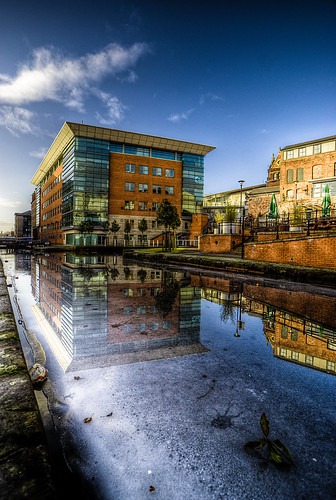
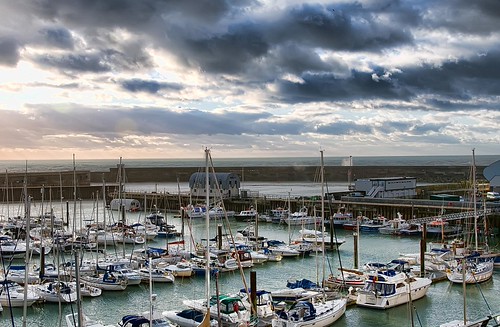
how do I do an HDR from 1 RAW file

cherokee1111

Suspended / Banned
Messages
822
Edit My Images
Yes
as above, I've tried miserably with photomatix and 3 bracketed pics but I heard you can do an HDR from 1 RAW file in CS3, anyone explain in noddy terms how to do it please?
thanks
 
Dead simple. Open raw file in photoshop or whatever editing program you use. Save one version as it is as a tiff file, naming it 'exposure 0' for example then adjust your exposure in photoshop and save individual tiff copies to get the range you want eg +2, +1,0, -1, -2 depending on what exposures you need to get the highlight/shadow detail. Don't do any other editing in photoshop at this stage. When you load the images into photamatix, you can enter the exposures manually or let it do it automatically. I think I normally enter them manually as per my exposure adjustments in photoshop. You then tone map the image and once you've saved it you can do final tweaks in photoshop. I've found surprisingly good results can be had in HDR using the above method from one original photo.

Photomatix is good so enjoy but with HDR, less is more when it comes to editing, overcooking's horrible in my opinion...good luck.

 
Dead simple. Open raw file in photoshop or whatever editing program you use. Save one version as it is as a tiff file, naming it 'exposure 0' for example then adjust your exposure in photoshop and save individual tiff copies to get the range you want eg +2, +1,0, -1, -2 depending on what exposures you need to get the highlight/shadow detail. Don't do any other editing in photoshop at this stage. When you load the images into photamatix, you can enter the exposures manually or let it do it automatically. I think I normally enter them manually as per my exposure adjustments in photoshop. You then tone map the image and once you've saved it you can do final tweaks in photoshop. I've found surprisingly good results can be had in HDR using the above method from one original photo.

Photomatix is good so enjoy but with HDR, less is more when it comes to editing, overcooking's horrible in my opinion...good luck.

Would you get the same effect from using 1 RAW file instead of 3 separate files using the AEB on an SLR? Or would the 3 separate files work better?
 
Dead simple. Open raw file in photoshop or whatever editing program you use. Save one version as it is as a tiff file, naming it 'exposure 0' for example then adjust your exposure in photoshop and save individual tiff copies to get the range you want eg +2, +1,0, -1, -2 depending on what exposures you need to get the highlight/shadow detail. Don't do any other editing in photoshop at this stage. When you load the images into photamatix, you can enter the exposures manually or let it do it automatically. I think I normally enter them manually as per my exposure adjustments in photoshop. You then tone map the image and once you've saved it you can do final tweaks in photoshop. I've found surprisingly good results can be had in HDR using the above method from one original photo.

Photomatix is good so enjoy but with HDR, less is more when it comes to editing, overcooking's horrible in my opinion...good luck.

There's no need for this.

In Photomatix, instead of clicking 'Generate HDR Image' all you need to do is click 'File' then 'Open' and select the single RAW file that you want to use. Photomatix will then create a Pseudo-HDR from this one file. Like this:

4282952126_cda70e96e8.jpg
 
cs4 has a merge to hdr function on it too
as i dont have photomatix i couldnt compare but it looks ok i spose :)
 
There's no need for this.

In Photomatix, instead of clicking 'Generate HDR Image' all you need to do is click 'File' then 'Open' and select the single RAW file that you want to use. Photomatix will then create a Pseudo-HDR from this one file. Like this:

Hmm..Never knw I could do that..I'll definitely gonna give it a go aftr exams! Thanks for sharing. :thumbs:
 
Would you get the same effect from using 1 RAW file instead of 3 separate files using the AEB on an SLR? Or would the 3 separate files work better?

3 seperate files generally gives you more flexibility and a less noisey finished shot as it isn't have to 'push' the 1 raw as much...but that does depend on how extreme your HDR is going to be :)
 
You can also drag and drop into photomatix :) save going to the file>open option at all :D I tend to right click on the raw in lightroom, click on 'Show in explorer' then drag it from there into lightroom...sounds long winded but is quick once you get it sorted (helps to have 2 monitors)
 
Although you CAN just drag and drop and let photomatix deal with the single RAW, it gives better results to split the raw into 3 separate exposures and input them as jpeg/tiffs
 
3 seperate files generally gives you more flexibility and a less noisey finished shot as it isn't have to 'push' the 1 raw as much...but that does depend on how extreme your HDR is going to be :)

I totally agree. Using the Photomatix one shot options generally gives pretty awful noise problems. You then end up trying to get rid of the noise and losing the all important details you were after in the first place. If you only have one picture you can get a pretty similar HDR effect using Topaz Adjust software and going for an extreme contrast setting. Like this....
 
1 shot option is ok but not for all images as it can create horrible noise in the dark areas. You have the control to turn the effect down however.

For some images like buildings especially stone/brick it works really well and really makes images pop.
 
Strictly speaking it is NOT and HDR if it's taken from 1 RAW file. It's a tonemapped image, yes, but HDR? No.

Is it effective? Yes, if the image used is of high enough quality and it properly exposed in the first place. You get lots of noise if you use a badly exposed image.
 
Back
Top