Editing images

Adamcski

Suspended / Banned
Messages
2,984
Name
Adam
Edit My Images
No
Hi folks, I hope all is well

Editing images on a monitor, laptop, tablet, phone whatever you use. Do you edit in srgb mode?

Reason I ask, is my Asus monitor on my laptop is some super oled 4k 100% this that and the other.

My monitor has a fair few choices, Asus standard, srgb, rec 709, DCI P3.

As I've always edited on my laptop I've never really questioned it (I don't print and barely upload to web other than here).

I read that you should edit in srgb mode, so I finished editing an image, left the laptop screen on (in all it's glory) hooked the monitor up, switched that to SRGb and loaded the image on lightroom mobile to compare all three.

The laptop and phone looked similar (pixel 7 pro) but when in srgb mode the monitor looked, well, horrible lol. If I altered the monitor colours, it made the laptop and phone images look really over saturated...so I switched the monitor back into the mode that matches them most closely

Do people here edit on srgb mode? What should I do? Ignore it as my images are for me, or start using srgb mode. I assume any images I've upload for challenges here in the past will have looked completely different on fellow member monitors, depending on the output they have...
 
Have you calibrated all the screens?

OLED is punchy with tones and deep blacks, some screens won't match them.
 
Last edited:
Laptop and monitor are calibrated but srgb just looks so different.

You have the same laptop as me I think and it's completely different to srgb mode on the monitor

If I put monitor on DCi P3 mode it looks more or less the same as the laptop.
 
Last edited:
I use sRGB in software for editing, I'm new to calibrating so I should probably back away and leave it to others, but if you've changed display mode on the monitor I'd have thought it needs recalibrating as the colours will change?

Hopefully someone will chip in :)
 
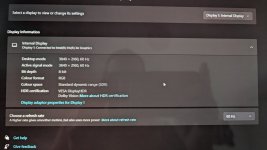
Laptop is set to RGB 8-bit with a custom ICC profile from calibration.
 
Go to settings, system, display, advanced display settings.
 
Last edited:
Are you conflating the working colour space that the image is stored in (I use whatever Lightroom uses) and the display setting?
 
You want to edit with as many colours as possible so why would you limit yourself to sRGB.

I use Lightroom so that is using the ProPhoto colour space. The only time I use sRGB is when I export to a .jpg
 
Are you referring to changing colour mode on the monitor?

If you've changed this since calibrating that monitor, the colours will be wrong?
 
I've got a monitor with various colour profiles, standard, srgb, DCi and so on. As I switch through these obviously the image changes. Now if I put my monitor on srgb mode the image displayed changes significantly compared to the laptop. So should I just leave the laptop screen and monitor on the profiles that match in terms of the image but just continue to export in srgb, upload in srgb and so on. Thing is, the srgb will be different to what they looked like on my laptop / monitor....or am I just overthinking and getting myself confused lol
 
If you have a calibration tool, reset the monitor to default, then run a calibration and set the ICC profile for the 2nd screen that should correct the colours.

By changing the monitors viewing modes you are changing colour spaces.
 
Yes, so if I just put it back to where it was and stop faffing around it should be fine. I do everything else correct in terms of camera colour settings and LR. Shouldn't have explored the other buttons lol.

To be honest I think I just confused myself as I've sent a couple of things to print and they have turned up fine and looked spot on. And I don't think I swapped to Adobe RGB for those either lol.

Sorry must just be having a moment
 
Last edited:
I would reset and run a calibration again, the monitors buttons will put another colour profile over your corrected profile.

Assuming I've understood the above.
 
Are you saying you calibrated your laptop screen and then calibrated the separate monitor on the same laptop?

If so, then that is a source of your problem.

Unless your laptop has two graphics cards you have to pick which screen you are going to edit on. Why, because upon calibration the OS will load the calibration LUT to the graphics card and whether laptop screen or external monitor they will 'share' the same LUT = only one will be acute as per the calibration
 
It was just me being a div.

Is got all messed up with screen and colours and thinking I was doing it wrong but I wasn't.

Screen on the laptop and monitor are the same and when I export a jpeg I do so in srgb. To test it I then sent that jpeg to my wife who has a bog standard laptop and she opened it and it looked fine.

Not sure why my monitor as different colour modes you can toggle through and why someone would choose srgb but hey ho, I got worked up about nothing (as usual) .
 
Back
Top