


Cagey75
Suspended / Banned
- Messages
- 17,146
- Name
- Keith
- Edit My Images
- No
Ok, so @twist suggested I do a seperate thread for this, as there might just be some others out there like me, who like the idea of customizing a desktop, but don't like the idea of DIY when it comes to mounts of cables and parts we're a bit confuzzled by. There's plenty of sites across the UK that offer this service, most of them will have customising software templates built into the site. You'll begin with a standard default set up, and change any parts you like until you have the ideal system for your budget.
I wanted a neat and tidy, discreet but powerful, gaming plus photo processing machine. My budget was in or around £700 all in, I didn't need a monitor, I will continue to use the 1080p Samsung HDTV I've been using for a couple year now, it's fine - 22" only, but as I sit pretty close up to it that doesn't matter - it's a chunk bigger than the 17" monitor on my old dying laptop that I used for years before. And it's better res and images look sharper with better contrast and colours - laptop always looked a bit washed out.
Anyway, after weeks of humming and hawing, and trying the customisation options on numerous sites, I took the tip from twist to go with Palicomp. They had this PC deal of the week [still going] here: https://www.palicomp.co.uk/pc_of_the_week by this time and a million question and youtube tutorials later, I was actually beggining to understand precisely what I needed and I could now name all the individual parts that make up a decent PC's internals
I changed up a few things, like the Gpu I bumped to a GTX 1660, the better 450m motherboard, threw in a cheap wireless KB & mouse set [using atm, clunky but wireless works fine on both] and a usb wi fi dongle [opted for one of the better ones with an aerial, £30] and a couple of fans. My one mistake really was not choosing more fans, this case takes 2 x 120mm fans on one side of the front and an 80mm on the other, there's also vents for fans on each side p tp 120mm] and 2 on the rear[80-92mm]. I only opted for the 2 fans without really knowing this, but Palicomp did best they could and put one on front and one on the side here the MB/cpu/gpu are situated. I've tested it with some trong graphical games [The Witcher III, Just cause 4] and temps never rose much above 60-70 celcius, which is amazing really with just one intake and one exhaust fan in such a tiny cse.
The main reason I jumped at this set up was the Ryzen 2600x cpu - which also comes with it's own fan and by all accounts is more than enough of a beast gpu for mid range gaming and photo processing, at least the amount I do. if you're much more focussed on the processing and you tend to push heavy loads of RAW files through LR/PS/CS1 etc and you're not nto gaming, then you would probably be best going for a higher end cpu like a ryzen 3600x or higher and just stick to the default gpu .
Anyway, here's how it all looks, I think they did a decent enough job on tidyness even though I did not opt for the extra cable management service - It needs another 8GB stick of RAM. The other thing I liked, the default is 8GB 3200mhz RAM which is fine to start, if you want to just add another 8GB later like I am
Here's the cpu fan that comes with the 2600x so you don't need to add a separate one - underneathy see the GTX 1660, bare bones version but t it is a decent 6GB RAM graphic card, dual fans and a heat pipe
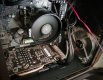
Wider view showing how they placed the 120mm fan on the side panel and the other to the front, it's working ouout fine, the system is not heating up much even under a good load

And of course, how it look from the outside - this is just a 22" monitor remember, it is pretty dinky I like it this way because I can hide it away under the desk when I want to neaten things up
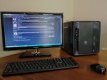
It's got that hybrid busness/gaming pc look about it I think - looks underwhelming but packs a good punch.
Total was £690 + shipping, in the UK you get that free I believe - this did include a £25 queue jump fee to speed the build up, I wouldn't recommend this right now as they as busier than normal. Best put that cash to something else maybe, like the extra RAM or the extra fans.
I should add that I chose not to have them install any OS, this save you £100 or thereabouts - so it might be a more pricey build for some than it first seems. But after intially being terrified of doing the OS install myself, after some good advice I decided to brave it and it really was a cinch - just need an 8GB+ usb stick and a little time to download the OS from MS [it is also all completelky legal even when you buy a cheap key from other sites] - you can even continue using win 10 for free as long as you like, though you will have some restrictions - like you won't be able to change your backdrop or windows themes, and I as I found out while playing a complete legity copy of the Witcher III, you will get nasty irritating water marks down right corner of your screen even while playing. SO know that you are comfortable with buyiong a cheap key and installing Win 10 yourself before factoring that into the budget
I wanted a neat and tidy, discreet but powerful, gaming plus photo processing machine. My budget was in or around £700 all in, I didn't need a monitor, I will continue to use the 1080p Samsung HDTV I've been using for a couple year now, it's fine - 22" only, but as I sit pretty close up to it that doesn't matter - it's a chunk bigger than the 17" monitor on my old dying laptop that I used for years before. And it's better res and images look sharper with better contrast and colours - laptop always looked a bit washed out.
Anyway, after weeks of humming and hawing, and trying the customisation options on numerous sites, I took the tip from twist to go with Palicomp. They had this PC deal of the week [still going] here: https://www.palicomp.co.uk/pc_of_the_week by this time and a million question and youtube tutorials later, I was actually beggining to understand precisely what I needed and I could now name all the individual parts that make up a decent PC's internals
I changed up a few things, like the Gpu I bumped to a GTX 1660, the better 450m motherboard, threw in a cheap wireless KB & mouse set [using atm, clunky but wireless works fine on both] and a usb wi fi dongle [opted for one of the better ones with an aerial, £30] and a couple of fans. My one mistake really was not choosing more fans, this case takes 2 x 120mm fans on one side of the front and an 80mm on the other, there's also vents for fans on each side p tp 120mm] and 2 on the rear[80-92mm]. I only opted for the 2 fans without really knowing this, but Palicomp did best they could and put one on front and one on the side here the MB/cpu/gpu are situated. I've tested it with some trong graphical games [The Witcher III, Just cause 4] and temps never rose much above 60-70 celcius, which is amazing really with just one intake and one exhaust fan in such a tiny cse.
The main reason I jumped at this set up was the Ryzen 2600x cpu - which also comes with it's own fan and by all accounts is more than enough of a beast gpu for mid range gaming and photo processing, at least the amount I do. if you're much more focussed on the processing and you tend to push heavy loads of RAW files through LR/PS/CS1 etc and you're not nto gaming, then you would probably be best going for a higher end cpu like a ryzen 3600x or higher and just stick to the default gpu .
Anyway, here's how it all looks, I think they did a decent enough job on tidyness even though I did not opt for the extra cable management service - It needs another 8GB stick of RAM. The other thing I liked, the default is 8GB 3200mhz RAM which is fine to start, if you want to just add another 8GB later like I am
Here's the cpu fan that comes with the 2600x so you don't need to add a separate one - underneathy see the GTX 1660, bare bones version but t it is a decent 6GB RAM graphic card, dual fans and a heat pipe
Wider view showing how they placed the 120mm fan on the side panel and the other to the front, it's working ouout fine, the system is not heating up much even under a good load
And of course, how it look from the outside - this is just a 22" monitor remember, it is pretty dinky
I like it this way because I can hide it away under the desk when I want to neaten things upIt's got that hybrid busness/gaming pc look about it I think - looks underwhelming but packs a good punch.
Total was £690 + shipping, in the UK you get that free I believe - this did include a £25 queue jump fee to speed the build up, I wouldn't recommend this right now as they as busier than normal. Best put that cash to something else maybe, like the extra RAM or the extra fans.
I should add that I chose not to have them install any OS, this save you £100 or thereabouts - so it might be a more pricey build for some than it first seems. But after intially being terrified of doing the OS install myself, after some good advice I decided to brave it and it really was a cinch - just need an 8GB+ usb stick and a little time to download the OS from MS [it is also all completelky legal even when you buy a cheap key from other sites] - you can even continue using win 10 for free as long as you like, though you will have some restrictions - like you won't be able to change your backdrop or windows themes, and I as I found out while playing a complete legity copy of the Witcher III, you will get nasty irritating water marks down right corner of your screen even while playing. SO know that you are comfortable with buyiong a cheap key and installing Win 10 yourself before factoring that into the budget
Last edited:


 me too, because I really cannot afford for this to F up on me

 I was watching the Task Manager on another monitor the other night and it doesn't seem to even use the CPU for games. Is that normal?