

Custom build via online service

Cagey75

Suspended / Banned
Messages
17,146
Name
Keith
Edit My Images
No
Ok, so @twist suggested I do a seperate thread for this, as there might just be some others out there like me, who like the idea of customizing a desktop, but don't like the idea of DIY when it comes to mounts of cables and parts we're a bit confuzzled by. There's plenty of sites across the UK that offer this service, most of them will have customising software templates built into the site. You'll begin with a standard default set up, and change any parts you like until you have the ideal system for your budget.

I wanted a neat and tidy, discreet but powerful, gaming plus photo processing machine. My budget was in or around £700 all in, I didn't need a monitor, I will continue to use the 1080p Samsung HDTV I've been using for a couple year now, it's fine - 22" only, but as I sit pretty close up to it that doesn't matter - it's a chunk bigger than the 17" monitor on my old dying laptop that I used for years before. And it's better res and images look sharper with better contrast and colours - laptop always looked a bit washed out.

Anyway, after weeks of humming and hawing, and trying the customisation options on numerous sites, I took the tip from twist to go with Palicomp. They had this PC deal of the week [still going] here: https://www.palicomp.co.uk/pc_of_the_week by this time and a million question and youtube tutorials later, I was actually beggining to understand precisely what I needed and I could now name all the individual parts that make up a decent PC's internals

I changed up a few things, like the Gpu I bumped to a GTX 1660, the better 450m motherboard, threw in a cheap wireless KB & mouse set [using atm, clunky but wireless works fine on both] and a usb wi fi dongle [opted for one of the better ones with an aerial, £30] and a couple of fans. My one mistake really was not choosing more fans, this case takes 2 x 120mm fans on one side of the front and an 80mm on the other, there's also vents for fans on each side p tp 120mm] and 2 on the rear[80-92mm]. I only opted for the 2 fans without really knowing this, but Palicomp did best they could and put one on front and one on the side here the MB/cpu/gpu are situated. I've tested it with some trong graphical games [The Witcher III, Just cause 4] and temps never rose much above 60-70 celcius, which is amazing really with just one intake and one exhaust fan in such a tiny cse.

The main reason I jumped at this set up was the Ryzen 2600x cpu - which also comes with it's own fan and by all accounts is more than enough of a beast gpu for mid range gaming and photo processing, at least the amount I do. if you're much more focussed on the processing and you tend to push heavy loads of RAW files through LR/PS/CS1 etc and you're not nto gaming, then you would probably be best going for a higher end cpu like a ryzen 3600x or higher and just stick to the default gpu .

Anyway, here's how it all looks, I think they did a decent enough job on tidyness even though I did not opt for the extra cable management service - It needs another 8GB stick of RAM. The other thing I liked, the default is 8GB 3200mhz RAM which is fine to start, if you want to just add another 8GB later like I am


Here's the cpu fan that comes with the 2600x so you don't need to add a separate one - underneathy see the GTX 1660, bare bones version but t it is a decent 6GB RAM graphic card, dual fans and a heat pipe
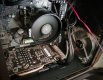

Pcinside.jpeg


Wider view showing how they placed the 120mm fan on the side panel and the other to the front, it's working ouout fine, the system is not heating up much even under a good load

pc2.jpeg

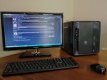
And of course, how it look from the outside - this is just a 22" monitor remember, it is pretty dinky :) I like it this way because I can hide it away under the desk when I want to neaten things up
IMG_20200501_160532.jpg

It's got that hybrid busness/gaming pc look about it I think - looks underwhelming but packs a good punch.

Total was £690 + shipping, in the UK you get that free I believe - this did include a £25 queue jump fee to speed the build up, I wouldn't recommend this right now as they as busier than normal. Best put that cash to something else maybe, like the extra RAM or the extra fans.

I should add that I chose not to have them install any OS, this save you £100 or thereabouts - so it might be a more pricey build for some than it first seems. But after intially being terrified of doing the OS install myself, after some good advice I decided to brave it and it really was a cinch - just need an 8GB+ usb stick and a little time to download the OS from MS [it is also all completelky legal even when you buy a cheap key from other sites] - you can even continue using win 10 for free as long as you like, though you will have some restrictions - like you won't be able to change your backdrop or windows themes, and I as I found out while playing a complete legity copy of the Witcher III, you will get nasty irritating water marks down right corner of your screen even while playing. SO know that you are comfortable with buyiong a cheap key and installing Win 10 yourself before factoring that into the budget
 
Last edited:
It’s good to read a good review of them. A friend of mine recently recommended them to me as I’m thinking of moving back to a PC after 7 years with a mac. Like you I don’t fancy building a PC myself but I would like to customise one to meet my needs. It’s good to hear their builds look quite good.
 
It’s good to read a good review of them. A friend of mine recently recommended them to me as I’m thinking of moving back to a PC after 7 years with a mac. Like you I don’t fancy building a PC myself but I would like to customise one to meet my needs. It’s good to hear their builds look quite good.

The only niggle I've had is that they were a day later than they initially promised getting my build started, and I did pay the £25 extra for the privelidge. Now, they have since offered to make this up by giving me a discount on the extra 8GB RAM I was going to add at a later date, pretty much the £25 off and free shipping, so all is good there. If you're in the UK the queue jump might be worth it, as I also got stung by DPD Ireland who held the package a further 5 days when it did land over here. Or if you are more patient, put that £25 to better use, like toward RAM or fans or something more long term. But yeah, I can only recommend them otherwise, to me it looks like they did a decent job, everything is working as intended and their prices are very competitive

I will say, do not go with AWD-IT like I almost did, until I read some of the feedback around online, their prices look too good to be true ... and you know what they say
 
I’m not in a rush so won’t be ordering for a while yet. I likely won’t go with a quick build as I’m not in a rush. It’s always good to hear a company are willing to sort problems out.
 
@Cagey75

Did the £690 include the Windows 10 OS, if so was that Home or Pro version.
 
I’m not in a rush so won’t be ordering for a while yet. I likely won’t go with a quick build as I’m not in a rush. It’s always good to hear a company are willing to sort problems out.

Are you thinking on a purely processing machine or are you into gaming of any kind on side? What kind of spec do you think you will go for? Intel or Ryzen seems to be one of the main decisions/debates lately
 
@Cagey75

Did the £690 include the Windows 10 OS, if so was that Home or Pro version.


No I opted for no OS, I download Win 10 myself and flashed it via usb, bought a win 10 pro key on a local site for €7 and it's worked fine [about £5]

I should probably add this in the OP - as I was a bit apprehensive about this at first, good ol' twist convinced me it was very simple to install win 10 and trusting him worked out nicely. If I'd paid the extra £100 for them to install it I would have had to cheapen out on something else, the graphics or cpu or a cheaper SSD [opted for the 500GB default on this build but if I was paying for windows I might have gone a different dirtection, like a 1600x with an RTX 580 and 256GB ssd ... something like that
 
Last edited:
No I opted for no OS, I download Win 10 myself and flashed it via usb, bought a win 10 pro key on a local site for €7 and it's worked fine [about £5]
Crumbs that is budget! Hope all ok with it going forwards :)
 
Are you thinking on a purely processing machine or are you into gaming of any kind on side? What kind of spec do you think you will go for? Intel or Ryzen seems to be one of the main decisions/debates lately
I’m thinking it will be processing (lightroom / bit of PS). I’ve never got into gaming. The only big of gaming I’ve done recently is when dusting off the wii during lockdown!
 
Crumbs that is budget! Hope all ok with it going forwards :)


Haha, my middle name ;) me too, because I really cannot afford for this to F up on me

I’m thinking it will be processing (lightroom / bit of PS). I’ve never got into gaming. The only big of gaming I’ve done recently is when dusting off the wii during lockdown!


That's good in a way, as what you spare on a fancier Gpu you can put onto the cpu. I would have liked the Ryzen 3600/3600x, but honestly for my uses, the 2600x is just fine. And with 16GB 3200mhz RAM [side note: Palicomp had the ram already unlocked to it's full potential in the BIOS, was suprised byt this as I'd watched a tonne of vids on how to do iut specifically for Ryzen chip motherboards] I will be good to go for LR/PS.


Just a quickie on the LR side - my laptop, that I painfully had to endure the past few years [8yrs old now, was decent at the time] could take up to 8 MINUTES for LR just to open ... I tested LR on this new desktop last night, 6 seconds ... 6 SECONDS!!! from clicking it to open and ready - now this is of course with no files pushed in for processing, I'll test that later - but still, I know my laptop - which had an i7 chip [an old one] and 12GB RAM [probably really low Mhz, never even checked as I had no clue] would take at least a couple minutes before deciding it should maybe start opening LR :ROFLMAO:
 
Haha, my middle name ;) me too, because I really cannot afford for this to F up on me


That's good in a way, as what you spare on a fancier Gpu you can put onto the cpu. I would have liked the Ryzen 3600/3600x, but honestly for my uses, the 2600x is just fine. And with 16GB 3200mhz RAM [side note: Palicomp had the ram already unlocked to it's full potential in the BIOS, was suprised byt this as I'd watched a tonne of vids on how to do iut specifically for Ryzen chip motherboards] I will be good to go for LR/PS.


Just a quickie on the LR side - my laptop, that I painfully had to endure the past few years [8yrs old now, was decent at the time] could take up to 8 MINUTES for LR just to open ... I tested LR on this new desktop last night, 6 seconds ... 6 SECONDS!!! from clicking it to open and ready - now this is of course with no files pushed in for processing, I'll test that later - but still, I know my laptop - which had an i7 chip [an old one] and 12GB RAM [probably really low Mhz, never even checked as I had no clue] would take at least a couple minutes before deciding it should maybe start opening LR :ROFLMAO:
About a year ago I started running my Mac off an external SSD. The difference it made compared to the internal hard drive was amazing. The performance difference is similar to what have seen.
 
Haha, my middle name ;) me too, because I really cannot afford for this to F up on me


That's good in a way, as what you spare on a fancier Gpu you can put onto the cpu. I would have liked the Ryzen 3600/3600x, but honestly for my uses, the 2600x is just fine. And with 16GB 3200mhz RAM [side note: Palicomp had the ram already unlocked to it's full potential in the BIOS, was suprised byt this as I'd watched a tonne of vids on how to do iut specifically for Ryzen chip motherboards] I will be good to go for LR/PS.


Just a quickie on the LR side - my laptop, that I painfully had to endure the past few years [8yrs old now, was decent at the time] could take up to 8 MINUTES for LR just to open ... I tested LR on this new desktop last night, 6 seconds ... 6 SECONDS!!! from clicking it to open and ready - now this is of course with no files pushed in for processing, I'll test that later - but still, I know my laptop - which had an i7 chip [an old one] and 12GB RAM [probably really low Mhz, never even checked as I had no clue] would take at least a couple minutes before deciding it should maybe start opening LR :ROFLMAO:

It'll be fine, windows either installs or it doesn't and like you say, if the key fails (highly unlikely as it'll be an oem) you get a watermark. That case is nice and small, thermals sound very good considering only 2 fans.
 
Last edited:
Update: so far so great - no issues with Win 10, all seems legit - games are running better than expected with just the one stick of 8GB RAM - even pushing them to ultra settings just for the craic [I'm far from an fps stress type gamer, I'm all about the looks!] have tried a handful of games now, The Witcher III, Ori and the will of the whisps. Descenders [downhill mountain biker] Just Cause 4 [only ran it as a tester, all full on graphics no bother] gave world of tanks a try - reviving my ancient account where I used to have everything on low, maxed it out - no hassle, even lighter games I play like Hearthstone and Gwent run so much smoother. Currently downloading Forza Horizon 4 - I think that will be the sternest tester but I have a feeling it'll run just fine.

Haven't shot any new RAW files to give LR a good tester, got a lens incoming that I will want to test so hopefully early next week I'll get through all of that.

Nothing to complain about so far, that's the main point really
 
Last edited:
Yeah, that @twist has got a lot to answer for..... I wanted a nice sensible Intel of some sort to run Photoshop and do a little light accounting. He made me spend all my money on a Ryzen 3900..... I reckon he gets kick backs from Ryzen :)

Coincidentally, Metal Gear Solid seems to run adequately on my work machine :D I was watching the Task Manager on another monitor the other night and it doesn't seem to even use the CPU for games. Is that normal?
 
Yeah, that @twist has got a lot to answer for..... I wanted a nice sensible Intel of some sort to run Photoshop and do a little light accounting. He made me spend all my money on a Ryzen 3900..... I reckon he gets kick backs from Ryzen :)

Coincidentally, Metal Gear Solid seems to run adequately on my work machine :D I was watching the Task Manager on another monitor the other night and it doesn't seem to even use the CPU for games. Is that normal?

I don't much about the ins and outs of how games are powered but I've heard reviewers refer to games as being either heavily CPU or GPU dependent, depends on the game.

I think you're right on twist, I was edging toward an Intel build but he put me straight, ryzen or nowt he said, bumped me then from a 1600 to the 2600x lol. He was right though, this 2600x is a beast, can only imagine the 3900 is phenomenal
 
I don't much about the ins and outs of how games are powered but I've heard reviewers refer to games as being either heavily CPU or GPU dependent, depends on the game.

I think you're right on twist, I was edging toward an Intel build but he put me straight, ryzen or nowt he said, bumped me then from a 1600 to the 2600x lol. He was right though, this 2600x is a beast, can only imagine the 3900 is phenomenal
A game that has complex graphics will always be gpu heavy. A game that requires lots of physics calculations or coordinating the movements of lots of individual game elements will be Cpu heavy.

An easy example of each is call of duty. This will always be gpu heavy if you turn up the settings as high quality textures need to be rendered by a good gpu. However in single player mode the cpu will be just ticking over as the game is ‘on rails’ it knows where your going next and all the actions of the aI players are predetermined. The cpu is calculating each frame and sending it to the gpu to render.

However try 64 player multiplayer and the same game remains gpu heavy but you now have 64 random players all running around doing random s*** and your cpu not only has to calculate where your going in relation to the other players but where the other players are in relation to you. The cpu is now very busy calculating distance but it’s still handing your gpu a frame to render each time.
 
A game that has complex graphics will always be gpu heavy. A game that requires lots of physics calculations or coordinating the movements of lots of individual game elements will be Cpu heavy.

An easy example of each is call of duty. This will always be gpu heavy if you turn up the settings as high quality textures need to be rendered by a good gpu. However in single player mode the cpu will be just ticking over as the game is ‘on rails’ it knows where your going next and all the actions of the aI players are predetermined. The cpu is calculating each frame and sending it to the gpu to render.

However try 64 player multiplayer and the same game remains gpu heavy but you now have 64 random players all running around doing random s*** and your cpu not only has to calculate where your going in relation to the other players but where the other players are in relation to you. The cpu is now very busy calculating distance but it’s still handing your gpu a frame to render each time.

Wow thanks - really interesting.
 
That makes sense, games with really long draw distance or that rely on calulations like speed/timing/scale would be more cpu dependent then?

Atm I'm playing the Witcher III and have been really impressed at how well the 1660 and just 8GB RAM are handling the game even on ultra settings [with just certain options set to high] - It's an open world, non linear game but it is strictly single player and all the cut scenes are of course pre-rendered - looks gorgeous though - got another 8GB RAM on the way to keep it smooth just in case.
 
That makes sense, games with really long draw distance or that rely on calulations like speed/timing/scale would be more cpu dependent then?

Atm I'm playing the Witcher III and have been really impressed at how well the 1660 and just 8GB RAM are handling the game even on ultra settings [with just certain options set to high] - It's an open world, non linear game but it is strictly single player and all the cut scenes are of course pre-rendered - looks gorgeous though - got another 8GB RAM on the way to keep it smooth just in case.
I’m also playing the Witcher 3 at the moment and it’s simply amazing. I tried to play it years ago but meh and then after watching the Netflix series last year I was hooked and gave the game another go.

It can still look very good, especially in Skellige and is a gpu heavy game, I doubt it taxes the cpu much, draw distance is a job for the gpu and is often a setting you can play with.

If you google a game and include cpu benchmark then you can see just how taxing a game is, e.g google witcher 3 cpu benchmark and this comes up. As the test shows even a weak cpu can deliver the gpu it’s 60 frames a second (for a smooth experience) so this game is a gpu heavy game.

https://www.techspot.com/amp/review/1006-the-witcher-3-benchmarks/page5.html
 
That makes sense, games with really long draw distance or that rely on calulations like speed/timing/scale would be more cpu dependent then?

Atm I'm playing the Witcher III and have been really impressed at how well the 1660 and just 8GB RAM are handling the game even on ultra settings [with just certain options set to high] - It's an open world, non linear game but it is strictly single player and all the cut scenes are of course pre-rendered - looks gorgeous though - got another 8GB RAM on the way to keep it smooth just in case.
Something like a RTS game is often cpu heavy but quite simple graphically. This is because the cpu has to calculate the position and movement of many individual units at once. They are Billions for example is very simple graphically, it’s barely 2d but can have up to 20k individual and independent sprites on screen at a time and each one of these requires cpu work.
 
I’m also playing the Witcher 3 at the moment and it’s simply amazing. I tried to play it years ago but meh and then after watching the Netflix series last year I was hooked and gave the game another go.

It can still look very good, especially in Skellige and is a gpu heavy game, I doubt it taxes the cpu much, draw distance is a job for the gpu and is often a setting you can play with.

If you google a game and include cpu benchmark then you can see just how taxing a game is, e.g google witcher 3 cpu benchmark and this comes up. As the test shows even a weak cpu can deliver the gpu it’s 60 frames a second (for a smooth experience) so this game is a gpu heavy game.

https://www.techspot.com/amp/review/1006-the-witcher-3-benchmarks/page5.html


The 980ti was a beast in it's day though? I had looked at a few pre-built systems running it

I've tried various settings with the 1660 and even on ultra it runs very smooth [turned off all the silly hair mod settings and just shadows and something else to high] Of course it is smoother if I switch down more settings to high like terrain, foliage etc, but I prefer looks over speed :)

On the game itself, I came from the opposite route, played the first 2 games, then after getting bored of Hearthstone fell into Gwent, the card game based on the Witcher lore [great looking for a card game by the way, the version within the game looks so dated now towards] - haven't tried Thronebreaker yet which also looks pretty good, but I've wanted to try the Witcher III for ages. Just no way it would ever run even on all low settings on the laptop. It's the first game I've bought for this pc and I know it'll get played the most. I was tempted to watch the series but I needed to play this game first. Geralt will always have that huskier voice and meaner demeaner to me so the series might ruin that a bit [not too fond of the actor choice]
 
Last edited:
Back
Top