

PaulButler
Suspended / Banned
- Messages
- 3,194
- Name
- Paul
- Edit My Images
- No
Apologies for the long post. I thought I understood the basics of a colour managed workflow but now I'm no so sure ...
I noticed when I responded to a comment on an image on another website that the image looked a little warmer, my wife described it as more blushy, and that is rather accurate imo. When I opened LR and compared the side by side it was indeed more blushy on the website. I then checked the jpg I uploaded, in the Win 10 photo app it looked the same as on the web, in Windows Photo Viewer it looked the same as in LR.
I have tried a number of different web browsers with the same outcome. However, Chrome is meant to be colour managed and I believe it is.
I have re-calibrated my monitor, it is a Dell U2413, it is hardware calibrated and I have ensured I am calibrating and using Cal 1. Same results.
The calibration process produces a .icm file (the profile file). Checking the monitor properties the file produced was being used (I deleted the previous one and it was regenerated during calibration). I believe it is this that is causing the issue, if I remove it and re-boot then the image in LR and on the web look the same, albeit too blushy, I've posted examples of what I mean below:
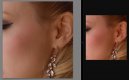
On the left is the image in LR with the monitor profile loaded and is how I want it, on the right is how it appears in Chrome (it is the same in every other app/browser except Photo Viewer and PS where it looks the same as LR).
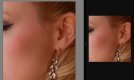
This is how it appears after I have removed the profile and re-booted the pc, left is LR and right is Chrome, same image, no edits - they look the same.
This is my typical workflow when editing portraits:
LR only works in ProFoto RGB as far as the develop module is concerned (in the library module I believe it uses Adobe RGB). PS can work in many colour spaces but it makes no sense to me to convert if the image is going back into LR. Even then I'm not convinced it will change things.
This is driving me nuts!
Can anyone explain this or help me understand why? Should I not be using the generated profile, is it that simple?
Where is @Pookeyhead when you need him ...
I noticed when I responded to a comment on an image on another website that the image looked a little warmer, my wife described it as more blushy, and that is rather accurate imo. When I opened LR and compared the side by side it was indeed more blushy on the website. I then checked the jpg I uploaded, in the Win 10 photo app it looked the same as on the web, in Windows Photo Viewer it looked the same as in LR.
I have tried a number of different web browsers with the same outcome. However, Chrome is meant to be colour managed and I believe it is.
I have re-calibrated my monitor, it is a Dell U2413, it is hardware calibrated and I have ensured I am calibrating and using Cal 1. Same results.
The calibration process produces a .icm file (the profile file). Checking the monitor properties the file produced was being used (I deleted the previous one and it was regenerated during calibration). I believe it is this that is causing the issue, if I remove it and re-boot then the image in LR and on the web look the same, albeit too blushy, I've posted examples of what I mean below:
On the left is the image in LR with the monitor profile loaded and is how I want it, on the right is how it appears in Chrome (it is the same in every other app/browser except Photo Viewer and PS where it looks the same as LR).
This is how it appears after I have removed the profile and re-booted the pc, left is LR and right is Chrome, same image, no edits - they look the same.
This is my typical workflow when editing portraits:
Import into LR without any presets
In the Develop module set Camera Profile to Camera Portrait
Crop if required
Make any adjustments to WB and exposure (inc highlights/shadows etc ...)
Remove any blemishes etc in the skin
Do any eye, teeth, lips enhancements if desired.
Edit in PS - tiff, 16 bit, ProFoto RGB, no compression
In PS do any skin smoothing using Frequency Separation
Save back to LR as a tif file.
Export as jpg for web use, 85% qual, size as approriate (usually 1024 x 1024) and sRGB as colour space
In the Develop module set Camera Profile to Camera Portrait
Crop if required
Make any adjustments to WB and exposure (inc highlights/shadows etc ...)
Remove any blemishes etc in the skin
Do any eye, teeth, lips enhancements if desired.
Edit in PS - tiff, 16 bit, ProFoto RGB, no compression
In PS do any skin smoothing using Frequency Separation
Save back to LR as a tif file.
Export as jpg for web use, 85% qual, size as approriate (usually 1024 x 1024) and sRGB as colour space
LR only works in ProFoto RGB as far as the develop module is concerned (in the library module I believe it uses Adobe RGB). PS can work in many colour spaces but it makes no sense to me to convert if the image is going back into LR. Even then I'm not convinced it will change things.
This is driving me nuts!
Can anyone explain this or help me understand why? Should I not be using the generated profile, is it that simple?
Where is @Pookeyhead when you need him ...


