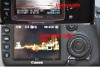
Canon does but Nikon dont!

kestral

Suspended / Banned
Messages
607
Edit My Images
Yes
It appears to me from the Nikon cameras that I have seen that none of them show the shutter and f stop when the preview image is shown.But Canon do.
Are there any Nikon DSLR's that show the shutter speed and f stop when the preview image is shown,without pressing any more buttons? God only knows why Nikons show the file number and date!:cuckoo:
 
If I push the down button twice on the multi-switch I get to a screen that has a small preview and all the info like ISO, shutter speed, f-number, histogram etc.

Once you've selected it it stays like that, I think it's similar on all Nikons.
 
Isn't it shown in the viewfinder window ??
 
On my D300, all the info is in the viewfinder. Shutter speed, ISO,F stop, and shooting Mode.
 
If I push the down button twice on the multi-switch I get to a screen that has a small preview and all the info like ISO, shutter speed, f-number, histogram etc.

Once you've selected it it stays like that, I think it's similar on all Nikons.

That is the problem.It is not that the information is not available it is the carry on to obtain it and the image goes a lot smaller.When you do as suggested you are having to press buttons that you should not have to.The info would be far better off on the large preview image.Why does anyone need to know the file number and date!:bang:
 
Oh well, you should spend more time looking through your viewfinder and less at the screen on the back - it makes monkeys of us all.
 
Looking in the viewfinder for my Nikon D5000 i can see shutter, aperture, iso, exp comp, AE-L confirm, warning if exposure is too dark or bright for the current settings and the amount of shots left in the buffer.

In live view if you use the INFO button (not the I button) you can change the config of the screen, and when reviewing pictures with straight away or later using the play button press thw down arrow on the 4 way circle thing and it will change between the image with basic date/time info, then the image with blown highlight detection and then one that shows you all the info with a histogram. Your choice should stay that way, so if i want to use the full info screen it should be like that next time it comes up.

I don't use Live view on the D5000 though, AF in LV is tortuously slow even with lenses that are quick in viewfinder mode.
 
Last edited:
On my D300, all the info is in the viewfinder. Shutter speed, ISO,F stop, and shooting Mode.

But when you look at the photos you have taken on the review screen at the rear of your camera you are unable to see what effect the shutter speed or F stop had when you took the photo,Unless you want to start pressing buttons.On a Canon the review screen has the info on without pressing buttons.It's make adjustmant and straight back to shooting.Does a D3,D3s have the info on the review screen?:shrug:

Edit: preview changed to review.That's what might be causing confusion here.
 
Last edited:
Kestral - on a Canon you still have to press the info button to scroll through the image without any overlay, histogram and exposure details. used to drive me barmy on my old Canons that when you aned the histogram on screen, the preview image need a magnifying glass to be viewed.

I now love the fact that I can have channels, exposure info, historam, setings, no overlay on my Nikon just by presing up and down on the D-pad. Miles better IMO....

DSC0009.jpg

Standard preview with nothing but folder and image number within that folder

DSC0008.jpg

Histogram

DSC0007.jpg

Blinkies

DSC00111.jpg

Exposure info

DSC0010.jpg

AF selection

DSC00121.jpg

General setting (WB, sharpness, ISO, colour mode)

Al done by pressing through up or down. Not hard IMO....
 
Last edited:
kestral said:
But when you look at the photos you have taken on the review screen at the rear of your camera you are unable to see what effect the shutter speed or F stop had when you took the photo,Unless you want to start pressing buttons.On a Canon the review screen has the info on without pressing buttons.It's make adjustmant and straight back to shooting.Does a D3,D3s have the info on the review screen?:shrug:

Edit: preview changed to review.That's what might be causing confusion here.

From what overhead above from theNikon shooters, it's the same as Canon. Once you have the view you need it stays there.

There's no more a default on the Canon than there icon the Nikon, with both giving you a choice of the amount of info you need.
 
On a Canon the review screen has the info on without pressing buttons.It's make adjustmant and straight back to shooting.

As it easily can be on Nikon, select the view you want once and it stays that way until YOU change it, turn the camera off, take the battery out etc it just stays as you set it....simples :shrug:
 
:shrug: Is it SUCH a big issue, I mean seriously? As already said, you can chose to have it showing that info on every preveiw, even if the image is a bit smaller. Unless it is going to make you change your Nikon for a Canon, then it's not worth stressing over. Have a beer, or something :beer:
 
Here we are,Nikon on top Canon on bottom.


The Canon has the shutter speed and f stop on view without pressing any buttons full size image.The Nikon has all the useless info on display unless you start toprees buutons and then the info canot be viewed on full size image?
Have alook see what you think.
 
Last edited:
I don't get what the issue is. Surely the settings are on the top plate LCD?

Out of interest, does this apply to all Canon cameras, or does it depend on if it's a xxxD/xxxxD body, which doesn't have a top LCD.

To be honest, I shoot thousands of images each week and have never found a problem with Nikon's system. Plus, on Nikon you have a proper blinkies view.....

OP - if it's that much of an issue then maybe you should have bought a Canon and not a D7000
 
Last edited:
I don't get what the issue is. Surely the settings are on the top plate LCD?

Out of interest, does this apply to all Canon cameras, or does it depend on if it's a xxxD/xxxxD body, which doesn't have a top LCD.

To be honest, I shoot thousands of images each week and have never found a problem with Nikon's system. Plus, on Nikon you have a proper blinkies view.....

OP - if it's that much of an issue then maybe you should have bought a Canon and not a D7000

You may be right about buying a Canon it's looking like a strong possiblity.But what bugs me is that there is no reason to put the useless info on the main image screen like Nikon do.I think it must be down to how different people take their photos.I take mine then look at them on the review screen and do that to see if it looks as I want, if it does not then I can make alterations if I have the shutter speed and F stop on the screen it's easier,not the date and bloody time:bang:great idea Nikon. Can someone tell me why they need to know the date ,time and file size in the middle of a phot shoot?:thinking:
 
Kestral - I still don't see the problem.

You take a shot and then review it, checking to see if you need to make an adjustment. I have my blinkies on permanently so i can make a judgement call going by the highlight warning. Seeing as you've just taken the shot, the settings will be on the top LCD (if you have one) and in the viewfinder. I generally know the settings I'm on as I'm shooting - that only comes through experience - but it's quite easy to go by the review image to gauge if you need to make any exposure compensation. As for DoF and sharpness, to check those you're going to have to zoom in anyway so then it's al a moot point.....

Sorry, but I just don't see a massive need to change things - Nikon has it spot-on....
 
You may be right about buying a Canon it's looking like a strong possiblity.But what bugs me is that there is no reason to put the useless info on the main image screen like Nikon do.I think it must be down to how different people take their photos.I take mine then look at them on the review screen and do that to see if it looks as I want, if it does not then I can make alterations if I have the shutter speed and F stop on the screen it's easier,not the date and bloody time:bang:great idea Nikon. Can someone tell me why they need to know the date ,time and file size in the middle of a phot shoot?:thinking:

OK, I am going to add a quote from your other thread and make a small assumption from a further thread too....

Why do Nikon think people want to know the date and file number in the middle of an action photo shoot!

....now, I am simply guessing here that you talking about shooting, for example, cars or other highspeed objects., where even that one press of the button feels like lost time? [though the technique to follow applies to anything really]

If that is the case, then its actually very simple, a quick glance at the pic on the LCD to check the overall pic looks good and you can carry on, no button pressing required - if it doesn't you can adjust up and down simply by putting the camera back to your eye and adjusting whatever settings you are in accordingly - they are there in the viewfinder from that last picture you just looked at and is certainly how I work when shooting a wedding or similar, I don't bother scrolling through pages of info, I save more time by adjusting with the camera already at my face and pointing where it needs to be. The only time I scroll through the info pages in review mode is when I want to check blinkies and histograms.


...or buy a Canon of course ;)
 
Dont think i have ever used live view on my DSLR,use my eyes to preview the shot :)

We're not talking about live view info (I hope :D), we're talking about what info
is displayed on screen when you press the 'PLAY' button to review the images you've taken. :thumbs:

The OP says he likes he fact that on Canon, when the image is displayed there is info on shutter speed, aperture and exposure compensation (if applied) that is shown as standard.

On Nikon, this info needs a button press (the D-pad) to access it, which he thinks is a pain.

I just think he's worrying about something that he needn't.
 
Last edited:
Do they do it full-screen these days? Can remember getting annoyed on my 20/30D that when i pressed info button, the histogram came on but the blinkies image was tiny. Did my nut in :)

As with all things, it depends on the model. I agree, it used to be too small to be of any great value but the more recent cameras it's a sensible size. Again, it used to be the same with the Nikons.
 
As with all things, it depends on the model. I agree, it used to be too small to be of any great value but the more recent cameras it's a sensible size. Again, it used to be the same with the Nikons.

This so true - I was just looking at my D700 screen, with a small-ish review pic and ALL the info you can shake a stick at under the image and you know what, certainly in landscape mode, that image with all the info, is not much smaller than a full size review image on my D70s :lol: How times and models have changed!
 
As with all things, it depends on the model. I agree, it used to be too small to be of any great value but the more recent cameras it's a sensible size. Again, it used to be the same with the Nikons.

Haven't delved deeply into modern Canons so never noticed any changes. I just took it for granted that when I went to a D200 from a 30D and everything just seemed so much more advanced on the D200 in terms of preview image size, histogram (etc). Suppose these things change all the time - I'm using a 2006 D2x camera now so i'll probably get a shock when I get a D3!!!! :)
 
Last edited:
Hmm, when NASA astronauts take pictures with Nikon's, do they think we've got to press a further button to get shutter speed/aperture quickly because the oxygen is running out ? no i don't think so :shrug:
 
Kestral - I still don't see the problem.

You take a shot and then review it, checking to see if you need to make an adjustment. I have my blinkies on permanently so i can make a judgement call going by the highlight warning. Seeing as you've just taken the shot, the settings will be on the top LCD (if you have one) and in the viewfinder. I generally know the settings I'm on as I'm shooting - that only comes through experience - but it's quite easy to go by the review image to gauge if you need to make any exposure compensation. As for DoF and sharpness, to check those you're going to have to zoom in anyway so then it's al a moot point.....

Sorry, but I just don't see a massive need to change things - Nikon has it spot-on....

Thanks specialman. I am on the D7000 I dont think it has this blinkies thing(is that the overlay) .
 
We're not talking about live view info (I hope :D), we're talking about what info
is displayed on screen when you press the 'PLAY' button to review the images you've taken. :thumbs:

The OP says he likes he fact that on Canon, when the image is displayed there is info on shutter speed, aperture and exposure compensation (if applied) that is shown as standard.

On Nikon, this info needs a button press (the D-pad) to access it, which he thinks is a pain.

I just think he's worrying about something that he needn't.

:lol: oh i see,maybe because i very rarely use the play button,that it does not bother me to much :)
 
Kestral, I think you need to take up a different interest. How about trainspotting? ;)
 
Yes it can. If you go into "Playback menu" -> "Display mode" then select the things you want. Make sure you select done, and then when you playback or post-shot review is on then you get blinkies or histogram/etc.
 
Back
Top