

You are using an out of date browser. It may not display this or other websites correctly.
You should upgrade or use an alternative browser.
You should upgrade or use an alternative browser.
Canon does but Nikon dont!
- Thread starter kestral
- Start date

Yes it can. If you go into "Playback menu" -> "Display mode" then select the things you want. Make sure you select done, and then when you playback or post-shot review is on then you get blinkies or histogram/etc.
Found it:Thanks. specailman also for posting the pics of blinkies.
That makes it a bit better.But Nikon should just have it like Canon so simple.
Kestral, I think you need to take up a different interest. How about trainspotting?
To late: Here are my Cover shots on national magazines.
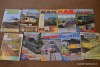
I look forward to seeing yours.

Phil V
Suspended / Banned
- Messages
- 26,303
- Name
- Phil
- Edit My Images
- No
kestral said:Found it:Thanks. specailman also for posting the pics of blinkies.
That makes it a bit better.But Nikon should just have it like Canon so simple.
Like I said before, Canon has it switchable too. So if I have my Canon set with none of that info displaying and you have your Nikon set with it all switched on that's perfectly doable and exactly the opposite of your idea of how things are.
Maybe you have got the idea they're so different because you were unsure how to leave your camera that way and you've picked up someone else's Canon and it was set like that. You've maybe deduced that the difference was the camera, when it was actually the user. I can only guess but from the above Nikons can do it and I know it's switchable on Canons so there appears to be no difference.

specialman
Suspended / Banned
- Messages
- 8,193
- Name
- Pat MacInnes
- Edit My Images
- Yes
To late: Here are my Cover shots on national magazines.
I look forward to seeing yours.
Has the designer realised that we've moved on from the classic 'fonts of 1983' book

Fair play on the covers, I'd play the game and put mine up but I have cakes to cook - maybe later


- Messages
- 15,745
- Name
- Phil
- Edit My Images
- Yes
Am I the only one not getting this ?
Isn't it simply down to your preference in how you set the 'default' image review display and nothing to do with Canon or Nikon ?
It's like going into somebody elses house and complaining that the cups are too far away from the kettle.
Isn't it simply down to your preference in how you set the 'default' image review display and nothing to do with Canon or Nikon ?
It's like going into somebody elses house and complaining that the cups are too far away from the kettle.

Daysleeper40
Suspended / Banned
- Messages
- 5,184
- Name
- Fi
- Edit My Images
- Yes
Am I the only one not getting this ?
Isn't it simply down to your preference in how you set the 'default' image review display and nothing to do with Canon or Nikon ?
It's like going into somebody elses house and complaining that the cups are too far away from the kettle.
I think you have a pretty good grasp on the situation actually.
Am I the only one not getting this ?
Isn't it simply down to your preference in how you set the 'default' image review display and nothing to do with Canon or Nikon ?
It's like going into somebody elses house and complaining that the cups are too far away from the kettle.
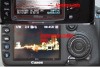
No it's not.Look at this photo attached. Canon on the bottom Nikon on the top.Nikon can not do exactly the same.Nikon has the time,date and file number(usless info) were Canon has the ss and fs.It is possible to do the overlay thing with Nikon but it is not as useful as having it in the top bar and a clear image.

- Messages
- 25,725
- Name
- Yvonne, pronounced Eve...
- Edit My Images
- Yes
Am I the only one not getting this ?
Isn't it simply down to your preference in how you set the 'default' image review display and nothing to do with Canon or Nikon ?
It's like going into somebody elses house and complaining that the cups are too far away from the kettle.
Now I could be wrong, but I think what he wants is aperture, s/speed and ISO showing in the full size review picture, which on nikons is only possible as an overlay or with a much small review image. The full size review image without overlay only displays with file name, date and time. You have to click the wheel one notch to get the information he wants and like I say, its either overlaid, or reduces the review image size. Personally I think it's nit picking, but we all have our own little annoyances that others fail to understand
Has the designer realised that we've moved on from the classic 'fonts of 1983' book
Fair play on the covers, I'd play the game and put mine up but I have cakes to cook - maybe later
Moved on maybe but thoes are photographs on the cover,Most magazines now have photoshoped images on them.
You cook your cakes you have done enough for today.
 .It's spaniels cover shots I want to see.
Thats correct.Now I could be wrong, but I think what he wants is aperture, s/speed and ISO showing in the full size review picture, which on nikons is only possible as an overlay or with a much small review image. The full size review image without overlay only displays with file name, date and time. You have to click the wheel one notch to get the information he wants and like I say, its either overlaid, or reduces the review image size. Personally I think it's nit picking, but we all have our own little annoyances that others fail to understand
I know you think it's nit picking (I am pleased that there is the overlay,thanks to the posters who helped
 ) but the other issue is why does anyone want the date,time and file number? to me it should just have the SS and FS like Canon it makes more sens.Does anyone out ther use the Date,time and file number when in the middle of a photo shoot?:bonk:
- Messages
- 25,725
- Name
- Yvonne, pronounced Eve...
- Edit My Images
- Yes
Thats correct.
I know you think it's nit picking (I am pleased that there is the overlay,thanks to the posters who helped
probably not, but I guess it is something that none of Nikons pro users have ever complained about and ergo they haven't considered changing it. I have to admit that in all the years I have been posting here, it is a totally new complaint on me, but like I say, we all have our irritations, and not going to berate you for it as such.
However I have just done something for you to help others see what you mean - apologies for image quality, used phone, but you will get the idea.
Standard full size review screen

one click down on scroll wheel - all the info, but smaller image

Several clicks, full size image, but hidden by the overlay

[yes, the ggs needs replacing, I will do it at some point]
There is no option for having simple settings displayed across top or bottom of a full size review image, which is what canon has and kestral wants.
Having said that, I suspect the D3 series might have it by virtue of its additional rear lcd readout, but as I don't own one, can't confirm
probably not, but I guess it is something that none of Nikons pro users have ever complained about and ergo they haven't considered changing it. I have to admit that in all the years I have been posting here, it is a totally new complaint on me, but like I say, we all have our irritations, and not going to berate you for it as such.
However I have just done something for you to help others see what you mean - apologies for image quality, used phone, but you will get the idea.
Standard full size review screen
one click down on scroll wheel - all the info, but smaller image
Several clicks, full size image, but hidden by the overlay
[yes, the ggs needs replacing, I will do it at some point]
There is no option for having simple settings displayed across top or bottom of a full size review image, which is what canon has and kestral wants.
Having said that, I suspect the D3 series might have it by virtue of its additional rear lcd readout, but as I don't own one, can't confirm
That's it thanks.Anyway I have found out about the overlay which helps and will use camera with this switched on and see how I get on.I have emailed Nikon about this and they said they review what ther customers want all the time.

Thats correct.
I know you think it's nit picking (I am pleased that there is the overlay,thanks to the posters who helped
So turn that page off.
Not only is the overlay switchable, but you can enable/disable individual pages from the order of pages that the up/down buttons rotate through, don't want date/time? turn it off, it'll never show up until you turn it back on. Want it so that the only pages are full preview, AF and histogram? no problem, you can do that.
As for 'does anyone?' yeah, I'm pretty sure that casual photographers like to be able to check the date on their preview, and you'll find that both canon and nikon cater just as much to the casual user as the professional, even on the professional models.

Chataigner
Suspended / Banned
- Messages
- 46
- Name
- David
- Edit My Images
- Yes
Reminds me of 15th C churchmen arguing about how many angels you can fit on the head of a pin.
reedwarbler
Suspended / Banned
- Messages
- 192
- Name
- garry
- Edit My Images
- Yes
sell it and buy a canon?
kestral, how often do you just want that info? and not additional info? If I am in manual, I can see the info of my last photo as the camera will still be set like that. It doesn't show the ISO, so you can't just use the shutter speed and aperture to recreate the photo.
It has some uses, perhaps if you are doing multiple shots on different shutter speeds playing with motion, you can see which is best, but often you want the histogram/blinkies to triple check the exposure
It has some uses, perhaps if you are doing multiple shots on different shutter speeds playing with motion, you can see which is best, but often you want the histogram/blinkies to triple check the exposure
fixedimage
Suspended / Banned
- Messages
- 902
- Edit My Images
- No
So it's Canon for chimpers, Nikon for real photographers right?
Can't believe this has actually reached 2 pages... I just assumed it was a troll?
Although personally I find no use for the date/time I guess one could be say you want to check a picture of something that happened at a set time (something that happened during a game of football/rugby so far into the game or maybe something from one race out of a whole day of racing?)
If I checked my last pic and it needed more DOF or faster shutter or anything I'd just look through the viewfinder and change it and take a pic... surely just as fast as seeing the shutter speed and aperture settings at the bottom of the picture?
Although personally I find no use for the date/time I guess one could be say you want to check a picture of something that happened at a set time (something that happened during a game of football/rugby so far into the game or maybe something from one race out of a whole day of racing?)
If I checked my last pic and it needed more DOF or faster shutter or anything I'd just look through the viewfinder and change it and take a pic... surely just as fast as seeing the shutter speed and aperture settings at the bottom of the picture?
Last edited:
Surely you check your histogram to see how photo has been exposed? Instead of just relying on the jpeg preview on the screen?
Pressing a button once isnt exactly overly hard to do
No,i tend to still think of digtal the same as film

Byker28i
Suspended / Banned
- Messages
- 21,339
- Edit My Images
- Yes
D30 ? 300D ? Tiny, tiny review screens on both.
(and still so so so much more than we ever had with film!!!)
Spotted someone shooting the other day with a 300D, my first DSLR which I got great results with. Frustrating at times, so I had to have a go with it and compare to my 50D. Blimey how things moved on! Small camera, tiny viewing screen, ages to turn on, slight delay to the shutter when pressing the button.
Byker28i
Suspended / Banned
- Messages
- 21,339
- Edit My Images
- Yes
Found it:Thanks. specailman also for posting the pics of blinkies.
That makes it a bit better.But Nikon should just have it like Canon so simple.
Sorry, but have you read your owners manual or just assumed you know how it all works? There's a lot of features these days that needs some detailed reading and understanding and I consider my camera quite simple to the more modern offerings.
I know you think it's nit picking (I am pleased that there is the overlay,thanks to the posters who helped
Yes actually. When shooting on location with multiple people. i.e. just the other day my son shot portraits at his school open day. Standard background setup with lights, pose person(s) in front, take details of image number at start and end of shoot and register against persons details. Made it really easy matching names to images.
Byker28i
Suspended / Banned
- Messages
- 21,339
- Edit My Images
- Yes
I actually quite like the overlay idea. I'm often shooting with the histogram/details turned on as I'm not too bothered about the image fine details as I've learnt you really have to zoom right in to check details like focus.
Having a large overlay might be an interesting option. Maybe I ought to write to Canon and demand they change their options to Nikons way? 
Do you get any third party add on firmware for Nikons like Magic Lantern?
Having a large overlay might be an interesting option. Maybe I ought to write to Canon and demand they change their options to Nikons way?
Do you get any third party add on firmware for Nikons like Magic Lantern?
Sorry, but have you read your owners manual or just assumed you know how it all works? There's a lot of features these days that needs some detailed reading and understanding and I consider my camera quite simple to the more modern offerings.
Yes actually. When shooting on location with multiple people. i.e. just the other day my son shot portraits at his school open day. Standard background setup with lights, pose person(s) in front, take details of image number at start and end of shoot and register against persons details. Made it really easy matching names to images.
Nikon do not put the SS and FS I have read the manual for the D7000.The file number is OK but I dont see the need for time and date!
Last edited:
Byker28i
Suspended / Banned
- Messages
- 21,339
- Edit My Images
- Yes
Nikon do not put the SS and FS I have read the manual for the D7000.The file number is OK but I dont see the need for time and date!
Nope but file number was really useful. You did mention all three options.
P.S. my Canon D10 compact has a habit of putting time and date on the image itself. Very annoying.

scottthehat
Suspended / Banned
- Messages
- 6,290
- Name
- scott
- Edit My Images
- Yes
why are you in such a need to have the ss and fs on the first screen.
specialman
Suspended / Banned
- Messages
- 8,193
- Name
- Pat MacInnes
- Edit My Images
- Yes
Can't believe this is still going....
Without looking at my Lightroom catalogue I couldn't tell you how many shots I've taken this year, but in the 200 or so days that I've been on shoots, I could probably count on one hand the number of times that I've had to rely on the info displayed over the preview image for any real reason. Once that shot is committed to CF card, that moment is gone, and if the exposure wasn't bang-on then, even if I do change the exposure to get it 'right', the moment has passed.
When I do need to make changes on-the-fly I just use my experience and understanding of my camera to make a change by instinct. That's not being big headed; that's just saying that knowing your camera is a massive part of being a more efficient photographer. I either look at the preview image (with blinkies turned on) and think that I need to stop down a tad, or open the shutter slightly (or whatever), or I just use the skills that I've built up over years to know what will happen if I turn my front command wheel one notch, or if I spin the rear command dial one stop or more. I do chimp but i don't dwell on it.
Having info spoon-fed is all fair and well but unless you know what those bits of information actually mean then they are worthless. And ultimately, even if you do know what they mean, you need to be able to translate that into an adjustment to the current settings, which in turn will probably take seconds for you to implement. The time savings of having info presented to you in the canon fashion (as opposed to Nikon's method) are so minimal they are not worth arguing over.
I'm not the font of all knowledge when it comes too the individual nuances of particular cameras - I know about the ones I've used, that's it - but it seems that you need to get to know your D7000 before you start dissing it. After all, it was you who made the decision to buy it so instead of moaning about Nikon (and expecting them to change things because you say so), I'd have a look at learning the use the camera because it's obvious that you haven't actually looked at the basics of setting it up for your individual tastes.
And when would I need time and date? I don't have a clue. It's basic metadata, that' all. It won't ruin your life, or make you into the world's worst photographer, so just let it ride and and enjoy the fact that you have something on your camera that no Canon doesn't...
...that little red triangle on the grip!!
Without looking at my Lightroom catalogue I couldn't tell you how many shots I've taken this year, but in the 200 or so days that I've been on shoots, I could probably count on one hand the number of times that I've had to rely on the info displayed over the preview image for any real reason. Once that shot is committed to CF card, that moment is gone, and if the exposure wasn't bang-on then, even if I do change the exposure to get it 'right', the moment has passed.
When I do need to make changes on-the-fly I just use my experience and understanding of my camera to make a change by instinct. That's not being big headed; that's just saying that knowing your camera is a massive part of being a more efficient photographer. I either look at the preview image (with blinkies turned on) and think that I need to stop down a tad, or open the shutter slightly (or whatever), or I just use the skills that I've built up over years to know what will happen if I turn my front command wheel one notch, or if I spin the rear command dial one stop or more. I do chimp but i don't dwell on it.
Having info spoon-fed is all fair and well but unless you know what those bits of information actually mean then they are worthless. And ultimately, even if you do know what they mean, you need to be able to translate that into an adjustment to the current settings, which in turn will probably take seconds for you to implement. The time savings of having info presented to you in the canon fashion (as opposed to Nikon's method) are so minimal they are not worth arguing over.
I'm not the font of all knowledge when it comes too the individual nuances of particular cameras - I know about the ones I've used, that's it - but it seems that you need to get to know your D7000 before you start dissing it. After all, it was you who made the decision to buy it so instead of moaning about Nikon (and expecting them to change things because you say so), I'd have a look at learning the use the camera because it's obvious that you haven't actually looked at the basics of setting it up for your individual tastes.
And when would I need time and date? I don't have a clue. It's basic metadata, that' all. It won't ruin your life, or make you into the world's worst photographer, so just let it ride and and enjoy the fact that you have something on your camera that no Canon doesn't...
...that little red triangle on the grip!!


weybourne
Suspended / Banned
- Messages
- 1,223
- Name
- Adrian
- Edit My Images
- Yes
Can't believe this is still going....
It won't ruin your life, or make you into the world's worst photographer, so just let it ride and and enjoy the fact that you have something on your camera that no Canon doesn't...
...that little red triangle on the grip!!
...but Canon users get a red ring around the lens (well not me cos I can't afford it  )
)
specialman
Suspended / Banned
- Messages
- 8,193
- Name
- Pat MacInnes
- Edit My Images
- Yes
Exactly - every Nikon owner gets it as standard!!
weybourne
Suspended / Banned
- Messages
- 1,223
- Name
- Adrian
- Edit My Images
- Yes
Exactly - every Nikon owner gets it as standard!!
 I'm going to put a red elastic band round the top of all my lenses - that'll show 'em :nuts:
Flash In The Pan
Suspended / Banned
- Messages
- 27,793
- Edit My Images
- Yes
If you find you've got a red ring the Anusol is probably the best thing for it.....

We get gold rings instead of red, and as any jeweller or Ron Paul will tell you, gold is worth more than red!
In fact, when was the last time you saw anyone buying things made out of red? Never, that's when!