Yes, I think so.
I believe your adobeRGB viewing space may be corrupt/uncalibrated. An image that is in sRGB should not shift at all when viewed in (converted to) adobeRGB. And an image in adobeRGB should typically shift minimally (if at all) when viewed in sRGB. Also, while working/viewing in sRGB you cannot recreate/see a color that is outside of the sRGB color space (an adobeRGB specific color).
You do not.
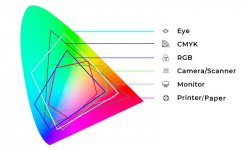
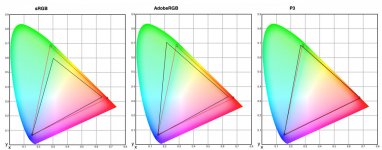
The red triangles are my monitor (M1 MacBook Pro) which is described as being a P3 monitor; and its' color space does most closely match the P3 space.
View attachment 464930
But it is not actually "a P3 monitor"; nor is it an adobeRGB or sRGB monitor. It has its' own color space/gamut which is not switchable; and neither is yours, not really. If I were to switch my monitor to "Internet & Web (sRGB)" mode I would simply be telling it to not show some of the color gamut it can; much like turning down the brightness setting would cause. And that is essentially all your monitor is doing as well.
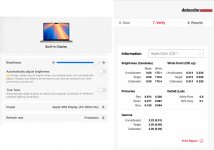
I don't change the mode my monitor is operating in, I leave it in P3 mode. And I use a custom calibration profile (icc file) so that colors display as correctly as possible; I have none of the issues you describe, even though the monitor has a larger color space than sRGB is. If I were to change the mode the monitor is operating in, I would then need a different calibration profile to ensure color accuracy again.
View attachment 464932
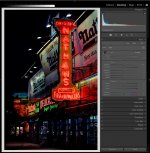
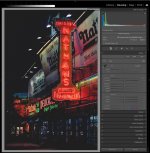
When you open a raw file in LR it has its' own color space (cameraRGB). The cameraRGB values are then converted to LR's color space (ProPhotoRGB) for editing, and the ProPhotoRGB colors are simultaneously converted into monitorRGB for viewing. But the whole time the file is still in its' original color space. That doesn't change until the file is converted (e.g. exported as a jpeg in sRGB). And again monitorRGB is not adobeRGB or anything else; even if that is how it is described.
You should not generally export a jpeg in adobeRGB for the web. Web images should only be in sRGB unless you have a very specific special use situation. If you do export an image in adobeRGB it is very likely to display wrong because the internet is largely not color managed. The internet (browsers and many programs) largely assume an image is in sRGB. And the color information is then displayed wrong; because the program in use tells the computer that the colors are in sRGB numbers, and the monitor profile then converts them into monitorRGB numbers incorrectly. This also happens if the program in use is color managed but the color space information is not embedded in the image file, or if it is invalid/unknown (program defaults to sRGB). But
uploading an image file doesn't change the colors in the file in most cases (and not when uploaded/displayed here).
Likewise, if you edit an image with the monitor in a different mode/environment the output image will not look correct unless it is also viewed in that same mode/environment. E.g. if I switch my monitor to "Design & Print (P3-D50)" and adjust for a specific color the result will not look correct if I then switch my monitor to "Photography (P3-D65)" or "Internet & Web (sRGB)"; because the monitor calibration/profile is changing to suit. If the result does look the same with the monitor then in a different mode then something is broken; possibly the monitor profile(s) being used.
It is possible for some emitted light/recorded colors to shift if an image is converted into a smaller color space. But most reflected light colors exist within the sRGB gamut (or very nearly), so it doesn't affect most photographs significantly... that's why recording jpegs in-camera and viewing them on RGB screens works so well.
Still, what you should be doing to check/edit for that issue is leave your monitor in its' normal viewing mode, and soft proof/edit the image in LR using the sRBG IEC61966 profile. Also, I would suggest you disable the out of gamut warnings; the image being displayed has already been shifted to be within the destination gamut. The warnings only tell which colors have been shifted. Then export the image as a jpeg in sRGB for uploading.