
Sterling Archer
Suspended / Banned
- Messages
- 229
- Name
- Mark
- Edit My Images
- Yes
I like it. Definitely fits the theme, and the windmill just looks so out of place.


That does indeed look weird, sitting behind terraced housing!


Hiya Lynne,
Well done you for getting this shot. Indeed it does look weird ... or out of place.
As you say it looks a tad soft/hazy, but guess that can happen when at the seaside.
Hope you had a great weekend and got lots of photos.
I have no clue what I am going to do for weird, but guess I still have some time to think about it.
Cheers
Dawn
That does indeed look weird, sitting behind terraced housing!
Well done Lynne for spotting the photo opportunity.
Well, its definitely odd and weird for a wind mill in the middle of a town.

Weird, it sure is! I must ask Lynne, where is Oliver's Mount in Scarborough? Been a fair few times but not come across that part. As for the pic you have done well considering the haze and limitations of your lens.
lynne..i like your shot for the thre different elements you've captured... the in focus housing in the foreground... with that windmill??? .. then the band of trees, dark and green, foreboding... then the haze over the coastline bringing us out of the darkness into the light... love it...
now what weirdo built a windmill amongst all those houses..????
I like it. Definitely fits the theme, and the windmill just looks so out of place.
My thoughts indeed.
I wonder if it works
Cheers.

Excellent landscape shot in its own right and yes definitely looks weird. Almost like it's been planted there.
It would have been a better shot if the cliffs have been less hazy , but you've discussed that already.
Good shot


That is definitely weird Lynne
For some reason I want to see this with a panoramic crop though. I just feel like putting the centre of the sails on the bottom third will give more prominence to the windmill and actually give you more of a split between the foreground and hazy background.
It does look weird having a windmill in your town, but it's more common than you think.
I lived in Sneinton Nottingham for several years and passed a working windmill most days. Also, there is a windmill on the way in to Blackpool not far off the motorway.
It looks like a nice spot.
Been quite blowy here all week in the evenings...until tonight ! 1 hour in the garden & very little wind but persevered & got a few shots . Also discovered that I don't have the ability to capture motion blur , the shots just looked OOF which whilst that may have worked better , I couldn't live with . With motorbike racing I spend all my time trying to freeze motion & blur the background...for the life of me couldn't do it the other way round :bang: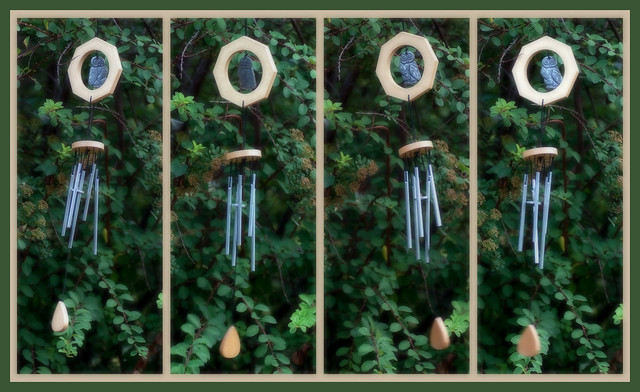 Will try n keep up with everyones threads but apologies in advance for being less active than normal
  )so hopefully can get this coming weekends theme done in between hospital visits & dog walking .

Hi, Lynne, I have to say, I like it.
There is a sense of motion in most of them.
Unusual to see 4 panels but it works.
The only thing I'd ike to see is a better BG, but then again, many of my themes have been done in our back garden...
Cheers.
Hiya Lynne, that is really good! It all works well together. There is a great sense of motion in there too. Well done
Strange how shots that I think will be panned , others seem to like well done lynne... 4 shots seem to convey a sense of movement yet each is still.. good idea.
Hi Lynne,
Nice idea for the theme.
The motion blur works, but I think a little more would have been better.
Hope all is well with your Dad
So apart from a few hours in the garden playing with my macro lens very little time to dedicate to this week . I did however recall that my folks had an old camera , came up with a plan & sorted the following which I thought quite apt for the theme & this forum :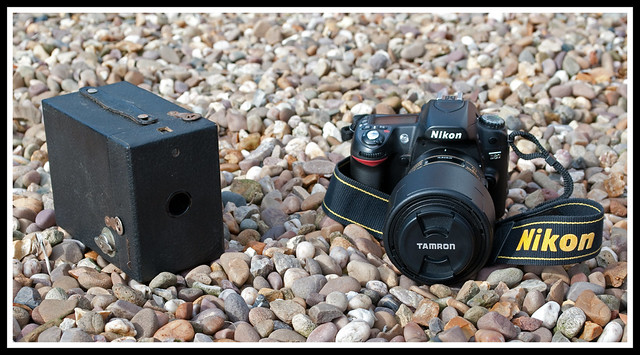
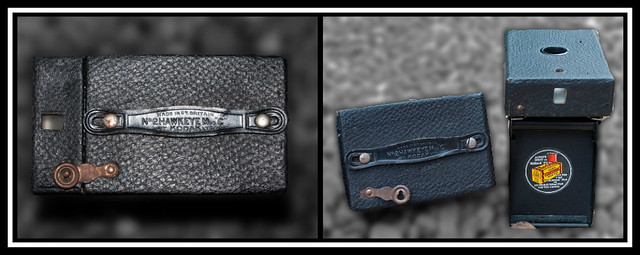 I am however quite pleased with the main shot as concentrated on using natural light but avoiding as many shadows as possible . The old camera is a Box Brownie & we belive it to a model from approx 1930....fascinating thing & I'm sorely tempted to try n find some film for it as would love to see what it's capable of producing .
<snip> Hi Dawn, good take on the evolution shot. As for the box brownie, you have to have a go!


Hi Dawn, good take on the evolution shot.
As for the box brownie, you have to have a go!
Edit - It's good hear your dad is doing well too
either way, i prefer shadows as the environ is outside on a beach... maybe a beach picnic setting? but the pebbles look great.... looks like someone just left that nikon on there to be washed out with the tide...  AHEMmm... no really..you put thought in and got the brand names showing, twisting the strap etc.
 and until it was pointed out, I hadn't noticed :bonk:
Question for you all...when focusing on the main image I struggled to get the words Nikon & Tamron both clearly in focus & can't figure out what I'm doing wrong ? Tried wide focus & normal focus but the result was the same .

With so many wonderful ladies in this 52, you cannot blame me for getting names mixed up
Hi Dawn, good take on the evolution shot.
As for the box brownie, you have to have a go!
Now the focus bit.
I'm not sure if I follow, but are you looking to turn the multipoint metering/ focus on?
I've set the function button to activate the focus point menu which is the cycled through with the main dial. On the top panel, the multipoint display should be just dots with no brackets around them.
If you have a wide single focus rectangle, I think you have the single wide point selected which is turned on and off in the main menu (the pencil symbol then a2) which will let you change from normal to wide.
Hope it helps.
Edit - It's good hear your dad is doing well too
Neil, I think you have had one too many shots from that glass in your avatar
Hiya Lynne
Firstly .... glad to hear everything has gone well with your dad's hip op
Lucky you having this great idea for evolution and the fact that your ma & pa had a Box Brownie for you to use as a prop.
As for the background, I actually like it ..... gives it a sort of beach feel and I can almost picture someone from back in the days standing on the beach with the box brownie alongside you taking a photo with your DSLR
Sorry I can't be of much help with your question regards the focus (I'm not familiar with Nikon cameras, nor have a macro lens) ... but it looks like Neil has this one covered for you and I am sure there will be others along soon to give their input.
Well done though on the shots I think you have done a good job.
I still have to finalise my photo for this week, but hopefully I will be able to sort it before the new theme is announced.
Cheers
Dawn
ditto the dawn-meister on this one..... and i thought i was hitting the cooking sherry too hard!!!
NOOOoooo...you even went back and edited it without seeing the obvious...!! :bonk:
@Lynne, i think both shots are good, albeit the PP on the RHS of the duo. makes the box look false and not popping for me , more pooping.. sorry.. but i try to do a blur like this and slate mys own efforts.
but the main shot, love the background, the Box could have been slightly in more, or maybe taken from further away so it had more background round it??.
as for foucal points, i found this in case your's had gone astray.. http://www.nikonusa.com/pdf/manuals/noprint/D90_ennoprint.pdf page 56 seemed to detailed selecting focus points, but it was like reading hebrew....and boy, i learnt that when moses was parting the red sea... and footnote on page points to the (a2) neil mentions, on page 174?
though i might be barking mad, and looking at a manual for a Suzuki 350, so buyer beware
good one lynne
Thanks for the link to the instruction manaul...spend loads of time telling my customers they should read their manual then never bother to do the same myself...off for a read .....Hiya Lynne, like your picture for evolution, I thought you had been to the beech with those backgrounds! Quite nice. I was thinking of doing something similare using my old canon fd mount cameras, but not got around to do ding it. With regards to the focus, I am not familiar with the Nikon system. But I always use centre point focus and select a suitable aperture and let dof take its cause. I see from your exif on flickr you used f9. Nikon on your camera looks just a little oof, but that could be my eyes this morning! So maybe something like f11, or you could try focusing a little further up the lens towards the body and see where your in focus bits start from. I sometimes use that technique when getting pictures of flowers. I hope it makes sense
Its not a focus problem... or shouldn't be
If you focus on one or the other or better, between then put a higher f# on the aperture (you may need a tripod) it should bring them both in sharper.
Otherwise, pick one and lower the f# to blur off nicely.
Great take on the evolution !
Cheers Kev...you guys never cease to surprise me...I post what I think is a very average/pants shot & get great feedback
i'll try harder next timeThanks for the link to the instruction manaul...spend loads of time telling my customers they should read their manual then never bother to do the same myself...off for a read .....
! I have tried the multipoint setting but thought it was only for moving objects :bonk:
Hi Lynne, not sure if you've sorted your focus issues, but here's my tuppence worth.
I used to have a D90 and I'm pretty sure it defaults to "area mode" focussing, i.e. the camera picks what the focus point will be, which is ok for general snaps but pants for real photography. You need to set the camera to single-point focussing. On the D90 you go into the menus to set that (I think it's called AF area mode or something).
Then you can pick your focus point from one of 11 using the little rocker thingy on the back of the camera. As long as your aperture is small enough you'll easily get the two bits of writing you mentioned in focus together.
Hope that makes sense and that I' not offending by teaching my grandmother to suck eggs.
Also great pics for wind and evolution.
I think it does work in continuous focus mode too for moving objects.
Either way, it will show in the view finder which points have focused on something. There is a setting too for you to select which point you want the camera to use for single point focus.
 After much shuffling & jiggling & humming & haaaing I fnally managed to get something near what I had in my mind .Not perfect by a long way but I'm quite pleased . I like the reflection , miffed that I couldn't get the "S" in on stereo but to do that meant getting the edge of the turntable in which had horrid glare on it :bang: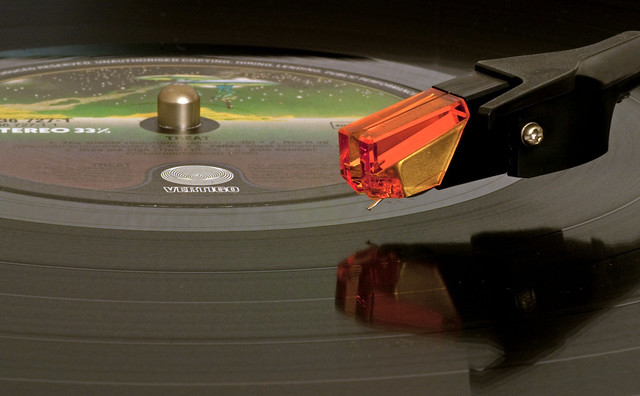


Lynne,
The main Evolution shot has been covered by everyone else. Smaller aperture (F11) and a tripod should bring it in focus and sharp. The other two shots just don't work, sorry.
Record is a suburb shot. I love the splash of colour the needle housing gives. If you get a chance to reshoot, this could be a good contender. Try moving to the right slightly, and have the arm coming in from the top right, so the needle is nearer the bottom left, just to fill that corner, and add a nice lead-in diagonal.
Well done.


