Automatic tagging of cars and bikes

Status
Not open for further replies.

JohnStewart

Suspended / Banned
Messages
1,160
Name
John Stewart
Edit My Images
Yes
For the past few months, I've been helping out a fellow motorsport photographer with a project he's been working on to automatically detect the make and model of cars in photos, and to record these as keywords and tags in the photos. It's free to download and use - search for tagomatic - it's a UK website.

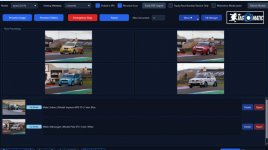
Instead of using costly cloud based AI models, this one uses an AI model you run locally on your windows PC. This means it's much slower (unless you have a very powerful GPU - 4090 or 5090). I have a 4070 Ti which takes about 20 seconds per image once it gets going (typically takes about 3 minutes for initialising and the first image and then speeds up after that).

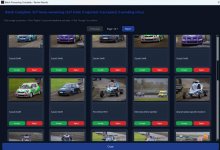
At the end you get a summary of the file processed, and if it gets something wrong (it's probably about 90% accurate at the moment), you can reject it. In the latest beta version you can enter the correct make/model etc and it will learn and hopefully get better results for the same vehicle in the future.
Summary.jpg

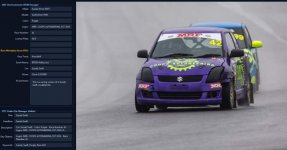
This is the sort of detail it identifies and adds to the tags in your photos.
Details.jpg

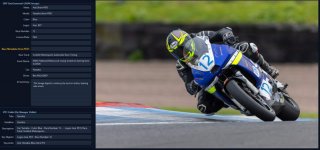
For motorsport photographers the key thing it picks up is the race number of the car or bike, as well as the make/model.
bike_details.jpg


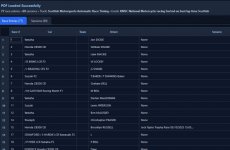
In the latest beta version (4.2) , I've been testing what will become a premium option in the future. This allows you to upload the race results pdf from the timing website prior to processing a batch of photos. This make the make/model detection even more accurate and also pulls through the driver/rider name as well! Not only that, it can sometimes cross reference the timestamp on the photo with the race results and identify it as Race 3, Heat 1 etc.
driver-rider summary.jpg


For those of you who have to tag and keyword images you send to an editor, this has the potential to save you lots of time and effort. For me it's not quick enough to process all the photos from an event, but it's certainly manageable to process say up to 100 photos I would send to an editor. For larger batches you could obviously leave it running overnight if you wanted.

Currently it works only on jpg files, but support for raw files should be coming in the future.

Tony (the developer) is very responsive to feedback and suggestions, particularly via whatsapp.

Possible future developments could include a Lightroom plug in, adding the keywords to your LR catalogue.

To use the software, you need to install an AI tool called ollama (another free download), and install a couple of models for it to run locally. For myself, I have have to restart olloma with a powershell script to force it to use the GPU instead of CPU which is many times faster.

Here's a photo of it processing a batch of images:
running.jpg

Be aware it's not 100% accurate (probably 90% for me), and it often gets stylised race numbers incorrect, reading 64 instead of 54 for example. If there's multiple bikes or cars in in image it will just use the closest one.

Some of the AI generated summaries are hilarious, particularly if there's no cars in the image - for example maybe a shot of some marshals :D

"The rain-soaked air is thick with anticipation as a lone figure in a vibrant orange high-visibility suit strides purposefully across a gravelly paddock. The scene is a motorsport tableau, though no cars are immediately in view. Instead, a massive pile of black tires dominates the foreground, their uniformity broken only by the occasional scuff mark or patch of dirt. In the background, a sparse crowd of spectators, bundled in dark jackets and hoods, watches intently. Their faces are a blur"
 
I’ve been using any vision for this for a few years. It accurately picks up registration, number, car, model and even can pick out event from a rally plate but that’s slightly hit or miss. It costs next to nothing for 1000s of photos and uses google cloud vision API models. I’ve been so busy this year that I’ve stopped using it - mainly because the export, upload element takes hours on say 4-5000 photos and the real benefits is doing it before you cull to help find specific cars or. Numbers.

I am due to give it another go over Christmas and update my 2025 catelogue with it and to see if it’s any faster
 
Tagomatic was supposed to launch on steam in December, but the link on the website doesn't go to anything. Did it not launch, as only the lite version is available.

Where can I get this any vision.
 
Last edited:
For the past few months, I've been helping out a fellow motorsport photographer with a project he's been working on to automatically detect the make and model of cars in photos, and to record these as keywords and tags in the photos. It's free to download and use - search for tagomatic - it's a UK website.

Instead of using costly cloud based AI models, this one uses an AI model you run locally on your windows PC. This means it's much slower (unless you have a very powerful GPU - 4090 or 5090). I have a 4070 Ti which takes about 20 seconds per image once it gets going (typically takes about 3 minutes for initialising and the first image and then speeds up after that).

At the end you get a summary of the file processed, and if it gets something wrong (it's probably about 90% accurate at the moment), you can reject it. In the latest beta version you can enter the correct make/model etc and it will learn and hopefully get better results for the same vehicle in the future.

View attachment 467323

This is the sort of detail it identifies and adds to the tags in your photos.

View attachment 467324

For motorsport photographers the key thing it picks up is the race number of the car or bike, as well as the make/model.

View attachment 467325


In the latest beta version (4.2) , I've been testing what will become a premium option in the future. This allows you to upload the race results pdf from the timing website prior to processing a batch of photos. This make the make/model detection even more accurate and also pulls through the driver/rider name as well! Not only that, it can sometimes cross reference the timestamp on the photo with the race results and identify it as Race 3, Heat 1 etc.

View attachment 467326


For those of you who have to tag and keyword images you send to an editor, this has the potential to save you lots of time and effort. For me it's not quick enough to process all the photos from an event, but it's certainly manageable to process say up to 100 photos I would send to an editor. For larger batches you could obviously leave it running overnight if you wanted.

Currently it works only on jpg files, but support for raw files should be coming in the future.

Tony (the developer) is very responsive to feedback and suggestions, particularly via whatsapp.

Possible future developments could include a Lightroom plug in, adding the keywords to your LR catalogue.

To use the software, you need to install an AI tool called ollama (another free download), and install a couple of models for it to run locally. For myself, I have have to restart olloma with a powershell script to force it to use the GPU instead of CPU which is many times faster.

Here's a photo of it processing a batch of images:

View attachment 467327

Be aware it's not 100% accurate (probably 90% for me), and it often gets stylised race numbers incorrect, reading 64 instead of 54 for example. If there's multiple bikes or cars in in image it will just use the closest one.

Some of the AI generated summaries are hilarious, particularly if there's no cars in the image - for example maybe a shot of some marshals :D

"The rain-soaked air is thick with anticipation as a lone figure in a vibrant orange high-visibility suit strides purposefully across a gravelly paddock. The scene is a motorsport tableau, though no cars are immediately in view. Instead, a massive pile of black tires dominates the foreground, their uniformity broken only by the occasional scuff mark or patch of dirt. In the background, a sparse crowd of spectators, bundled in dark jackets and hoods, watches intently. Their faces are a blur"
Tried this this morning, following the instructions provided, and I am sorry to say it didn't work at all. The first time I ran it, all it came up with for every image was "A scene or environment". When I stopped it and tried to run it again, it just hung on a single image and did nothing.

I've uninstalled it.

No by G- Slev, on Flickr
 
Last edited:
Tried this this morning, following the instructions provided, and I am sorry to say it didn't work at all. The first time I ran it, all it came up with for every image was "A scene or environment". When I stopped it and tried to run it again, it just hung on a single image and did nothing.

I've uninstalled it.

No by G- Slev, on Flickr
I’m sorry it didn’t work for you. I’ve not tried the latest version as I’ve not had time over the past month or so, but will download it this weekend and see how it performs.
 
I’m sorry it didn’t work for you. I’ve not tried the latest version as I’ve not had time over the past month or so, but will download it this weekend and see how it performs.
It could be my system - it won't recognise my 1080 as an NVIDIA GPU. But I wonder if the reason why it isn't go live on Steam on 25 December is that there is an issue. Unfortunately, there doesn't seem to be an option to go back to a previous version. Nor does there appear to be an archive of the website on Archive.org.

It is a shame, as I would find this a really useful tool. I gave up tagging car models etc on Instagram, as it is quite resource intensive.

Incidentally, it doesn't appear to be able to read PDFs with race results from TSL timing either.
 
Last edited:
It could be my system - it won't recognise my 1080 as an NVIDIA GPU. But I wonder if the reason why it isn't go live on Steam on 25 December is that there is an issue. Unfortunately, there doesn't seem to be an option to go back to a previous version. Nor does there appear to be an archive of the website on Archive.org.

It is a shame, as I would find this a really useful tool. I gave up tagging car models etc on Instagram, as it is quite resource intensive.

Incidentally, it doesn't appear to be able to read PDFs with race results from TSL timing either.
That’s odd, as it read the PDFs for BTCC and BSB for me which are TSL. It didn’t quite cope with the sidecars which had two names listed in an extra column and the format was slightly different.

If you message Tony via WhatsApp he is normally quick to respond and keen to diagnose any issues. It could well be that your 1080 is too old.

He did at one point have an option to use cloud processing instead of your local GPU, but you had to provide your own (paid for) API key.

My main use case is to tag photos after an event post culling, for easy searching later on.
 
Tagomatic was supposed to launch on steam in December, but the link on the website doesn't go to anything. Did it not launch, as only the lite version is available.

Where can I get this any vision.


Comes highly recomended just wish it was a bit quicker, Could be my 45mpx files though and compressed raw.
 

Comes highly recomended just wish it was a bit quicker, Could be my 45mpx files though and compressed raw.
Having read the guide, I see I would have to pay for a Google Gemini account. Is there a risk of unwittingly running up a huge bill, like renting Amazon servers can do?
 
I’ve been using any vision for this for a few years. It accurately picks up registration, number, car, model and even can pick out event from a rally plate but that’s slightly hit or miss. It costs next to nothing for 1000s of photos and uses google cloud vision API models. I’ve been so busy this year that I’ve stopped using it - mainly because the export, upload element takes hours on say 4-5000 photos and the real benefits is doing it before you cull to help find specific cars or. Numbers.

I am due to give it another go over Christmas and update my 2025 catelogue with it and to see if it’s any faster
A homemade python script could handle the numbers quite fast with no need to upload. I found the tesseract ocr library works pretty well.
 
Having read the guide, I see I would have to pay for a Google Gemini account. Is there a risk of unwittingly running up a huge bill, like renting Amazon servers can do?

No, because its so cheap per photo and it gives you an indicative cost. I just sorted my whole 2025 catelogue, must be 40-50,000 images at a guess (as i'd already done some) and it was about £20 or so.
 
A homemade python script could handle the numbers quite fast with no need to upload. I found the tesseract ocr library works pretty well.

If I ever get time I'll have to look into it, but I am not a programmer so would be a bit of a learning curve!
 
Hey guys,

I’ve been using Racetagger with pretty good results. Unlike Tagomatic, it uses the Cloud, but it keeps the original files private.You do need an internet connection, but it's much faster—usually 1 or 2 seconds per photo. That's a huge plus when you're dealing with a large number of shots.

Also, from what I’ve heard, they are developing dedicated systems for major championships like F1, MotoGP, IMSA, and WEC that don't rely on LLMs but use other systems instead. I thought you might be interested.Just search for racetagger.cloud.

Let me know what you think if you give it a try.
Cheers!
 
Hey guys,

I’ve been using Racetagger with pretty good results. Unlike Tagomatic, it uses the Cloud, but it keeps the original files private.You do need an internet connection, but it's much faster—usually 1 or 2 seconds per photo. That's a huge plus when you're dealing with a large number of shots.

Also, from what I’ve heard, they are developing dedicated systems for major championships like F1, MotoGP, IMSA, and WEC that don't rely on LLMs but use other systems instead. I thought you might be interested.Just search for racetagger.cloud.

Let me know what you think if you give it a try.
Cheers!

Looks like another pay per use model which is quite expensive? I shoot 4000-5000 photos an event (rally) and upto 10-12,000 for a 3 day circuit event, so if I wanted to tag upfront thats a hell of a cost when you do 3/4 events a month.
 
I have had some success uploading a copy of the race results, a photo and a car number to Google Gemini and asking it to produce instagram titles in my desired format. I have also asked it to commit the process to memory so that I can upload the files with "Generate instagram titles" for it to churn something out. It still gets it wrong sometimes, and I can only do it on one image at a time, but that isn't an issue for me as I just shoot motorsport for pleasure.
 
Looks like another pay per use model which is quite expensive? I shoot 4000-5000 photos an event (rally) and upto 10-12,000 for a 3 day circuit event, so if I wanted to tag upfront thats a hell of a cost when you do 3/4 events a month.
I'm in the same situation. But instead of doing it manually, I don't mind paying €50-100 to let a tool handle it—as long as there are paying clients.
 
  • Like
Reactions: A_S
I have had some success uploading a copy of the race results, a photo and a car number to Google Gemini and asking it to produce instagram titles in my desired format. I have also asked it to commit the process to memory so that I can upload the files with "Generate instagram titles" for it to churn something out. It still gets it wrong sometimes, and I can only do it on one image at a time, but that isn't an issue for me as I just shoot motorsport for pleasure.

what is an instagram title when its at home? (sorry, it may be really obvious!)
 
I've banned TagOmatic and deleted the link to his software. The ban is temporary, but necessary because he has chosen to advertise his software without approaching the Admins for permission to advertise nor requesting a discussion about paid advertising.I allowed the above discussion to stay because it seemed helpful but anyone interested would have to go look for the software. I'm letting that ride still for now...
Wasn't that helpful, as his software didn't actually work for me!
 
Last edited by a moderator:
Status
Not open for further replies.
Back
Top