JohnStewart
Suspended / Banned
- Messages
- 1,160
- Name
- John Stewart
- Edit My Images
- Yes
For the past few months, I've been helping out a fellow motorsport photographer with a project he's been working on to automatically detect the make and model of cars in photos, and to record these as keywords and tags in the photos. It's free to download and use - search for tagomatic - it's a UK website.
Instead of using costly cloud based AI models, this one uses an AI model you run locally on your windows PC. This means it's much slower (unless you have a very powerful GPU - 4090 or 5090). I have a 4070 Ti which takes about 20 seconds per image once it gets going (typically takes about 3 minutes for initialising and the first image and then speeds up after that).
At the end you get a summary of the file processed, and if it gets something wrong (it's probably about 90% accurate at the moment), you can reject it. In the latest beta version you can enter the correct make/model etc and it will learn and hopefully get better results for the same vehicle in the future.
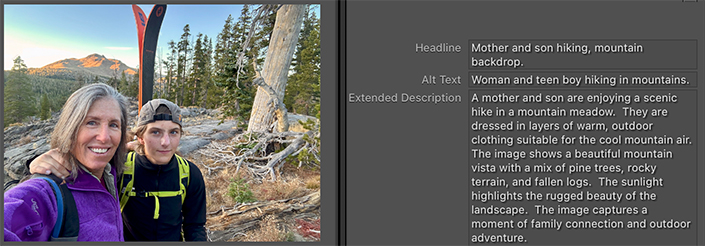
This is the sort of detail it identifies and adds to the tags in your photos.
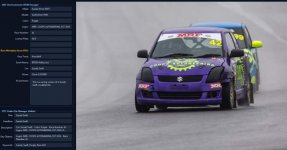
For motorsport photographers the key thing it picks up is the race number of the car or bike, as well as the make/model.
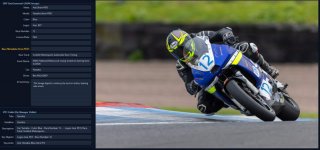
In the latest beta version (4.2) , I've been testing what will become a premium option in the future. This allows you to upload the race results pdf from the timing website prior to processing a batch of photos. This make the make/model detection even more accurate and also pulls through the driver/rider name as well! Not only that, it can sometimes cross reference the timestamp on the photo with the race results and identify it as Race 3, Heat 1 etc.
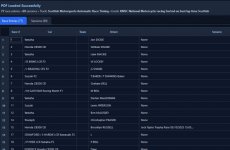
For those of you who have to tag and keyword images you send to an editor, this has the potential to save you lots of time and effort. For me it's not quick enough to process all the photos from an event, but it's certainly manageable to process say up to 100 photos I would send to an editor. For larger batches you could obviously leave it running overnight if you wanted.
Currently it works only on jpg files, but support for raw files should be coming in the future.
Tony (the developer) is very responsive to feedback and suggestions, particularly via whatsapp.
Possible future developments could include a Lightroom plug in, adding the keywords to your LR catalogue.
To use the software, you need to install an AI tool called ollama (another free download), and install a couple of models for it to run locally. For myself, I have have to restart olloma with a powershell script to force it to use the GPU instead of CPU which is many times faster.
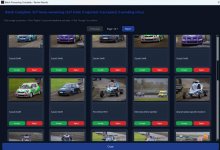
Here's a photo of it processing a batch of images:
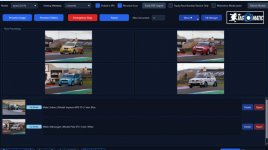
Be aware it's not 100% accurate (probably 90% for me), and it often gets stylised race numbers incorrect, reading 64 instead of 54 for example. If there's multiple bikes or cars in in image it will just use the closest one.
Some of the AI generated summaries are hilarious, particularly if there's no cars in the image - for example maybe a shot of some marshals
"The rain-soaked air is thick with anticipation as a lone figure in a vibrant orange high-visibility suit strides purposefully across a gravelly paddock. The scene is a motorsport tableau, though no cars are immediately in view. Instead, a massive pile of black tires dominates the foreground, their uniformity broken only by the occasional scuff mark or patch of dirt. In the background, a sparse crowd of spectators, bundled in dark jackets and hoods, watches intently. Their faces are a blur"
Instead of using costly cloud based AI models, this one uses an AI model you run locally on your windows PC. This means it's much slower (unless you have a very powerful GPU - 4090 or 5090). I have a 4070 Ti which takes about 20 seconds per image once it gets going (typically takes about 3 minutes for initialising and the first image and then speeds up after that).
At the end you get a summary of the file processed, and if it gets something wrong (it's probably about 90% accurate at the moment), you can reject it. In the latest beta version you can enter the correct make/model etc and it will learn and hopefully get better results for the same vehicle in the future.
This is the sort of detail it identifies and adds to the tags in your photos.
For motorsport photographers the key thing it picks up is the race number of the car or bike, as well as the make/model.
In the latest beta version (4.2) , I've been testing what will become a premium option in the future. This allows you to upload the race results pdf from the timing website prior to processing a batch of photos. This make the make/model detection even more accurate and also pulls through the driver/rider name as well! Not only that, it can sometimes cross reference the timestamp on the photo with the race results and identify it as Race 3, Heat 1 etc.
For those of you who have to tag and keyword images you send to an editor, this has the potential to save you lots of time and effort. For me it's not quick enough to process all the photos from an event, but it's certainly manageable to process say up to 100 photos I would send to an editor. For larger batches you could obviously leave it running overnight if you wanted.
Currently it works only on jpg files, but support for raw files should be coming in the future.
Tony (the developer) is very responsive to feedback and suggestions, particularly via whatsapp.
Possible future developments could include a Lightroom plug in, adding the keywords to your LR catalogue.
To use the software, you need to install an AI tool called ollama (another free download), and install a couple of models for it to run locally. For myself, I have have to restart olloma with a powershell script to force it to use the GPU instead of CPU which is many times faster.
Here's a photo of it processing a batch of images:
Be aware it's not 100% accurate (probably 90% for me), and it often gets stylised race numbers incorrect, reading 64 instead of 54 for example. If there's multiple bikes or cars in in image it will just use the closest one.
Some of the AI generated summaries are hilarious, particularly if there's no cars in the image - for example maybe a shot of some marshals
"The rain-soaked air is thick with anticipation as a lone figure in a vibrant orange high-visibility suit strides purposefully across a gravelly paddock. The scene is a motorsport tableau, though no cars are immediately in view. Instead, a massive pile of black tires dominates the foreground, their uniformity broken only by the occasional scuff mark or patch of dirt. In the background, a sparse crowd of spectators, bundled in dark jackets and hoods, watches intently. Their faces are a blur"